How to Modify Dell Data Security Uninstaller Values for Forensic Key Download
Summary: This article explains how to modify the Dell Data Security Uninstaller values for forensic key download using two registry entries.
Ця стаття стосується
Ця стаття не стосується
Ця стаття не стосується якогось конкретного продукту.
У цій статті зазначено не всі версії продукту.
Instructions
Affected Products:
- Dell Encryption
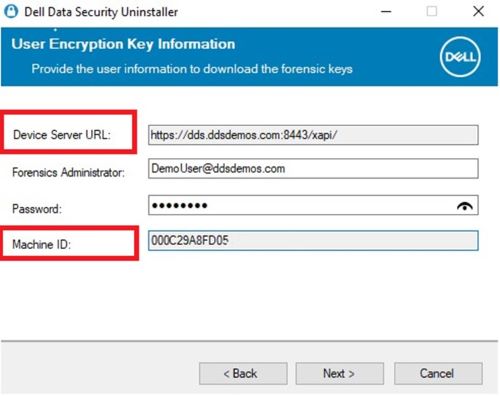
The Device Server URL and Machine ID are pulled through the registry when selecting Encryption Removal Agent - Download Keys from Server.
Warning: The next step is a Windows Registry edit:
- Back up the Registry before proceeding, reference How to Back Up and Restore the Registry in Windows
.
- Editing the Registry can cause the computer to become unresponsive on the next reboot.
- Contact Dell Data Security International Support Phone Numbers for assistance if you have concerns about performing this step.
To change these values, modify the following registry key at the following locations:
- Device Server URL:
HKLM\SYSTEM\CurrentControlSet\Services\CMGShield REG_SZ: ServletURL - Machine ID:
HKLM\SYSTEM\CurrentControlSet\Services\CMGSHIELD REG_SZ: MCID
Продукти, яких це стосується
Dell EncryptionВластивості статті
Article Number: 000218564
Article Type: How To
Востаннє змінено: 15 лип. 2026
Version: 7
Отримайте відповіді на свої запитання від інших користувачів Dell
Служба підтримки
Перевірте, чи послуги служби підтримки поширюються на ваш пристрій.