CloudIQ:Cloud IQ 未将数据发送到 Dell Technologies
摘要: CloudIQ:Cloud IQ 不会向 Dell Technologies 发送数据。
本文适用于
本文不适用于
本文并非针对某种特定的产品。
本文并非包含所有产品版本。
说明
本知识库文章包含一些必须由支持代理对 Cloud IQ SR 进行的检查,以确保其配置正确并将数据正确发送给 Dell Technologies:
-
确保已从 CLI 和 UI
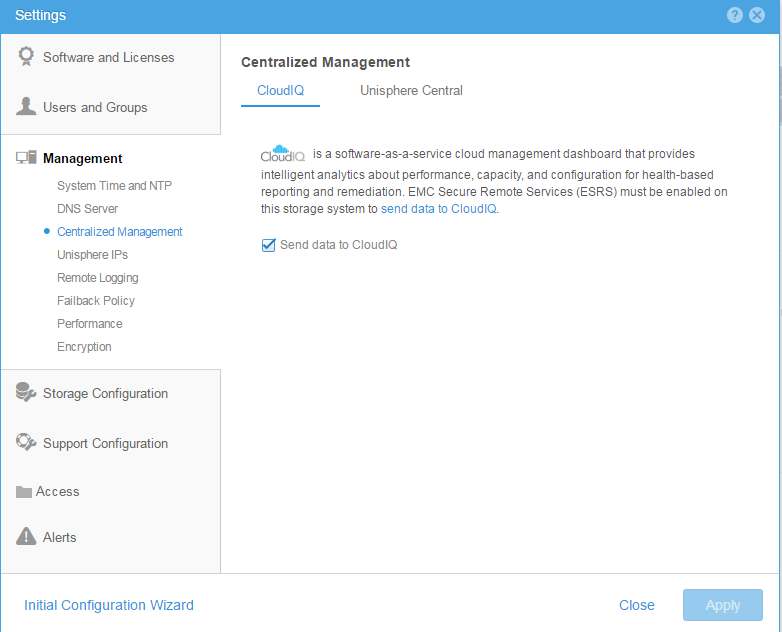
启用 cloud iq 从 CLI:使用此命令检查云管理是否已启用10:58:34 service@(none) spb:~> uemcli /sys/support/config show -detail Storage system address: 127.0.0.1 Storage system port: 443 HTTPS connection 1: Support proxy server enabled = no Support proxy server address = Support proxy server port = 0 Support proxy user name = Support proxy protocol = Unknown Automatic support contracts update enabled = no Cloud management enabled = yes From GUI: Please make sure that the check box of send data to CloudIQ is checked as below :
-
确保 ESRS 配置正确,并显示绿色连接状态
-
确保 Dell Technologies 阵列全部位于客户安装基础 IB 中。
-
确保 客户 Cloud IQ 帐户与 Dell Technologies 端的支持凭据相同 。
受影响的产品
Dell EMC Unity Family产品
CloudIQ, PowerMax, PowerMax 2000, PowerMax 8000, PowerMaxOS 5978, Unisphere for VMAX, Unisphere for PowerMax, Dell Unity 300, Dell EMC Unity 300F, Dell EMC Unity 350F, Dell EMC Unity 400, Dell EMC Unity 450F, Dell EMC Unity 500, Dell EMC Unity 500F
, Dell EMC Unity 600, Dell EMC Unity 600F, Dell EMC Unity 650F, Dell EMC Unity Family |Dell EMC Unity All Flash, Dell EMC Unity Family, Dell EMC Unity Hybrid, Dell EMC UnityVSA Professional Edition/Unity Cloud Edition, VMAX, VMAX 100K, VMAX 200K, VMAX 250F, VMAX 400K, VMAX 450F, VMAX 50K, VMAX 850F, VMAX 950F, VMAX All Flash, VMAX3 Series
...
文章属性
文章编号: 000022684
文章类型: How To
上次修改时间: 20 10月 2025
版本: 5
从其他戴尔用户那里查找问题的答案
支持服务
检查您的设备是否在支持服务涵盖的范围内。