Avamar:群集配置错误 SQL AG、Exchange DAG 或 Hyper-V
摘要: 本文提供了从 Windows作系统 (OS) 中手动删除 Avamar 群集服务的步骤。
本文适用于
本文不适用于
本文并非针对某种特定的产品。
本文并非包含所有产品版本。
症状
Avamar 群集配置向导无法安装和卸载 Exchange DAG 或 Hyper-V 群集配置。
av_cluster_config_wizard WARN<0000>:  Unable to retrieve any cluster group agent information for the plug-in associated with pin file: 'windows.pin'.
av_cluster_config_wizard WARN<0000>:  The cluster agent resource does not exist. This is expected if the cluster has not yet been configured.
av_cluster_config_wizard WARN<0000>:  Unable to get Avamar server settings because no Cluster Group Agents were detected. This is expected if the cluster has not yet been configured.
av_cluster_config_wizard WARN<0000>:  The cluster agent resource does not exist. This is expected if the cluster has not yet been configured.
群集配置向导无法安装和卸载 SQL AG。 Exchange DAG 或 Hyper-V 群集。
原因
Avagent 已在故障切换群集管理器工具中手动删除了 SQL AG、Exchange DAG 或 Hyper-V 群集的群集角色:
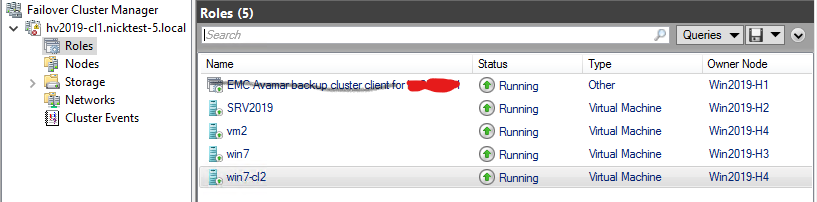
但是, Avagent 群集服务保留在 services.msc 安慰:

解决方案
- 验证 SQL AG、Exchange DAG 或 Hyper-V
Avagent群集服务仍已安装,打开services.mscMicrosoft Windows 中的控制台。复制服务名称字段中的值,然后关闭services.msc控制台(*重要!见下文)。 - 在客户端计算机或服务器上以管理员身份打开 Windows 命令提示符。
- 使用以下命令获取服务配置信息:
sc [<ServerName>] qc [<ServiceDisplayName>]- 获取统计信息
Avagent本地计算机上的群集服务:
sc qc "Avamar Backup Agent for hv2019"- 使用”
sc delete“命令删除服务:sc [<ServerName>] delete [<ServiceName>]
示例:
sc delete "Avamar Backup Agent for hv2019".在具有相同问题的群集节点上重复该过程。
*重要提示!关闭 services.msc 控制台提高了手动删除 Avagent 使用 Windows 命令提示符从 中的群集服务 services.msc 安慰。否则,如果服务删除命令成功,则计划停机时间以重新启动群集节点,但 Avagent 群集服务仍然存在于 services.msc 安慰。
受影响的产品
Avamar, Avamar Plug-in for Exchange VSS, Avamar Plug-in for Hyper-V VSS, Avamar Plug-in for SQL文章属性
文章编号: 000041427
文章类型: Solution
上次修改时间: 17 12月 2025
版本: 4
从其他戴尔用户那里查找问题的答案
支持服务
检查您的设备是否在支持服务涵盖的范围内。