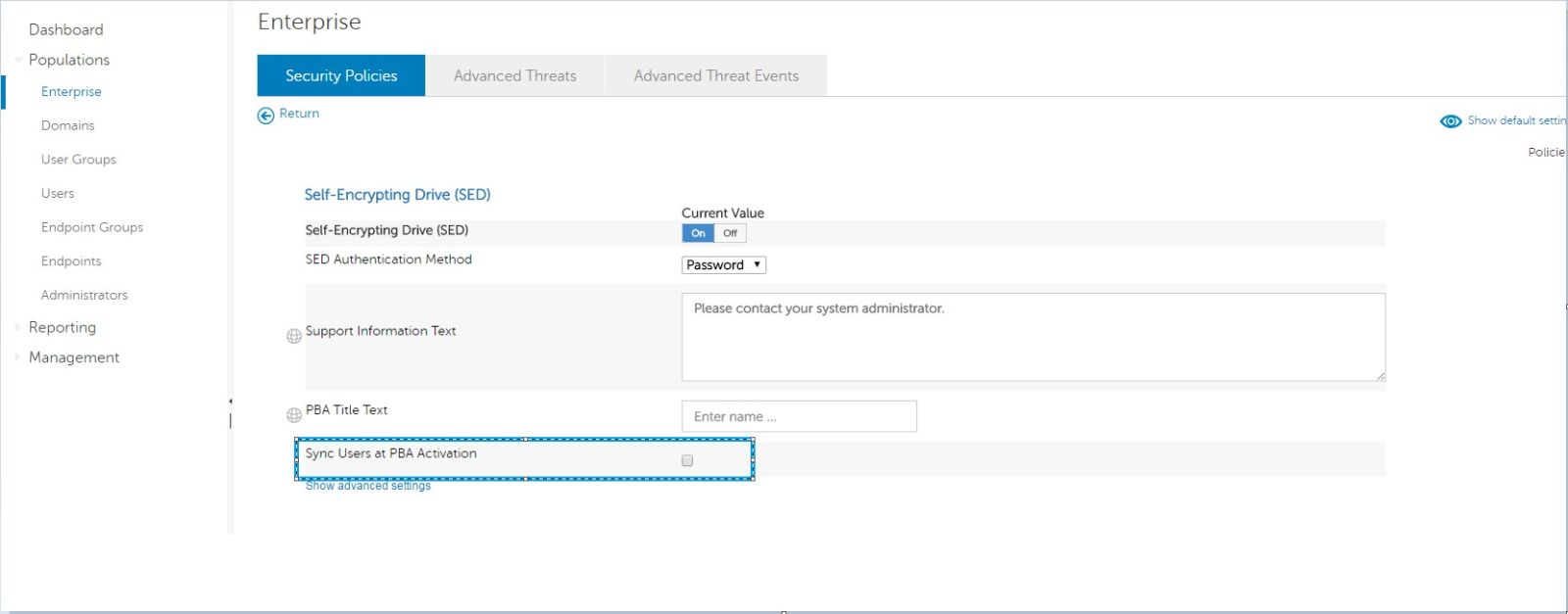
Sync Users at PBA Activation
摘要: All users are not being synced to Pre-Boot Authentication (PBA) during activation on v8.12 client with the policy of "Sync Users at PBA Activation" enabled.
本文适用于
本文不适用于
本文并非针对某种特定的产品。
本文并非包含所有产品版本。
症状
Affected Products:
- Dell Data Protection | Encryption
Affected Versions:
- v8.12
A new self-encrypting drive policy was introduced in Dell Data Protection | Enterprise Edition server v9.6: Sync users at PBA activation.
- This allows for all user accounts (including local) to be synced to the PBA during provisioning, allowing for local accounts to log in to a remotely managed PBA.
原因
Not Applicable
解决方案
For client v8.12.0 to use this feature, the following registry key must be in place before the PBA is provisioned:
Warning: The next step is a Windows Registry edit:
- Back up the Registry before proceeding, reference How to Back Up and Restore the Registry in Windows
.
- Editing the Registry can cause the computer to become unresponsive on the next reboot.
- Contact Dell Data Security International Support Phone Numbers for assistance if you have concerns about performing this step.
HKEY_LOCAL_MACHINE\SOFTWARE\Dell\Dell Data Protection\SyncUsers
DWORD(32BIT): "SyncAllUsers"
Value: 1
Client v8.13 can use this feature once the sync users at PBA activation policy is enabled, and the registry key is no longer effective.
To contact support, reference Dell Data Security International Support Phone Numbers.
Go to TechDirect to generate a technical support request online.
For additional insights and resources, join the Dell Security Community Forum.
受影响的产品
Dell Encryption文章属性
文章编号: 000129960
文章类型: Solution
上次修改时间: 03 6月 2026
版本: 12
从其他戴尔用户那里查找问题的答案
支持服务
检查您的设备是否在支持服务涵盖的范围内。