PowerEdge: 13G/14G服务器BIOS设置详解-引导模式选择和启动项顺序的设置
摘要: 本文章提供BIOS设置中的引导模式选择和启动项顺序更改方法。引导模式选择提供了选项来指定引导模式(BIOS或者UEFI)。
本文适用于
本文不适用于
本文并非针对某种特定的产品。
本文并非包含所有产品版本。
说明
目录:
开机按F2进入主菜单点击System BIOS后选择Boot Settings,通过Boot Mode可以指定引导模式(BIOS或者UEFI)。
在System BIOS界面下选择Boot Settings,选择BIOS Option Settings后进入到下图界面。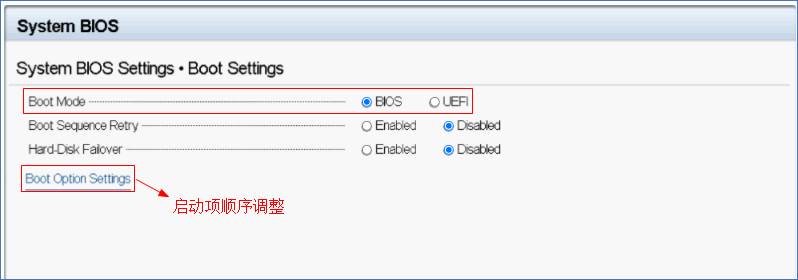
在Boot Sequence通过键盘上下箭头调整启动项顺序。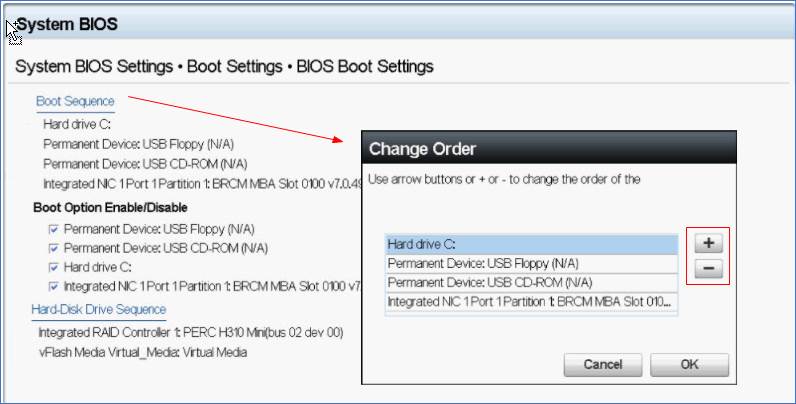
| Boot Mode | Enables you to set the boot mode of the system. | 使您可以设置系统的引导模式。 |
| CAUTION: Switching the boot mode may prevent the system from booting if the operating system is not installed in the same boot mode. | 注:切换引导模式可能会导致系统无法启动,所安装的操作系统必须支持对应的启动方式。 | |
| If the operating system supports UEFI, you can set this option to UEFI. Setting this field to BIOS enables compatibility with non-UEFI operating systems. This option is set to UEFI by default. | 如果操作系统支持UEFI,则可以将此选项设置为UEFI。此字段设置为BIOS允许与非UEFI操作系统兼容。此选项默认设置为UEFI。 | |
| NOTE: Setting this field to UEFI disables the BIOS Boot Settings menu. | 注:该字段设置为禁用UEFI BIOS引导设置菜单。 | |
| Boot Sequence Retry | Enables or disables the Boot Sequence Retry feature. If this option is set to Enabled and the system fails to boot, the system re-attempts the boot sequence after 30 seconds. This option is set to Enabled by default. | 启用或禁用重试引导顺序功能。如果此选项设置为Enabled,系统找不到任何启动项30秒后系统会重新尝试引导顺序。此选项默认设置为启用。 |
| Hard-Disk Failover | Specifies the drive that is booted in the event of a drive failure. The devices are selected in the Hard-Disk Drive Sequence on the Boot Option Setting menu. When this option is set to Disabled, only the first drive in the list is attempted to boot. When this option is set to Enabled, all drives are attempted to boot in the order selected in the Hard-Disk Drive Sequence. This option is not enabled for UEFI Boot Mode. This option is set to Disabled by default. | 指定在一个启动驱动器发生故障的情况下从其他驱动器启动。当此选项设置为禁用,只有在列表中的第一个驱动器试图启动。当此选项设置为Enabled,所有驱动器都试图启动在硬盘驱动器顺序选择的顺序。此选项不支持UEFI引导模式,默认设置为禁用。 |
| Generic USB Boot | Enables or disables the USB boot option. This option is set to Disabled by default. | 启用或禁用USB启动选项。此选项默认设置为禁用。 |
| Hard-disk Drive Placeholder | Enables or disables the Hard-disk drive placeholder option. This option is set to Disabled by default. | 启用或禁用硬盘驱动器的占位符选项。此选项默认设置为禁用。 |
| BIOS Boot Settings | Enables or disables BIOS boot options. | 启用或禁用BIOS启动选项。 |
| NOTE: This option is enabled only if the boot mode is BIOS. | 注:此选项启用仅在引导模式为BIOS。 | |
| UEFI Boot Settings | Enables or disables UEFI Boot options. | 启用或禁用UEFI启动选项。 |
| The Boot options include IPv4 PXE and IPv6 PXE. This option is set to IPv4 by default. | 启动选项包括的IPv4 PXE和IPv6 PXE。此选项默认设置为IPv4的。 | |
| NOTE: This option is enabled only if the boot mode is UEFI. | 注:此选项启用仅在引导模式为UEFI。 | |
| UEFI Boot Sequence | Enables you to change the boot device order. | 允许您更改引导设备的顺序。 |
| Boot Options Enable/Disable | Enables you to select the enabled or disabled boot devices. | 使您可以选择启用或禁用引导设备。 |
更多信息请参考以下手册:
BIOS Setup User Guide for 13th Generation Dell PowerEdge Servers
Setting up BIOS on 14th Generation (14G) Dell EMC PowerEdge Servers
受影响的产品
Rack Servers, Tower Servers文章属性
文章编号: 000191847
文章类型: How To
上次修改时间: 10 3月 2026
版本: 12
从其他戴尔用户那里查找问题的答案
支持服务
检查您的设备是否在支持服务涵盖的范围内。