PowerEdge: 13G/14G服务器BIOS设置详解-配置系统安全设置
摘要: 本文章介绍BIOS设置中配置系统安全设置的解决方案
本文适用于
本文不适用于
本文并非针对某种特定的产品。
本文并非包含所有产品版本。
说明
目录:
开机按F2键进入主菜单点击System BIOS后选择System Security。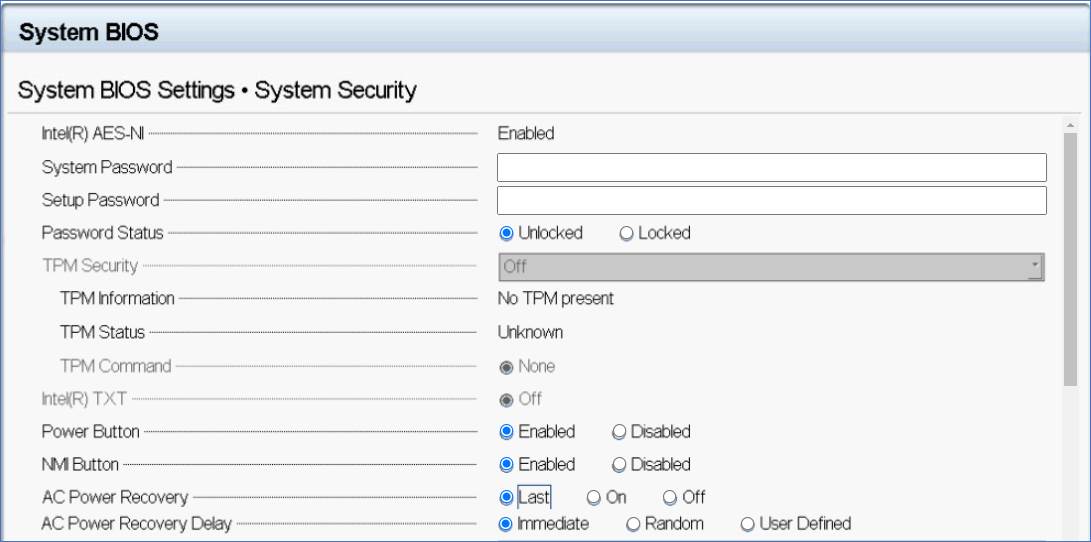
| Option | Description | 描述 |
| CPU AES-NI | Improves the speed of applications by performing encryption and decryption by using the Advanced Encryption Standard Instruction Set (AES-NI). This option is set to Enabled by default. | 通过使用高级加密标准指令集(AES-NI)执行加密和解密,提高了应用程序的速度。 默认情况下,此选项设置为“启用”。 |
| System Password | Enables you to set the system password. This option is set to Enabled by default and is read-only if the password jumper is not installed in the system. | 使您可以设置系统密码。 默认情况下,此选项设置为“已启用”,如果系统中未安装密码跳线,则此选项为只读。 |
| Setup Password | Enables you to set the system setup password. This option is read-only if the password jumper is not installed in the system. | 使您可以设置系统设置密码。 如果系统中未安装密码跳线,则此选项为只读。 |
| Password Status | Enables you to lock the system password. This option is set to Unlocked by default. | 使您可以锁定系统密码。 默认情况下,此选项设置为“解锁”。 |
| TPM Security | NOTE: The TPM menu is available only when the TPM module is installed. | 注:仅当安装了TPM模块时,TPM菜单才可用。 |
| Enables you to control the reporting mode of the TPM. The TPM Security option is set to Off by default. You can only modify the TPM Status TPM Activation, and the Intel TXT fields if the TPM Status field is set to either On with Pre-boot Measurements or On without Pre-boot Measurements. | 使您可以控制TPM的报告模式。 默认情况下,“ TPM安全性”选项设置为“关”。 如果TPM Status字段设置为On(带预引导测量)或On(不带预引导测量),则只能修改TPM Status TPM Activation和Intel TXT字段。 | |
| When TPM 1.2 is installed, the TPM Security option is set to Off, On with Pre-boot Measurements, or On without Pre-boot Measurements. | 安装TPM 1.2时,“ TPM安全性”选项设置为“关闭”,“使用预引导测量打开”或“不使用预引导测量打开”。 | |
| When TPM 2.0 is installed, the TPM Security option is set to On or Off. This option is set to Off by default. | 安装TPM 2.0时,“ TPM安全性”选项设置为“开”或“关”。 默认情况下,此选项设置为“关”。 | |
| TPM Information | Enables you to change the operational state of the TPM. This option is set to No Change by default. | 使您能够更改TPM的操作状态。 默认情况下,此选项设置为“无更改”。 |
| TPM Status | Specifies the TPM status. | 指定TPM状态。 |
| TPM Command | Controls the Trusted Platform Module (TPM). When set to None, no command is sent to the TPM. When set to Activate, the TPM is enabled and activated. When set to Deactivate, the TPM is disabled and deactivated. | 控制受信任的平台模块(TPM)。 设置为“无”时,没有命令发送到TPM。 设置为激活时,将启用并激活TPM。 设置为停用时,TPM被禁用和停用。 |
| When set to Clear, all the contents of the TPM are cleared. This option is set to None by default. | 设置为“清除”时,将清除TPM的所有内容。 默认情况下,此选项设置为“无”。 | |
| CAUTION: Clearing the TPM results in the loss of all keys in the TPM. The loss of TPM keys may affect booting to the operating system. | 注意:清除TPM会导致TPM中的所有密钥丢失。 TPM密钥的丢失可能会影响到操作系统的引导。 | |
| This field is read-only when TPM Security is set to Off. The action requires an additional reboot before it can take effect. | 当“ TPM安全性”设置为“关”时,此字段为只读。 该操作需要重新启动才能生效。 | |
| TPM Advanced Settings | This setting is enabled only when TPM Security is set to ON. | 仅当“ TPM安全性”设置为“开”时,才启用此设置。 |
| Intel(R) TXT | Enables you to set the Intel Trusted Execution Technology (TXT) option. To enable the Intel TXT option, virtualization technology and TPM Security must be enabled with Pre-boot measurements. This option is set to Off by default. | 使您可以设置英特尔可信执行技术(TXT)选项。 要启用英特尔TXT选项,必须通过预引导测量启用虚拟化技术和TPM安全性。 默认情况下,此选项设置为“关”。 |
| When TPM 2.0 is installed, TPM 2 Algorithm option is available. It enables you to select a hash algorithm from those supported by the TPM (SHA1, SHA256). TPM 2 Algorithm option must be set to SHA256, to enable TXT. | 安装TPM 2.0时,“ TPM 2算法”选项可用。 它使您能够从TPM支持的算法(SHA1,SHA256)中选择一种哈希算法。 必须将TPM 2算法选项设置为SHA256,才能启用TXT。 | |
| Power Button | Enables you to set the power button on the front of the system. This option is set to Enabled by default. | 使您可以设置系统正面的电源按钮。 默认情况下,此选项设置为“启用”。 |
| AC Power Recovery | Sets how the system behaves after AC power is restored to the system. This option is set to Last by default. | 设置交流电源恢复到系统后系统的行为。 默认情况下,此选项设置为Last。
|
| AC Power Recovery Delay | Enables you to set the time that the system should take to turn on after AC power is restored to the system. This option is set to Immediate by default. | 使您可以设置在系统恢复交流电源后系统应打开的时间。 默认情况下,此选项设置为“立即”。 |
| User Defined Delay (60s to 600s) | Enables you to set the User Defined Delay option when the User Defined option for AC Power Recovery Delay is selected. | 当选择“交流电源恢复延迟”的“用户定义”选项时,使您可以设置“用户定义的延迟”选项。 |
| UEFI Variable Access | Provides varying degrees of securing UEFI variables. When set to Standard (the default), UEFI variables are accessible in the operating system per the UEFI specification. When set to Controlled, selected UEFI variables are protected in the environment, and new UEFI boot entries are forced to be at the end of the current boot order. | 提供不同程度的UEFI变量保护。 设置为标准(默认值)时,可以根据UEFI规范在操作系统中访问UEFI变量。 设置为“受控”时,选定的UEFI变量将在环境中受到保护,并且新的UEFI引导项将强制位于当前引导顺序的末尾。 |
| In-Band Manageability Interface | When set to Disabled, this setting hides the Management Engine's (ME), HECI devices, and the system's IPMI devices from the operating system. This prevents the operating system from changing the ME power capping settings, and blocks access to all in-band management tools. All management should be managed through out-ofband. This option is set to Enabled by default. | 设置为“禁用”时,此设置对操作系统隐藏管理引擎(ME),HECI设备和系统的IPMI设备。 这样可以防止操作系统更改ME功率上限设置,并阻止对所有带内管理工具的访问。 所有管理都应通过带外进行管理。 默认情况下,此选项设置为“启用”。 |
| NOTE: BIOS update requires HECI devices to be operational and DUP updates require IPMI interface to be operational. This setting needs to be set to Enabled to avoid updating errors. | 注意:BIOS更新要求HECI设备可运行,而DUP更新则要求IPMI接口可运行。 此设置需要设置为“已启用”,以避免更新错误。 | |
| Secure Boot | Enables Secure Boot, where the BIOS authenticates each pre-boot image by using the certificates in the Secure Boot Policy. Secure Boot is set to Disabled by default. | 启用安全启动,BIOS会使用安全启动策略中的证书对每个预启动映像进行身份验证。 默认情况下,安全启动设置为“禁用”。 |
| Secure Boot Policy | When Secure Boot policy is set to Standard, the BIOS uses the system manufacturer key and certificates to authenticate pre-boot images. When Secure Boot policy is set to Custom, the BIOS uses the user-defined key and certificates. Secure Boot policy is set to Standard by default. | 当“安全启动”策略设置为“标准”时,BIOS将使用系统制造商密钥和证书来验证预启动映像。 当“安全启动”策略设置为“自定义”时,BIOS将使用用户定义的密钥和证书。 默认情况下,安全启动策略设置为标准。 |
| Secure Boot Mode | Enables you to configure how the BIOS uses the Secure Boot Policy Objects (PK, KEK, db, dbx). | 使您能够配置BIOS如何使用安全启动策略对象(PK,KEK,db,dbx)。 |
| If the current mode is set to Deployed Mode, the available options are User Mode and Deployed Mode. If the current mode is set to User Mode, the available options are User Mode, Audit Mode, and Deployed Mode. | 如果当前模式设置为“部署模式”,则可用选项为“用户模式”和“部署模式”。 如果当前模式设置为“用户模式”,则可用选项为“用户模式”,“审核模式”和“部署模式”。 | |
| Options: Description | 选项:说明 | |
| User Mode: In User Mode, PK must be installed, and BIOS performs signature verification on programmatic attempts to update policy objects. BIOS allows unauthenticated programmatic transitions between modes. | 用户模式:在用户模式下,必须安装PK,BIOS会对程序更新策略对象的尝试执行签名验证。 BIOS允许在模式之间进行未经身份验证的编程转换。 | |
| Audit Mode: In Audit mode, PK is not present. BIOS does not authenticate programmatic updates to the policy objects, and transitions between modes.Audit Mode is useful for programmatically determining a working set of policy objects.BIOS performs signature verification on pre-boot images. BIOS also logs the results in the image Execution Information Table, but approves the images whether they pass or fail verification. | 审核模式:在审核模式下,不存在PK。 BIOS不会验证对策略对象的程序更新以及在模式之间的转换。审核模式对于以编程方式确定策略对象的工作集很有用。BIOS对预启动映像执行签名验证。 BIOS还将结果记录在映像执行信息表中,但会批准映像通过或未通过验证。 | |
| Deployed Mode: Deployed Mode is the most secure mode. In Deployed Mode, PK must be installed and the BIOS performs signature verification on programmatic attempts to update policy objects. Deployed Mode restricts the programmatic mode transitions. | 部署模式:部署模式是最安全的模式。 在部署模式下,必须安装PK,BIOS会对更新策略对象的编程尝试执行签名验证。 部署模式限制了编程模式的转换。 | |
| Secure Boot Policy Summary | Specifies the list of certificates and hashes that secure boot uses to authenticate images. | 指定安全启动用来验证映像的证书和哈希列表。 |
| Secure Boot Custom Policy Settings | Configures the Secure Boot Custom Policy. To enable this option, set the Secure Boot Policy to Custom. | 配置安全启动自定义策略。 要启用此选项,请将安全启动策略设置为“自定义”。 |
| Redundant OS Control screen details | ||
| Redundant OS Location | Enables you to select a backup disk from the following devices: | 使您可以从以下设备中选择备份磁盘: |
| None | 没有 | |
| IDSDM | IDSDM内部双SD卡模块 | |
| Internal SD card | 内置SD卡 | |
| SATA Ports in AHCI mode | 在AHCI模式的SATA端口 | |
| BOSS PCIe Cards (Internal M.2 Drives) | BOSS PCIe卡(内部M.2驱动器) | |
| Internal USB | 内置USB | |
| NOTE: RAID configurations and NVMe cards not are included as BIOS does not have the ability to distinguish between individual drives in those configurations. | 注:不包含RAID配置和NVMe卡,因为BIOS无法区分这些配置中的各个驱动器。 | |
| Redundant OS State | NOTE: This option is disabled if Redundant OS Location is set to None. | 注意:如果“冗余OS位置”设置为“无”,则禁用此选项。 |
| When set to Visible, the backup disk is visible to the boot list and OS. When set to Hidden, the backup disk is disabled and is not visible to the boot list and OS. This option is set to Visible by default. | 设置为“可见”时,备份磁盘对引导列表和操作系统可见。 设置为“隐藏”时,备份磁盘将被禁用,并且对引导列表和操作系统不可见。 默认情况下,此选项设置为“可见”。 | |
| NOTE: BIOS will disable the device in hardware, so it cannot be accessed by the OS. | 注意:BIOS将禁用硬件中的设备,因此操作系统无法访问它。 | |
| Redundant OS Boot | NOTE: This option is disabled if Redundant OS Location is set to None or if Redundant OS State is set to Hidden. | 注意:如果“冗余OS位置”设置为“无”或“冗余OS状态”设置为“隐藏”,则此选项被禁用。 |
| When set to Enabled, BIOS boots to the device specified in Redundant OS Location. When set to Disabled, BIOS preserves the current boot list settings. This option is set to Disabled by default. | 设置为“ Enabled”时,BIOS引导至“冗余OS位置”中指定的设备。 设置为Disabled(禁用)时,BIOS会保留当前的引导列表设置。 默认情况下,此选项设置为“禁用”。 |
更多信息请参考以下手册:
BIOS Setup User Guide for 13th Generation Dell PowerEdge Servers
Setting up BIOS on 14th Generation (14G) Dell EMC PowerEdge Servers
受影响的产品
Rack Servers, Tower Servers文章属性
文章编号: 000191860
文章类型: How To
上次修改时间: 19 2月 2026
版本: 8
从其他戴尔用户那里查找问题的答案
支持服务
检查您的设备是否在支持服务涵盖的范围内。