Dell Networking S 系列:基本接口配置 – SONIC 4.0
摘要: 如何配置 SONIC 4.0 接口基础设置。
本文适用于
本文不适用于
本文并非针对某种特定的产品。
本文并非包含所有产品版本。
说明
Dell Networking S 系列:基本接口配置 - SONIC 4.0
摘要:如何配置 SONIC 4.0 接口基础设置。
说明
这些步骤假定从出厂默认设置开始将交换机配置为独立设备。有关书面示例,请参阅链接的知识库文章。
在本机格式中,SONIC 前面板接口从以太网 0 命名为以太网 X,其中 X 是最后一个前面板端口。 标准命名采用以太网 x/y/z 模式,其中 x/y 是插槽/端口编号,而 z 用于表示分支端口。
接口命名格式变化:将默认接口命名模式从本机模式“Native”更改为标准模式“Standard”。
- 从 Linux 提示符处,使用“sonic-cli”启动 SONIC CLI:
admin@sonic:~$ sonic-cli
sonic#
- 使用“show interface-naming”来显示当前配置的接口状态模式
sonic# show interface-naming
Interface naming mode is native
sonic#
- 显示接口状态并查看默认接口命名约定(本机命名)“show interface status”(图 1):
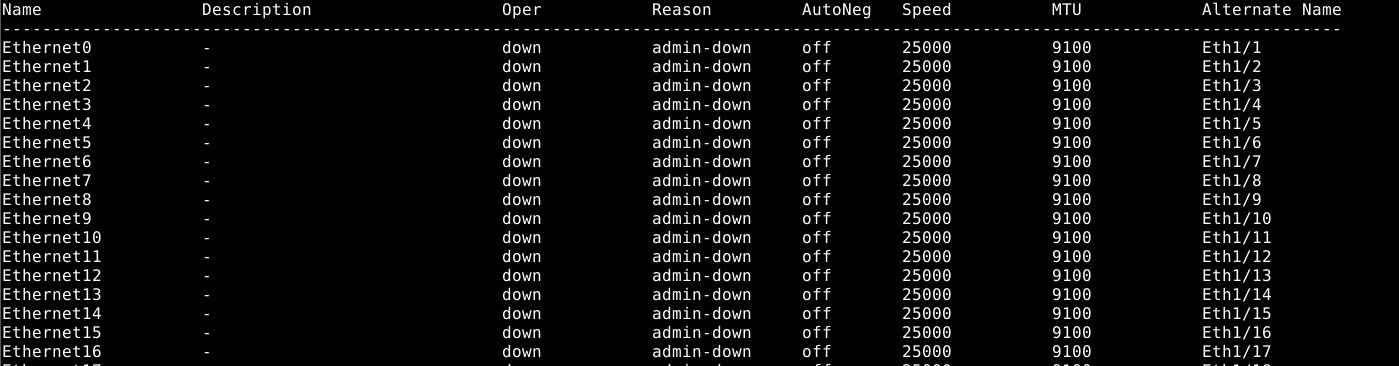
图 1:show interface status 示例。
- 要修改交换机配置,请运行“configure terminal”命令。
sonic# configure terminal
sonic(config)#
- 要将接口命名模式更改为标准模式,请使用命令“interface-naming standard”:
sonic(config)# interface-naming standard
Broadcast message: Interface naming mode has changed. Users running 'sonic-cli' are required to restart your session.

sonic(config)#
提醒:所有用户必须退出并重新进入 SONIC CLI,模式更改才能生效。。
- 使用“exit”退出配置模式:
sonic(config)# exit
sonic#
- 使用“exit”退出 SONIC CLI:
sonic# exit
admin@sonic:~$
- 使用“sonic-cli”重新进入 SONIC CLI:
admin@sonic:~$ sonic-cli
sonic#
- 使用“show interface status”来显示接口状态:
sonic# show interface status
注意接口名称从以太网 X 更改为以太网 x/y 的变化(图 2)。
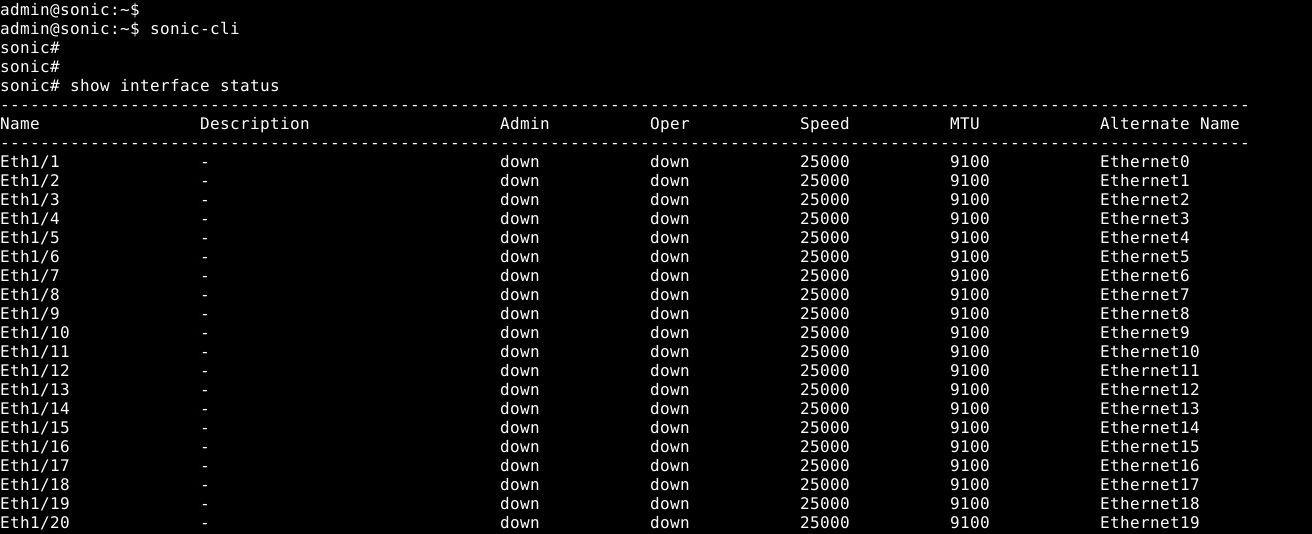
图 2:标准模式:show interface status 示例
- 使用“write memory”命令将正在运行的配置保存到启动配置:
sonic# write memory
sonic#
单个接口配置:进入配置模式,然后进入接口配置模式。
- 使用“sonic-cli”启动 SONiC CLI:
admin@sonic:~$ sonic-cli
sonic#
- 使用“show running-configuration interface Eth 1/30”来显示接口配置:
sonic# show running-configuration interface Eth 1/30
!
interface Eth1/30
 mtu 9100
 speed 25000
 fec none
 shutdown
- 使用“configure terminal”以进入配置模式:
sonic# configure terminal
sonic(config)#
- 使用“interface Eth 1/30”以进入接口以太网 1/30 配置模式:
sonic(config)# interface Eth 1/30
sonic(conf-if-Eth1/30)#
- 使用“no shutdown”以便不关闭接口以太网 1/30:
sonic(conf-if-Eth1/30)# no shutdown
sonic(conf-if-Eth1/30)#
- 在接口以太网 1/30 上使用“IP address 10.1.1.2/24”来配置 IP 地址:
sonic(conf-if-Eth1/30)# ip address 10.1.1.2/24
sonic(conf-if-Eth1/30)#
- 使用“end”退出配置模式:
sonic(conf-if-Eth1/30)# end
sonic#
- 使用“show running-configuration interface Eth 1/30”来显示接口配置:
sonic# show running-configuration interface eth 1/30
!
interface Eth1/30
 mtu 9100
 speed 25000
 fec none
 no shutdown
 ip address 10.1.1.2/24
- 使用“show ip interfaces”来显示 IP 接口:
sonic# show ip interfaces
Flags: U-Unnumbered interface, A-Anycast IP
-----------------------------------------------------------------------------------------------
Interface            IP address/mask                    VRF            Admin/Oper     Flags
-----------------------------------------------------------------------------------------------
Eth1/30              10.1.1.2/24                                           up/up
sonic#
- 使用“show interface eth 1/30”来显示以太网 1/30 的接口状态:
(output truncated for brevity)

sonic# show interface eth 1/30

Eth1/30 is up, line protocol is up
Hardware is Eth
IPV4 address is 10.1.1.2/24
Mode of IPV4 address assignment: MANUAL
Mode of IPV6 address assignment: not-set
Interface IPv6 oper status: Disabled
IP MTU 9100 bytes
LineSpeed 25GB, Auto-negotiation off
FEC: DISABLED
Last clearing of "show interface" counters: never
…
- 使用“write memory”命令将正在运行的配置保存到启动配置:
sonic# write memory
sonic#
多个接口配置:要同时配置多个接口,请使用“interface range”选项。要使用 show 命令查看一系列接口,不需要“range”关键字。
示例:
- 要配置端口 14 到 15 的连续范围,请使用“interface range ethernet 1/1/14-1/1/15”。
- 要配置端口 3、10、19 的非连续性范围,请使用“interface range ethernet 3,10,19”。
- 要配置连续和非连续性端口范围组合,请使用“interface range ethernet 1/1/3, 1/1/14-1/1/15”。
- 要显示多个接口,并不一定要使用“range”选项。要显示以太网 1/1-1/3、1/5,请使用命令“show interface Eth 1/1-1/3,1/5”:
(output truncated for brevity)
sonic# show interface Eth 1/1-1/3,1/5

Eth1/1 is down, line protocol is down, reason admin-down
Hardware is Eth, address is 0c:02:22:c7:00:08
Mode of IPV4 address assignment: not-set
...
Output statistics:
        0 packets, 0 octets
        0 Multicasts, 0 Broadcasts, 0 Unicasts
        0 error, 0 discarded, 0 Oversize

Eth1/2 is down, line protocol is down, reason admin-down
Hardware is Eth, address is 0c:02:22:c7:00:08
Mode of IPV4 address assignment: not-set
...
Output statistics:
        0 packets, 0 octets
        0 Multicasts, 0 Broadcasts, 0 Unicasts
        0 error, 0 discarded, 0 Oversize

Eth1/3 is down, line protocol is down, reason admin-down
Hardware is Eth, address is 0c:02:22:c7:00:08
Mode of IPV4 address assignment: not-set
...
Output statistics:
        0 packets, 0 octets
        0 Multicasts, 0 Broadcasts, 0 Unicasts
        0 error, 0 discarded, 0 Oversize

Eth1/5 is down, line protocol is down, reason admin-down
Hardware is Eth, address is 0c:02:22:c7:00:08
Mode of IPV4 address assignment: not-set
...
Output statistics:
        0 packets, 0 octets
        0 Multicasts, 0 Broadcasts, 0 Unicasts
        0 error, 0 discarded, 0 Oversize
sonic(config)# end
- 运行“configure terminal”命令。
sonic# configure terminal
sonic(config)#
- 使用“interface range Eth1/1-1/3,1/5,1/7-1/9”来配置接口以太网 1/1-1/3、1/5、/1/7-1/9:
sonic(config)# interface range eth 1/1-1/3,1/5,1/7-1/9
%Info: Configuring only existing interfaces in range
sonic(conf-if-range-eth**)#
- 使用“no shut”将接口配置为不关闭:
sonic(conf-if-range-eth**)# no shutdown
sonic(conf-if-range-eth**)#
- 使用“switchport access vlan 1”来配置访问模式 vlan 1 的接口:
sonic(conf-if-range-eth**)# switchport access vlan 1
sonic(conf-if-range-eth**)#
- 使用“show interface status”来验证用户配置(图 3):
提醒:“Oper”列和“Reason”列已更改所配置接口范围的状态。

图 3:Show interface status 示例
- 使用“show vlan 1”来检查 VLAN 1 接口分配(图 4):

图 4:Show vlan 1 示例
- 使用“write memory”命令将正在运行的配置保存到启动配置:
sonic# write memory
sonic#
有关进一步的帮助,请参阅 Dell Technologies 企业 SONiC 用户指南发行文档或联系 Dell Technologies 技术支持。
受影响的产品
Networking, Enterprise SONiC Distribution文章属性
文章编号: 000202172
文章类型: How To
上次修改时间: 23 5月 2024
版本: 5
从其他戴尔用户那里查找问题的答案
支持服务
检查您的设备是否在支持服务涵盖的范围内。