AIX 上的 PowerProtect File System Agent 安装失败
摘要: AIX 上的 PowerProtect File System Agent 安装失败,并且没有关于故障的详细信息。
本文适用于
本文不适用于
本文并非针对某种特定的产品。
本文并非包含所有产品版本。
症状
The PowerProtect File System Agent install.sh script debug execution shows:
xyzbdb1:/SCC-TMP/PowerP/fsagent> ./install.sh --debug
2022/08/26 11:46:01 Checking if required XL C++ runtime environment version filesets exist to proceed with Installation
2022/08/26 11:46:01 Found supported XL C++ runtime environment version 16.1.0.8, proceeding with installation
2022/08/26 11:46:01 Checking OS Compatibility for AIX
2022/08/26 11:46:05 Found supported version of AIX operating system, continuing with installation.
2022/08/26 11:46:05 AIX
2022/08/26 11:46:05
2022/08/26 11:46:05 The powerprotect-agentsvc was not installed.
2022/08/26 11:46:06
2022/08/26 11:46:06 The ppdm_fsagent was not installed.
2022/08/26 11:46:06 The ppdm_fsagent installation failed.
2022/08/26 11:46:06 FSAgent installation failed
The truss debugging utility command execution to evaluate the trace of the PowerProtect File System Agent install.sh script.
truss -a -f -e -o truss.out bash ./install.sh --debug
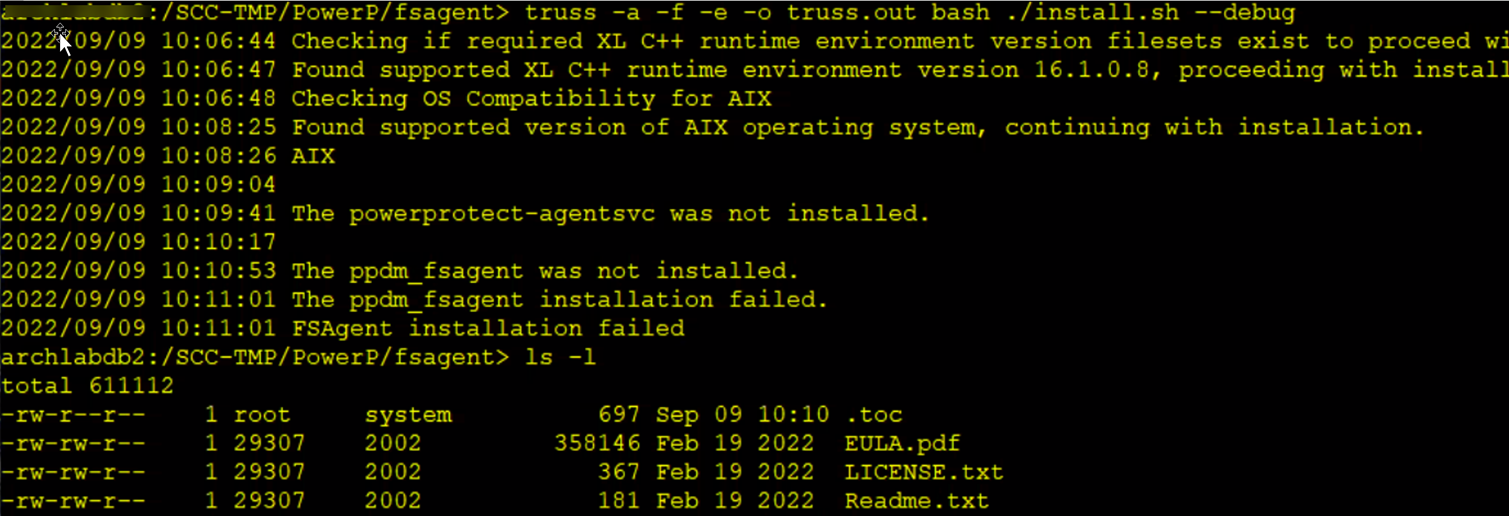
truss 输出被截断,最后一行显示对磁盘空间的引用。
42467800:       15860051: kread(8, " 0 5 0 3 - 0 2 5   % 1 $".., 4096) =4096
42467800:       15860051: kwrite(2, " 0 5 0 3 - 0 2 5  ", 9)    =9
42467800:       15860051: kwrite(2, " i n s t a l l p", 8)      =8
42467800:       15860051: kwrite(2, " :     T h e r e   i s  ".., 54) =54
42467800:       15860051: kwrite(2, " / o p t", 4)              =4
42467800:       15860051: kwrite(2, "   (", 2)                  =2
42467800:       15860051: kwrite(2, " 2 1 0 1 6 0", 6)          =6
42467800:       15860051: kwrite(2, "   m o r e   5 1 2 - b y".., 136) = 136 <<--- TRUCATED LINE indicating 512 bytes are needed
原因
/opt 目标分区没有足够的空间用于文件系统代理安装。《PowerProtect Data Manager 文件系统用户指南》介绍了文件系统代理安装所需的最小磁盘空间。
解决方案
增加 AIX OS 上的 /opt 分区大小,以允许安装复制相关的文件系统代理文件。
其他信息
验证 AIX作系统上是否安装了 XL 和 C++ 6.1 及更高版本。
lslpp -l | grep -i xlc

文章属性
文章编号: 000203371
文章类型: Solution
上次修改时间: 23 12月 2025
版本: 6
从其他戴尔用户那里查找问题的答案
支持服务
检查您的设备是否在支持服务涵盖的范围内。