Connectrix:SANnav 中未显示历史和实时数据
摘要: 无法在 SANnav 中查看交换机的实际和历史性能数据。
本文适用于
本文不适用于
本文并非针对某种特定的产品。
本文并非包含所有产品版本。
症状
用户无法在 SANnav 中查看真实和历史性能数据。
已验证 SNMP 端口是否已添加到
已验证 SNMP 端口是否已添加到
firewall-cmd --list-all。
原因
交换机 FOS 升级和网络或配置更改。
解决方案
- 根据交换机和 FOS 型号确定问题是否与 SNMP 或遥测相关。
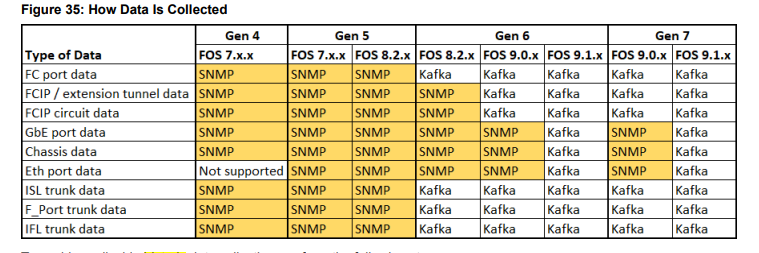
- 运行
troubleshooting-sannav.sh脚本位于<SANnav_Home>/bin/directory。
[root@xxxxxxxxxx bin]# sh troubleshooting-sannav.sh [troubleshooting-sannav.sh]

Select an option to execute and press enter:

  1) SANnav service status checks

  2) SANnav system requirement checks

  3) SNMP and Syslog checks

4) Telemetry checks

ESC) Press Esc and Enter to exit
- 根据使用的协议选择选项 3 或 4。
以下示例显示了交换机 10.10.xx.xx 的遥测问题。
troubleshooting-sannav.sh
检查交换机遥测配置、配置文件和关联的 CA 根证书的注册和状态。
此外,服务器上遥测相关服务的端口状态也需要一些时间。
输入以逗号分隔的交换机 IP 地址列表:10.10.xx.xx
测试:验证遥测配置文件
Profile: Profile_PortMetrics_10_xxx.x.xx Error status: Schema on server and switch is incompatible. Check Server and Switch Schema.
        Profile: Profile_FCIPTunnelMetrics__10_xxx.x.xx Error status: Schema on server and switch is incompatible. Check Server and Switch Schema.
        Profile: Profile_FCIPCircuitMetrics__10_xxx.x.xx Error status: Schema on server and switch is incompatible. Check Server and Switch Schema.
        Profile: Profile_GigEPortStats__10_xxx.x.xx Error status: Schema on server and switch is incompatible. Check Server and Switch Schema.
        Profile: Profile_ChassisMetrics__10_xxx.x.xx Error status: Schema on server and switch is incompatible. Check Server and Switch Schema.
对于 SNMP 相关问题:
- 验证 SNMP 所需的端口 161 和 162 是否在交换机和 SANnav 之间正常工作。
- 验证 SNMP 配置是否准确,如果配置了多个 IP,则将 SANnav IP 地址添加到访问控制列表中。
对于遥测相关问题:
- 验证 SANnav 和交换机之间的遥测端口是否处于打开状态。端口 18081、18082、19094 [对于 IPV4 交换机] 或 19095 [对于 IPV6 交换机]
- 使用 检查 Kafka 证书在 Brocade 交换机上是否有效
seccertmgmtcommand
- 执行上述作后,在 SANnav 中取消监视和监视交换机以解决此问题。
有关故障处理的更多详细信息,请参阅 《Brocade SANnav Management Portal User Guide 2.3.1x》中的“SNMP 和遥测故障故障故障处理”部分

其他信息
必须在防火墙中打开的端口:
受影响的产品
Connectrix SANnav文章属性
文章编号: 000224084
文章类型: Solution
上次修改时间: 14 8月 2025
版本: 3
从其他戴尔用户那里查找问题的答案
支持服务
检查您的设备是否在支持服务涵盖的范围内。