戴尔笔记本电脑摄像头在 Teams、Zoom 和 Windows 摄像头应用程序中无法正常工作
摘要: 本文提供有关缺少或不正确的驱动程序的信息。它们会导致笔记本电脑网络摄像头停止在使用移动行业处理器接口 (MIPI) 摄像头的戴尔笔记本电脑上工作。
本文适用于
本文不适用于
本文并非针对某种特定的产品。
本文并非包含所有产品版本。
症状
下表 1 和表 2 中列出的笔记本电脑可能已配备高性能 MIPI 摄像头。这些笔记本电脑需要的驱动程序与配备传统网络摄像头的笔记本电脑不同。缺少或不正确的驱动程序可能会导致摄像头问题。
一种或多种症状可能包括:
- 网络摄像头在 Teams、Zoom、Discord 或其他应用程序中无法正常工作。
- Windows Hello 可能无法正常工作。
- 在使用视频的电话会议期间,网络摄像头间歇性滞后且卡顿。
- 英特尔 AVStream 摄像头、摄像头传感器或设备管理器中的英特尔控制逻辑上出现黄色惊叹号。通常,设备管理器中没有异常设备。
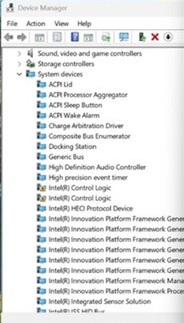
- 在蓝牙和设备→摄像头下未检测到摄像头。
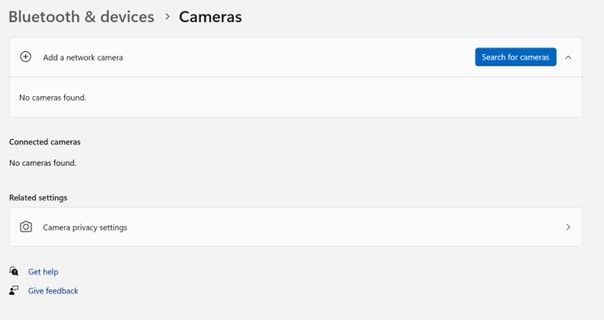
- Windows 相机应用程序中出现摄像头错误消息“We cannot find your camera”:(请参见第一张图片)。
We cannot find your camera
- 下面的屏幕截图中显示错误消息:“We can't find your camera”。

- 在蓝牙和设备→摄像头下未检测到摄像头。
| 戴尔笔记本电脑 | Dell Pro 笔记本电脑 | Dell Pro Max 笔记本电脑 | XPS 笔记本电脑 | 戴尔 Pro Precision | Dell Pro 坚固机箱 13 |
|---|---|---|---|---|---|
| Dell Pro 14 Premium DA14250 | Dell Pro 14 Premium PA14250 | Dell Pro 坚固机箱 14 MC14250 | XPS 14 DA14260 | 戴尔 Pro Precision 7 和 14 PW714260 | Dell Pro 坚固机箱 10 RA00260 |
| Dell Pro 16 Premium DA16250 | Dell Pro 13 Premium PA13250 | Dell Pro 14 Premium MA14250 | XPS 16 DA16260 | 戴尔 Pro Precision 7 和 16 PW716260 | Dell Pro 坚固机箱 12 RA02260 |
| Dell Pro 16 Plus PB16250 | Dell Pro 坚固机箱 16 MC16250 | 戴尔 Pro Precision 5 和 14 PW514261 | |||
| Dell Pro 14 Plus PB14250 | Dell Pro 16 Premium MA16250 | 戴尔 Pro Precision 5 和 16 PW51626 | |||
| Dell Pro 13 Plus PB13250 | |||||
| Dell Pro 14 Premium PA14260 |
| Latitude 笔记本电脑 | Precision 移动工作站 | XPS 笔记本电脑 |
|---|---|---|
| Latitude 9450 二合一笔记本 | Precision 5690 | XPS 16 9640 |
| Latitude 9440 二合一笔记本 | Precision 5680 | XPS 13 9350 |
| Latitude 9430 | Precision 5490 | XPS 14 9440 |
| Latitude 9330 | Precision 5480 | XPS 13 9340 |
| Latitude 9420 | Precision 5470 | XPS 13 Plus 9320 |
| Latitude 7650 | XPS 13 9315 | |
| Latitude 7450 | XPS 13 9315 二合一电脑 | |
| Latitude 7350 可拆卸式笔记本 | ||
| Latitude 7350 | ||
| Latitude 7640 | ||
| Latitude 7440 | ||
| Latitude 7340 | ||
| Latitude 7030 Rugged Extreme | ||
| Latitude 7230 Rugged Extreme | ||
| Latitude 7320 可拆卸式笔记本 | ||
| Latitude 9450 二合一笔记本 |
原因
Windows Update、Norton Updater 和其他实用程序可能会推送不正确或不完整的驱动程序。在重新安装操作系统、部署公司操作系统映像或手动安装驱动程序时,也会发生这种情况。存在对其他英特尔驱动程序的依赖项,必须按特定顺序安装。
解决方案
注:要安装任何驱动程序和应用程序或配置操作系统,需要笔记本电脑的管理员权限。
-
确保已填入 BIOS 中“启用摄像头”旁边的复选框。
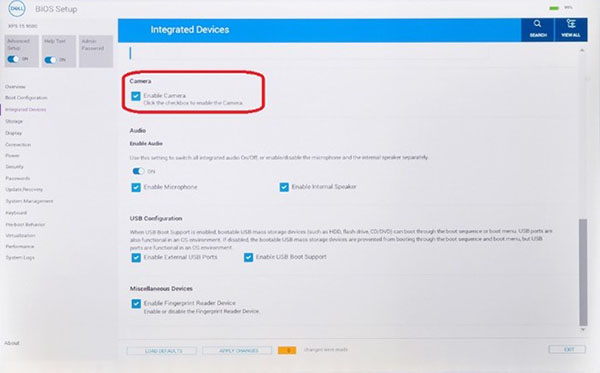
-
安装最新版本
Intel 2D Imaging通过 运行可执行文件,从戴尔网站获取摄像头驱动程序。此驱动程序在 戴尔支持站点的“摄像头”类别下列出。戴尔知识库文章:如何下载并安装戴尔驱动程序注意: 在本地下载文件后,双击它并按照屏幕上的说明进行操作。在安装过程中,请确保保持选中应用程序列出为前提条件的所有软件。如果缺少它们,它们将自动安装,以确保安装成功。注意: 戴尔下载网站上的驱动程序包包括一个用于删除旧驱动程序文件的实用程序。整个过程可能需要一到两分钟,并且不会显示进度条。等待新窗口打开,确认驱动程序已成功安装。Windows Update 执行的自动更新中不包含删除实用程序。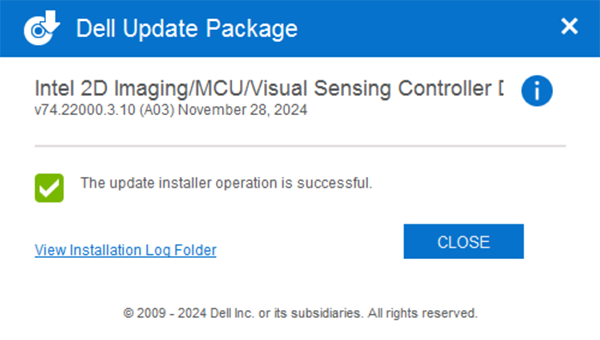
-
重新启动,然后检查摄像头是否在 Windows 摄像头应用程序中正常工作。
-
如果摄像头仍然无法正常工作,则更新所有 相关的驱动程序 和 BIOS。有两个选项:
- (强烈推荐)运行 Windows Update、Dell Command Update(商用平台)、Dell Update(消费者平台)或 SupportAssist(所有平台),以将所有驱动程序更新到最新版本。
提醒:如果通过其中一种工具更新驱动程序和 BIOS,请继续运行该工具,直到不需要更新。
- 从戴尔网站手动下载并安装这些驱动程序和 BIOS 的最新可用版本。所有这些驱动程序都是摄像头正常工作所必需的。戴尔知识库文章:如何下载并安装戴尔驱动程序
- 英特尔芯片组设备软件
- 英特尔显卡或 Arc 显卡驱动程序
- 英特尔集成传感器解决方案驱动程序(与英特尔视觉传感控制器(英特尔 Clover Falls (CVF))或用户存在检测 (UPD) 相关。)
- Intel 串行 I/O 驱动程序
- 英特尔管理引擎组件安装程序
- 将设备更新到可用的最新 Chrome 版本
- (强烈推荐)运行 Windows Update、Dell Command Update(商用平台)、Dell Update(消费者平台)或 SupportAssist(所有平台),以将所有驱动程序更新到最新版本。
- 安装所有驱动程序后,重新启动笔记本电脑以确认问题已解决。
- 这样就解决了问题。无需采取其他措施。
- 否,问题未解决。联系戴尔技术支持以获得其他帮助。
其他信息
重要事项
- MIPI 摄像头接口使用的通信协议与传统 USB 网络摄像头不同,SupportAssist 启动前板载诊断程序看不到此接口。有关更多信息,请参阅戴尔知识库文章启动 前硬件诊断未检测到Dell 笔记本电脑上的英特尔 MIPI 摄像头
受影响的产品
XPS 14 (Dell 14 Premium) DA14250, XPS 16 (Dell 16 Premium) DA16250, Dell Pro Max 14 Premium MA14250, Dell Pro Max 14 MC14250, Dell Pro Max 16 MC16250, Dell Pro 13 Premium PA13250, Dell Pro 14 Premium PA14250, Dell Pro 14 Premium PA14260
, Dell Pro 13 Plus PB13250, Dell Pro 14 Plus PB14250, Dell Pro 16 Plus PB16250, Dell Pro Precision 5 14 PW514261, Dell Pro Precision 5 16 PW516261, Dell Pro Precision 7 14 PW714260, Dell Pro Precision 7 16 PW716260, Dell Pro Rugged 10 Tablet RA00260, Dell Pro Rugged 12 Tablet RA02260, Latitude 7030 Rugged Extreme Tablet, Latitude 7230 Rugged Extreme Tablet, Latitude 7320 Detachable, Latitude 7340, Latitude 7350, Latitude 7350 Detachable, Latitude 9330, Latitude 5455, Latitude 7440, Latitude 7450, Latitude 9420, Latitude 9430, Latitude 9440 2-in-1, Latitude 9450 2-in-1, Latitude 7640, Latitude 7650, Precision 5470, Precision 5480, Precision 5490, Precision 5680, Mobile Precision 5690, XPS 13 9315 2-in-1, XPS 13 9315, XPS 13 Plus 9320, XPS 13 9340, XPS 13 9350, XPS 14 9440, XPS 16 9640, XPS 14 DA14260, XPS 16 DA16260
...
产品
Dell Pro Max 16 Premium MA16250文章属性
文章编号: 000248760
文章类型: Solution
上次修改时间: 29 7月 2026
版本: 30
从其他戴尔用户那里查找问题的答案
支持服务
检查您的设备是否在支持服务涵盖的范围内。