RecoverPoint for VMs:使用单个映像 ESXi 群集时,6.0.x 安装失败
摘要: 如果 ESXi 群集配置为使用单个映像(已启用 vLCM),则 RecoverPoint for Virtual Machines(VMs) 6.0.x 将失败。 在 RecoverPoint for Virtual Machines 系统中注册外部 ESXi 群集时,这也会导致拆分器安装失败。
本文适用于
本文不适用于
本文并非针对某种特定的产品。
本文并非包含所有产品版本。
症状
RecoverPoint for Virtual Machines (VMs) 安装执行到 53% 时失败,并显示错误:
could not deploy ESX splitter. Operation failed. Failed to deploy splitter. ActionFailedException(super=com.emc.recoverpoint.connectors.actions.infra.ActionFailedException: Failed to deploy IOF splitter on some of the ESXs., faultCause=GENERAL_ERROR)vSphere 任务显示错误:
Cannot complete the operation. See the event log for details.
Failed to modify installation status of I/O filter, EMC_bootbank_emcsplitter_6011.m.96-1OEM.700.1.0.15843807, on all hosts.
Error stack:
Failed to modify installation status of I/O filter, EMC_bootbank_emcsplitter_6011.m.96-1OEM.700.1.0.15843807, on all hosts.vSphere APIs for I/O Filters (VAIO) installation of filters on cluster RP Cluster in datacenter XXXXX Datacenter has failedvSphere 任务失败类似于以下内容: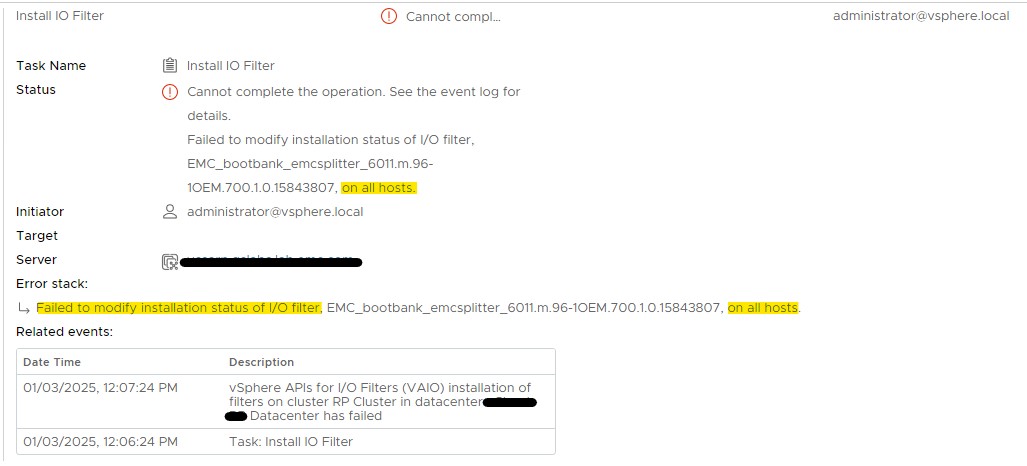
原因
ESXi 群集配置为作为单个映像(已启用 vLCM)进行更新,而 RecoverPoint for Virtual Machines(VM) 不支持此状态。
RecoverPoint for Virtual Machines 6.0.x 需要使用基线 — 旧版 vSphere Update Manager (VUM) 的一部分。
解决方案
解决方法:
最新的 RecoverPoint for Virtual Machines 部署指南(第 23 页)介绍了如何在 vLCM 环境中进行部署。
分辨率:
Dell Technologies 工程部门正在研究未来支持单映像 ESXi 群集的方法。请联系 Dell Technologies 客户支持中心 或您的服务代表寻求帮助,并提供此解决方案 ID。
其他信息
要验证 ESXi 群集是否设置为使用单个映像,请在 vSphere 用户界面中:
- 选择 ESXi 群集对象
- 转到右窗格中的“更新”选项卡
- 单击 Image 部分
对于已启用 vLCM(单个映像),它应显示类似于以下内容的内容:
Hosts in this cluster are managed collectively. This image below will be applied to all hosts in this cluster.

对于 VUM(基线)群集,映像上方应该有一个 基线 选项,或者代替它。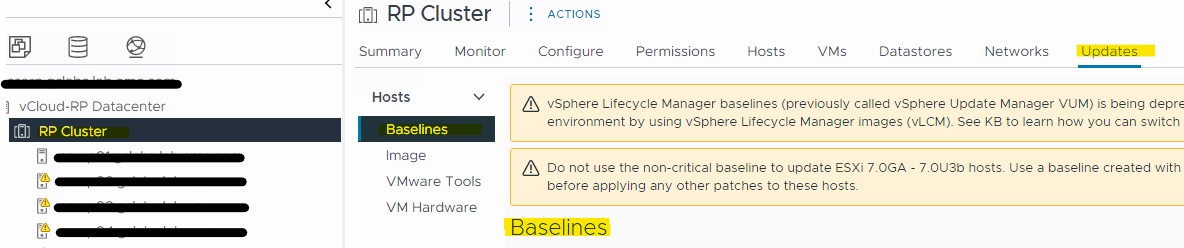
受影响的产品
RecoverPoint, RecoverPoint for Virtual Machines文章属性
文章编号: 000267913
文章类型: Solution
上次修改时间: 10 10月 2025
版本: 5
从其他戴尔用户那里查找问题的答案
支持服务
检查您的设备是否在支持服务涵盖的范围内。