如何安装 Dell Client Device Manager
摘要: 本文提供有关安装 Dell Client Device Manager (DCDM) 的信息。
本文适用于
本文不适用于
本文并非针对某种特定的产品。
本文并非包含所有产品版本。
说明
受影响的产品:
- Dell 客户端设备管理器
- 下载 并 解压:
- 以管理员身份运行命令提示符。
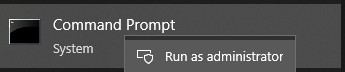
- 将目录 (cd) 切换到解压 DCDM 的位置。

- 根据您的需要,使用下面的参数或示例运行 PowerShell 脚本
powershell.exe -executionpolicy Bypass -windowstyle hidden -noninteractive -nologo -file "dcdm_deployment.ps1" -action -modules

| 参数 | 描述 |
|---|---|
| -help | 可选:显示参数说明 |
| -行动 | 必需 指定要执行的作(安装或卸载) |
| -模块 | 可选 指定要包含的模块。默认值(DCDMCS、DCDMU、DCDMS) |
| -logpath | 可选:默认值为 C:ProgramData\Dell\ClientDeviceManager。指定日志文件的路径 |
| -详细日志 | 可选:在控制台中启用日志显示(True 或 False) |
| -debuglevel | 可选默认值为 all。指定调试信息的级别 |
| -遥测同意 | 可选默认值为 true。表示遥测同意 |
| 模块 | 描述 | 模块取决于 |
|---|---|---|
| DCDMCS | Dell Client Device Manager Core Services(以前称为 Dell Core Service (DCS)) | 需要不适用核心组件 |
| DCDMS | Dell Client Device Manager Security(以前称为戴尔可信设备 (DTD)) | DCDMCS |
| DCDMU | Dell Client Device Manager Update(以前称为 Dell Command Update (DCU)) | DCDMCS、DCDMS |
示例:
安装或更新所有模块并发送 DCDMU 的遥测数据
powershell.exe -executionpolicy Bypass -windowstyle hidden -noninteractive -nologo -file "dcdm_deployment.ps1" -action "install"
在没有遥测的情况下安装或更新所有模块
powershell.exe -executionpolicy Bypass -windowstyle hidden -noninteractive -nologo -file "dcdm_deployment.ps1" -action "install" -telemetryconsent "false"
安装或更新戴尔客户端设备管理器 |安全性 (DCDMS)
powershell.exe -executionpolicy Bypass -windowstyle hidden -noninteractive -nologo -file "dcdm_deployment.ps1" -action "install" -modules "DCDMS"
卸载戴尔客户端设备管理器 |安全性 (DCDMS)
powershell.exe -executionpolicy Bypass -windowstyle hidden -noninteractive -nologo -file "dcdm_deployment.ps1" -action "uninstall" -modules "DCDMS"
卸载所有模块
powershell.exe -executionpolicy Bypass -windowstyle hidden -noninteractive -nologo -file "dcdm_deployment.ps1" -action "uninstall"
受影响的产品
Dell Client Device Manager文章属性
文章编号: 000299185
文章类型: How To
上次修改时间: 22 5月 2026
版本: 3
从其他戴尔用户那里查找问题的答案
支持服务
检查您的设备是否在支持服务涵盖的范围内。