IDPA:vCenter Server (vCSA) 無法在部署期間開機 |DP4400
摘要: vCenter Server Appliance (vCSA) 無法在部署期間從 Appliance Configuration Manager (ACM) 開機。
本文章適用於
本文章不適用於
本文無關於任何特定產品。
本文未識別所有產品版本。
症狀
受影響的產品:
- PowerProtect DP4400
症狀:
- 僅影響 DP4400 版本 2.2
- 在回報成功部署 vCSA 和 DDVE 虛擬機器後,部署會停止回應或立即失敗
- ACM UI 報告:
-
ACMvCenter server deployed successfully. Waiting for services on vCenter server. FAILED.server.log顯示:vCenter is not up in 20 MINs. Stopping the configuration. ApplianceException occurred while executing DeployAndConfigVcsaTask.vCSA 主控台顯示:
Error: Failed to start services. Firstboot Error.原因
ACM 是使用短主機名稱設定,而非完整網域名稱 (FQDN)。
當系統名稱無效時,vCSA 無法啟動服務,如:
/var/log/firstboot/visl-support-firstboot.py_<timestamp>_stderr.log
其他影響因素:
網路上重複的 IP 位址也可能使 vCSA 無法啟動。
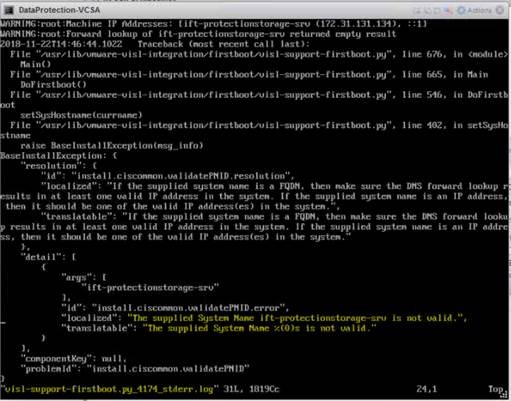
解析度
若要解決此問題:
- 在 ACM 設定期間,所有 IDPA 系統主機名稱使用 FQDN
- 確定所有主機名稱和 IP 位址均存在有效的 DNS 項目
- 開始部署之前:
- 檢查本機網路上的重複 IP
- 驗證正向 和反向 DNS 查詢 ,請使用
nslookup
如果問題仍然存在,請聯絡 Dell EMC 技術支援以 取得進一步協助。
其他資訊
受影響的產品
Integrated Data Protection Appliance Family產品
PowerProtect DP4400, PowerProtect Data Protection Software, Integrated Data Protection Appliance Family, PowerProtect Data Protection Hardware, Integrated Data Protection Appliance Software文章屬性
文章編號: 000033313
文章類型: Solution
上次修改時間: 03 10月 2025
版本: 4
向其他 Dell 使用者尋求您問題的答案
支援服務
檢查您的裝置是否在支援服務的涵蓋範圍內。