Avamar: Administrator UI reports an unresponsive Data Domain status (Invalid SNMP trap host or trap post)
摘要: This article reviews the Avamar User Interface (UI) reporting that the Data Domain status is unresponsive with the message 'Invalid SNMP trap host or trap post.'
本文章適用於
本文章不適用於
本文無關於任何特定產品。
本文未識別所有產品版本。
症狀
This is a reporting issue. Backups and Maintenance are not affected.
Avamar monitoring status for Data Domain changes from Green to Yellow or red on the Avamar Administrator UI. One or more of the following errors may appear in the Avamar UI:
Invalid SNMP trap host or trap host.

原因
The Data Domain Simple Network Management Protocol (SNMP) trap host value is set to the internal hostname of the Avamar Utility Node instead of the Avamar fully qualified domain name (FQDN).
解析度
1. Log in to the Avamar Administrator UI.
2. Click Server tab, Server Management tab.
3. Select the Data Domain in question (The Data Domain in question has a yellow colored dot to the left of the username).
4. Select Actions, Edit Data Domain System.
5. From the display window, select "Re-add Trap Host."
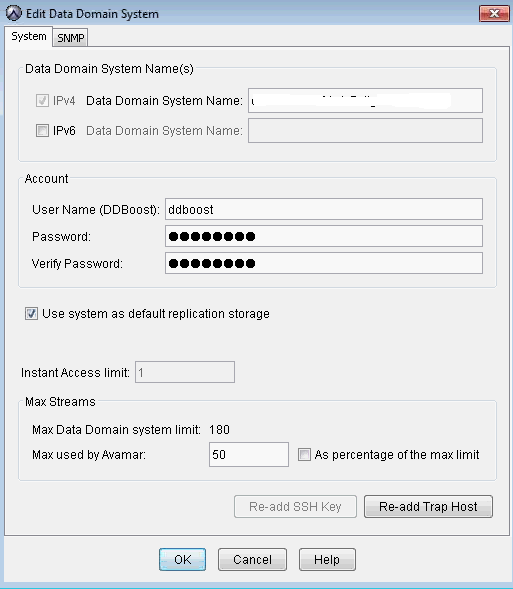
6. Click OK to update the Data Domain.
7. Log in to the Data Domain and verify that the FQDN of Avamar is added on the Data Domain (Sample output below).
snmp show config
General Configuration
---------------------
   SNMP sysLocation: testlocation
   SNMP sysContact: admin@company.com

SNMP v2c Configuration
----------------------
   Community   Access      Hosts
   ---------   ---------   -----
   avamartest   read-only
   public      read-only
   ---------   ---------   -----

   Trap Host                             Port   Community
   -----------------------------------   ----   ---------
   testavamar-internal               163
   testavamar.company.com   163
   -----------------------------------   ----   ---------

SNMP v3 Configuration
---------------------
   User   Access   Authentication Protocol   Privacy Protocol
   ----   ------   -----------------------   ----------------
   ----   ------   -----------------------   ----------------

   Trap Host   Port   User
   ---------   ----   ----
   ---------   ----   ----
受影響的產品
Avamar, Avamar Server文章屬性
文章編號: 000041708
文章類型: Solution
上次修改時間: 15 5月 2025
版本: 5
向其他 Dell 使用者尋求您問題的答案
支援服務
檢查您的裝置是否在支援服務的涵蓋範圍內。