如何識別 Dell Data Security Server / Dell Data Protection 伺服器前端版本
摘要: 瞭解 Dell Data Security (之前稱為 Dell Data Protection) 伺服器前端的版本十分重要,可讓您:
本文章適用於
本文章不適用於
本文無關於任何特定產品。
本文未識別所有產品版本。
說明
瞭解 Dell Data Security (之前稱為 Dell Data Protection) 伺服器前端的版本十分重要,可讓您:
- 識別已知問題
- 瞭解工作流程變更
- 確認系統需求
受影響的產品:
- Dell Security Management Server
- Dell Data Protection | Enterprise Edition Server
受影響的作業系統:
- Windows
本文可識別 Dell Security Management Server 或 Dell Security Management Server Virtual 的前端伺服器版本。如需識別後端版本,請參閱如何識別 Dell Data Security/Dell Data Protection 伺服器版本。
可透過以下方式判斷版本:
- 安裝程式
- Windows 使用者介面
如需詳細資訊,請按一下適當的程序。
安裝程式
- 解壓縮 Security Management Server .zip
- 請至
[LOCATION]\Security Management Server\x64。註:[LOCATION]= 解壓縮.zip檔案的位置 - 以滑鼠右鍵按一下
setup.exe,然後選擇 屬性。

- 按一下詳細資料標籤。
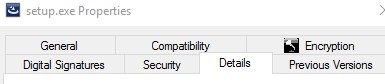
- 記下產品版本。在範例中,產品版本為 9.9.2。
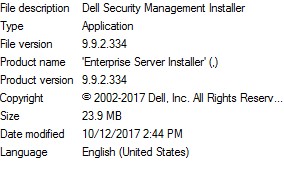 檔案的版本可能會與上述螢幕擷取畫面不同。
Windows
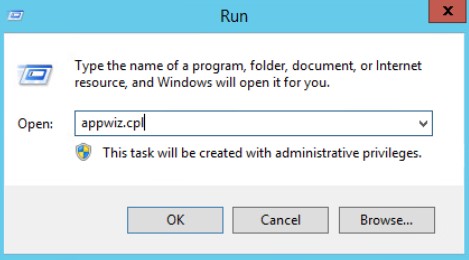
- 使用系統管理員身份,在 Windows 「開始」功能表上按右鍵,然後按一下執行。

- 在執行 UI 中輸入
appwiz.cpl然後按下確認。
- 在「程式與功能」中,找到 Dell Security Management Server x64。
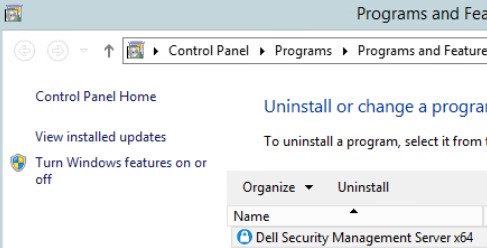 某些版本的伺服器可能會以「Dell Enterprise Server」表示,而非「Dell Security Management Server」。
 - 記下版本。在範例中,產品版本為 10.2.3。
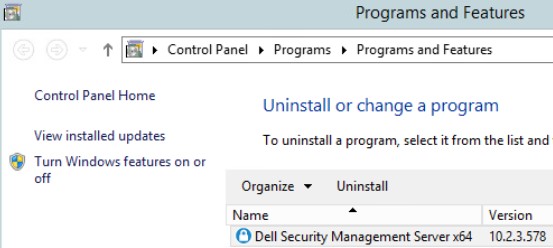 版本可能會與上述螢幕擷取畫面不同。
其他資訊
影片
受影響的產品
Dell Encryption文章屬性
文章編號: 000130588
文章類型: How To
上次修改時間: 10 8月 2026
版本: 12
向其他 Dell 使用者尋求您問題的答案
支援服務
檢查您的裝置是否在支援服務的涵蓋範圍內。