Windows: How to Reset the Directory Services Restore Mode Administrator password
摘要: This article gives information about resetting the Directory Services Restore Mode (DSRM) Administrator password on an Active Directory domain controller.
本文章適用於
本文章不適用於
本文無關於任何特定產品。
本文未識別所有產品版本。
說明
The DSRM administrator account is the only local user account on a domain controller (DC). This account is not accessible when the DC is booted into normal mode. As its name implies, the account can only be used to boot the DC into Directory Services Restore Mode. The password for the DSRM administrator account is set during the DC promotion process. Since the account is rarely used, its password can be forgotten. The following steps show how to reset its password.
A video of this procedure is found at:
When available, closed caption (subtitles) language settings can be chosen using the CC icon on this video player.
Note: The DC must be booted into normal mode, not DSRM, to perform these steps.
- Type
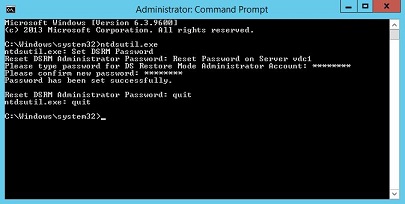
ntdsutil.exeat an elevated command prompt to open the NTDSUtil command interface. - Type
set dsrm password. - Type
reset password on server dc1(replacing dc1 with the name of the DC). - Type the new password.
- Retype the new password.
- Type
quitto exit the Reset DSRM Administrator Password interface. - Type
quitto exit NTDSUtil.
Figure 1: Setting the DSRM password with the NTDSUtil tool
A video of this procedure is found at:
Set Your Directory Services Restore Mode Password.
Duration: 00:03:19 (hh:mm:ss)When available, closed caption (subtitles) language settings can be chosen using the CC icon on this video player.
其他資訊
As demonstrated in the video, it is also possible to synchronize the DSRM password with the password of an existing domain account. In step 3 of the above procedure, type
This performs a one-time synchronization. If the password of the specified domain account is later changed, the DSRM administrator password is not updated then.
sync from domain account username (replacing username with the username of a domain account). Skip steps 4 and 5, which are unnecessary.
This performs a one-time synchronization. If the password of the specified domain account is later changed, the DSRM administrator password is not updated then.
受影響的產品
Microsoft Windows Server 2016, Microsoft Windows Server 2019, Microsoft Windows Server 2022, Microsoft Windows Small Business Server 2011 Essentials, Microsoft Windows Small Business Server 2008, Microsoft Windows Essential Business Server 2008
, Microsoft Windows 2008 Server R2, Microsoft Windows 2008 Server Service Pack 2, Microsoft Windows 2012 Server, Microsoft Windows 2012 Server R2
...
文章屬性
文章編號: 000136611
文章類型: How To
上次修改時間: 22 8月 2025
版本: 12
向其他 Dell 使用者尋求您問題的答案
支援服務
檢查您的裝置是否在支援服務的涵蓋範圍內。