日志收集器示例脚本
摘要: 本文提供了 Windows 操作系统的日志收集器脚本示例。
本文章適用於
本文章不適用於
本文無關於任何特定產品。
本文未識別所有產品版本。
說明
IT 专业人员可能必须从一台或多台计算机提取日志文件,以诊断问题。这最好通过远程管理工具完成,但也可以通过脚本编制来完成。本文的“附件”部分包括可以运行或修改的日志收集器示例,以满足大多数需求。
脚本详细信息:
- Only uses Windows Command Line and PowerShell commands
- Does not install software
- Does not change registry values
- Stores files in a temp folder until the creation of a .zip file with all logs
C:\Users\<Current User>\AppData\Roaming\- Temp folder deleted upon creation of the .zip file
- Open Source
提醒:戴尔技术支持无法为客户修改此脚本或提供这方面的帮助。此脚本展示的示例是:无法在其环境中安装管理工具的客户使用命令行和 PowerShell 可以完成的操作。
- 下载日志收集器
- 下载您选择的日志收集器文件。
- 转到本文的 “附件 ”部分以下载文件。
- 为确保下载的完整性,用户可以验证校验和值:
- MD5:
9af4c403c997dcebdba49b6251565a5c - SHA1:
3a8bb6d3a75ebe14ffc631fe68dcfa308eaf3691 - SHA-256:
4917c7f2e0d8d6111159cfe18b8dc9ca6cf04ff4467166d65435e3b8e07a5e2b
- MD5:
- 下载您选择的日志收集器文件。
- 将日志收集器提取到可访问的位置
- 关闭所有不必要的应用程序。
- 关闭应用程序可减少日志中可能必须筛选的额外数据。
- 复制要调查的问题。
- 用户应记录复制的问题或错误的日期和时间。
- 运行日志收集器。
- 如果可能,以管理员身份运行日志收集器。
- 在运行脚本的文件夹中最多可以生成两个日志文件。
- 始终创建主日志文件,其文件名格式为 Model#_ServiceTag_Date_Time.zip
- 如果收集内存转储,则会创建包含它们的第二个.zip文件 (Dumps_Model#_ServiceTag_Date_Time.zip)
- 查看日志
- 使用记录的日期和时间,查看相关日志,以帮助找出问题的原因。
- 用户可以使用 Microsoft 的 Windows 文档了解有关各种日志的更多信息。
- 收集器如何工作?
- 日志收集器使用 Windows 命令行和 PowerShell 命令来创建日志文件,并将其存储在临时文件夹中。然后此文件夹将被压缩为 .zip 文件,临时文件将被删除。
- 我能否根据公司的需求使用此日志收集器?
- 是的,此脚本被视为开源。
- Dell 是否会帮助我自定义此收集器以满足我的需求?
- 不。此收集器作为示例提供。希望为其环境自定义收集器的客户应查看 Microsoft 文档,学习修改此文件或创建自己的文件。
- 我是否可以决定与戴尔共享哪些数据?
- 是,日志收集器不会自动向戴尔或其他方传输任何数据。用户可以在.zip文件中删除他们不想与戴尔共享的任何日志,然后再上载/发送电子邮件。完整列表可在本文档的“日志参考”部分中找到。
-
提醒:用户应注意不要删除戴尔调查其问题可能需要的任何文件。
- 日志收集器需要多长时间才能运行?
- 收集器运行所需的时间平均为 5-15 分钟。该事件因日志大小以及 CPU、内存和硬盘 (HDD) 或固态硬盘 (SSD) 的速度而有很大差异。
- 我可以在非 Dell 计算机上使用此日志收集器吗?
- 日志收集器可以在非 Dell 计算机上运行,但对于特定于 Dell 应用程序和设置,可能有空文件或缺少字段。
- Dell 是否可以提供任何其他诊断或管理工具?
- 是的,客户可以使用 Dell SupportAssist 和 Dell Client Command Suite 来管理他们的计算机并收集诊断数据。客户可以了解如何运行戴尔在线诊断测试。
- 用于处理我的数据的 Dell 数据隐私政策是什么?
- 请参阅特定于位置的隐私声明。
- Lite和Advanced版本发生了什么变化?
- 截至 2.3 版发布,Lite 版本的内容与在没有管理员的情况下运行高级版的内容相同,因此我们现在只发布一个版本。
- 当我解压文件时,
.cmd文件显示为记事本图标,并在双击时打开为记事本- IT 管理员可以更改默认应用程序以运行
.cmd和其他脚本文件。 - 建议用户从作为脚本运行的命令行运行该文件。
- 为什么我不能将其作为
.bat而是文件?- Windows 使用两种不同的解释器
.cmd和.bat包含上下文和安全性差异的文件。 - 日志收集器经过了全面测试,使用
.cmd。 - 日志收集器尚未经过测试
.bat。
- Windows 使用两种不同的解释器
- IT 管理员可以更改默认应用程序以运行
- OS_Refresh_Upgrade是什么
.txt文件是否包含?- 此文件包含对系统进行的所有 Windows作系统升级和刷新的列表。
- 系统重置是完全数据擦除,将清除此数据。
| 日志已收集 | ZIP 日志路径 | 使用的命令 | 需要管理员 | 命令类型 | Microsoft/戴尔参考 URL | 2.3 更改 |
|---|---|---|---|---|---|---|
| 应用程序事件日志 | \Logs\OperatingSystem\Event Logs\application_eventlog.evtx |
wevtutil epl Application /q:"*[System[(Level<=5)]]" application_eventlog.evtx |
否 | 命令行 | https://learn.microsoft.com/windows/win32/wes/windows-event-log  |
0 |
| Appx 软件包列表 | \Logs\Application\installed_appx.txt |
Get-AppxPackage | Select PackageFullName | Sort PackageFullName |
是的 | PowerShell | https://learn.microsoft.com/powershell/module/appx/get-appxpackage?view=windowsserver2022-ps |
0 |
| 可用的睡眠状态列表 | \Logs\Power\available_sleepstates.txt |
powercfg /a |
否 | 命令行 | https://learn.microsoft.com/windows-hardware/design/device-experiences/powercfg-command-line-options |
0 |
| 电池报告 | \Logs\Power\Battery_Report.html |
powercfg /batteryreport /output Battery_Report.html /duration 14 |
是的 | 命令行 | https://learn.microsoft.com/windows-hardware/design/device-experiences/powercfg-command-line-options |
0 |
| BCD 信息 | \Logs\OperatingSystem\bcd.txt |
bcdedit |
是的 | 命令行 | https://learn.microsoft.com/windows-server/administration/windows-commands/bcdedit |
0 |
| Bitlocker 保护程序列表 | \Logs\Security\bitlocker_PCRs.txt |
manage-bde %SYSTEMDRIVE% -protectors -get -type TPM |
是的 | PowerShell | https://learn.microsoft.com/windows-server/administration/windows-commands/manage-bde |
0 |
| Bitlocker 状态 | \Logs\Security\bitlocker_status.txt |
manage-bde -status |
是的 | PowerShell | https://learn.microsoft.com/windows-server/administration/windows-commands/manage-bde |
0 |
| 宽带适配器列表 | \Logs\Network\broadband_adapter.txt |
netsh mbn show interfaces |
否 | 命令行 | https://learn.microsoft.com/windows-server/networking/technologies/netsh/netsh-contexts |
0 |
| 已配置唤醒计时器列表 | \Logs\Power\waketimers.txt |
powercfg /waketimers |
是的 | 命令行 | https://learn.microsoft.com/windows-hardware/design/device-experiences/powercfg-command-line-options |
0 |
| Dell Command Update 日志 | \Logs\Dell\Dell_Command_Update\Activity.log |
XCOPY /s /y /q /F %SYSTEMDRIVE%\ProgramData\Dell\UpdateService\Log |
是的 | 命令行 | Dell Command | Update | 0 |
| Dell Data Migrate 日志(目标) | \Logs\Dell\Dell_Data_Migrate_Destination\(Various files) |
XCOPY /s /I /y /q /F %SYSTEMDRIVE%\ProgramData\Dell\SupportAssist\CDM\Logs . |
是的 | 命令行 | https://www.dell.com/support/manuals/data-assistant/migrate_1.0_ug/ | 0 |
| 戴尔数据迁移日志(源) | \Logs\Dell\Dell_Data_Migrate_Source\(Various Files) |
XCOPY /s /y /q /F %SYSTEMDRIVE%\ProgramData\DDA\logs\ . |
是的 | 命令行 | https://www.dell.com/support/manuals/data-assistant/migrate_1.0_ug/introduction?guid=guid-28c0bb91-e84d-4118-99ee-e5500769b170& | 0 |
| Dell Digital Delivery 日志 | \Logs\Dell\Dell_Digital_Delivery\ |
XCOPY /s /y /q /F %SYSTEMDRIVE%\ProgramData\dell\D3\Resources\Logs\ |
是的 | 命令行 | https://www.dell.com/support/contents/article/product-support/self-support-knowledgebase/software-and-downloads/download-center/dell-digital-delivery | 0 |
| 戴尔出厂负荷信息 | \Logs\Dell\FactoryLoad\dell.sdr |
XCOPY /y /q /F %SYSTEMDRIVE%\dell.sdr |
否 | 命令行 | https://learn.microsoft.com/windows-server/administration/windows-commands/xcopy |
0 |
| Dell Optimizer 戴尔智能调优软件日志 | \Logs\Dell\Dell_Optimizer\* |
*XCOPY command copies multiple AppData files specific to Dell Optimizer* |
否 | 命令行 | https://learn.microsoft.com/windows-server/administration/windows-commands/xcopy |
1 |
| Dell Update Package 日志 | \Logs\Dell\Dell_Update_Package\* |
XCOPY /s /y /q /F %SYSTEMDRIVE%\ProgramData\Dell\UpdatePackage\Log . |
否 | 命令行 | Dell Command | Update | 0 |
| 详细的驾驶员报告 | \Logs\Driver\driver_details.txt |
Get-WmiObject Win32_PnPSignedDriver | select * |
否 | PowerShell | https://learn.microsoft.com/previous-versions/windows/desktop/legacy/aa394354(v=vs.85) |
0 |
| DirectX 诊断日志 | \Logs\Graphics\DXdiag.txt |
dxdiag.exe /t DXdiag.txt |
否 | 命令行 | https://support.microsoft.com/windows/open-and-run-dxdiag-exe-dad7792c-2ad5-f6cd-5a37-bf92228dfd85 |
0 |
| 驱动程序列表 | \Logs\Driver\driver_list.txt |
Get-WmiObject Win32_PnPSignedDriver| select devicename, driverversion, driverdate | Sort-Object devicename |
否 | PowerShell | https://learn.microsoft.com/previous-versions/windows/desktop/legacy/aa394354(v=vs.85) |
0 |
| 驱动程序存储列表 | \Logs\Driver\driver_store.txt |
dism /online /get-drivers /all /format:table |
是的 | 命令行 | https://learn.microsoft.com/windows-hardware/manufacture/desktop/what-is-dism?view=windows-11 |
0 |
| 驱动程序处于错误状态 | \Logs\Driver\error_state_drivers.txt |
Pnputil /enum-devices /problem /ids |
否 | 命令行 | https://learn.microsoft.com/windows-hardware/drivers/devtest/pnputil |
1 |
| 能源报告 | \Logs\Power\energy.html |
powercfg /energy /output energy.html |
是的 | 命令行 | https://learn.microsoft.com/windows-hardware/design/device-experiences/powercfg-command-line-options |
0 |
| 组策略对象 | \Logs\OperatingSystem\GPO_List.html |
start /min gpresult /H GPO_List.html |
否 | 命令行 | https://learn.microsoft.com/windows-server/administration/windows-commands/gpresult |
0 |
| 已安装应用程序列表 | \Logs\Application\installed_apps.txt |
Get-ItemProperty HKLM:\Software\Microsoft\Windows\CurrentVersion\Uninstall\* | Select-Object DisplayName, DisplayVersion, Publisher, InstallDate | Sort-Object InstallDate |
否 | PowerShell | https://learn.microsoft.com/powershell/module/microsoft.powershell.management/get-itemproperty?view=powershell-7.3 |
0 |
| IP 配置 | \Logs\Network\ipconfig_all.txt |
ipconfig /all |
否 | 命令行 | https://learn.microsoft.com/windows-server/administration/windows-commands/ipconfig |
0 |
| 上次唤醒触发器 | \Logs\Power\lastwake.txt |
powercfg /lastwake |
否 | 命令行 | https://learn.microsoft.com/windows-hardware/design/device-experiences/powercfg-command-line-options |
0 |
| 内存转储(完整内核) | \Logs\MemoryDumps\memory.dmp |
XCOPY /y /q /F %SYSTEMROOT%\memory.dmp |
否 | 命令行 | https://learn.microsoft.com/en-us/windows-server/administration/windows-commands/xcopy |
0 |
| 内存转储(小型转储) | \Logs\MemoryDumps\*.dmp |
XCOPY /s /I /y /q /F %SYSTEMROOT%\minidump\*.dmp |
是的 | 命令行 | https://learn.microsoft.com/windows-server/administration/windows-commands/xcopy |
0 |
| 内存转储(状态/详细信息) | \Logs\Operating System\DumpStatus.txt |
IF EXIST %SYSTEMROOT%\memory.dmp |
是的 | 命令行 | https://learn.microsoft.com/windows-server/administration/windows-commands/if |
0 |
| 内存管理状态 | \Logs\System\MemoryManagement.html |
Get-mmagent | Out-File MemoryManagement.html |
是的 | PowerShell | https://learn.microsoft.com/powershell/module/mmagent/get-mmagent?view=windowsserver2022-ps |
1 |
| Microsoft 系统信息 (MSinfo32) | \Logs\OperatingSystem\msinfo32.nfo |
start msinfo32 /nfo msinfo32.nfo |
否 | 命令行 | https://support.microsoft.com/topic/description-of-microsoft-system-information-msinfo32-exe-tool-10d335d8-5834-90b4-8452-42c58e61f9fc |
0 |
| 显示器信息 | \Logs\Graphics\monitor.txt |
Get-CimInstance -Namespace root\wmi -ClassName WmiMonitorID | ForEach-Object {if ($_.UserFriendlyNameLength -gt 0) {($_.ManufacturerName -ne 0 | foreach {[char]$_}) + [char] 10 + 'InstanceName: ' + ($_.InstanceName) + [char] 10 + ($_.UserFriendlyName -ne 0 | foreach {[char]$_}) + [char] 10 + 'Serial: ' + ($_.SerialNumberID -ne 0 | foreach {[char]$_}) + [char] 10 + 'ProdCodeID: ' + ($_.ProductCodeID -ne 0 | foreach {[char]$_}) + [char] 10 + 'WeekOfManufacture:' + $_.WeekOfManufacture + [char] 10 + 'YearOfManufacture:' + $_.YearOfManufacture + [char] 10 + 'DisplayActive:' + $_.Active + [char] 10 -join ''} else{($_.ManufacturerName -ne 0 | foreach {[char]$_}) + [char] 10 + 'InstanceName: ' + ($_.InstanceName) + [char] 10 + ('No Model (Likely Internal LCD)') + [char] 10 + 'Serial: ' + ($_.SerialNumberID -ne 0 | foreach {[char]$_}) + [char] 10 + 'ProdCodeID: ' + ($_.ProductCodeID -ne 0 | foreach {[char]$_}) + [char] 10 + 'WeekOfManufacture:' + $_.WeekOfManufacture + [char] 10 + 'YearOfManufacture:' + $_.YearOfManufacture + [char] 10 + 'DisplayActive:' + $_.Active + [char] 10 -join ''}} |
否 | 否 | https://learn.microsoft.com/windows/win32/wmicoreprov/wmimonitorid |
0 |
| 网络适配器高级属性日志 | \Logs\Network\net_adapter_adv_properties.txt |
Get-NetAdapterAdvancedProperty |
否 | PowerShell | https://learn.microsoft.com/powershell/module/netadapter/get-netadapteradvancedproperty?view=windowsserver2022-ps |
0 |
| 作系统版本和安装日期 | \Logs\LogCollectorStatus.txt |
(Get-WMIObject -class Win32_ComputerSystem | Select-Object Model| Format-List | Out-string).Trim(); (Get-WMIObject -class Win32_OperatingSystem | Select-Object Caption, Version| Format-List| Out-string).Trim(); (Write-Output 'OS Install Date:').Trim(); ((Get-Item 'C:\Windows\system.ini').CreationTime | Out-String).Trim() |
否 | PowerShell | https://learn.microsoft.com/windows/win32/cimwin32prov/win32-operatingsystem |
0 |
| PnP 设备列表 | \Logs\Operating System\pnp_devices.txt |
Get-CimInstance Win32_PnPEntity |
否 | PowerShell | https://learn.microsoft.com/windows/win32/cimwin32prov/win32-pnpentity |
0 |
| 电源请求 | \Logs\Power\power_requests.txt |
powercfg /requests |
是的 | 命令行 | https://learn.microsoft.com/windows-hardware/design/device-experiences/powercfg-command-line-options |
0 |
| 电源方案详细信息 | \Logs\Power\powerschemes.txt |
powercfg /query |
否 | 命令行 | https://learn.microsoft.com/windows-hardware/design/device-experiences/powercfg-command-line-options |
0 |
| 电源方案列表 | \Logs\Power\power_schemes.html |
powercfg /list |
否 | 命令行 | https://learn.microsoft.com/windows-hardware/design/device-experiences/powercfg-command-line-options |
0 |
| 进程列表 | \Logs\OperatingSystem\ processes.txt |
Get-WmiObject -Class Win32_Service | Select-Object -Property Name, ProcessID |
否 | PowerShell | https://learn.microsoft.com/powershell/module/scheduledtasks/get-scheduledtask?view=windowsserver2022-ps |
0 |
| 资源调配包 | \Logs\Application\installed_provisioning_packages.txt |
Get-ProvisioningPackage |
否 | PowerShell | https://learn.microsoft.com/powershell/module/provisioning/get-provisioningpackage?view=windowsserver2022-ps |
0 |
| 计划任务列表 | \Logs\OperatingSystem\taskscheduler.txt |
Get-ScheduledTask | Where State -ne "Disabled" | Get-ScheduledTaskInfo |
否 | PowerShell | https://learn.microsoft.com/powershell/module/scheduledtasks/get-scheduledtask?view=windowsserver2022-ps |
0 |
| 服务编号 | Part of File Name |
Get-CimInstance -ClassName Win32_BIOS -Property SerialNumber | Select-Object -ExpandProperty SerialNumber |
否 | PowerShell | https://learn.microsoft.com/windows/win32/cimwin32prov/win32-bios |
0 |
| 服务编号和底板 ID | \Logs\System\System_Board.txt |
Get-CimInstance -ClassName Win32_BaseBoard | Format-List |
否 | PowerShell | https://www.dell.com/support/manuals/data-assistant/migrate_1.0_ug/introduction?guid=guid-28c0bb91-e84d-4118-99ee-e5500769b170 | 1 |
| 服务列表 | \Logs\OperatingSystem\services.txt |
Get-Service | Sort Status |
否 | PowerShell | https://learn.microsoft.com/powershell/module/microsoft.powershell.management/get-service?view=powershell-7.3 |
0 |
| 睡眠研究报告 | \Logs\Power\sleepstudy.html |
powercfg /sleepstudy /output sleepstudy.html |
是的 | 命令行 | https://learn.microsoft.com/windows-hardware/design/device-experiences/powercfg-command-line-options |
0 |
| 启动进程列表 | \Logs\Application\startup_processes.txt |
Get-CimInstance Win32_StartupCommand | Select-Object Name, command, Location, User | Format-List |
否 | PowerShell | https://learn.microsoft.com/windows/win32/cimwin32prov/win32-startupcommand |
0 |
| 存储设备列表 | \Logs\Storage\Disk_Drives.txt |
Get-CimInstance -ClassName Win32_DiskDrive | select * | Format-List |
否 | PowerShell | https://learn.microsoft.com/windows/win32/cimwin32prov/win32-diskdrive |
0 |
| 存储卷 | \Logs\Storage\Disk_Volumes.txt |
Get-CimInstance -ClassName Win32_DiskPartition | Format-List |
否 | PowerShell | https://learn.microsoft.com/windows/win32/cimwin32prov/Win32-DiskPartition |
0 |
| 系统型号 | Part of File Name |
Get-WMIObject -class Win32_ComputerSystem | Select-Object -ExpandProperty Model |
否 | PowerShell | https://learn.microsoft.com/windows/win32/cimwin32prov/win32-computersystem |
0 |
| TPM 信息 | \Logs\Security\tpm.txt |
get-tpm |
是的 | PowerShell | https://learn.microsoft.com/powershell/module/trustedplatformmodule/get-tpm?view=windowsserver2022-ps |
0 |
| USB 设备列表 | \Logs\USB\usb_devices.txt |
gwmi Win32_USBControllerDevice |%%{[wmi]($_.Dependent)} | Sort Manufacturer,Name,Description,DeviceID | Ft -GroupBy Manufacturer Name,Description,Service,DeviceID |
否 | PowerShell | https://learn.microsoft.com/windows/win32/cimwin32prov/win32-usbcontrollerdevice |
0 |
| 视频适配器详细信息 | \Logs\Graphics\video.txt |
Get-WmiObject win32_videocontroller | select * |
否 | PowerShell | https://learn.microsoft.com/windows/win32/cimwin32prov/win32-videocontroller |
0 |
| 视频分辨率详细信息 | \Logs\Graphics\video.txt |
Get-WmiObject win32_videocontroller | select caption, CurrentHorizontalResolution, CurrentVerticalResolution, CurrentRefreshRate, DriverVersion |
否 | PowerShell | https://learn.microsoft.com/windows/win32/cimwin32prov/win32-videocontroller |
0 |
| 唤醒设备列表 | \Logs\Power\device_wake_armed.html |
powercfg -devicequery wake_armed |
否 | 命令行 | https://learn.microsoft.com/windows-hardware/design/device-experiences/powercfg-command-line-options |
0 |
| Windows 系统事件日志 | \Logs\OperatingSystem\Event Logs\system_eventlog.evtx |
wevtutil epl System /q:"*[System[(Level<=5)]]" system_eventlog.evtx |
否 | 命令行 | https://learn.microsoft.com/windows/win32/wes/windows-event-log |
0 |
| Windows Systeminfo 日志 | \Logs\LogCollectorStatus.txt |
Systeminfo |
否 | 命令行 | https://learn.microsoft.com/windows-server/administration/windows-commands/systeminfo |
0 |
| Windows 更新列表 | \Logs\OperatingSystem\WindowsUpdateLog.txt |
Get-WindowsUpdateLog |
否 | PowerShell | https://learn.microsoft.com/powershell/module/windowsupdate/get-windowsupdatelog?view=windowsserver2022-ps |
0 |
| Windows 更新日志 | \Logs\OperatingSystem\hotfixes.txt |
Get-hotfix |
否 | PowerShell | https://learn.microsoft.com/powershell/module/microsoft.powershell.management/get-hotfix?view=powershell-7.3 |
0 |
| 有线网络列表 | \Logs\Network\current_wired_network_interfaces.txt |
netsh lan show interfaces |
否 | 命令行 | https://learn.microsoft.com/windows-server/networking/technologies/netsh/netsh-contexts |
0 |
| 有线网络配置文件 | \Logs\Network\wired_profiles.txt |
netsh lan show profiles |
否 | 命令行 | https://learn.microsoft.com/windows-server/networking/technologies/netsh/netsh-contexts |
0 |
| 有线网络设置 | \Logs\Network\wired_settings.txt |
netsh lan show settings |
否 | 命令行 | https://learn.microsoft.com/windows-server/networking/technologies/netsh/netsh-contexts |
0 |
| 无线报告 | \Logs\Network\wlan-report-latest.html |
netsh wlan show wlanreport duration=30 && copy /y %ProgramData%\microsoft\windows\wlanreport\wlan-report-latest.html . && copy /y %ProgramData%\Microsoft\Windows\wlanreport\wlan-report-latest.cab . |
是的 | 命令行 | https://learn.microsoft.com/windows-server/networking/technologies/netsh/netsh-contexts |
0 |
| Windows 升级/刷新 | \Logs\OperatingSystem\windows_upgrade_history |
get-itemproperty -path 'HKLM:\SYSTEM\Setup\Source OS*' | SELECT PSChildName, Productname, ReleaseId, DisplayVersion, CurrentBuild |
PowerShell | https://learn.microsoft.com/powershell/module/microsoft.powershell.management/get-itemproperty?view=powershell-7.4 |
1 | |
| 显示流压缩 | Logs\Graphics\Display_Stream_Compression_status.txt |
REG QUERY HKLM\SYSTEM\CurrentControlSet\Control\Class /s /v DPMstDscDisable > Display_Stream_Compression_status.txt |
否 | PowerShell | https://learn.microsoft.com/windows-server/administration/windows-commands/reg-query |
1 |
| PCIe 设备生成和链路速度 | \Logs\System\PCIe_Device_Info.txt |
(Get-WMIObject Win32_Bus -Filter 'DeviceID like "PCI%%"').GetRelated('Win32_PnPEntity') | foreach { [pscustomobject][ordered]@{Name = $_.Name; ExpressSpecVersion=$_.GetDeviceProperties('DEVPKEY_PciDevice_ExpressSpecVersion').deviceProperties.data;MaxLinkSpeed=$_.GetDeviceProperties('DEVPKEY_PciDevice_MaxLinkSpeed').deviceProperties.data; MaxLinkWidth=$_.GetDeviceProperties('DEVPKEY_PciDevice_MaxLinkWidth').deviceProperties.data; CurrentLinkSpeed=$_.GetDeviceProperties('DEVPKEY_PciDevice_CurrentLinkSpeed').deviceProperties.data; CurrentLinkWidth=$_.GetDeviceProperties('DEVPKEY_PciDevice_CurrentLinkWidth' ).deviceProperties.data} | Where MaxLinkSpeed } | Format-Table -AutoSize; |
否 | PowerShell | https://learn.microsoft.com/powershell/module/microsoft.powershell.management/get-wmiobject?view=powershell-5.1 |
1 |
| BIOS 设置 | \Logs\System\BIOS_Settings.txt |
Get-CimInstance -Namespace root\dcim\sysman\biosattributes -ClassName EnumerationAttribute | Select-Object AttributeName, CurrentValue, Defaultvalue, PossibleValue |
是的 | PowerShell | https://learn.microsoft.com/powershell/module/cimcmdlets/get-ciminstance?view=powershell-7.4 |
1 |
| Dell Command 忽略列表 | \Logs\Dell\Dell_Command_Update\Update_Ignore_List.txt |
REG QUERY HKLM\SOFTWARE\DELL\UpdateService\Service\IgnoreList /s /v InstalledUpdateJson |
否 | PowerShell | https://learn.microsoft.com/windows-server/administration/windows-commands/reg-query |
1 |
| Dell Optimizer 戴尔智能调优软件设置 | \Logs\Dell\Dell_Optimizer\user_settings.txt |
do-cli /get |
否 | 命令行 | https://www.dell.com/support/manuals/dell-optimizer/dell-optimizer-4.0_ug/command-line-interface-for-dell-optimizer?guid=guid-a82481c9-8abf-4a15-9f2b-6011e36c6b19& |
1 |
- 运行收集器后未创建的日志文件
- 原因:
- 日志收集器正在从文件内部运行.zip
- 解决方案:
- 在运行之前,始终从.zip文件中提取日志收集器脚本
- 原因:
- 在ZIP过程中发现错误
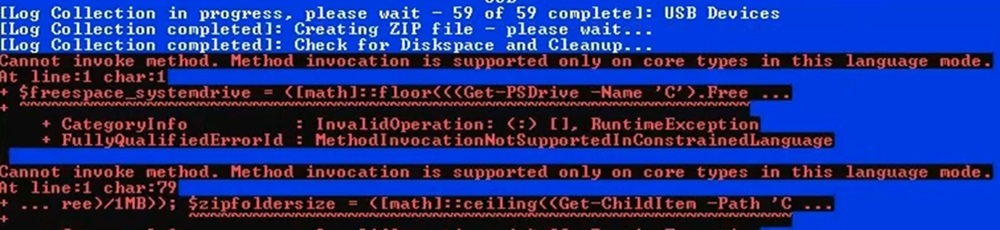
- 在.zip过程中,用户可能会遇到以下错误。如果 Windows Powershell 设置为在受限模式下
- 临时解决方法:
- 用户可以在出现错误消息期间停止日志收集器,并从 %appdata%\ServiceTag 收集日志
- 用户可以暂时将模式从 ConstrainedLanguage 更改为 FullLanguage,以运行 Log Collector
- 针对此问题,计划为下一版本的日志收集器提供长期解决方法和通知。
- 错误示例:
- 在.zip过程中,用户可能会遇到以下错误。如果 Windows Powershell 设置为在受限模式下
- Windows Defender 引发 SmartScreen 警告/错误
- 原因:
- Windows Defender 和其他安全应用程序旨在将未识别的脚本识别为可疑脚本。
- 解决方案:
- 以管理员身份运行日志收集器
- 调整 Defender 设置以允许日志收集器运行
- Windows SmartScreen 文档
- 原因:
- Windows Defender/安全软件被识别为特洛伊木马程序
- 原因:
- Windows Defender 和其他安全应用程序旨在将未识别的脚本识别为可疑脚本。
- 解决方案:
- 以管理员身份运行日志收集器
- 调整安全设置以允许日志收集器运行
- 原因:
- 无法通过按“N”停止GPResult日志创建
- 原因:
- 停止正在运行的进程需要管理员访问权限
- 解决方案:
- 通过右键单击并以管理员身份运行来运行日志收集器
- 原因:
受影響的產品
Dell All-in-One, Dell Pro Max Micro, Dell Pro Max Slim, Dell Pro Max Tower, Dell Pro Micro, Inspiron, OptiPlex, Vostro, XPS, Dell Monitors, Dell Plus Monitors, Dell Plus, Dell Pro, Dell Pro Max, Inspiron, Latitude, Vostro, XPS, Fixed Workstations
, Mobile Workstations
...
產品
Dell Pro Slim, Dell Pro Tower, Dell Slim, Dell Tower, Dell Pro Plus Monitors, Dell Pro Plus, Dell Pro Premium, Dell Pro Rugged文章屬性
文章編號: 000203831
文章類型: How To
上次修改時間: 07 1月 2026
版本: 24
向其他 Dell 使用者尋求您問題的答案
支援服務
檢查您的裝置是否在支援服務的涵蓋範圍內。