PowerEdge:PERC11 或 10 HII 組態公用程式和 iDRAC 不支援陣列擴充
摘要: PowerEdge RAID 控制器 (PERC11、PERC10)、人機介面基礎架構 (HII) 設定公用程式,以及 iDRAC 不支援陣列擴充。
本文章適用於
本文章不適用於
本文無關於任何特定產品。
本文未識別所有產品版本。
症狀
當磁碟群組中的硬碟更換為較大的磁碟時, Expand Virtual Disk 選項不適用於 PERC HII 設定公用程式:系統設定 -> PERC 設定 -> VD 作業 下拉式清單: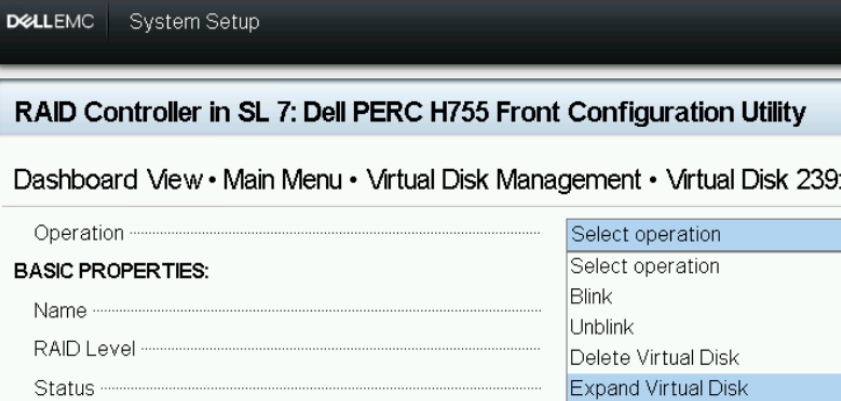
圖 1:HII 設定公用程式 --VD 作業
可使用 Edit Disk Capacity 選項位於 iDRAC WebGUI->儲存裝置->虛擬磁碟 -> VD 動作下拉式清單中:
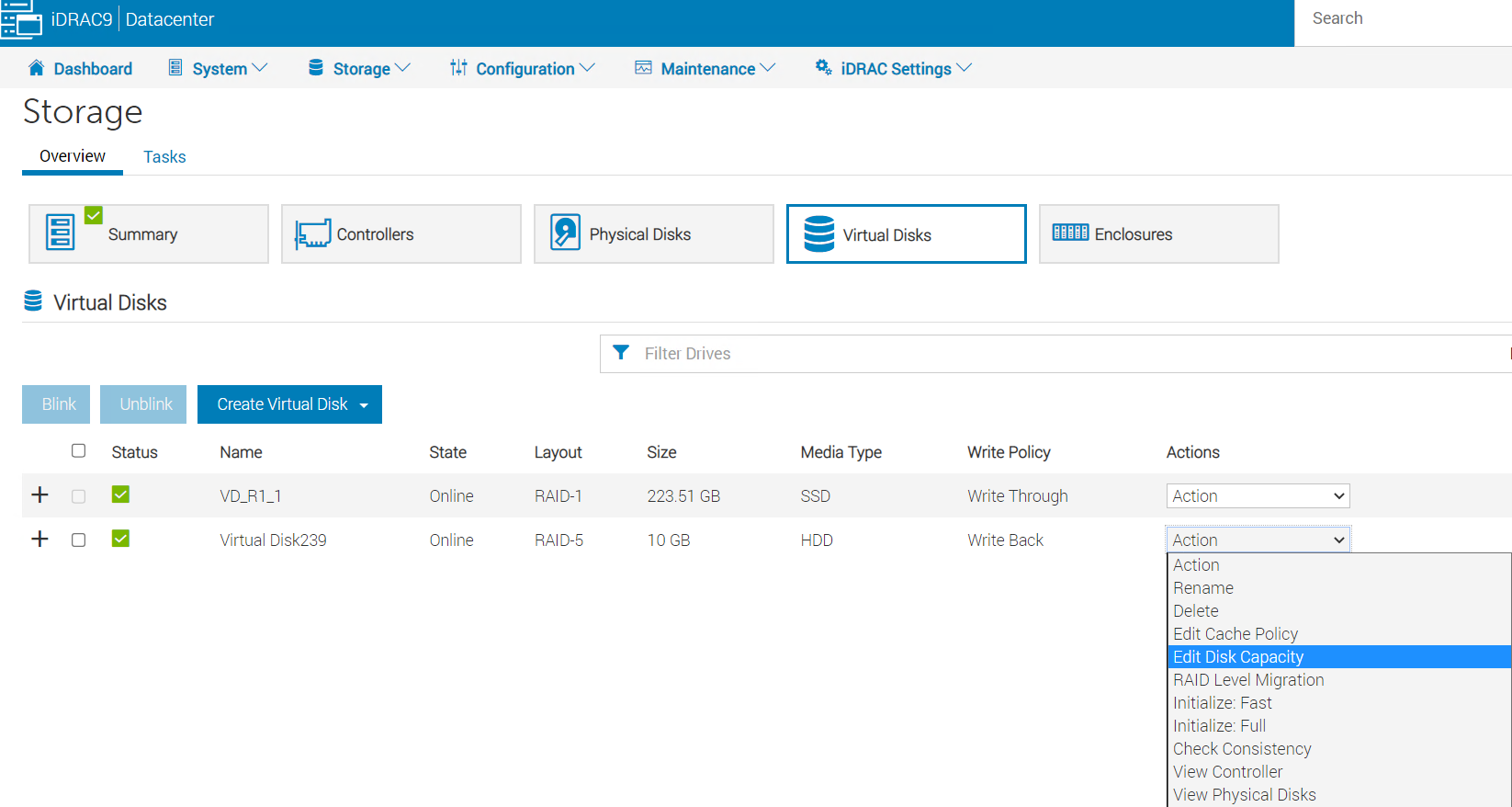
圖 2: iDRAC WebGUI->儲存裝置->虛擬磁碟
可使用 Available Space 選擇後顯示 0.00 GB Edit Disk Capacity:
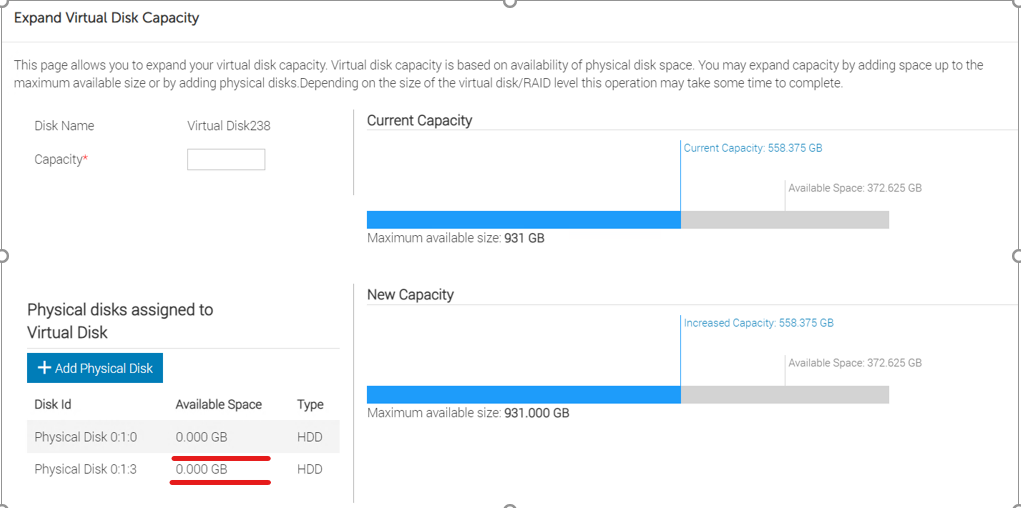
圖 3: iDRAC WebGUI->展開虛擬磁碟容量頁面。
嘗試在容量 欄位中輸入最大可用大小來擴充虛擬磁碟容量時,作業會失敗: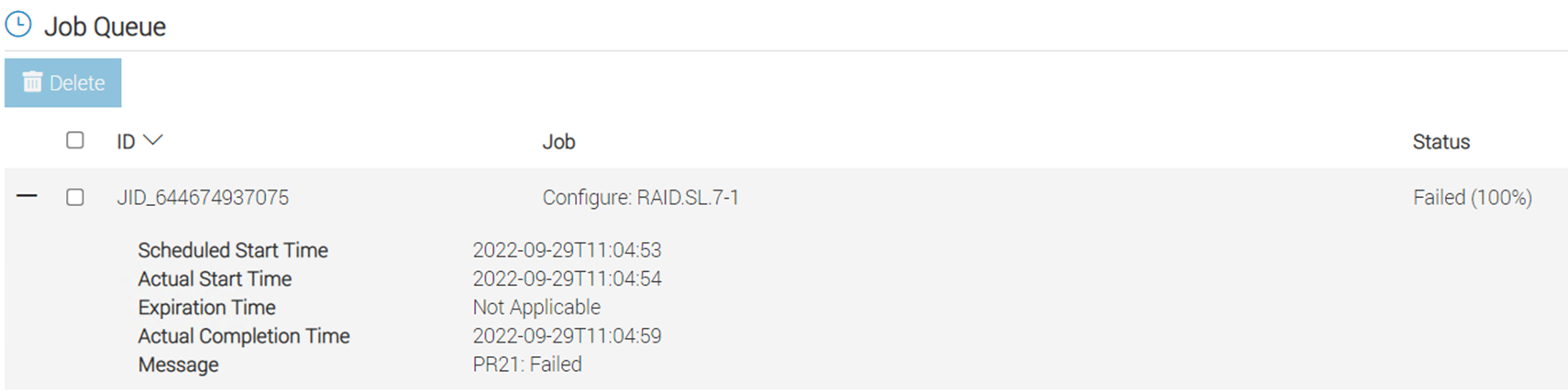
圖 4:工作佇列錯誤訊息
如果現有陣列中有可用空間,請使用 PERCCLI 效用來擴展。
PERCCLI /cx/vx show expansion 顯示以下位置的可用空間: NoArrExp.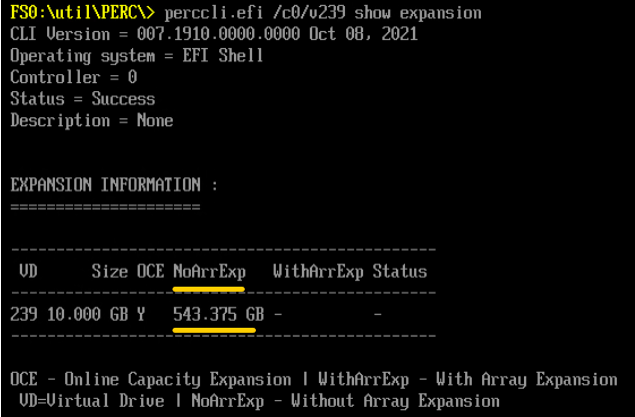
圖 5: PERCCLI 輸出 NoArrExp
但是,如果磁碟群組中的硬碟已更換為較大的磁碟,則可用空間會顯示在 WithArrExp 在 PERCCLI /cx/vx show expansion 輸出: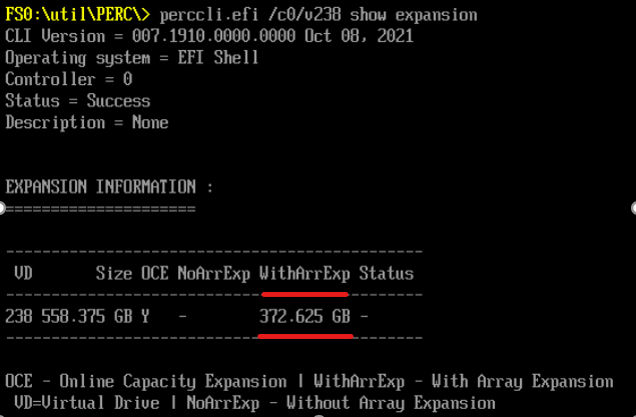
圖 6: PERCCLI 輸出 WithArrExp
原因
PERC HII 設定公用程式和 iDRAC 不支援擴充陣列容量。
解析度
使用 Dell 擴充陣列容量 PERCCLI 公用程式:
1. Run "perccli /cx/vx show expansion" to determine the available expansion space.

2. Then run "perccli /cx/vx expand Size=<xx> expandarray" to perform the array expansion.

            The expand command will expand the virtual drive within the existing array if there is available space, or expand into additional capacity if the drives have been replaced with larger ones.
            The <xx> size value is specified in MB.
            If the "expandarray" option is specified, the full array capacity will be expanded.
            If this option is not specified, only the virtual drive capacity will be expanded rather than the full array.
將所有陣列成員更換為更大的磁碟機後,請使用 PERCCLI 公用程式,使用 expandarray 參數。
此行為也會記錄在 PERC11 使用者指南的「 PowerEdge RAID 控制器 11 的功能」-> 「重新設定虛擬磁碟」 區段底下:
https://www.dell.com/support/home/en-us/product-support/product/perc-h755/docs
受影響的產品
OEMR R240, OEMR R250, OEMR XE R250, OEMR R260, OEMR XE R260, OEMR R340, OEMR R350, OEMR XE R350, OEMR R360, OEMR XE R360, OEMR R440, PowerEdge XR2, OEMR R450, OEMR R540, OEMR R550, OEMR R640, OEMR XL R640, OEMR R6415, OEMR R650, OEMR R650xs
, OEMR R6515, OEMR R6525, OEMR R660, OEMR XL R660, OEMR R660xs, OEMR R6615, OEMR R6625, OEMR R740, OEMR XL R740, OEMR R740xd, OEMR XL R740xd, OEMR R740xd2, OEMR R7415, OEMR R7425, OEMR R750, OEMR R750xa, OEMR R750xs, OEMR R7515, OEMR R7525, OEMR R760, OEMR R760xa, OEMR R760XD2, OEMR XL R760, OEMR R760xs, OEMR R7615, OEMR R7625, OEMR R840, OEMR R860, OEMR R940, OEMR R940xa, OEMR R960, OEMR T140, OEMR T150, OEMR T340, OEMR T350, OEMR T360, OEMR T440, OEMR T550, OEMR T560, OEMR T640, OEMR XL T640, OEMR XL R240, OEMR XL R340, OEMR XL R660xs, OEMR XL R6615, OEMR XL R6625, OEMR XL R760xs, OEMR XL R7615, OEMR XL R7625, OEMR XR11, OEMR XR12, PowerEdge RAID Controller H745, PowerEdge RAID Controller H745P MX, PowerEdge RAID Controller H750 Adapter SAS, PowerEdge RAID Controller H755 Adapter, PowerEdge RAID Controller H755 MX Adapter, PowerEdge RAID Controller H755N Front NVMe, PowerEdge RAID Controller H755 Front SAS, Poweredge C4140, PowerEdge C6420, PowerEdge C6520, PowerEdge C6525, PowerEdge C6615, PowerEdge C6620, PowerEdge FC640, PowerEdge HS5610, PowerEdge HS5620, PowerEdge M640, PowerEdge M640 (for PE VRTX), PowerEdge MX740C, PowerEdge MX750c, PowerEdge MX760c, PowerEdge MX840C, PowerEdge R240, PowerEdge R250, PowerEdge R260, PowerEdge R340, PowerEdge R350, PowerEdge R360, PowerEdge R440, PowerEdge R450, PowerEdge R540, PowerEdge R550, PowerEdge R640, PowerEdge R6415, PowerEdge R650, PowerEdge R650xs, PowerEdge R6515, PowerEdge R6525, PowerEdge R660, PowerEdge R660xs, PowerEdge R6615, PowerEdge R6625, PowerEdge R740, PowerEdge R740XD, PowerEdge R740XD2, PowerEdge R7415, PowerEdge R7425, PowerEdge R750, PowerEdge R750XA, PowerEdge R750xs, PowerEdge R7515, PowerEdge R7525, PowerEdge R760, PowerEdge R760XA, PowerEdge R760xd2, PowerEdge R760xs, PowerEdge R7615, PowerEdge R7625, PowerEdge R840, PowerEdge R860, PowerEdge R940, PowerEdge R940xa, PowerEdge R960, PowerEdge RAID Controller H740P, PowerEdge T140, PowerEdge T150, PowerEdge T160, PowerEdge T340, PowerEdge T350, PowerEdge T360, PowerEdge T440, PowerEdge T550, PowerEdge T560, PowerEdge T640, PowerEdge XR11, PowerEdge XR12
...
文章屬性
文章編號: 000203958
文章類型: Solution
上次修改時間: 15 5月 2026
版本: 6
向其他 Dell 使用者尋求您問題的答案
支援服務
檢查您的裝置是否在支援服務的涵蓋範圍內。