No Power, No Display, or Alert About Undersized Power Adapter on OptiPlex Micro Form Factor
摘要: This article provides information about OptiPlex 7010 micro form factor no power, no display, or displaying an alert about an undersized power adapter.
本文章適用於
本文章不適用於
本文無關於任何特定產品。
本文未識別所有產品版本。
症狀
Affected Platforms:
- OptiPlex Micro 7010
- OptiPlex Micro 7020
- OptiPlex Micro Plus 7020
Symptoms:
- No power
- No display
- A warning Message is displayed about an undersized power adapter.
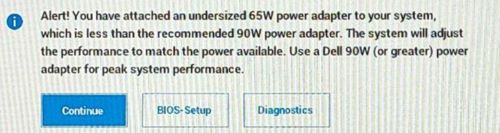
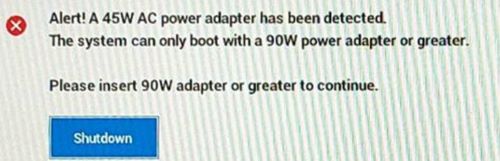
The user may encounter these symptoms when using a type-c AC adapter or a USB charger with a type-c cable configured with less current than the recommended 90W.
原因
An insufficient wattage adapter attached causes these alerts.
解析度
The Dell engineering team is aware of this behavior, and this is working as designed when an insufficient wattage adapter is attached.
Note: Dell engineering team recommends using 90W or higher wattage power adapter or USB-C charger with a type-c cable that carries 90W or higher current on OptiPlex 7010 micro form factor.
- OptiPlex 7010 micro form factor offers a no adapter option on Dell.com.
- Customers use a type-c adapter or a USB charger with type-c cable configured as a power source, and they do not use the barrel AC adapter.
Note: If the customer purchased a non-Dell adapter configuration, it is their responsibility to source an AC adapter.
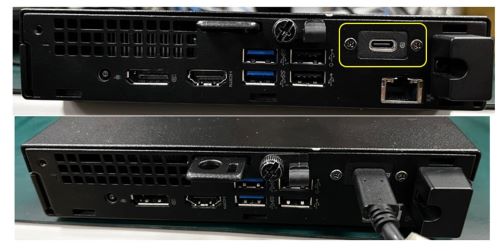
Verify AC adapter wattage:
- For a Dell AC adapter, the wattage information is on the label
- For a non-Dell AC adapter, have the customer check the label or the manufacturer documentation
受影響的產品
OptiPlex Micro 7010, OptiPlex Micro 7020, OptiPlex Micro Plus 7020文章屬性
文章編號: 000221342
文章類型: Solution
上次修改時間: 13 7月 2026
版本: 11
向其他 Dell 使用者尋求您問題的答案
支援服務
檢查您的裝置是否在支援服務的涵蓋範圍內。