Dell Unity: Alert 14:b20080 TLSv1.0 and TLSv1.1 are not secure. It is recommended that you use TLSv1.2
摘要: After an upgrade (NDU) to Unity OS 5.4.0.0.5.094, an alert is generated for "TLSv1.0 and TLSv1.1 are not secure. It is recommended that TLSv1.2 is used. See KB 000022527 for information about how to disable TLSv1.0 and TLSv1.1" ...
本文章適用於
本文章不適用於
本文無關於任何特定產品。
本文未識別所有產品版本。
症狀
After an upgrade (NDU) to Unity OS 5.4.0.0.5.094, an alert 14:b20080 is generated for TLSv1.0 and TLSv1.1 are not secure. It is recommended that you use TLSv1.2. See KB 000022527 for information about how to disable TLSv1.0 and TLSv1.1"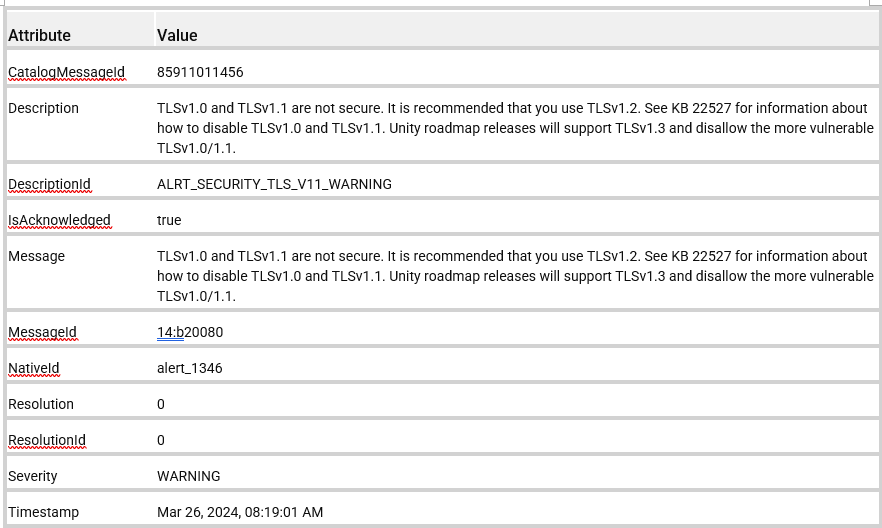
原因
This is a new alert that was added to the Unity OS 5.4.0.0.5.094 release to warn customers that TLSv1.0 and TLSv1.1 are not secure and can pose a security risk when used. A future Unity OS release disallows the use of TLSv1.0/1.1.
解析度
It is recommended that customers disable TLSv1.0/1.1 and use TLSv1.2. See KBA 000022527 Dell Unity: How to Disable TLS 1.0 and 1.1 on Unity Array (User Correctable) for instructions on disabling TLSv1.0/1.1.
NOTE:
UEMCLI clients 5.0.2 and earlier do not support TLSv1.2. If TLSv1.1 is disabled on Unity, the old UEMCLI clients cannot connect with Unity. Upgrade to UEMCLI client version 5.0.3 or above to ensure support for TLSv1.2.
UEMCLI clients 5.0.2 and earlier do not support TLSv1.2. If TLSv1.1 is disabled on Unity, the old UEMCLI clients cannot connect with Unity. Upgrade to UEMCLI client version 5.0.3 or above to ensure support for TLSv1.2.
NOTE:
There is a rare issue where Dell Unity arrays upgraded from Unity OS 4.2 (or earlier) code may still attempt to use TLSv1.0 even when it is disabled due to a Unisphere rolemapping file not being updated properly. See KBA 000035540 Dell Unity: Unisphere UI fails to log in as LDAP User when TLS1.0 is disabled with message "The logged in user is not authorized to access Unisphere" (Dell Correctable)
There is a rare issue where Dell Unity arrays upgraded from Unity OS 4.2 (or earlier) code may still attempt to use TLSv1.0 even when it is disabled due to a Unisphere rolemapping file not being updated properly. See KBA 000035540 Dell Unity: Unisphere UI fails to log in as LDAP User when TLS1.0 is disabled with message "The logged in user is not authorized to access Unisphere" (Dell Correctable)
受影響的產品
Dell EMC Unity, Dell EMC Unity Family文章屬性
文章編號: 000223686
文章類型: Solution
上次修改時間: 25 7月 2025
版本: 4
向其他 Dell 使用者尋求您問題的答案
支援服務
檢查您的裝置是否在支援服務的涵蓋範圍內。