VxRail:如何更新 ESXi 主機上的 VMware 工具版本
摘要: 本文指導使用者如何使用 Broadcom 離線封包更新 ESXi 主機中的 VMware Tools 版本。請勿將本文用於已啟用 vLCM 的叢集。如需詳細資訊,請查看備註。
本文章適用於
本文章不適用於
本文無關於任何特定產品。
本文未識別所有產品版本。
說明
-
下載
VMware Tools Offline VIB Bundle的 Broadcom 支援頁面。前往 我的下載 區段,然後依 VMware 工具進行搜尋。選取所需的版本,並下載離線 vSphere 安裝套裝 (VIB):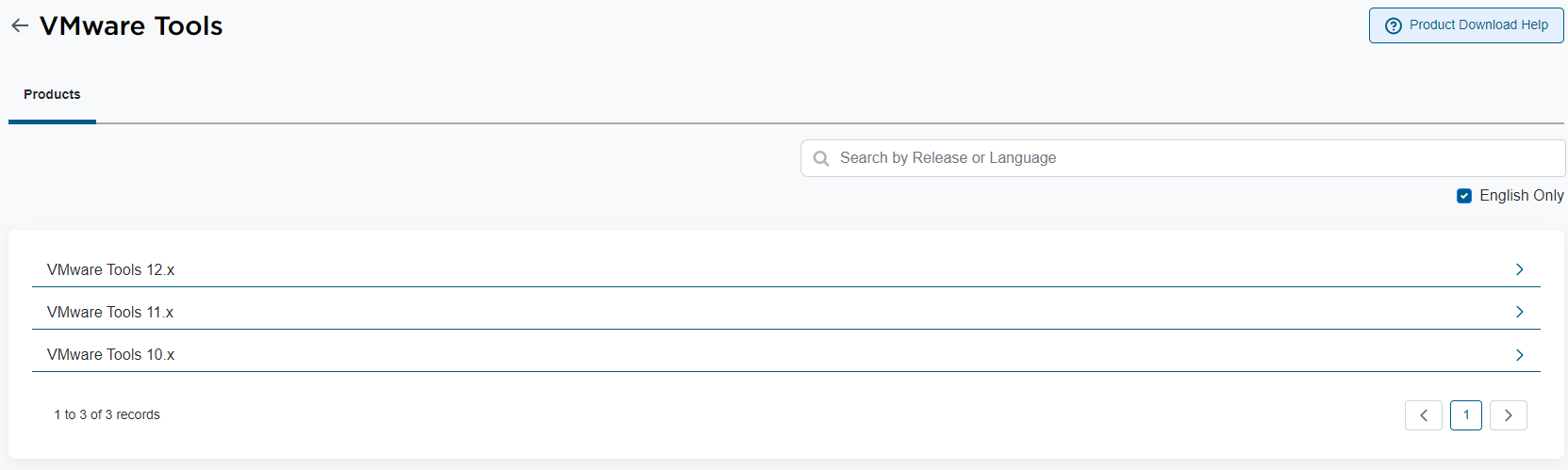

-
套用更新之前,您可以檢查 ESXi 主機中目前的 VMware Tools 版本。透過 SSH 存取 ESXi 主機並執行下列命令:
esxcli software component get | grep VMware-VM-Tools -B 1 -A 14
範例:
[root@host01:~] esxcli software component get | grep VMware-VM-Tools -B 1 -A 14

VMware-VM-Tools_12.3.5.22544099-23794019
   Name: VMware-VM-Tools
   Display Name: ESXi VM Tools
   Version: 12.3.5.22544099-23794019
   Display Version: 12.3.5
   VIBs: VMware_locker_tools-light_12.3.5.22544099-23794019
   Vendor: VMware
   Summary: ESXi Tools Component
   Severity: general
   Urgency: critical
   Category: security
   Release Type: patch
   Kburl: https://docs.vmware.com/en/VMware-vSphere/7.0/rn/vsphere-esxi-70u3q-release-notes/index.html#Resolved%20Issues-VMware-VM-Tools_12.3.5.22544099-23794019
   Description: This component contains the tools VIB.
   Contact: VMware
   ReleaseDate: 05-21-2024
在這種情況下,ESXi 主機中目前的 VMware Tools 版本為
12.3.5.22544099-23794019。 -
在 ESXi 主機中建立暫存目錄,以放置
VMware Tools Offline VIB Bundle。在這種情況下,版本 12.4.5 的大小約為 370 MB。您必須將此檔案放在支援的 ESXi 主機目錄中。在此範例中,將在本機資料儲存內建立一個臨時目錄:[root@host01:~] cd /vmfs/volumes/LOCAL-DATASTORE [root@host01:/vmfs/volumes/LOCAL-DATASTORE] mkdir vmware-tools-temp
建立暫存目錄後,請複製
VMware Tools Offline VIB Bundle文件進入其中。您可以使用 WinSCP、PowerShell 或您偏好的應用程式,將檔案複製到 ESXi 主機。 -
若要更新 VMware Tools 版本,不需要讓 ESXi 主機進入維護模式或重新開機。您可以使用以下命令進行確認:
esxcli software sources vib get --depot=file:/vmfs/volumes/LOCAL-DATASTORE/vmware-tools-temp/VMware-Tools-12.4.5-core-offline-depot-ESXi-all-23787635.zip
命令輸出範例:
VMware_locker_tools-light_6.5.0-12.4.5.23787635
   Name: tools-light
   Version: 6.5.0-12.4.5.23787635
   Type: locker
   Vendor: VMware
   Acceptance Level: VMwareCertified
   Summary: VMware Tools VIB for Windows and Linux guests for ESXi 6.5.0
   Description: This package contains cdrom and floppy images used to install the VMware Tools inside virtual machines.
   ReferenceURLs:
   Creation Date: 2024-05-22
   Depends: esx-version = 6.5.0
   Conflicts:
   Replaces:
   Provides:
   Maintenance Mode Required: False
   Hardware Platforms Required:
   Live Install Allowed: True
   Live Remove Allowed: True
   Stateless Ready: True
   Overlay: False
   Tags:
   Payloads: tools

VMware_locker_tools-light_12.4.5.23787635-23919197
   Name: tools-light
   Version: 12.4.5.23787635-23919197
   Type: locker
   Vendor: VMware
   Acceptance Level: VMwareCertified
   Summary: VMware Tools VIB for Windows and Linux guests (generated by vmtoolspkg build 23919197)
   Description: This package contains cdrom and floppy images used to install the VMware Tools inside virtual machines.
   ReferenceURLs:
   Creation Date: 2024-05-22
   Depends: esx-version >= 6.6.0
   Conflicts:
   Replaces:
   Provides:
   Maintenance Mode Required: False
   Hardware Platforms Required:
   Live Install Allowed: True
   Live Remove Allowed: True
   Stateless Ready: True
   Overlay: False
   Tags:
   Payloads: tools
-
執行下列命令以套用更新:
esxcli software vib install --depot=file:/vmfs/volumes/LOCAL-DATASTORE/vmware-tools-temp/VMware-Tools-12.4.5-core-offline-depot-ESXi-all-23787635.zip
命令輸出範例:
[root@vxrail01:/vmfs/volumes/LOCAL-DATASTORE/vmware-tools-temp] esxcli software vib install --depot=file:/vmfs/volumes/LOCAL-DATASTORE/vmware-tools-temp/VMware-Tools-12.4.5-core-offline-depot-ESXi-all-23787635.zip
Installation Result
   Message: Operation finished successfully.
   Reboot Required: false
   VIBs Installed: VMware_locker_tools-light_12.4.5.23787635-23919197
   VIBs Removed: VMware_locker_tools-light_12.3.5.22544099-23794019
   VIBs Skipped:
-
之後,您可以檢查 VMware Tools 版本:
[root@vxrail01:/vmfs/volumes/LOCAL-DATASTORE/vmware-tools-temp] esxcli software component get | grep VMware-VM-Tools -B 1 -A 14TOOLS-23919197
   Name: VMware-VM-Tools
   Display Name: VMware Tools Async Release
   Version: 12.4.5.23787635-23919197
   Display Version: 12.4.5
   VIBs: VMware_locker_tools-light_12.4.5.23787635-23919197
   Vendor: VMware
   Summary: VMware Tools 12.4.5 Async Release
   Severity: general
   Urgency: important
   Category: bugfix
   Release Type: patch
   Kburl: https://docs.vmware.com/en/VMware-Tools/12.4/rn/vmware-tools-1245-release-notes/index.html
   Description: VMware Tools 12.4.5 Async Release
   Contact: http://www.vmware.com/support/contacts/
   ReleaseDate: 06-27-2024
如您所見,新的 VMware Tools 版本是
12.4.5.23787635-23919197。 -
現在,您可以存取 vSphere Client,選取您更新了 VMware Tools 的 ESXi 主機,並在其中執行的虛擬機器 (VM) 上更新 VMware 工具。
建議在叢集中的所有 ESXi 主機上進行更新!
其他資訊
對於已啟用 vLCM 的叢集,請按照 VxRail 下的步驟操作:更新 VMware 工具以解決 VMSA 問題。
受影響的產品
VxRail, VxRail Appliance Series, VxRail G Series Nodes, VxRail D Series Nodes, VxRail D560, VxRail D560F, VxRail E Series Nodes, VxRail E560, VxRail E560F, VxRail E560N, VxRail E660, VxRail E660F, VxRail E660N, VxRail E665, VxRail E665F, VxRail E665N
, VxRail G560, VxRail G560F, VxRail P Series Nodes, VxRail P470, VxRail P570, VxRail P570F, VxRail P580N, VxRail P670F, VxRail P670N, VxRail P675F, VxRail P675N, VxRail S Series Nodes, VxRail S570, VxRail S670, VxRail Software, VxRail V Series Nodes, VxRail V570, VxRail V570F, VXRAIL V670F, VxRail VD-4510C, VxRail VD-4520C, VxRail VD Series Nodes, VxRail VE-660, VxRail VE-6615, VxRail VE-670, VxRail VP-760, VxRail VP-7625, VxRail VP-770, VxRail VS-760
...
文章屬性
文章編號: 000227059
文章類型: How To
上次修改時間: 11 3月 2026
版本: 3
向其他 Dell 使用者尋求您問題的答案
支援服務
檢查您的裝置是否在支援服務的涵蓋範圍內。