Azure Stack:HLH 升級:找不到位置參數 無法存取的網路分享
摘要: 使用類似於以下網域\使用者名稱的登入資料時,PnU 工具無法將 HLH ISO 檔案連接至 iDRAC。 找不到接受參數「無法存取的網路共用」的位置參數。
本文章適用於
本文章不適用於
本文無關於任何特定產品。
本文未識別所有產品版本。
症狀
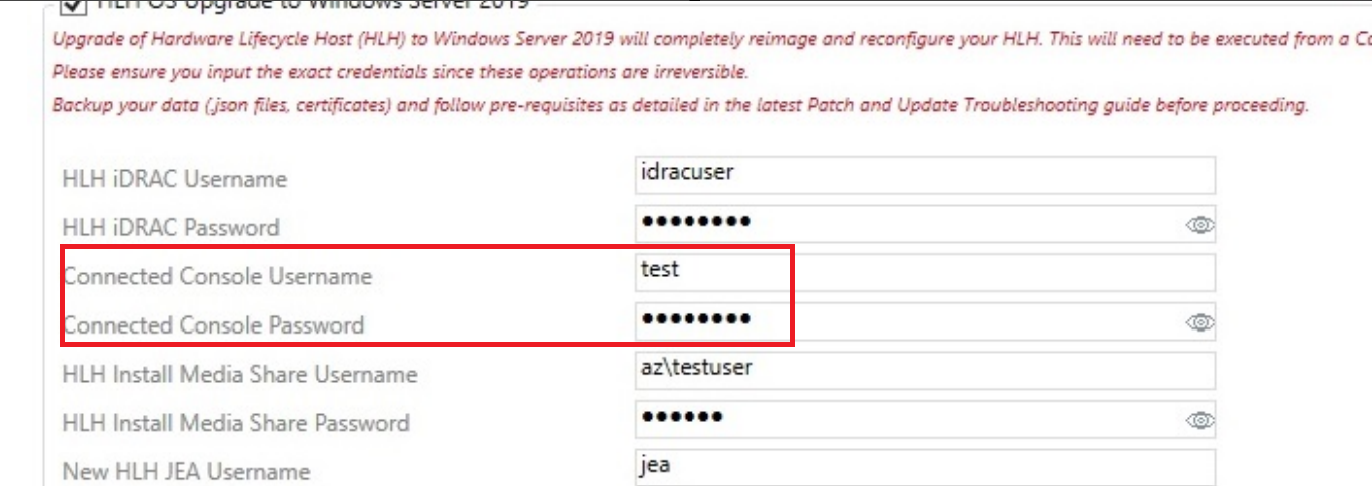
使用類似以下的登入資料時,PnU 工具無法將 HLH ISO 檔案連接至 iDRAC:
Connected Console Username: domain\username
錯誤詳細資料:
2025-05-08 01:55:04.350 +03:00 [INF] Settings ISO found at C:\Program Files\Dell EMC\VxRack AS Patch and Update Automation\PSScripts\HLH\Windows\OSDShare\PnU-Setup.iso
2025-05-08 01:55:04.356 +03:00 [INF] HLH ISO found at C:\Program Files\Dell EMC\VxRack AS Patch and Update Automation\PSScripts\HLH\Windows\OSDShare\MS2406_Dell2411.4_Redeployment.iso
2025-05-08 01:55:04.362 +03:00 [INF] Attaching HLH OS ISO for iDRAC 172.16.112.2.
2025-05-08 01:55:04.686 +03:00 [INF] OSD initiated successfully.
2025-05-08 01:55:05.693 +03:00 [INF] OSD Task State :
2025-05-08 01:55:05.788 +03:00 [ERR] A positional parameter cannot be found that accepts argument 'Inaccessible network share.'.
2025-05-08 01:55:05.792 +03:00 [INF] Validating iDRAC credentials and creating session
2025-05-08 01:55:05.796 +03:00 [INF] Checking connectivity for HLH iDRAC
原因
如果在 PNU 自動化工具中使用網域認證「網域\使用者名稱」,iDRAC 的 API 將無法運作。
解析度
若要變通解決此問題,請使用沒有功能變數名稱的本地管理員帳戶。
Connected Console Username: testuser
受影響的產品
Integrated System for Microsoft Azure Stack Hub 14G產品
Integrated System for Microsoft Azure Stack Hub 16G文章屬性
文章編號: 000323734
文章類型: Solution
上次修改時間: 15 1月 2026
版本: 2
向其他 Dell 使用者尋求您問題的答案
支援服務
檢查您的裝置是否在支援服務的涵蓋範圍內。