PowerProtect Data Manager:VM 檔案層級還原無法安裝 vProxy 代理程式
摘要: 由於 VMware 工具問題,PowerProtect Data Manager 虛擬機器 (VM) 檔案層級還原 (FLR) 無法掛接磁碟。
本文章適用於
本文章不適用於
本文無關於任何特定產品。
本文未識別所有產品版本。
症狀
VM 檔案層級還原在掛接階段失敗,並顯示錯誤代碼: ARV0029 或 ARV0039
錯誤範例:
Unable to mount disks. Unable to install vProxy Agent on 'win-client01'. Unable to create temporary installation directory on VM 'win-client01' (vm-32020). ServerFaultCode: The guest operations agent could not be contacted.或
Unable to mount disks. Unable to setup communication with target VM 'win-sql01'. VMware Tools is not running on VM 'win-sql01' (vm-4006). (0)或
VM Direct engine is unable to restore the virtual machine 'rhel-client01' on vCenter 'vcsa.domain.com' because VMware Tools is not running on the virtual machine
記錄位置:
- PowerProtect Data Manager 內嵌:
/opt/emc/vproxy/runtime/logs/vproxyd | /opt/emc/vproxy/runtime/logs/recycle/vproxyd/mount-<sessionid>.log - 外部虛擬機器直接引擎:
/opt/emc/vproxy/runtime/logs/vflrd | /opt/emc/vproxy/runtime/logs/recycle/vflrd/mount-<sessionid>.log
2025-02-20T08:24:31.209Z ERROR:  [bce7372da916f629;bdf2a515b62b4ce9] VMware Tools is not running on VM 'rhel-client01' (vm-17023).
2025-02-20T08:24:31.209Z ERROR:  [bce7372da916f629;bdf2a515b62b4ce9] Unable to setup communication with target VM 'rhel-client01'.  VMware Tools is not running on VM 'rhel-client01' (vm-17023).
原因
如果 VMware Tools 未執行、未安裝,或在虛擬機器上遇到內部錯誤,FLR 還原將會失敗。VM 備份和還原作業取決於 VMware Tools。症狀可能會影響任何 PowerProtect Data Manager 版本。
解析度
確認已使用 vSphere Web Client 安裝 VMware Tools:
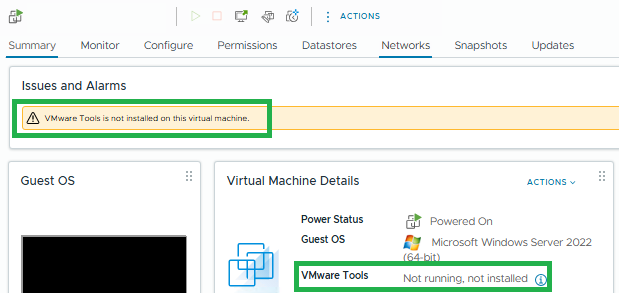
依照 VMware 指示進行,在 VM 上安裝 VMware 工具,然後重試 FLR 還原:
在 VMware 產品中安裝 VMware Tools

若已安裝,請確認服務正在客體作業系統上執行:
Windows 範例:
- 按下 Win + R,輸入 services.msc,按下 Enter 或按一下 確定。
- 確認 VMware Tools 服務正在執行中 ,並設為 自動。
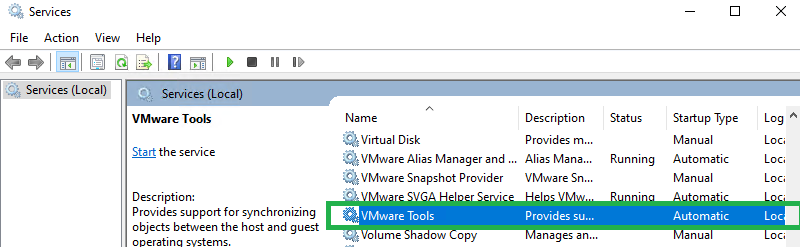
Linux (以 Red Hat Enterprise Linux 為例):
- SSH 至 Linux VM
- 執行下列命令以檢查服務狀態:
systemctl status vmtoolsd.service輸出範例:

- 如果服務停止,則啟動:
systemctl start vmtoolsd.service
如果 VMware Tools 無法啟動或無法正常運作,請與您的內部 VMware 或作業系統支援團隊合作以解決問題。
受影響的產品
PowerProtect Data Manager, PowerProtect Data Manager Essentials, PowerProtect Data Manager Software文章屬性
文章編號: 000430035
文章類型: Solution
上次修改時間: 03 3月 2026
版本: 1
向其他 Dell 使用者尋求您問題的答案
支援服務
檢查您的裝置是否在支援服務的涵蓋範圍內。