Windows Server Dell OEM:授權和降級
摘要: 本文提供 Windows Server 的 Dell OEM 授權相關資訊。如何識別 COA 標籤,以及降級 Windows Server 版本的步驟以及在虛擬機器中的使用。
本文章適用於
本文章不適用於
本文無關於任何特定產品。
本文未識別所有產品版本。
說明
OEM 授權是隨硬體銷售時所附帶的,且限制為僅能用於特定硬體。當您向 Dell 購買伺服器時,若選取並同時購買各種 Windows Server 作為作業系統或第二個作業系統,則會將 Windows Server 的 Dell OEM 授權附加至伺服器機箱。除了可作為主機作業系統外,Windows Server 的 Dell OEM 授權也能以虛擬機器的方式在 Hypervisor 上使用,但應用於具備 OEM 授權的伺服器機箱內。
目錄
COA 標籤
如果您隨伺服器購買授權,在出貨時,伺服器機箱上便會直接貼上以下的真品證明書 (COA) 標籤。
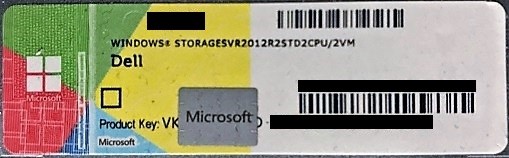
COA 標籤上提供啟用授權所需的產品金鑰,無論您是在主機作業系統上使用此授權,還是在 Hypervisor 上做為虛擬機器,皆可使用此產品金鑰來啟動授權。
自 Windows Server 2012 起,產品金鑰的部份便會加上刮除區,因此客戶必須使用硬幣加以刮除。由於 COA 標籤不會重新發佈,且並未提供其他具有產品金鑰的憑證,刮除時請務必小心,避免損壞標籤。如果標籤受損,請取下 COA 標籤的圖,準備清楚的影像檔案,然後聯絡 Dell 技術支援部門。
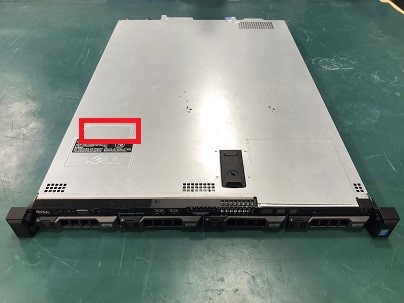
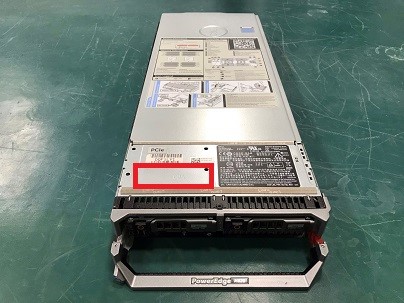
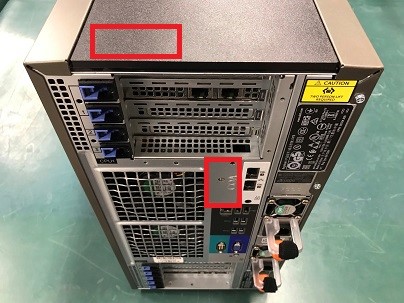
以下為 COA 標籤的黏貼範例。
機架式伺服器 (正面上方)
刀鋒伺服器 (正面上方)
立式伺服器 (後面板或上方後側)
降級/降低版本權利
向 Dell 購買的 Windows Server OEM 授權包含Microsoft降級和降低版本的權利。這些權利允許您使用比原始許可版本更早或更低版本的 Windows Server。要確認允許哪些版本和版本,請查看所購買產品的 Microsoft許可條款 。
。
。
如果您打算降級或降低版本,則必須同時具有早期版本或版本的安裝介質和產品密鑰。Dell 會在購買伺服器時提供降級套件,其中包括所需的媒體和產品金鑰。由於降級權利來自 Microsoft OEM 授權本身 (而非 Dell),因此使用從 Dell 以外取得的媒體或產品金鑰 (包括先前在其他環境中啟動的金鑰) 不會有任何問題。
如果產品金鑰無法啟動(例如檢測到重複使用的金鑰時),請聯繫 Microsoft許可啟動中心
如果您購買的 OEM 授權未使用降級套件,或原始套件已遺失,請聯絡 Dell 銷售人員以討論購買更換品的事宜。Windows Server 降級套件包含作業系統安裝媒體和產品金鑰。這些套件可隨伺服器一起訂購,或在初次銷售 (APOS) 後另行購買。只有在購買具有 OEM Windows Server 授權的伺服器時,才提供 APOS 降級套件。這些必須購買,且無訂單即無法派送。
以下是降級/降低版本權利的範例:
| 購買的版本 | 可用版本類型 | 可用版本範例 |
|---|---|---|
| Windows Server 2016 Datacenter | Windows Server 2016 | Datacenter |
| 標準 | ||
| Windows Server 2012 R2 | Datacenter | |
| 標準 | ||
| Windows Server 2012 | Datacenter | |
| 標準 | ||
| Windows Server 2016 Standard | Windows Server 2016 | 標準 |
| Windows Server 2012 R2 | ||
| Windows Server 2012 | ||
| Windows Server 2012 R2 Datacenter | Windows Server 2012 R2 | Datacenter |
| 標準 | ||
| Windows Server 2012 | Datacenter | |
| 標準 | ||
| Windows Server 2012 R2 Standard | Windows Server 2012 R2 | 標準 |
| Windows Server 2012 | ||
| Windows Server 2012 Datacenter | Windows Server 2012 | Datacenter |
| 標準 | ||
| Windows Server 2012 Standard | Windows Server 2012 | 標準 |
| Windows Server 2022 Datacenter | Windows Server 2019 | Datacenter |
| 標準 | ||
| Windows Server 2016 | Datacenter | |
| 標準 | ||
| Windows Server 2022 Standard | Windows Server 2019 | 標準 |
| Windows Server 2016 | ||
| Windows Server 2022 Essential 10 核心 | Windows Server 2019 | 要點 |
| Windows Server 2016 | ||
| Windows Server 2019 Datacenter | Windows Server 2016 | Datacenter |
| 標準 | ||
| Windows Server 2012 R2 | Datacenter | |
| 標準 | ||
| Windows Server 2019 Standard | Windows Server 2016 | 標準 |
| Windows Server 2012 R2 | ||
| Windows Server 2019 Essentials | Windows Server 2019 | 要點 |
| Windows Server 2016 |
使用於虛擬機器內
根據 Microsoft 定義的虛擬例項執行權利,使用 Dell OEM 授權的 Windows Server 可在 Hypervisor 上以虛擬機器執行。資料中心無限制,Standard 擁有最多兩個虛擬例項執行權利。
由於已套用所購買版本的執行權利,例如在已購買 Datacenter 版本但將版本降至 Standard 的環境中,因此可以不受限制地使用虛擬例項執行權利。由於 Standard 版本只有兩個虛擬例項執行權利,請在聯絡技術支援部門時,回報您使用降低版本權利,以擁有不受限制的執行權利。此外 Hypervisor 亦沒有限制,即使 ESXi 等 Hypervisor 為個別準備的,但如果 Windows Server 在相同硬體上以虛擬機器執行,則 Dell OEM 授權仍為有效。
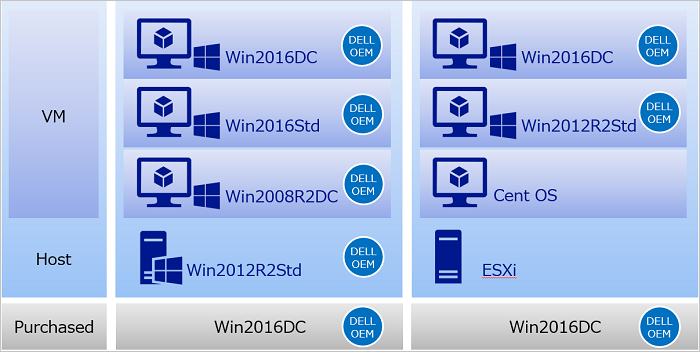
說明以 Dell OEM 購買 Windows Server 2016 Datacenter 的案例。
在下圖中,標有「Dell OEM」標誌的項目具有有效的 Dell OEM 授權,且 Dell 可提供 OEM 支援。
受影響的產品
Microsoft Windows Server 2016, Microsoft Windows Server 2019, Microsoft Windows Server 2022, Microsoft Windows Server 2025, Microsoft Hyper-V™ Server 2008, Microsoft Windows 2008 Server R2, Microsoft Windows 2008 Server Service Pack 2
, Microsoft Windows 2012 Server, Microsoft Windows 2012 Server R2
...
文章屬性
文章編號: 000442016
文章類型: How To
上次修改時間: 25 3月 2026
版本: 2
向其他 Dell 使用者尋求您問題的答案
支援服務
檢查您的裝置是否在支援服務的涵蓋範圍內。