Dell EMC Unity:陣列系統限制 (使用者可修正)。
摘要: Dell EMC Unity:陣列系統限制 (使用者可修正)。
本文章適用於
本文章不適用於
本文無關於任何特定產品。
本文未識別所有產品版本。
說明
每個陣列模型都由某些系統限制定義;磁碟機插槽數量上限、可設定 LUN 數量上限等。
若要檢視系統限制,請參閱支援矩陣、Unisphere、資料收集、UEMCLI 或驅動程式屬性物件清單。
- 支援矩陣
瀏覽至支援矩陣並檢查表 6、7 和 8。按一下這裡支援矩陣。
- Unisphere
-
輸入 SP 管理 IP 位址,然後登入,即可啟動 Unisphere。
-
按一下 設定。
-
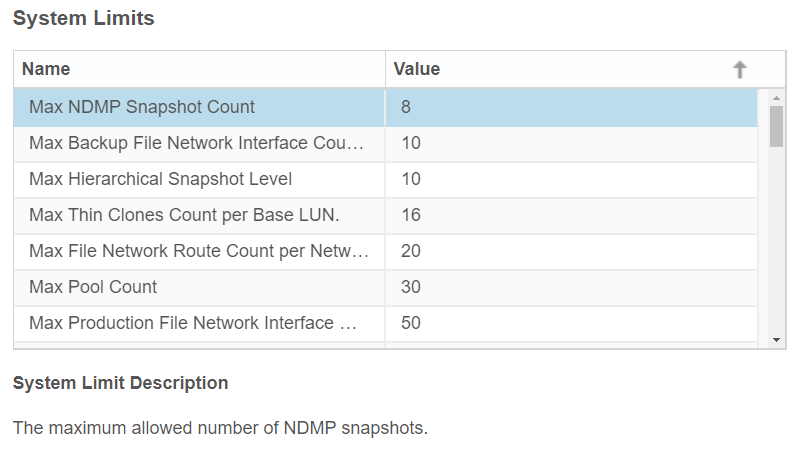
在 「軟體和授權 」標籤下,尋找系統限制。
-
按一下 系統限制。
Unity 350F 的範例:

- UEMCLI
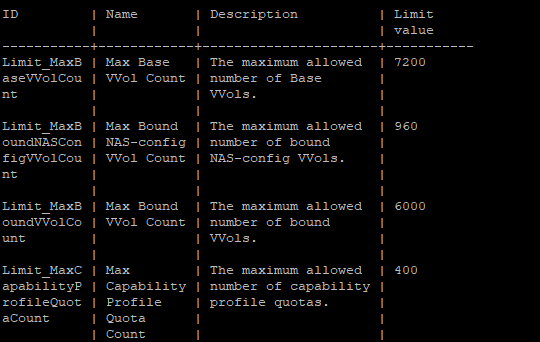
service@spa:~/user# uemcli /sys/limit show -output table -wrap
Unity 350F 的範例:
- 驅動程式屬性物件清單
service@spa:~/user# svc_storagecheck --list | grep -i Max_
或
service@spa:~/user# svc_storagecheck --list | sed -n '/Driver Properties Object List/,/<< 新物件 >>/p'
Max_Pools :30
Max_LUs :1500
Max_DrivesPerPool :250
Max_DrivesPerOperation :250
Max_DrivesUsableForAllPools :250
Max_LUSizeInBlocks :549755813888 (0x8000000000)
Max_CompressLUs:500
Max_CompressBackgroundProcesses :10
Max_PrivateFLUs :126
Max_LUs :1500
Max_DrivesPerPool :250
Max_DrivesPerOperation :250
Max_DrivesUsableForAllPools :250
Max_LUSizeInBlocks :549755813888 (0x8000000000)
Max_CompressLUs:500
Max_CompressBackgroundProcesses :10
Max_PrivateFLUs :126
其他資訊
本內容已翻譯為 15 種語言:
| https://downloads.dell.com/TranslatedPDF/DE_KB540548.pdf |
| https://downloads.dell.com/TranslatedPDF/ES_KB540548.pdf |
| https://downloads.dell.com/TranslatedPDF/ES-XL_KB540548.pdf |
| https://downloads.dell.com/TranslatedPDF/FR_KB540548.pdf |
| https://downloads.dell.com/TranslatedPDF/IT_KB540548.pdf |
| https://downloads.dell.com/TranslatedPDF/JA_KB540548.pdf |
| https://downloads.dell.com/TranslatedPDF/KO_KB540548.pdf |
| https://downloads.dell.com/TranslatedPDF/NL_KB540548.pdf |
| https://downloads.dell.com/TranslatedPDF/PT_KB540548.pdf |
| https://downloads.dell.com/TranslatedPDF/PT-BR_KB540548.pdf |
| https://downloads.dell.com/TranslatedPDF/RU_KB540548.pdf |
| https://downloads.dell.com/TranslatedPDF/SV_KB540548.pdf |
| https://downloads.dell.com/TranslatedPDF/ZH-CN_KB540548.pdf |
| https://downloads.dell.com/TranslatedPDF/ZH-TW_KB540548.pdf |
| https://downloads.dell.com/TranslatedPDF/AR_KB540548.pdf |
受影響的產品
Dell EMC Unity Family |Dell EMC Unity All Flash產品
Dell Unity 300, Dell EMC Unity 300F, Dell EMC Unity 350F, Dell EMC Unity XT 380, Dell EMC Unity XT 380F, Dell EMC Unity 400, Dell EMC Unity 400F, Dell EMC Unity 450F, Dell EMC Unity XT 480, Dell EMC Unity XT 480F, Dell EMC Unity 500
, Dell EMC Unity 500F, Dell EMC Unity 600, Dell EMC Unity 600F, Dell EMC Unity 650F, Dell EMC Unity XT 680, Dell EMC Unity XT 880, Dell EMC Unity XT 880F, Dell EMC Unity Family |Dell EMC Unity All Flash, Dell EMC Unity Hybrid, Dell EMC UnityVSA Professional Edition/Unity Cloud Edition
...
文章屬性
文章編號: 000021404
文章類型: How To
上次修改時間: 11 12月 2025
版本: 5
向其他 Dell 使用者尋求您問題的答案
支援服務
檢查您的裝置是否在支援服務的涵蓋範圍內。