Dell Unity:Error: RPA X 故障或發生錯誤:在叢集 0x42c525d9ccd582 中,SP 看不到 RPA2
摘要: Error: RPA X 故障或發生錯誤:在叢集 0x42c525d9ccd582 中,SP 看不到 RPA2。
本文章適用於
本文章不適用於
本文無關於任何特定產品。
本文未識別所有產品版本。
症狀
- Dell Unity UI (Unisphere) 未報告任何錯誤。所有連接均已登錄並註冊。
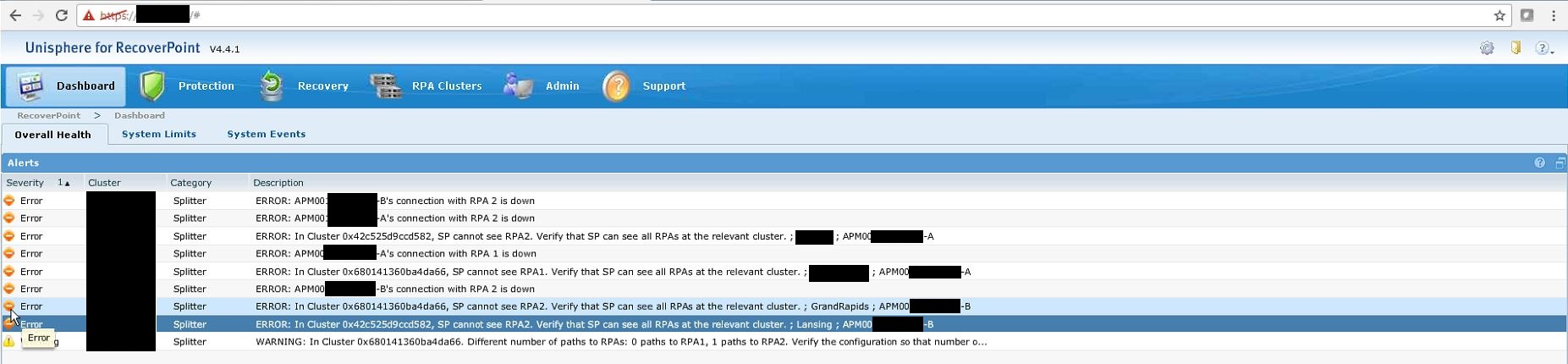
- RecoverPoint UI (Unisphere) 的錯誤範例:
ERROR: APM0000000000-A's connection to RPA 2 is DownERROR: APM0000000000-B's connection to RPA 2 is Down
ERROR: In Cluster 0x42c525d9ccd582, SP cannot see RPA2. Verify that SP can see all RPAs at the relevant cluster. ; Site_Name ; APM0000000000-AERROR: In Cluster 0x42c525d9ccd582, SP cannot see RPA2. Verify that SP can see all RPAs at the relevant cluster. ; Site_Name ; APM0000000000-B
- Dell Unity EMCSystemLog (又稱為 splogs) 會顯示下列警示:
"12b000f [INFO] System: SANCopy Disk Driver: Search failed : could not find or access FC Port xxxxxxxLUN xx : status = 7E11F013"Error code 0x7e11f013 is EMCPAL_STATUS_NO_SUCH_DEVICE
原因
RecoverPoint 已設定為使用 Dell Unity 陣列上的原生同步連接埠。搭配 Dell Unity 陣列使用 RecoverPoint 裝置 (RPA) 時,這不是有效的組態。
解析度
同步複寫介面
原生同步區塊複寫是在陣列上設定的第一個光纖通道 (FC) 連接埠上執行。設為光纖通道時,會使用編號最低的連接埠進行同步複寫介面。
使用 Unisphere CLI,您可以執行「/remote/sys show -detail命令。此命令返回本地系統以及配置了複製連接的所有系統的資訊。僅顯示相關資訊的命令的範例輸出如下所示。
17:32:54 service@UnityXT spa:~/user# uemcli /remote/sys show -detailStorage system address: 127.0.0.1Storage system port: 443HTTPS connection
1: ID = RS_0 Name = UnityXT Address = 10.245.18.6 Alternate Management Address = Model = Unity 480 (Local System) Serial number = FNM00190200427 Connection type = async Source interfaces = N/A Local interfaces = N/A Remote interfaces = N/A Operational status = OK (0x2) Health state = OK (5) Health details = "Communication with the replication host is established. No action is required." Synchronous FC ports = spa_iom_0_fc0, spb_iom_0_fc0 Bandwidth schedules = uses available bandwidth Current bandwidth = uses available bandwidth
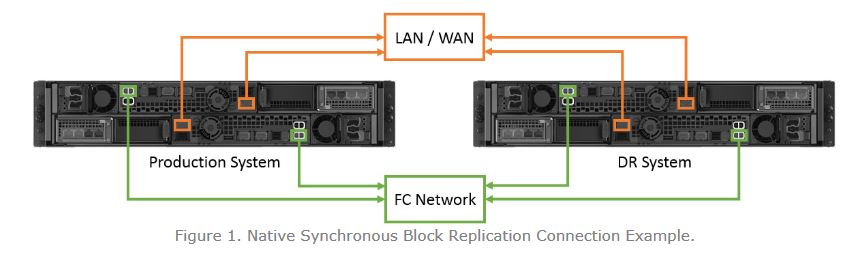
RecoverPoint 與 Dell Unity
設定 RecoverPoint 時,不支援已使用 Dell Unity 原生複製軟體複製的 LUN 和 VMware vStorage VMFS 資料存放區。此外,不應將 RecoverPoint 設定為在任一儲存處理器 (SP) 上使用 Dell Unity 同步複寫連接埠。
當 RecoverPoint 設定連線至 Unity 陣列的同步連接埠時,會顯示連線似乎已連線並已登入,但 RecoverPoint 顯示連接埠處於 關閉 狀態。
ERROR: APM0000000000-A's connection to RPA 2 is DownERROR: APM0000000000-B's connection to RPA 2 is DownERROR: In Cluster 0x42c525d9ccd582, SP cannot see RPA2. Verify that SP can see all RPAs at the relevant cluster. ; Site_Name ; APM0000000000-AERROR: In Cluster 0x42c525d9ccd582, SP cannot see RPA2. Verify that SP can see all RPAs at the relevant cluster. ; Site_Name ; APM0000000000-B
若要修正此問題,連接埠必須移至未在 Unity 陣列 上設定為 原生複寫的 FC 連接埠。還必須在客戶的 Fibre Channel 網路上更新分區。
受影響的產品
Dell EMC Unity Family |Dell EMC Unity All Flash產品
RecoverPoint Gen5 Server, RecoverPoint Gen6 Server, Dell EMC Unity Family |Dell EMC Unity All Flash, Dell EMC Unity Hybrid文章屬性
文章編號: 000054938
文章類型: Solution
上次修改時間: 14 5月 2025
版本: 4
向其他 Dell 使用者尋求您問題的答案
支援服務
檢查您的裝置是否在支援服務的涵蓋範圍內。