Local LCD Displayer Shows a Black Screen When Opening Lid or Hot Plugging an External Monitor
摘要: This article is about getting a black screen on a local LCD displayer for a second when opening the lid or hot-plugging an external monitor.
本文章適用於
本文章不適用於
本文無關於任何特定產品。
本文未識別所有產品版本。
症狀
The local LCD displayer shows a black screen for one second when opening the lid or hot-plugging to an external monitor.
Affected Platforms:
- Latitude 5410
- Latitude 5510
- Latitude 5411
- Latitude 5511
- Latitude 7210 2-in-1
- Latitude 7310
- Latitude 7410
- Latitude 9410
- Latitude 9510
- Precision 3550
- Precision 3551
- Precision 7550
- Precision 7750
原因
Getting the black screen for a sec is an expected behavior of the Microsoft Multiplane Overlay
Note: MPO feature is a power conservation feature to enhance battery life. Intel recommends end user to enable this feature.
解析度
MPO feature can be disabled by editing the registry table as follow steps:
- Search DisplayFeatureControl in the Registry Editor.
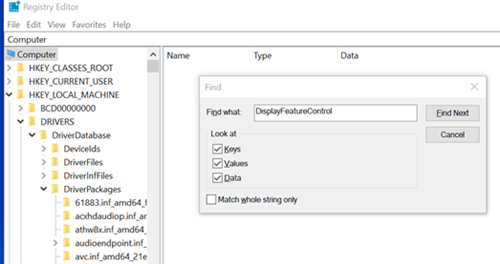
- Modify the value from 3e3 to 383.
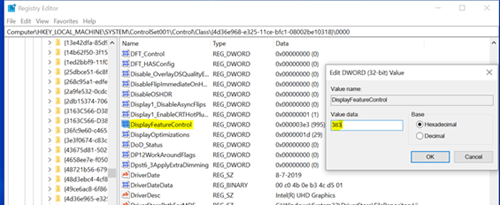
- Restart the computer.
受影響的產品
Latitude 7210 2-in-1, Latitude 7310, Latitude 5410, Latitude 5411, Latitude 7410, Latitude 9410, Latitude 5510, Latitude 5511, Latitude 9510, Precision 3550, Precision 3551, Precision 7550, Precision 7750文章屬性
文章編號: 000130724
文章類型: Solution
上次修改時間: 19 4月 2026
版本: 6
向其他 Dell 使用者尋求您問題的答案
支援服務
檢查您的裝置是否在支援服務的涵蓋範圍內。