Dell Networking S 系列:基本介面組態 – SONIC 4.0
摘要: 如何設定 SONIC 4.0 介面的基礎知識。
本文章適用於
本文章不適用於
本文無關於任何特定產品。
本文未識別所有產品版本。
說明
Dell Networking S 系列:基本介面組態 - SONIC 4.0
摘要:如何設定 SONIC 4.0 介面的基礎知識。
指示
這些步驟假設交換器開始設定時,是以原廠預設為獨立裝置。請參閱連結的知識文章,以取得明確範例。
在原生模式下,SONIC 前面板介面的命名為從 Ethernet 0 到 Ethernet X,X 為最後一個前面板連接埠。 標準命名使用乙太網路 x/y/z 模式,其中 x/y 是插槽/連接埠編號,z 則用於分接連接埠。
介面命名格式變更:將預設介面命名模式從「原生」變更為「標準」。
- 在 Linux 提示中,以「sonic-cli」啟動 SONIC CLI:
admin@sonic:~$ sonic-cli
sonic#
- 以「show interface-naming」命令顯示目前所設定的介面狀態模式
sonic# show interface-naming
Interface naming mode is native
sonic#
- 顯示介面狀態,並查看預設介面命名慣例 (原生命名)「show interface status」(圖 1):
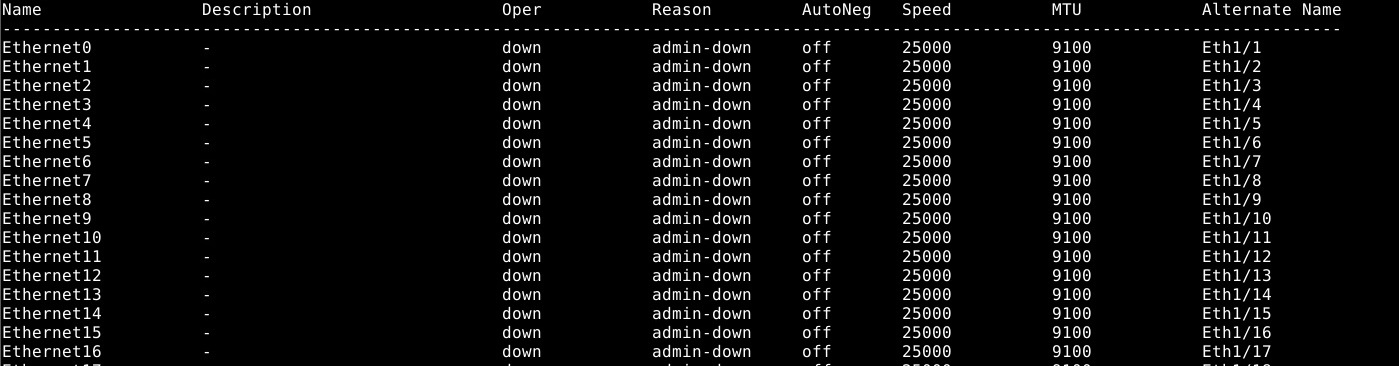
圖 1:show interface status 的範例。
- 若要修改交換器組態,請執行「configure terminal」命令。
sonic# configure terminal
sonic(config)#
- 若要將介面命名模式變更為「標準」模式,請使用命令「interface-naming standard」:
sonic(config)# interface-naming standard
Broadcast message: Interface naming mode has changed. Users running 'sonic-cli' are required to restart your session.

sonic(config)#
注意:所有使用者都必須退出並重新進入 SONIC CLI,模式變更才會生效。。
- 使用「exit」結束組態模式:
sonic(config)# exit
sonic#
- 以「exit」退出 SONIC CLI:
sonic# exit
admin@sonic:~$
- 以「sonic-cli」重新進入 SONIC CLI:
admin@sonic:~$ sonic-cli
sonic#
- 以「show interface status」顯示介面狀態:
sonic# show interface status
介面名稱從 Ethernet X 變更為 Eth x/y (圖 2)。
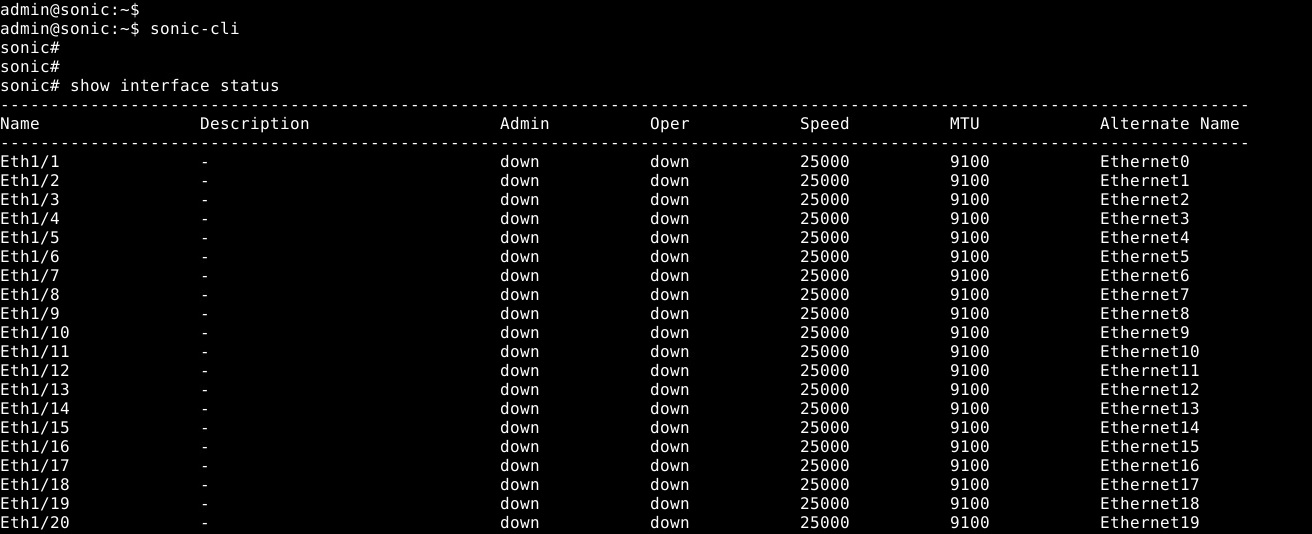
圖 2:標準模式:show interface status 的範例
- 使用「write memory」將執行中的組態儲存至啟動組態:
sonic# write memory
sonic#
個別介面組態:進入組態模式,然後進入介面組態模式。
- 以「sonic-cli」開始 SONiC CLI:
admin@sonic:~$ sonic-cli
sonic#
- 以「show running-configuration interface Eth 1/30」顯示介面組態:
sonic# show running-configuration interface Eth 1/30
!
interface Eth1/30
 mtu 9100
 speed 25000
 fec none
 shutdown
- 以「configure terminal」進入組態模式:
sonic# configure terminal
sonic(config)#
- 以「interface Eth 1/30」進入介面 Eth 1/30 組態模式:
sonic(config)# interface Eth 1/30
sonic(conf-if-Eth1/30)#
- 以「no shutdown」設定無關機 Eth 1/30:
sonic(conf-if-Eth1/30)# no shutdown
sonic(conf-if-Eth1/30)#
- 以「IP address 10.1.1.2/24」在介面 Eth 1/30 上設定 IP 位址:
sonic(conf-if-Eth1/30)# ip address 10.1.1.2/24
sonic(conf-if-Eth1/30)#
- 使用「end」結束組態模式:
sonic(conf-if-Eth1/30)# end
sonic#
- 以「show running-configuration interface Eth 1/30」顯示介面組態:
sonic# show running-configuration interface eth 1/30
!
interface Eth1/30
 mtu 9100
 speed 25000
 fec none
 no shutdown
 ip address 10.1.1.2/24
- 以「show ip interfaces」顯示 IP 介面:
sonic# show ip interfaces
Flags: U-Unnumbered interface, A-Anycast IP
-----------------------------------------------------------------------------------------------
Interface            IP address/mask                    VRF            Admin/Oper     Flags
-----------------------------------------------------------------------------------------------
Eth1/30              10.1.1.2/24                                           up/up
sonic#
- 以「show interface eth 1/30」顯示 Eth 1/30 的介面狀態:
(output truncated for brevity)

sonic# show interface eth 1/30

Eth1/30 is up, line protocol is up
Hardware is Eth
IPV4 address is 10.1.1.2/24
Mode of IPV4 address assignment: MANUAL
Mode of IPV6 address assignment: not-set
Interface IPv6 oper status: Disabled
IP MTU 9100 bytes
LineSpeed 25GB, Auto-negotiation off
FEC: DISABLED
Last clearing of "show interface" counters: never
…
- 使用「write memory」將執行中的組態儲存至啟動組態:
sonic# write memory
sonic#
多介面組態:若要同時設定多個介面,請使用「interface range」選項。若要使用 show 命令檢視一個介面範圍,您不需要「range」關鍵字。
範例:
- 若要設定連接埠 14 至 15 的連續範圍,命令為「interface range ethernet 1/1/14-1/1/15」。
- 若要設定連接埠 3、10、19 的非連續範圍,命令則為「interface range ethernet 3,10,19」。
- 若要混合連續和非連續範圍,命令則會是「interface range ethernet 1/1/3, 1/1/14-1/1/15」。
- 若要顯示多個介面,則不需要「range」選項。若要顯示 Ethernet 1/1-1/3、1/5,請使用命令「show interface Eth 1/1-1/3,1/5」:
(output truncated for brevity)
sonic# show interface Eth 1/1-1/3,1/5

Eth1/1 is down, line protocol is down, reason admin-down
Hardware is Eth, address is 0c:02:22:c7:00:08
Mode of IPV4 address assignment: not-set
...
Output statistics:
        0 packets, 0 octets
        0 Multicasts, 0 Broadcasts, 0 Unicasts
        0 error, 0 discarded, 0 Oversize

Eth1/2 is down, line protocol is down, reason admin-down
Hardware is Eth, address is 0c:02:22:c7:00:08
Mode of IPV4 address assignment: not-set
...
Output statistics:
        0 packets, 0 octets
        0 Multicasts, 0 Broadcasts, 0 Unicasts
        0 error, 0 discarded, 0 Oversize

Eth1/3 is down, line protocol is down, reason admin-down
Hardware is Eth, address is 0c:02:22:c7:00:08
Mode of IPV4 address assignment: not-set
...
Output statistics:
        0 packets, 0 octets
        0 Multicasts, 0 Broadcasts, 0 Unicasts
        0 error, 0 discarded, 0 Oversize

Eth1/5 is down, line protocol is down, reason admin-down
Hardware is Eth, address is 0c:02:22:c7:00:08
Mode of IPV4 address assignment: not-set
...
Output statistics:
        0 packets, 0 octets
        0 Multicasts, 0 Broadcasts, 0 Unicasts
        0 error, 0 discarded, 0 Oversize
sonic(config)# end
- 執行「configure terminal」命令。
sonic# configure terminal
sonic(config)#
- 使用「interface range Eth1/1-1/3,1/5,1/7-1/9」設定介面 Ethernet 1/1-1/3、1/5、/1/7-1/9:
sonic(config)# interface range eth 1/1-1/3,1/5,1/7-1/9
%Info: Configuring only existing interfaces in range
sonic(conf-if-range-eth**)#
- 以「no shut」設定介面為無關機:
sonic(conf-if-range-eth**)# no shutdown
sonic(conf-if-range-eth**)#
- 以「switchport access vlan 1」將介面設定為存取模式 vlan 1:
sonic(conf-if-range-eth**)# switchport access vlan 1
sonic(conf-if-range-eth**)#
- 使用「show interface status」確認使用者組態 (圖 3):
注意:Oper 和 Reason 欄位會顯示所設定介面範圍的已變更狀態。

圖 3:show interface status 的範例
- 以「show vlan 1」檢查 VLAN 1 介面指派 (圖 4):

圖 4:Show vlan 1 的範例
- 使用「write memory」將執行中的組態儲存至啟動組態:
sonic# write memory
sonic#
如需進一步協助,請參閱 Dell Technologies Enterprise SONiC 使用者指南說明文件,或聯絡 Dell Technologies 技術支援部門。
受影響的產品
Networking, Enterprise SONiC Distribution文章屬性
文章編號: 000202172
文章類型: How To
上次修改時間: 23 5月 2024
版本: 5
向其他 Dell 使用者尋求您問題的答案
支援服務
檢查您的裝置是否在支援服務的涵蓋範圍內。