記錄收集器範例指令檔
摘要: 本文提供 Windows 作業系統的記錄收集器指令檔範例。
本文章適用於
本文章不適用於
本文無關於任何特定產品。
本文未識別所有產品版本。
說明
在診斷問題時,IT 專業人員可能需要從一或多台電腦提取記錄檔。這最好是透過遠端系統管理工具完成,但也可透過編寫指令檔進行。本文的「附件」區段提供可執行或修改以符合大多數需求的範例記錄收集器。
指令檔詳細資料:
- 僅使用 Windows 命令列和 PowerShell 命令
- 無安裝軟體
- 無變更登錄檔值
- 將檔案儲存在暫存資料夾中,直到建立包含所有記錄的 .zip 檔案
C:\Users\<Current User>\AppData\Roaming\- 建立 .zip 檔案時會刪除暫存資料夾
- 開放原始碼
注意:Dell 技術支援部門無法針對此指令檔為客戶提供協助或修改。此指令檔僅提供作為範例,說明無法在其環境中安裝管理工具的客戶能如何使用命令列和 PowerShell 來達成其目標。
- 下載記錄收集器
- 下載您選擇的記錄收集器檔案。
- 前往本文的附件區段以下載檔案。
- 為了確保下載的完整性,使用者可確認檢查總和值:
- MD5:
ca64304df8746ab341c654084fd113d9 - SHA1:
03475dcb0c882102fe9f07267a2aac0353b39613 - SHA-256:
70424626d3b182a82a5877a91fec5b84f562dbf78059e86b34f6946d81242a89
- MD5:
- 下載您選擇的記錄收集器檔案。
- 將記錄收集器解壓縮至可存取的位置
- 關閉所有不必要的應用程式。
- 關閉應用程式可減少記錄中需要篩選的額外資料。
- 複製要調查的問題。
- 使用者應記錄複製之問題或錯誤的日期和時間。
- 執行記錄收集器。
- 記錄收集器應盡可能以管理員身分執行。
- 收集完成後,系統會將記錄檔新增至用來執行指令檔的資料夾。
- 視記錄大小和系統規格而定,記錄收集需要 5-15 分鐘的時間。
- 最多可在用來執行指令檔的資料夾中產生兩個記錄檔。
- 一律會建立主要記錄檔,且其檔案名稱格式為 Model#_ServiceTag_Date_Time.zip
- 若有收集記憶體傾印,系統會建立第二個包含這些傾印的 .zip 檔案 (Dumps_Model#_ServiceTag_Date_Time.zip)
- 檢閱記錄
- 使用所記錄的日期和時間檢閱相關記錄,以協助找出問題原因。
- 使用者可利用 Microsoft 的 Windows 說明文件,深入瞭解各種記錄。
- 收集器的運作方式為何?
- 記錄收集器使用 Windows 命令列和 PowerShell 命令建立記錄檔,並將其儲存在暫存資料夾中。接著會將此資料夾壓縮為 .zip 檔案,並將暫存檔案刪除。
- 我可以根據公司的需求使用記錄收集器嗎?
- 是,此指令檔被視為為開放原始碼。
- Dell 是否會協助我自訂此收集器以滿足我的需求?
- 否。僅提供此收集器作為範例。若客戶要為環境自訂收集器,應檢閱 Microsoft 說明文件,並學習修改此檔案或建立自己的檔案。
- 我可以決定要與 Dell 分享哪些資料嗎?
- 是,記錄收集器不會自動將任何資料傳送給 Dell 或其他第三方。使用者可在上傳或透過電子郵件傳送前,刪除 .zip 檔案中不想與 Dell 分享的任何記錄。您可以在本文件的「記錄參考」區段中找到完整清單。
-
注意:使用者應小心避免刪除 Dell 調查其問題時可能需要的任何檔案。
- 記錄收集器需要多長的執行時間?
- 收集器執行平均需要 5 至 15 分鐘不等。此時間會因記錄大小和 CPU、記憶體、硬碟 (HDD) 或固態硬碟 (SSD) 的速度而大幅改變。
- 我可以在非 Dell 電腦上使用此記錄收集器嗎?
- 此記錄收集器可在非 Dell 電腦上執行,但針對 Dell 特定的應用程式與設定,可能會有空白的檔案或缺少欄位。
- Dell 是否提供任何其他診斷或管理工具?
- 是,客戶可以使用 Dell SupportAssist 和 Dell Client Command Suite 來管理其電腦並收集診斷資料。客戶可瞭解如何執行 Dell Online Diagnostics 測試。
- 處理我的資料時,Dell 的資料隱私權政策為何?
- 請參閱隱私權中心首頁。
- Lite 版和 Advanced 版發生什麼事?
- 自 2.3 版發行起,Lite 版的內容與未使用管理員權限執行 Advanced 版時相同,因此我們目前僅發行單一版本。
- 在我解壓縮檔案時,
.cmd檔案會顯示為記事本圖示,且連按兩下時會開啟為記事本- IT 管理員可能會變更執行的預設應用程式
.cmd和其他指令檔檔案。 - 建議使用者從命令列執行該檔案,使其以指令檔形式執行。
- 為什麼我不能改為以檔案形式
.bat執行檔案?- Windows 會為含有內容與安全性差異的檔案
.cmd和.bat使用兩種不同的解譯器。 - 記錄收集器已使用以下項目進行完整測試:
.cmd。 - 記錄收集器「尚未」針對以下項目進行測試:
.bat。
- Windows 會為含有內容與安全性差異的檔案
- IT 管理員可能會變更執行的預設應用程式
- OS_Refresh_Upgrade
.txt檔案包含哪些內容?- 此檔案包對系統執行之所有 Windows 作業系統升級與更新的清單。
- 系統重設為完整資料抹除,會清除此資料。
| 收集的記錄 | ZIP 記錄路徑 | 使用的命令 | 需要管理員權限 | 命令類型 | Microsoft/Dell 參考 URL | 2.3 變更 |
|---|---|---|---|---|---|---|
| 應用程式事件記錄 | \Logs\OperatingSystem\Event Logs\application_eventlog.evtx |
wevtutil epl Application /q:"*[System[(Level<=5)]]" application_eventlog.evtx |
否 | 命令行 | https://learn.microsoft.com/windows/win32/wes/windows-event-log  |
0 |
| Appx 套件清單 | \Logs\Application\installed_appx.txt |
Get-AppxPackage | Select PackageFullName | Sort PackageFullName |
是 | PowerShell | https://learn.microsoft.com/powershell/module/appx/get-appxpackage?view=windowsserver2022-ps |
0 |
| 可用的睡眠狀態清單 | \Logs\Power\available_sleepstates.txt |
powercfg /a |
否 | 命令行 | https://learn.microsoft.com/windows-hardware/design/device-experiences/powercfg-command-line-options |
0 |
| 電池報告 | \Logs\Power\Battery_Report.html |
powercfg /batteryreport /output Battery_Report.html /duration 14 |
是 | 命令行 | https://learn.microsoft.com/windows-hardware/design/device-experiences/powercfg-command-line-options |
0 |
| BCD Information | \Logs\OperatingSystem\bcd.txt |
bcdedit |
是 | 命令行 | https://learn.microsoft.com/windows-server/administration/windows-commands/bcdedit |
0 |
| BitLocker 保護程式清單 | \Logs\Security\bitlocker_PCRs.txt |
manage-bde %SYSTEMDRIVE% -protectors -get -type TPM |
是 | PowerShell | https://learn.microsoft.com/windows-server/administration/windows-commands/manage-bde |
0 |
| BitLocker 狀態 | \Logs\Security\bitlocker_status.txt |
manage-bde -status |
是 | PowerShell | https://learn.microsoft.com/windows-server/administration/windows-commands/manage-bde |
0 |
| 寬頻介面卡清單 | \Logs\Network\broadband_adapter.txt |
netsh mbn show interfaces |
否 | 命令行 | https://learn.microsoft.com/windows-server/networking/technologies/netsh/netsh-contexts |
0 |
| 已設定的喚醒計時器清單 | \Logs\Power\waketimers.txt |
powercfg /waketimers |
是 | 命令行 | https://learn.microsoft.com/windows-hardware/design/device-experiences/powercfg-command-line-options |
0 |
| Dell Client Device Manager | \Logs\Dell\Dell_DCDM\* |
XCOPY /s /y /q /F %SYSTEMDRIVE%\ProgramData\dell\ClientDeviceManager\Logs . |
是 | 命令行 | 什麼是 Dell Client Device Manager | |
| Dell Command Update 記錄 | \Logs\Dell\Dell_Command_Update\* |
XCOPY /s /y /q /F %SYSTEMDRIVE%\ProgramData\Dell\UpdateService\Log . XCOPY /s /y /q /F %SYSTEMDRIVE%\ProgramData\Dell\UpdateService\UpdatePackage\Log . XCOPY /s /y /q /F %SYSTEMDRIVE%\ProgramData\Dell\UpdateService\Scheduler\*.dat . XCOPY /s /y /q /F %SYSTEMDRIVE%\ProgramData\Dell\UpdateService\Clients\CommandUpdate\*.log . XCOPY /s /y /q /F %SYSTEMDRIVE%\ProgramData\Dell\"Bradbury API Sub Agent"\*.log . XCOPY /s /y /q /F %SYSTEMDRIVE%\"Program Files (x86)"\Dell\UpdateService\Log . |
是 | 命令行 | Dell Command | Update | 0 |
| Dell 核心服務 | \Logs\Dell\Dell_Core_Service\* |
XCOPY /s /y /q /F %SYSTEMDRIVE%\ProgramData\dell\CoreServices.Client\*.log |
是 | 命令行 | 什麼是 Dell 核心服務 | |
| Dell Data Migrate 記錄 (目的地) | \Logs\Dell\Dell_Data_Migrate_Destination\(Various files) |
XCOPY /s /I /y /q /F %SYSTEMDRIVE%\ProgramData\Dell\SupportAssist\CDM\Logs . |
是 | 命令行 | https://www.dell.com/support/manuals/data-assistant/migrate_1.0_ug/ | 0 |
| Dell Data Migrate 記錄 (來源) | \Logs\Dell\Dell_Data_Migrate_Source\(Various Files) |
XCOPY /s /y /q /F %SYSTEMDRIVE%\ProgramData\DDA\logs\ . |
是 | 命令行 | https://www.dell.com/support/manuals/data-assistant/migrate_1.0_ug/introduction?guid=guid-28c0bb91-e84d-4118-99ee-e5500769b170& | 0 |
| Dell Digital Delivery 記錄 | \Logs\Dell\Dell_Digital_Delivery\ |
XCOPY /s /y /q /F %SYSTEMDRIVE%\ProgramData\dell\D3\Resources\Logs\ |
是 | 命令行 | https://www.dell.com/support/contents/article/product-support/self-support-knowledgebase/software-and-downloads/download-center/dell-digital-delivery | 0 |
| Dell Display and Peripheral Manager | \Logs\Dell\Dell_DDPM\* |
XCOPY /s /y /q /F %USERPROFILE%\AppData\Local\DELL\"Dell Display and Peripheral Manager"\Log . |
是 | 命令行 | 適用於 Windows 的 Dell Display and Peripheral Manager | |
| Dell 原廠載入資訊 | \Logs\Dell\FactoryLoad\dell.sdr |
XCOPY /y /q /F %SYSTEMDRIVE%\dell.sdr |
否 | 命令行 | https://learn.microsoft.com/windows-server/administration/windows-commands/xcopy |
0 |
| Dell Optimizer 記錄 | \Logs\Dell\Dell_Optimizer\* |
XCOPY /s /I /y /q /F %SYSTEMDRIVE%\ProgramData\Dell\"UUE Components"\UUEComponents.log .\UUE_Components XCOPY /s /I /y /q /F %SYSTEMDRIVE%\ProgramData\Dell\"UUE Components"\UUEComponents.01.log .\UUE_Components XCOPY /s /I /y /q /F %SYSTEMDRIVE%\ProgramData\Dell\"UUE Components"\UUEComponents.02.log .\UUE_Components XCOPY /s /I /y /q /F %SYSTEMDRIVE%\ProgramData\Dell\Dell.Digital.Delivery.Service.SubAgent\Dell.Digital.Delivery.Service.SubAgent.log . XCOPY /s /I /y /q /F %SYSTEMDRIVE%\ProgramData\Dell.UserMode\DellOptimizer\Console\%USER_GUID%\DellOptimizerConsole.log . XCOPY /s /I /y /q /F %SYSTEMDRIVE%\ProgramData\Dell.UserMode\DellOptimizer\Systray\%USER_GUID%\DellOptimizerSysTrayConsole.log . XCOPY /s /I /y /q /F %SYSTEMDRIVE%\ProgramData\Dell\Dell.Digital.Delivery.Service.SubAgent\Resources\SQLite\D3V2.sqlite . |
是 | 命令行 | https://learn.microsoft.com/windows-server/administration/windows-commands/xcopy |
1 |
| Dell 軟體 - 登錄原則清單 | \Logs\Dell\Dell_SW_Policy.txt |
REG QUERY HKLM\SOFTWARE\DELL\UpdateService\Service /s |
是 | |||
| Dell Trusted Device | \Logs\Dell\Dell_TrustedDevice\TrustedDevice_EventLog.csv |
Get-WinEvent -FilterHashtable @{LogName='Dell Trusted Device'; StartTime=(Get-Date).AddMonths(-6)} | Select-Object TimeCreated, LevelDisplayName, LogName, Id, ProviderName, Message | Export-Csv |
否 | PowerShell | 什麼是 Dell Trusted Device | |
| Dell Update Package 記錄 | \Logs\Dell\Dell_Update_Package\* |
XCOPY /s /y /q /F %SYSTEMDRIVE%\ProgramData\Dell\UpdatePackage\Log . |
否 | 命令行 | Dell Command | Update | 0 |
| 詳細驅動程式報告 | \Logs\Driver\driver_details.txt |
Get-WmiObject Win32_PnPSignedDriver | select * |
否 | PowerShell | https://learn.microsoft.com/previous-versions/windows/desktop/legacy/aa394354(v=vs.85) |
0 |
| DirectX 診斷記錄 | \Logs\Graphics\DXdiag.txt |
dxdiag.exe /t DXdiag.txt |
否 | 命令行 | https://support.microsoft.com/windows/open-and-run-dxdiag-exe-dad7792c-2ad5-f6cd-5a37-bf92228dfd85 |
0 |
| 驅動程式清單 | \Logs\Driver\driver_list.txt |
Get-WmiObject Win32_PnPSignedDriver| select devicename, driverversion, driverdate | Sort-Object devicename |
否 | PowerShell | https://learn.microsoft.com/previous-versions/windows/desktop/legacy/aa394354(v=vs.85) |
0 |
| 驅動程式存放區清單 | \Logs\Driver\driver_store.txt |
dism /online /get-drivers /all /format:table |
是 | 命令行 | https://learn.microsoft.com/windows-hardware/manufacture/desktop/what-is-dism?view=windows-11 |
0 |
| 處於錯誤狀態的驅動程式 | \Logs\Driver\error_state_drivers.txt |
Pnputil /enum-devices /problem /ids |
否 | 命令行 | https://learn.microsoft.com/windows-hardware/drivers/devtest/pnputil |
1 |
| 能源報告 | \Logs\Power\energy.html |
powercfg /energy /output energy.html |
是 | 命令行 | https://learn.microsoft.com/windows-hardware/design/device-experiences/powercfg-command-line-options |
0 |
| 群組原則物件 | \Logs\OperatingSystem\GPO_List.html |
start /min gpresult /H GPO_List.html |
否 | 命令行 | https://learn.microsoft.com/windows-server/administration/windows-commands/gpresult |
0 |
| 已安裝應用程式清單 | \Logs\Application\installed_apps.txt |
Get-ItemProperty HKLM:\Software\Microsoft\Windows\CurrentVersion\Uninstall\* | Select-Object DisplayName, DisplayVersion, Publisher, InstallDate | Sort-Object InstallDate |
否 | PowerShell | https://learn.microsoft.com/powershell/module/microsoft.powershell.management/get-itemproperty?view=powershell-7.3 |
0 |
| IP 組態 | \Logs\Network\ipconfig_all.txt |
ipconfig /all |
否 | 命令行 | https://learn.microsoft.com/windows-server/administration/windows-commands/ipconfig |
0 |
| 上次喚醒觸發程序 | \Logs\Power\lastwake.txt |
powercfg /lastwake |
否 | 命令行 | https://learn.microsoft.com/windows-hardware/design/device-experiences/powercfg-command-line-options |
0 |
| 記憶體傾印 (完整核心) | \Logs\MemoryDumps\memory.dmp |
XCOPY /y /q /F %SYSTEMROOT%\memory.dmp |
否 | 命令行 | https://learn.microsoft.com/en-us/windows-server/administration/windows-commands/xcopy |
0 |
| 記憶體傾印 (小型傾印) | \Logs\MemoryDumps\*.dmp |
XCOPY /s /I /y /q /F %SYSTEMROOT%\minidump\*.dmp |
是 | 命令行 | https://learn.microsoft.com/windows-server/administration/windows-commands/xcopy |
0 |
| 記憶體傾印 (狀態/詳細資料) | \Logs\Operating System\DumpStatus.txt |
IF EXIST %SYSTEMROOT%\memory.dmp
|
是 | 命令行 | https://learn.microsoft.com/windows-server/administration/windows-commands/if |
0 |
| 記憶體資訊 | \Logs\System\Memory_Info.txt |
Get-WmiObject Win32_PhysicalMemory | Format-Table Tag, Banklabel, Devicelocator, @{Name = 'Capacity, GB'; Expression = {$_.Capacity/1GB}}, Speed, Manufacturer, Partnumber, Serialnumber |
否 | PowerShell | ||
| Microsoft 系統資訊 (MSinfo32) | \Logs\OperatingSystem\msinfo32.nfo |
start msinfo32 /nfo msinfo32.nfo |
否 | 命令行 | https://support.microsoft.com/topic/description-of-microsoft-system-information-msinfo32-exe-tool-10d335d8-5834-90b4-8452-42c58e61f9fc |
0 |
| 顯示器資訊 | \Logs\Graphics\monitor.txt |
Get-CimInstance -Namespace root\wmi -ClassName WmiMonitorID | ForEach-Object {if ($_.UserFriendlyNameLength -gt 0) {($_.ManufacturerName -ne 0 | foreach {[char]$_}) + [char] 10 + 'InstanceName: ' + ($_.InstanceName) + [char] 10 + ($_.UserFriendlyName -ne 0 | foreach {[char]$_}) + [char] 10 + 'Serial: ' + ($_.SerialNumberID -ne 0 | foreach {[char]$_}) + [char] 10 + 'ProdCodeID: ' + ($_.ProductCodeID -ne 0 | foreach {[char]$_}) + [char] 10 + 'WeekOfManufacture:' + $_.WeekOfManufacture + [char] 10 + 'YearOfManufacture:' + $_.YearOfManufacture + [char] 10 + 'DisplayActive:' + $_.Active + [char] 10 -join ''} else{($_.ManufacturerName -ne 0 | foreach {[char]$_}) + [char] 10 + 'InstanceName: ' + ($_.InstanceName) + [char] 10 + ('No Model (Likely Internal LCD)') + [char] 10 + 'Serial: ' + ($_.SerialNumberID -ne 0 | foreach {[char]$_}) + [char] 10 + 'ProdCodeID: ' + ($_.ProductCodeID -ne 0 | foreach {[char]$_}) + [char] 10 + 'WeekOfManufacture:' + $_.WeekOfManufacture + [char] 10 + 'YearOfManufacture:' + $_.YearOfManufacture + [char] 10 + 'DisplayActive:' + $_.Active + [char] 10 -join ''}} |
否 | 否 | https://learn.microsoft.com/windows/win32/wmicoreprov/wmimonitorid |
0 |
| 網路介面卡進階屬性記錄 | \Logs\Network\net_adapter_adv_properties.txt |
Get-NetAdapterAdvancedProperty |
否 | PowerShell | https://learn.microsoft.com/powershell/module/netadapter/get-netadapteradvancedproperty?view=windowsserver2022-ps |
0 |
| 作業系統版本與安裝日期 | \Logs\LogCollectorStatus.txt |
(Get-WMIObject -class Win32_ComputerSystem | Select-Object Model| Format-List | Out-string).Trim(); (Get-WMIObject -class Win32_OperatingSystem | Select-Object Caption, Version| Format-List| Out-string).Trim(); (Write-Output 'OS Install Date:').Trim(); ((Get-Item 'C:\Windows\system.ini').CreationTime | Out-String).Trim()
|
否 | PowerShell | https://learn.microsoft.com/windows/win32/cimwin32prov/win32-operatingsystem |
0 |
| Ping 測試 | \Logs\Netwrok\Ping_Test.txt |
ping localhost ping www.dell.com |
否 | 命令行 | https://learn.microsoft.com/windows-server/administration/windows-commands/ping |
|
| 隨插即用裝置清單 | \Logs\Operating System\pnp_devices.txt |
Get-CimInstance Win32_PnPEntity |
否 | PowerShell | https://learn.microsoft.com/windows/win32/cimwin32prov/win32-pnpentity |
0 |
| 電源要求 | \Logs\Power\power_requests.txt |
powercfg /requests |
是 | 命令行 | https://learn.microsoft.com/windows-hardware/design/device-experiences/powercfg-command-line-options |
0 |
| 電源配置詳細資料 | \Logs\Power\powerschemes.txt |
powercfg /query |
否 | 命令行 | https://learn.microsoft.com/windows-hardware/design/device-experiences/powercfg-command-line-options |
0 |
| 電源配置清單 | \Logs\Power\power_schemes.html |
powercfg /list |
否 | 命令行 | https://learn.microsoft.com/windows-hardware/design/device-experiences/powercfg-command-line-options |
0 |
| 程序清單 | \Logs\OperatingSystem\ processes.txt |
Get-WmiObject -Class Win32_Service | Select-Object -Property Name, ProcessID |
否 | PowerShell | https://learn.microsoft.com/powershell/module/scheduledtasks/get-scheduledtask?view=windowsserver2022-ps |
0 |
| 佈建套件 | \Logs\Application\installed_provisioning_packages.txt |
Get-ProvisioningPackage |
否 | PowerShell | https://learn.microsoft.com/powershell/module/provisioning/get-provisioningpackage?view=windowsserver2022-ps |
0 |
| 排程工作清單 | \Logs\OperatingSystem\taskscheduler.txt |
Get-ScheduledTask | Where State -ne "Disabled" | Get-ScheduledTaskInfo |
否 | PowerShell | https://learn.microsoft.com/powershell/module/scheduledtasks/get-scheduledtask?view=windowsserver2022-ps |
0 |
| 產品服務編號 | Part of File Name |
Get-CimInstance -ClassName Win32_BIOS -Property SerialNumber | Select-Object -ExpandProperty SerialNumber |
否 | PowerShell | https://learn.microsoft.com/windows/win32/cimwin32prov/win32-bios |
0 |
| 產品服務編號與基礎板 ID | \Logs\System\System_Board.txt |
$b=Get-WmiObject Win32_BaseBoard;$p=$b.SerialNumber.Split('/');$raw=$p[$p.Length-2];$cn=$raw.Substring(0,2);$rest=$raw.Substring(2);$cn+'-'+$b.Product+'-'+$rest.Substring(0,5)+'-'+$rest.Substring(5,3)+'-'+$rest.Substring(8) |
否 | PowerShell | https://www.dell.com/support/manuals/data-assistant/migrate_1.0_ug/introduction?guid=guid-28c0bb91-e84d-4118-99ee-e5500769b170 | 1 |
| 服務清單 | \Logs\OperatingSystem\services.txt |
Get-Service | Sort Status |
否 | PowerShell | https://learn.microsoft.com/powershell/module/microsoft.powershell.management/get-service?view=powershell-7.3 |
0 |
| 睡眠研究報告 | \Logs\Power\sleepstudy.html |
powercfg /sleepstudy /output sleepstudy.html |
是 | 命令行 | https://learn.microsoft.com/windows-hardware/design/device-experiences/powercfg-command-line-options |
0 |
| 啟動程序清單 | \Logs\Application\startup_processes.txt |
Get-CimInstance Win32_StartupCommand | Select-Object Name, command, Location, User | Format-List |
否 | PowerShell | https://learn.microsoft.com/windows/win32/cimwin32prov/win32-startupcommand |
0 |
| 儲存裝置清單 | \Logs\Storage\Disk_Drives.txt |
Get-CimInstance -ClassName Win32_DiskDrive | select * | Format-List |
否 | PowerShell | https://learn.microsoft.com/windows/win32/cimwin32prov/win32-diskdrive |
0 |
| 儲存裝置磁碟區 | \Logs\Storage\Disk_Volumes.txt |
Get-CimInstance -ClassName Win32_DiskPartition | Format-List |
否 | PowerShell | https://learn.microsoft.com/windows/win32/cimwin32prov/Win32-DiskPartition |
0 |
| 系統型號 | Part of File Name |
Get-WMIObject -class Win32_ComputerSystem | Select-Object -ExpandProperty Model |
否 | PowerShell | https://learn.microsoft.com/windows/win32/cimwin32prov/win32-computersystem |
0 |
| TPM Information | \Logs\Security\tpm.txt |
get-tpm |
是 | PowerShell | https://learn.microsoft.com/powershell/module/trustedplatformmodule/get-tpm?view=windowsserver2022-ps |
0 |
| USB 裝置清單 | \Logs\USB\usb_devices.txt |
gwmi Win32_USBControllerDevice |%%{[wmi]($_.Dependent)} | Sort Manufacturer,Name,Description,DeviceID | Ft -GroupBy Manufacturer Name,Description,Service,DeviceID |
否 | PowerShell | https://learn.microsoft.com/windows/win32/cimwin32prov/win32-usbcontrollerdevice |
0 |
| 視訊介面卡詳細資料 | \Logs\Graphics\video.txt |
Get-WmiObject win32_videocontroller | select * |
否 | PowerShell | https://learn.microsoft.com/windows/win32/cimwin32prov/win32-videocontroller |
0 |
| 視訊解析度詳細資料 | \Logs\Graphics\video.txt |
Get-WmiObject win32_videocontroller | select caption, CurrentHorizontalResolution, CurrentVerticalResolution, CurrentRefreshRate, DriverVersion |
否 | PowerShell | https://learn.microsoft.com/windows/win32/cimwin32prov/win32-videocontroller |
0 |
| 已喚醒裝置清單 | \Logs\Power\device_wake_armed.html |
powercfg -devicequery wake_armed |
否 | 命令行 | https://learn.microsoft.com/windows-hardware/design/device-experiences/powercfg-command-line-options |
0 |
| Windows 系統事件記錄 | \Logs\OperatingSystem\Event Logs\system_eventlog.evtx |
wevtutil epl System /q:"*[System[(Level<=5)]]" system_eventlog.evtx |
否 | 命令行 | https://learn.microsoft.com/windows/win32/wes/windows-event-log |
0 |
| Windows Systeminfo 記錄 | \Logs\LogCollectorStatus.txt |
Systeminfo |
否 | 命令行 | https://learn.microsoft.com/windows-server/administration/windows-commands/systeminfo |
0 |
| Windows Update 清單 | \Logs\OperatingSystem\WindowsUpdateLog.txt |
Get-WindowsUpdateLog |
否 | PowerShell | https://learn.microsoft.com/powershell/module/windowsupdate/get-windowsupdatelog?view=windowsserver2022-ps |
0 |
| Windows Update 記錄 | \Logs\OperatingSystem\hotfixes.txt |
Get-hotfix |
否 | PowerShell | https://learn.microsoft.com/powershell/module/microsoft.powershell.management/get-hotfix?view=powershell-7.3 |
0 |
| 有線網路清單 | \Logs\Network\current_wired_network_interfaces.txt |
netsh lan show interfaces |
否 | 命令行 | https://learn.microsoft.com/windows-server/networking/technologies/netsh/netsh-contexts |
0 |
| 有線網路設定檔 | \Logs\Network\wired_profiles.txt |
netsh lan show profiles |
否 | 命令行 | https://learn.microsoft.com/windows-server/networking/technologies/netsh/netsh-contexts |
0 |
| 有線網路設定 | \Logs\Network\wired_settings.txt |
netsh lan show settings |
否 | 命令行 | https://learn.microsoft.com/windows-server/networking/technologies/netsh/netsh-contexts |
0 |
| 無線報告 | \Logs\Network\wlan-report-latest.html
|
netsh wlan show wlanreport duration=30 && copy /y %ProgramData%\microsoft\windows\wlanreport\wlan-report-latest.html . && copy /y %ProgramData%\Microsoft\Windows\wlanreport\wlan-report-latest.cab . |
是 | 命令行 | https://learn.microsoft.com/windows-server/networking/technologies/netsh/netsh-contexts |
0 |
| Windows 升級/更新 | \Logs\OperatingSystem\windows_upgrade_history |
get-itemproperty -path 'HKLM:\SYSTEM\Setup\Source OS*' | SELECT PSChildName, Productname, ReleaseId, DisplayVersion, CurrentBuild |
PowerShell | https://learn.microsoft.com/powershell/module/microsoft.powershell.management/get-itemproperty?view=powershell-7.4 |
1 | |
| 顯示串流壓縮 | Logs\Graphics\Display_Stream_Compression_status.txt |
REG QUERY HKLM\SYSTEM\CurrentControlSet\Control\Class /s /v DPMstDscDisable > Display_Stream_Compression_status.txt |
否 | PowerShell | https://learn.microsoft.com/windows-server/administration/windows-commands/reg-query |
1 |
| PCIe 裝置世代與連結速度 | \Logs\System\PCIe_Device_Info.txt |
(Get-WMIObject Win32_Bus -Filter 'DeviceID like "PCI%%"').GetRelated('Win32_PnPEntity') | foreach { [pscustomobject][ordered]@{Name = $_.Name; ExpressSpecVersion=$_.GetDeviceProperties('DEVPKEY_PciDevice_ExpressSpecVersion').deviceProperties.data;MaxLinkSpeed=$_.GetDeviceProperties('DEVPKEY_PciDevice_MaxLinkSpeed').deviceProperties.data; MaxLinkWidth=$_.GetDeviceProperties('DEVPKEY_PciDevice_MaxLinkWidth').deviceProperties.data; CurrentLinkSpeed=$_.GetDeviceProperties('DEVPKEY_PciDevice_CurrentLinkSpeed').deviceProperties.data; CurrentLinkWidth=$_.GetDeviceProperties('DEVPKEY_PciDevice_CurrentLinkWidth' ).deviceProperties.data} | Where MaxLinkSpeed } | Format-Table -AutoSize; |
否 | PowerShell | https://learn.microsoft.com/powershell/module/microsoft.powershell.management/get-wmiobject?view=powershell-5.1 |
1 |
| BIOS 設置 | \Logs\System\BIOS_Settings.txt |
Get-CimInstance -Namespace root\dcim\sysman\biosattributes -ClassName EnumerationAttribute | Select-Object AttributeName, CurrentValue, Defaultvalue, PossibleValue |
是 | PowerShell | https://learn.microsoft.com/powershell/module/cimcmdlets/get-ciminstance?view=powershell-7.4 |
1 |
| Dell Command 忽略清單 | \Logs\Dell\Dell_Command_Update\Update_Ignore_List.txt |
REG QUERY HKLM\SOFTWARE\DELL\UpdateService\Service\IgnoreList /s /v InstalledUpdateJson |
否 | PowerShell | https://learn.microsoft.com/windows-server/administration/windows-commands/reg-query |
1 |
| Dell Optimizer 設定 | \Logs\Dell\Dell_Optimizer\user_settings.txt |
do-cli /get |
否 | 命令行 | https://www.dell.com/support/manuals/dell-optimizer/dell-optimizer-4.0_ug/command-line-interface-for-dell-optimizer?guid=guid-a82481c9-8abf-4a15-9f2b-6011e36c6b19& |
1 |
- 執行收集器後未建立記錄檔
- Cause:
- 從 .zip 檔案內執行記錄收集器
- 解決方案:
- 執行前,請務必先從 .zip 檔案中解壓縮記錄收集器指令檔
- Cause:
- ZIP 程序期間發現錯誤
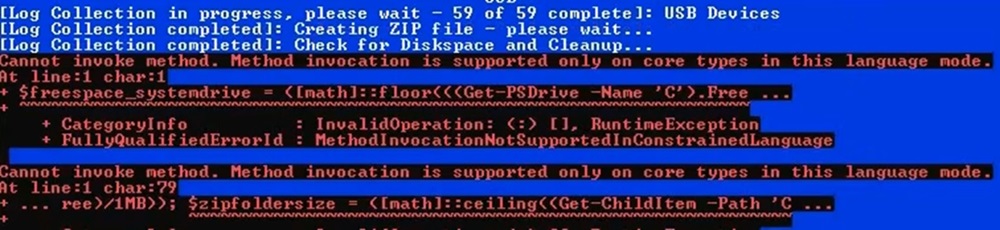
- 使用者在 .zip 程序期間可能會遇到下列錯誤。若將 Windows PowerShell 設為以限制模式
- 因應措施:
- 出現錯誤訊息時,使用者可停止記錄收集器,並從 %appdata%\ServiceTag 收集記錄
- 使用者可暫時將模式從 ConstrainedLanguage 變更為 FullLanguage,以執行記錄收集器
- 我們已針對此問題為下一版記錄收集器規劃長期因應措施和通知。
- 錯誤範例:
- 使用者在 .zip 程序期間可能會遇到下列錯誤。若將 Windows PowerShell 設為以限制模式
- Windows Defender 擲回 SmartScreen 警告/錯誤
- Cause:
- Windows Defender 和其他安全性應用程式的設計會將無法識別的指令檔視為可疑項目。
- 解決方案:
- 以管理員身分執行記錄收集器
- 調整 Defender 設定,以允許記錄收集器執行
- Windows SmartScreen 文件
- Cause:
- Windows Defender/安全性軟體將其視為木馬
- Cause:
- Windows Defender 和其他安全性應用程式的設計會將無法識別的指令檔視為可疑項目。
- 解決方案:
- 以管理員身分執行記錄收集器
- 調整安全性設定,以允許記錄收集器執行
- Cause:
- 無法透過按下「N」鍵停止 GPResult 記錄建立
- Cause:
- 需要管理員存取權才能停止執行中的程序。
- 解決方案:
- 以滑鼠右鍵按一下記錄收集器並以管理員身分加以執行,來執行記錄收集器。
- Cause:
受影響的產品
Dell All-in-One, Dell Pro Max Micro, Dell Pro Max Slim, Dell Pro Max Tower, Dell Pro Micro, Inspiron, OptiPlex, Vostro, XPS, Dell Monitors, Dell Plus Monitors, Dell Plus, Dell Pro, Dell Pro Max, Inspiron, Latitude, Vostro, XPS, Fixed Workstations
, Mobile Workstations
...
產品
Dell Pro Slim, Dell Pro Tower, Dell Slim, Dell Tower, Dell Pro Plus Monitors, Dell Pro Plus, Dell Pro Premium, Dell Pro Rugged附件
文章屬性
文章編號: 000203831
文章類型: How To
上次修改時間: 14 7月 2026
版本: 30
向其他 Dell 使用者尋求您問題的答案
支援服務
檢查您的裝置是否在支援服務的涵蓋範圍內。