PowerProtect:由於儲存裝置密碼不符,導致災難回復備份失敗
摘要: PowerProtect Data Manager 災難回復備份失敗,錯誤訊息「5075,錯誤:使用者沒有足夠的存取權限,使用者沒有足夠的存取權限」
本文章適用於
本文章不適用於
本文無關於任何特定產品。
本文未識別所有產品版本。
症狀
- PowerProtect Data Manager 伺服器災難回復 (ServerDr) 備份失敗
- 錯誤代碼:
ASDR0001(此錯誤代碼並非此問題獨有) - 系統工作錯誤:
ASDR0001: Server Disaster Recovery backup was unsuccessful on host <PPDM_Name> to storage target <DD_Name>.

The Server Disaster Recovery backup cannot be completed.

 Make sure that the Protection Storage and the shared storage device paths are accessible from the PowerProtect Data Manager appliance.
記錄中的錯誤 serverdr.log
記錄位置: /var/log/brs/
2025-07-02T14:30:05.168Z WARN [] [https-jsse-nio-8456-exec-2] [][][][TRACE_ID:b43e187f91d94e6b][] [c.e.d.e.c.s.c.d.d.DDBoostManagerDao.exists(413)] -  Connection failure detected: DD_ERR_PERM
2025-07-02T14:30:05.169Z INFO [] [https-jsse-nio-8456-exec-2] [][][][TRACE_ID:b43e187f91d94e6b][] [c.e.d.e.c.s.c.d.d.DDBoostManagerDao.refreshConnection(50)] -  Refreshing connection
2025-07-02T14:30:05.215Z INFO [] [https-jsse-nio-8456-exec-2] [][][][TRACE_ID:b43e187f91d94e6b][] [c.e.d.e.c.s.d.s.i.DdBoostSdkServiceImpl.getConnection(132)] -  Attempting to connect to <dd_hostname>
2025-07-02T14:30:10.626Z INFO [] [https-jsse-nio-8456-exec-2] [][][][TRACE_ID:b43e187f91d94e6b][] [c.e.d.e.c.s.c.s.i.ManifestManagerImpl.reconciliateEsBackupManifestFromDD(442)] -  Exiting method: reconciliateEsBackupManifestFromDD
2025-07-02T14:30:11.201Z ERROR [] [https-jsse-nio-8456-exec-2] [][][][TRACE_ID:b43e187f91d94e6b][] [c.e.d.e.c.s.c.s.i.BackupServiceImpl.lambda$copiesToSdrBackups$0(924)] -  Failure to retrieve id SDR_RECONCILIATE_ES_MANIFEST_FAILED code=500 reason="Cannot reconcile ES ManifestIO. DdboostException: DD_ERR_PERM code=5075 reason="Error Code : 5075, Error : the user has insufficient access rights the user has insufficient access rights" " remediation="none" from domain
2025-07-02T14:30:11.202Z INFO [] [https-jsse-nio-8456-exec-2] [][][][TRACE_ID:b43e187f91d94e6b][] [c.e.d.e.c.s.c.s.i.BackupServiceImpl.lambda$copiesToSdrBackups$0(926)] -  Unable to retrieve 8d161230-0b3a-4557-85a3-f3d21ab2bc92.manifest from domain
如果重新啟動 PowerProtect Data Manager,檢視 ServerDr 備份時使用 系統設定>災難回復>管理備份 會顯示其他錯誤。
500: Exception 'com.emc.dpsg.ecdm.cs.serverdr.ddboost.exception.DdboostException'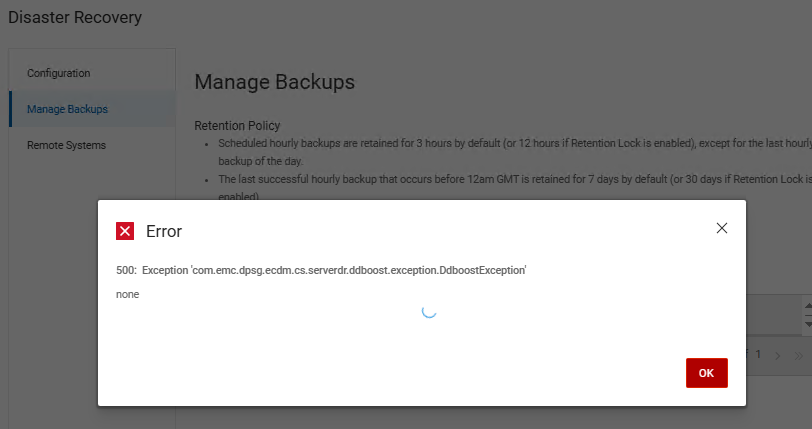
原因
PowerProtect Data Manager 災難回復儲存裝置的儲存單元密碼會自動在 PowerProtect Data Manager 上產生。切勿在 PowerProtect DD 上直接變更此密碼。
此儲存單元密碼是根據 PowerProtect Data Manager 管理員 UI 密碼產生。
變更 PowerProtect DD 上的儲存單元密碼會直接使其與 PowerProtect Data Manager 失去同步,導致災難回復備份失敗。
在密碼不相符的情況下重新開機 PowerProtect Data Manager,會導致 DD boostfs 掛接點失敗,以及啟動時的其他錯誤,如上所示。
解析度
無論是什麼原因導致 PowerProtect Data Manager 中的儲存裝置密碼與 PowerProtect DD 不相符。
更新 DD 上的認證密碼,以符合 PowerProtect Data Manager 中記錄的密碼。
- 使用管理員透過 ssh 連線至 PowerProtect Data Manager。
- 執行以下命令,查看目前記錄的 PowerProtect Data Manager 災難回復儲存裝置密碼。
/usr/local/brs/puppet/scripts/get_sdr_config_credential.py範例輸出:

從 PowerProtect Data Manager UI ->系統設定 ->災難回復,可以看到 PowerProtect Data Manager 災難回復儲存裝置名稱,如下所示。
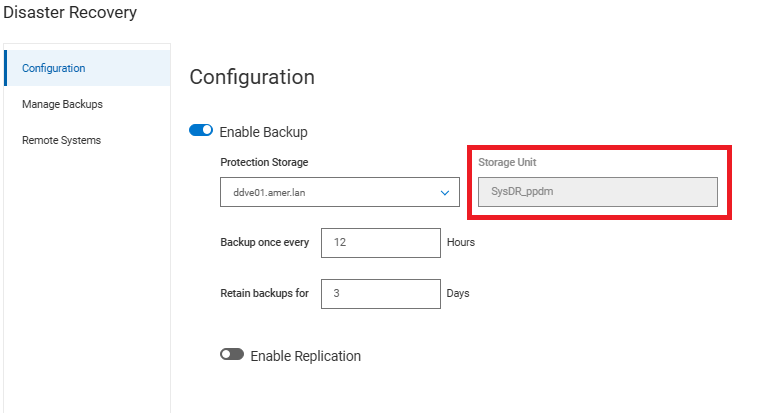
依預設,PowerProtect DD 會記住最近使用的密碼。必須暫時停用此功能,才能將密碼設定為與 PowerProtect Data Manager 相符。
- 透過 SSH 連線至 PowerProtect DD。
- 執行以下命令以檢視目前記住的密碼設定,並記下值。
user password strength show範例輸出:
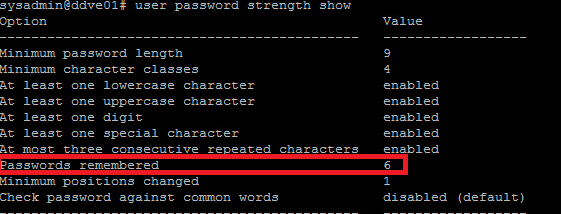
3.b) 執行下列命令,將記住的密碼值設為 0。
user password strength set passwords-remembered 0範例輸出:
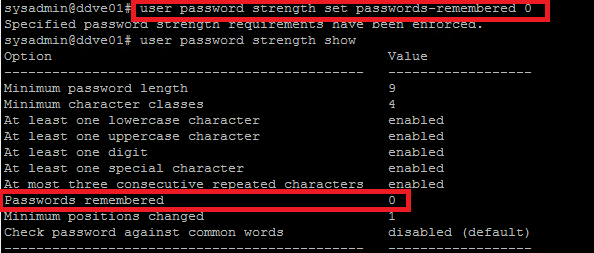
- 將步驟 2 中的密碼停用,然後登入 PowerProtect DD,並以顯示的密碼更新相同的認證。
- 使用 PowerProtect DD Web UI->管理存取->>本機使用者->變更密碼
- 使用 CLI -> 透過 ssh 登入 DD,並使用步驟 2 的使用者名稱和密碼執行下列命令。
使用災難回復儲存裝置使用者名稱更新<your_su_username>
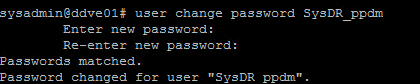
user change password <your_su_username>出現提示時,輸入步驟 2 的密碼。
範例輸出:
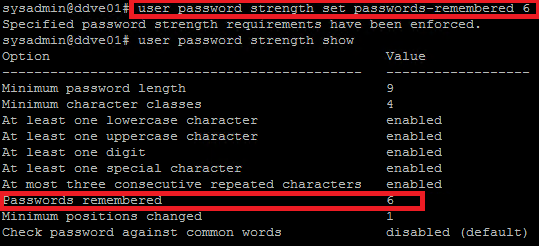
- 如果 PowerProtect DD 值在步驟 3 中變更,請使用步驟 3.b 的命令使用步驟 3.a 中的原始值來重設。
範例輸出:
受影響的產品
PowerProtect Data Manager, PowerProtect Data Manager Software文章屬性
文章編號: 000339984
文章類型: Solution
上次修改時間: 19 2月 2026
版本: 3
向其他 Dell 使用者尋求您問題的答案
支援服務
檢查您的裝置是否在支援服務的涵蓋範圍內。