Data Domain:登錄機碼組態主要支援 啟用 CloudIQ 時,網路安全性不存在
摘要: 執行作業系統 (OS) 8.3.x 及更新版本的 Data Domain 無法啟用「使用 CloudIQ 共用資料」。圖形使用者介面 (UI) 顯示錯誤「登錄機碼 config_master.support.cyber_security 不存在」。 建立新的存取金鑰並停用 directFailoverEnabled 可修正 SupportAssist,但 CloudIQ 仍會停用 (config_master.support.cloudiq_enabled=0)。 ...
本文章適用於
本文章不適用於
本文無關於任何特定產品。
本文未識別所有產品版本。
症狀
觀察到的問題
嘗試啟用 CloudIQ 資料共用失敗。
UI 錯誤
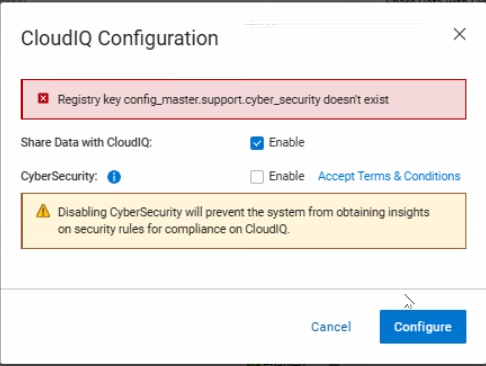
啟用 CloudIQ 時,UI 會顯示以下錯誤:
Error: Registry key config_master.support.cyber_security doesn’t exist
登錄檔設定
config_master.support.cloudiq_enabled = 0 (CloudIQ disabled)- 遺失登錄機碼:
config_master.support.cyber_security
遙測活動
不會將遙測資料傳送至 CloudIQ;的 dd_telemetry_collector 記錄顯示沒有嘗試傳輸資料。
原因
遺失登錄機碼,防止啟用 CloudIQ
CloudIQ 啟用作業失敗,因為需要登錄機碼 config_master.support.cyber_security 不存在於系統登錄中。若缺少此金鑰,會取消在 CloudIQ 組態步驟期間的登錄檔交易,並導致錯誤訊息「Registry key config_master.support.cyber_security doesn’t exist.」
09/29 12:53:42.050013 [14050fa0] sms_cloudiq_set_info_job:(ddr/sm/sms/sms_support.c:3393): Registry key config_master.support.cyber_security doesn't exist
09/29 12:53:42.050045 [14050fa0] ERROR: sms_cloudiq_set_info_job: Aborting registry trasaction
- CloudIQ 和網路安全整合路徑需要此金鑰。
- 當金鑰遺失時,SMS 服務會取消 CloudIQ 啟用要求。
導致登錄機碼遺漏的軟體問題
在全新安裝和升級 DDOS 8.3.x 期間,安裝指令碼不會建立 config_master.support.cyber_security 註冊表項。
解析度
在 PowerProtect Data Domain 上啟用 CloudIQ 資料共用。
先決條件
- DD OS 命令列的管理存取權限
- SupportAssist 必須成功設定並正常運作。
逐步解決方案 (CLI 或 UI)
CLI
- 創建缺少的網路安全註冊表項。CloudIQ 啟用作業需要此金鑰。
reg set config_master.support.cyber_security 0
警示:將值設定為
0 停用網路安全遙測旗標,這是大部分 Data Domain 部署的預設標記。
UI
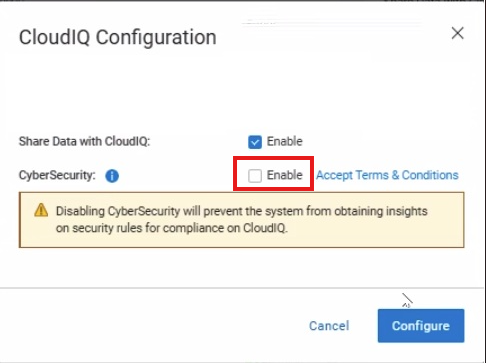
- 在設定CloudIQ期間,選取 網路安全性 選項以啟用。
- 完成配置;這將創建註冊表項。
- 如有需要,請編輯組態並清除 網路安全 以停用。
注意: 如果在完成步驟後仍無法解決問題,請聯絡 Dell 支援。
受影響的產品
Data Domain文章屬性
文章編號: 000420107
文章類型: Solution
上次修改時間: 06 2月 2026
版本: 2
向其他 Dell 使用者尋求您問題的答案
支援服務
檢查您的裝置是否在支援服務的涵蓋範圍內。