PowerFlex:如何在 Debian 型伺服器 (Debian、Ubuntu 或 Proxmox) 上安裝 SDC
摘要: 以下過程說明如何在基於 Debian 的伺服器上手動安裝外部 SDC。 以下程序中的步驟與 Debian 和 Ubuntu 作業系統相關,包括 Proxmox 虛擬環境。
本文章適用於
本文章不適用於
本文無關於任何特定產品。
本文未識別所有產品版本。
說明
擷取 SDC 軟體。
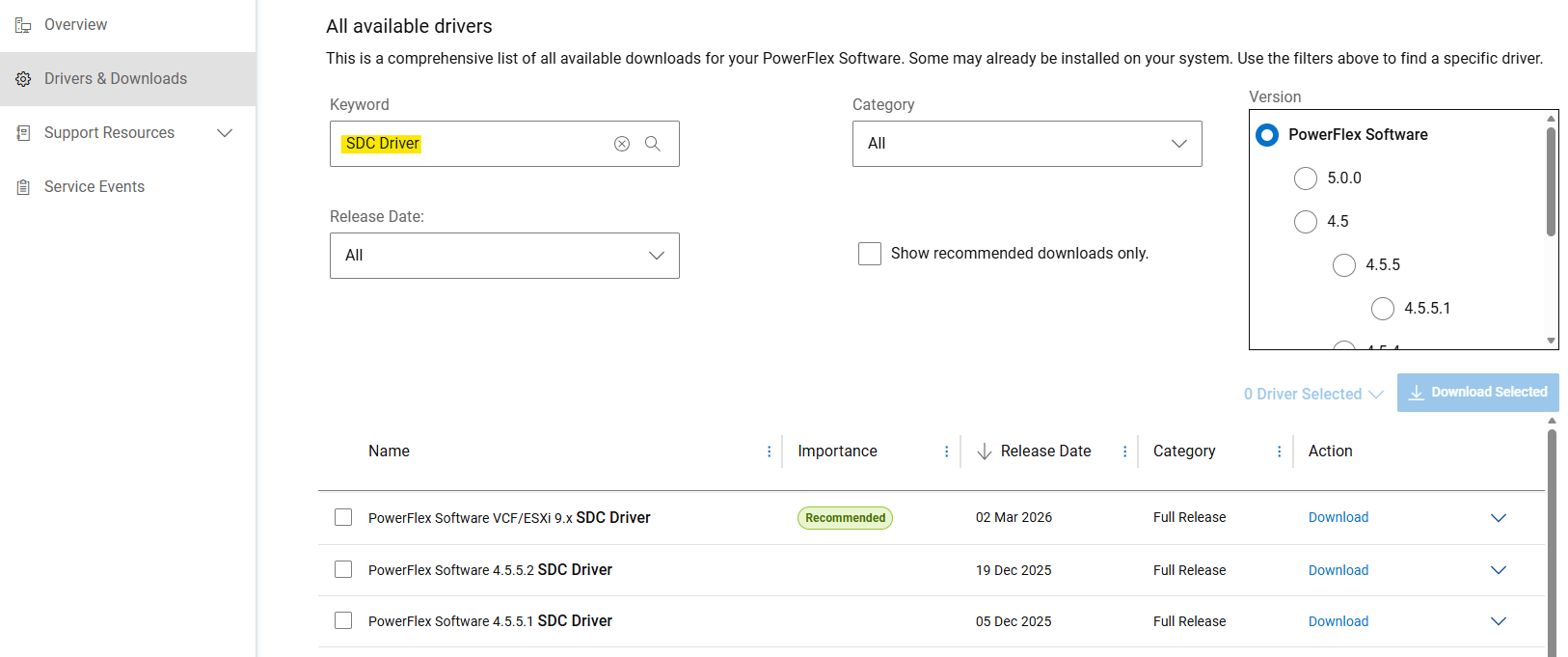
- 從 Dell 支援網站取得手動安裝的 SDC 驅動程式
- 在「驅動程式與下載」區段中搜尋「SDC 驅動程式」作為關鍵字。
- 下載「
PowerFlex_*_SDCs_for_manual_install.zip與要安裝的 PowerFlex 版本相符的檔案。
(SDC 向後和向前相容 PowerFlex 系統版本。請參閱版本資訊)
解壓縮 Debian 型套裝 (.deb)
PowerFlex 元件套件以 .tar 適用於 Debian 型作業系統的檔案。在安裝之前, .deb 套裝必須使用提供的項目解壓縮 siob_extract 公用程式:
- 擷取 SDC
.zip檔案,以取得特定作業系統版本檔案 (來自」PowerFlex_*_SDCs_for_manual_install.zip“存檔) - 檢查完整性 (md5 或 sha256),並為 SDC 充氣
.zipfile - 解壓縮”
EMC-ScaleIO-sdc-*" .tarfile - 解壓縮
.deb包使用siob_extract公用程式
# Extract SDC for Debian 12 (bookworm) / Proxmox VE 8.x
unzip PowerFlex_*_SDCs_for_manual_install.zip "*Debian12_SDC.*"

# Check integrity & inflate zip file
cd PowerFlex_*_SDCs_for_manual_install/
sha256sum PowerFlex_*_Debian12_SDC.zip
cat PowerFlex_*_Debian12_SDC.sha256
unzip PowerFlex_*_Debian12_SDC.zip

# Extract .deb package (using `siob_extract` utility)
cd PowerFlex_*_Debian12_SDC/
tar -xvf EMC-ScaleIO-sdc-*.Debian12.x86_64.tar
chmod +x siob_extract
./siob_extract EMC-ScaleIO-sdc-*.Debian12.x86_64.siob
ls EMC-ScaleIO-sdc-*.Debian12.x86_64.deb若為其他作業系統版本,請使用:」*Debian13_SDC*“或”*Ubuntu24.04_SDC*」
在伺服器上安裝 SDC,並將其連接至 PowerFlex。
- 收集 PowerFlex 系統 (或所有 MDM 管理員 IP) 的 MDM 虛擬 IP 位址
- 安裝 SDC 套裝
- 確認驅動程式已載入
MDM_IP="<MDM_IP1>,<MDM_IP2>,..." dpkg -i EMC-ScaleIO-sdc-*.deb
systemctl status scini.service
如果 scini.service 無法啟動,「scini」驅動程式可能與您的核心版本不相容。如果是這種情況,請參閱如何設定 driver_sync (可能需要登入 Dell 支援才能檢視本文) 或隨選編譯。此外, 在 SDC 上使用安全開機 也有一些限制,需要額外的步驟。
請參閱說明文件,以取得建議的部署後工作或將磁碟區對應至 SDC。
受影響的產品
PowerFlex rack, PowerFlex Appliance, PowerFlex custom node, ScaleIO, PowerFlex Software文章屬性
文章編號: 000462918
文章類型: How To
上次修改時間: 12 6月 2026
版本: 3
向其他 Dell 使用者尋求您問題的答案
支援服務
檢查您的裝置是否在支援服務的涵蓋範圍內。