

Unsolved
1 Rookie
•
57 Posts
1
23216
September 11th, 2021 09:00
Aurora R10, BIOS 2.2.1 update, AGESA 1.0.0.6
Good afternoon everyone,
Just noticed the new 2.2.1 BIOS update for the Aurora R10.
This is the list of fixes :
------------------------------------
Fixes & Enhancements
Fixes:
- Fixed the issue where the BIOS cannot be updated using Dell SupportAssist.
Enhancements:
- Added Dell SupportAssist | Pre-Boot System Performance Check warning message that is displayed while booting after Real Time Clock (RTC) reset.
- Enhanced the stability of the system after installing an XMP device. It is applicable on systems with BIOS versions earlier than 2.2.1.
- Reduced the fan noise when the system is idle.
- Fixed the issue where the BIOS cannot be updated using Dell SupportAssist.
Enhancements:
- Added Dell SupportAssist | Pre-Boot System Performance Check warning message that is displayed while booting after Real Time Clock (RTC) reset.
- Enhanced the stability of the system after installing an XMP device. It is applicable on systems with BIOS versions earlier than 2.2.1.
- Reduced the fan noise when the system is idle.
----------------------------------------
So nothing really interesting, I guess the motherboard will still report itself wrongly to cpuz as a x570. I'll eat the bullet and update it to check the AGESA (we can always dream). Same AGESA, my hopes are down again.
Before :
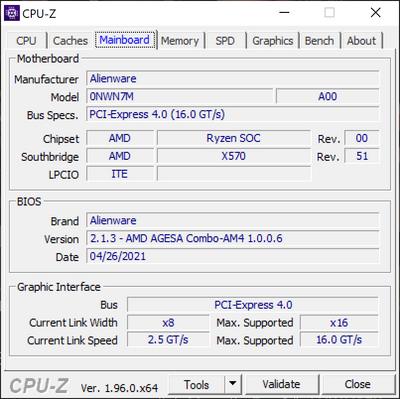
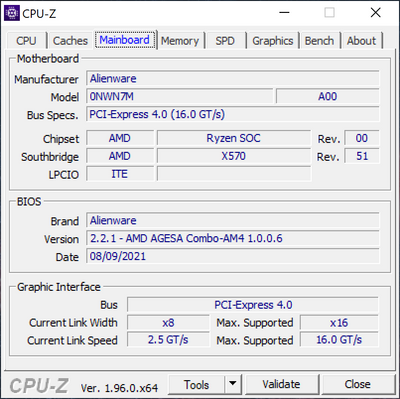
I ll update my post with the new version.
After update:
No Events found!
Factionless183
9 Posts
0
September 13th, 2021 14:00
I also no longer have CPU Freq/temp/usage after the update.
5900X and RTX3080
Gives another data point to tc5's theory?
Redd_Army_of_One
20 Posts
0
September 15th, 2021 09:00
AMD supports the 3000 series now. I'm interested to see what Dell's excuse is now.
AMD Smart Access Memory | AMD
"System requirements for Smart Access Memory supports all 3000 Series Processors (except for the Ryzen 5 3400G and Ryzen 3 3200G)"
Redd_Army_of_One
20 Posts
1
September 15th, 2021 09:00
I lost those with the last update. I just removed Alienware FX and installed Ryzen Master and MSI Afterburner.
GuillaumeA
1 Rookie
•
57 Posts
0
September 15th, 2021 11:00
It will be simple : "We don't support it"
The only way would be it involved AMD in this, and make them force Dell to act.
Jayples
6 Posts
1
September 15th, 2021 15:00
I heartily recommend avoiding this update. I have a brand new Aurora Ryzen R10 not yet a month old and this update, which I was prompted by the Dell bloatware to install, has soft-bricked my PC.
Everything gets as far as the the Alienwware screen and the circling dots and stays there forever.
Tried everything from from hard reset, resetting the BIOS, following all the FAQ and customer service stuff. Downloaded the recovery tool, windows reinstall install media, cmos etc. Can't get past the post boot screen with the Alienware logo. Just the same every time - dancing circle of purgatory.
Avoid, avoid, avoid.
Vanadiel
8 Professor
•
7.1K Posts
•
29.6K Points
0
September 15th, 2021 15:00
I am thinking the answer will be the same. NVidia does not support resizable BAR on Ryzen 3000 processors. I am waiting patiently until Nvidia does.
Vanadiel
8 Professor
•
7.1K Posts
•
29.6K Points
0
September 15th, 2021 16:00
I would suggest contacting @DELL-Cares to ascertain warranty status of your new system. They will help you with any warranty issues.
rdigs31789
1 Rookie
•
12 Posts
0
September 15th, 2021 17:00
I figured I would add in my two cents. Installed BIOS 2.2.1 last night and noticed today that my CPU is no longer reporting temperatures or frequency in AWCC. I have a Ryzen 7 5800X with an RTX 3080. Seems to be the 5000 series after all. Little bit relieved that it's not a hardware issue and seems to be related to the update to be honest.
heauxingpains
5 Posts
0
September 15th, 2021 22:00
I'm also having the issue of ACC not showing my CPU temps/usage/frequency after updating BIOS to 2.2.1. Whenever I restart my computer, I also get an error message from ACC that states that my OC profile is invalid and it cannot apply it. I am just running the stock "Overclock 02" profile like always. I have tried disabling and reenabling the OC profile in both ACC and BIOS, but I still get this error message. I'm assuming it has something to do with ACC not displaying any of the CPU info. Hopefully Dell fixes this with an update to ACC and/or BIOS soon. Ryzen 9 5950x and RTX 3090, if that matters.
tc5
2 Intern
•
54 Posts
1
September 16th, 2021 04:00
When AWCC starts-up, it will validate that any OC profiles enabled have been properly applied. Since AWCC is unable to read the CPU's configuration when running on firmware v2.2.1, AWCC notifies you with the error message. Since AWCC can't read the CPU configuration, seeing the AWCC OC error is expected.
If you want to stop receiving the AWCC error, set your OC profile to "Off".
If you need to use the "Overclock 02" profile, you can manually configure system performance settings via the BIOS menu. If you need instructions, reply to this thread and I can post steps later.
I'd recommend you—and anyone else experiencing this issue after updating to firmware v2.2.1—send a DM to @DELL-Cares and describe the problem. At minimum, this should make Dell's Support Team aware of the issue and they can notify the firmware team. I'll be submitting a bug report to Dell next week about this.
As for a fix, it's possible that another firmware BIOS revision or a future update to AWCC or the OC Controls (OCC) software could resolve this—i.e., we may need to be on the lookout for a software update to AWCC and OCC, too.
heauxingpains
5 Posts
1
September 16th, 2021 10:00
I just let Dell Support have remote control of my PC for 2 hours. They uninstalled and reinstalled AWCC, and had me change settings in my BIOS multiple times. The issue still remained, as expected.
I insisted that this can only be fixed by another BIOS update or an AWCC update because clearly AWCC is not seeing the CPU readouts after BIOS 2.2.1. He told me that I needed a new motherboard and a clean install of Windows. Hahaha! NO SIR!
I told him about this discussion and a similar discussion on Reddit and provided links to show that others are having this same issue. I said, "Surely you don't think that ALL of these other people are also going to need new motherboards. My R10 is only a month old, and the motherboard is just fine. This is a software issue, not a hardware issue. The AWCC software is not properly interfacing with the new BIOS and that's that."
He said that he would escalate the issue and opened a ticket.
Ltldev
21 Posts
0
September 17th, 2021 03:00
To me, Dell had suggested to downgrade the BIOS. Has anyone tried that?
Vanadiel
8 Professor
•
7.1K Posts
•
29.6K Points
1
September 17th, 2021 04:00
I don't believe that is possible. You could try, but I do not believe it will work because it goes from version 2.1.3 to version 2.2.1. Since you cannot downgrade to version 2.1.3 or earlier once you upgrade to version 2.1.3 or later, I don't think a downgrade is supported.
Once the BIOS is upgraded to version 2.1.3 or later, you cannot downgrade the BIOS to version 2.1.3 or earlier. BIOS downgrades are restricted when there are security updates and important fixes with earlier versions that impact the functionality of the system.
Ltldev
21 Posts
0
September 17th, 2021 05:00
This is my message from them:
Let's try to downgrade the BIOS and see if that helps.
...so I asked if it was safe to do so, they responded:
Yes, you can try.
Ltldev
21 Posts
0
September 17th, 2021 06:00
yea, I can do without an experiment