


Unsolved
1 Rookie
•
57 Posts
1
22856
September 11th, 2021 09:00
Aurora R10, BIOS 2.2.1 update, AGESA 1.0.0.6
Good afternoon everyone,
Just noticed the new 2.2.1 BIOS update for the Aurora R10.
This is the list of fixes :
------------------------------------
Fixes & Enhancements
Fixes:
- Fixed the issue where the BIOS cannot be updated using Dell SupportAssist.
Enhancements:
- Added Dell SupportAssist | Pre-Boot System Performance Check warning message that is displayed while booting after Real Time Clock (RTC) reset.
- Enhanced the stability of the system after installing an XMP device. It is applicable on systems with BIOS versions earlier than 2.2.1.
- Reduced the fan noise when the system is idle.
- Fixed the issue where the BIOS cannot be updated using Dell SupportAssist.
Enhancements:
- Added Dell SupportAssist | Pre-Boot System Performance Check warning message that is displayed while booting after Real Time Clock (RTC) reset.
- Enhanced the stability of the system after installing an XMP device. It is applicable on systems with BIOS versions earlier than 2.2.1.
- Reduced the fan noise when the system is idle.
----------------------------------------
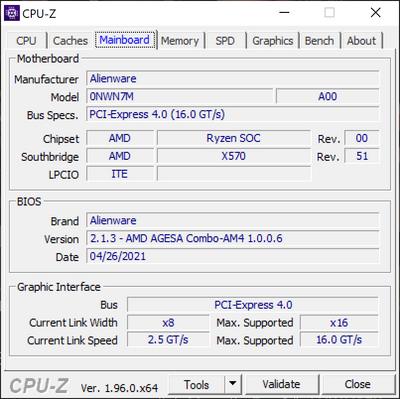
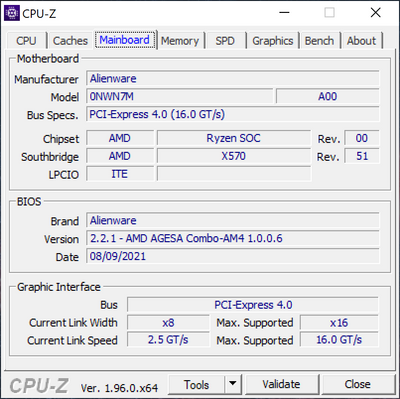
So nothing really interesting, I guess the motherboard will still report itself wrongly to cpuz as a x570. I'll eat the bullet and update it to check the AGESA (we can always dream). Same AGESA, my hopes are down again.
Before :
I ll update my post with the new version.
After update:
No Events found!
tc5
1 Rookie
•
54 Posts
1
October 22nd, 2021 10:00
Yeah, the way that AWCC is distributed in the Microsoft Store comes with caveats because AWCC is what Microsoft calls a "UWP device app".
Note that the "USB Input Device" at the bottom of the list is the Alienware FX lighting controller on the Aurora R10, but it does not have any associated HSAs. So, if you do not have any other Alienware hardware components the Microsoft Store will not install AWCC—and you'd need to install AWCC from Dell's support website.
You can get to AWCC in the Microsoft Store if you have a direct URL, but you may run into problems installing AWCC from the Microsoft Store unless you've got a driver that uses AWCC as an HSA.
Yeah, I noticed that AWCC v5.4.7.0 does not appear in the list of drivers for the R10 from Dell.
Greg100
2 Intern
•
133 Posts
0
October 22nd, 2021 11:00
Thanks, sounds like good advice
Greg100
2 Intern
•
133 Posts
1
October 22nd, 2021 11:00
My update was automatically installed by the Microsoft Store as well and after rebooting, offered to install the updated OC software, which I did. Rebooted again. CPU temp and frequency seem to be working again normally on my R10 5900X. All my previous settings were saved. I agree did not see it on the drivers download list from Dell.com
fbm482
4 Posts
0
October 22nd, 2021 11:00
Thanks! I have an AW keyboard so will probably see something when Dell releases the version for the R10.
fbm482
4 Posts
0
October 22nd, 2021 12:00
So I hadn't had the AW keyboard and mouse connected...I plugged in and on next reboot the Dell update popped up stating that the OCC tools needed to be updated. Let that install and restart and now my CPU temp/speed is working again.
tc5
1 Rookie
•
54 Posts
1
October 22nd, 2021 13:00
Nice—glad you were able to get the software updates!
Makaniche
9 Posts
0
October 23rd, 2021 12:00
Has anyone tried to to run CPUID HWMonitor at the same time as the fusion tab?? I'm getting some big discrepancies of CPU temp readings... Fusion showing temps that are up to 6 degrees lower!!! (I used to run both before, prior to the Fusion sudden fail, and it was always pretty much the same)
Am on R10 Ryzen 9 5950X
I also have a Area 51m R2 with I9 10900k, and Fusion (also just updated) is pretty much reading CPU temps that are aligned with CUPID HWMonitor when running at the same time... so could there be a problem with Fusion not getting proper readind from the AMD??
Makaniche
9 Posts
0
October 24th, 2021 06:00
Ok... so... additionally to the issue I explained in my previous post, I'm also getting some really wild fan speeds... when I set it to Performance, the front fan comes in insanely loud suddenly, even though the Fusion tab says it's only set to 20%...
I really think something is messed up again with Command Center... When I set thermals to "quiet" the top fan tab says it's set to 47% which it is obviously not as it would be rather loud and it's very quiet... As a test I created a custom setting with an offset to 47% and it's so loud l you can hear it in the other room. So I think the settings are not managing the fans properly at all. Right now I'm thinking that the previous faulty version was actually better!
tc5
1 Rookie
•
54 Posts
1
October 24th, 2021 14:00
Yes—I see discrepancies between the CPU metrics reported by AWCC and HWiNFO64.
On my machine, the differences in the values are expected because AWCC and HWiNFO64 sample CPU performance metrics at different points in time. In the screenshot (below) AWCC samples CPU performance at an interval of 1 second, and I have configured HWiNFO64 to sample CPU performance metrics at an interval of 0.25 seconds.
From my experiences with AWCC v5.4.7.0, I doubt that AWCC is having problems reading AMD CPU performance metrics.
tc5
1 Rookie
•
54 Posts
0
October 24th, 2021 14:00
Here's what fan behavior looks like on my R10 when thermals in AWCC are set to "Performance" under a CPU load. In the example (below), Horizon Zero Dawn is compiling optimized shaders.
Below are fan speeds from my R10 when the "Performance" and "Quiet" thermal profiles are active.
IMHO, I think that you're presuming that 47% should be near to half of the fan's Revolutions Per Minute (RPM) range. You could try creating a fan curve to see the relationship between %-fan speed in AWCC and fan RPM as reported by HWiNFO64 on your R10.
tc5
1 Rookie
•
54 Posts
1
October 24th, 2021 15:00
When I set the top fan offset to 47%, the top fan will run at 67%.
From what I can tell, the offset setting for fans changes fan speed behavior as follows:
Alienware provides very little documentation about how any of the settings in the "Advanced" tab are supposed to work. If you're going to configure an offset or smooth line setting for a fan, you'll probably have to observe how those different fan settings affect fan behavior under different CPU / GPU loads.
Makaniche
9 Posts
0
October 25th, 2021 12:00
Thanks so much for taking the time to post such detailed explanation, that is really great. I'm going to check on that and to some more testing on my machine...