

Unsolved
64 Posts
0
4325
March 3rd, 2023 13:00
Aurora R10, Ryzen 7-5800, RTX 3080
My used (like new) Aurora arrived today from Amazon. It's clearly an open box but it's as advertised with all the right components (as far as I have checked) but haven't powered on yet.
My plans for upgrades are:
1. An extra stick of RAM to go dual channel mode (or buy a pair of 2 new sticks)
2. Change fans for quiet ones if it's too noisy
Here's some pics =


0 events found
No Events found!
tmawson
64 Posts
0
March 11th, 2023 05:00
Thanks Professor. As an EE, I was aware of the logarithmic scales but what does the 'A' mean in dB(A)? I am also slightly deaf (high frequency hearing loss from my time n the RAF) so I am less bothered by high frequency noise. Travelling right now but will get home tomorrow and work on the updates to my system next week. All the stuff (RAM, fans) I ordered has arrived at home now so I should be good for the job
ProfessorW00d
6 Operator
•
2.4K Posts
•
4 Points
0
March 11th, 2023 09:00
dB(A) is an A-weighted decibel scale that gives higher values to sounds in the frequency range that can be detected by the human ear. Good luck with your fan project! Since it may be easier to do the push/pull config with the AIO cooler removed, consider having some good thermal paste on hand.
tmawson
64 Posts
0
March 15th, 2023 04:00
Update: Currently my wife and I are sick with annoying head colds (not Covid, at least according to our home tests) so not getting much done.
The used - like new LG Ultragear 2K monitor from Amazon was a bust, hooked it up and - nothing, dead, bereft of picture, it does not work. So it's been RMA'd and another is on the way. I plugged in a 4k 65 Hz monitor yesterday and installed Borderland 3 which I played on Ultra at 4K and got really good frame rates - at least they seemed smooth and playable to me which they weren't on my old Radeon R290 gaming PC. The reason for holding back on Mods is that I want to thoroughly test the R10 to make sure it's a good one before modifying as it would be a huge pain to un-modify it if I had to send it back.
I wanted to track what the pre-Mods fans and CPU temps were on the R10 while I played but couldn't find where that screen was in the Alienware menus. However, the fans did crank up significantly to make me want to swap them for the Nocura ones. I did run the free Time Spy 3DMark test yesterday and got frame rates of 85 - 110 and a 3D score of 17,000+. Time SPy renders at 2560 × 1440 resolution, the CPU got up to 65 C in those tests and the fans were running fairly hard. I want to do some objective scored tests before I upgrade RAM and fans. Maybe I'll get to that today.
ProfessorW00d
6 Operator
•
2.4K Posts
•
4 Points
0
March 15th, 2023 05:00
My rig is older so the version of AWCC will be different, but my fan speeds and temp readings are under the Fusion tab, then click the thermometer for Thermal Profiles. I hope you and your wife get to feeling better. (click photo to embiggen)
tmawson
64 Posts
0
March 15th, 2023 15:00
Well I played Borderlands 3 in windowed 2K today and the rendition is really good (which I would expect) although the fans cranked up and got noisey. Then I had a BSOD which is what I am trying to get past before doing any physical upgrades. So then I ran the Dell Update utility (WIndows 11 is already 100% up to date) which applied 7 updates including a full BIOS update. That's where I'm at - next I'll try to get the AWCC showing temps and then try running more Borderlands 3 in windowed mode so I can watch temps.
JohnnyRamone
1 Rookie
•
118 Posts
0
March 16th, 2023 10:00
Try the OC1 profile (that will set correct speed and timings for your aftermarket memory) and make sure that voltage is set to 1.35V.
tmawson
64 Posts
0
March 16th, 2023 10:00
Hmmm, another BSOD today so I'm looking for help; here's what happened...
I checked the Event log this morning and found that there was a report of a memory HW error in there so I removed the 1x16G Kingston stick and fitted 2x16G Crucial sticks in the 2 white slots. On reboot I was taken into the BIOS (as expected) and confirmed that it saw 32G and that the speed was 3200. I also saw that, under the Advanced > Performance Options, all I see is:
Overclocking Features: Enabled
Memory: Auto
But, thinking that the Overclocking might be causing the issues, I tried that drop down but it doesn't work so I'm sort of stuck on O'Clocking 'Enabled'
I ran Borderlands 3 in windowed 2K mode and monitored the CPU and GPU temps, both were maxing out around 75 C but it BSOD'd on me while playing - with the new RAM fitted.
Back in the BIOS, I was able to turn Overclocking to 'Disabled' by going to Optimized Defaults. That's where I'm at now and testing. Thoughts:
1. It could be the Borderlands 3 game that's the issue
2. Not sure if the temps are too high and that is what's causing the BSODs but, if I have to return this PC, I don't want to modify the fans.
Any thoughts or suggestions on what to try next?
tmawson
64 Posts
0
March 16th, 2023 11:00
Best as I can tell, there's no options in the BIOS (2.4.0) that seem to offer an 'OC1' profile. Even when I load defaults and then am able to select Overclocking to 'enable', changing the Memory from 'Auto' to 'Custom' reveals a screen of voltage and timing settings but nothing else. So far, I have been unable to find how to run AWCC to see the black window with the temp gauges etc. I could go into the custom RAM settings and check the voltage there, is that what you suggest Johnny?
ProfessorW00d
6 Operator
•
2.4K Posts
•
4 Points
0
March 16th, 2023 11:00
Try different games to see if you get BSOD. Game with your side cover off and see if that improves CPU & GPU temps. I don't know anything about that game, so I don't know what to think of 75C. Try Cinebench 10 minute CPU multi-core stress test for CPU temp (side cover on & off). I don't recall the AMD equivalent of Intel XTU, but if you can find that it may provide more information as to what, if anything, is throttling your CPU.
tmawson
64 Posts
0
March 16th, 2023 11:00
Looks like my RAM is running at 1.2V according to CPU-Z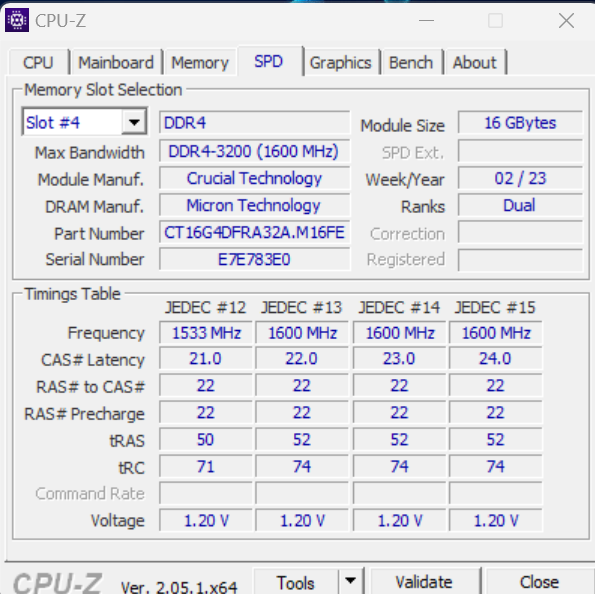
ProfessorW00d
6 Operator
•
2.4K Posts
•
4 Points
0
March 16th, 2023 12:00
Do you have AWCC installed on yourR10? The window is only black because I have selected 'Dark Mode'. It can also be white.
ProfessorW00d
6 Operator
•
2.4K Posts
•
4 Points
0
March 16th, 2023 12:00
No XMP profile?
This is the AMD equivalent of Intel XTU I was thinking about Ryzen Master
Vanadiel
8 Professor
•
7.1K Posts
•
29.6K Points
0
March 16th, 2023 12:00
No, that is telling you the SPD profiles stored in RAM. That indicates the 1600 Mhz profile should be running at 1.20 Volts.
For the actual memory stats you have to go to the Memory tab and see what it is running at. For the voltage you might have to use HWInfo64, but I am not sure if it can read the actual memory voltage on an R10.
JohnnyRamone
1 Rookie
•
118 Posts
0
March 16th, 2023 12:00
Ok the memory has quiet slow timings. Usually 3200Mhz DDR4 aftermarket memory (like Crucial Ballistix) needs 1.35V, the oem-memory needs 1.25V at this speed, your 3466Mhz oem needs 1.35V too. You can change the settings in the memory OC (XMP).
tmawson
64 Posts
0
March 16th, 2023 15:00
I loaded Ryzen Master; so are the settings you're suggesting in Ryzen Master?