

Unsolved
This post is more than 5 years old
6 Posts
0
75277
March 11th, 2013 06:00
Alienrespawn - why does my backup option grayed out?
Hi
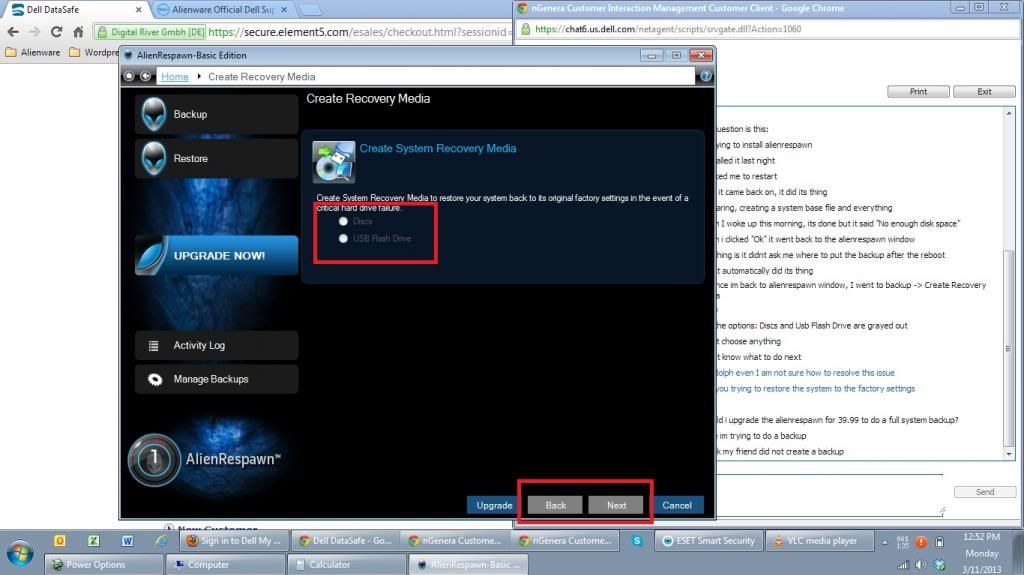
I am the second owner of my m11x r2 and warranty is now expired. I bought this from a friend that after using it for a few months, he reliazed that the 11.6in screen is too small for him so he bough a m17x. The 11.6in screen with i7 engine is just what i wanted. Now, I havent had a single idea that there are such thing as Alienrespawn in this laptop until recently AlienAutopsy popped out and asked me to run some hardware tests and I saw the "Alienrespawn" option. Its wasnt even installed so I installed it, read all about it and now Im ready to do a backup. When I clicked backup to start the backup process, heres what I saw:
As you can see I cant even select the destination of my backup because its grayed out. I contacted chat support and conveyed my experience and asked them if do I have to pay the $39.99 upgrade just to make it work and the agent said no. "It should wont even without paying" she said. Even she doesnt understand why its grayed out.
Now, I read some more and found out there should be a partition drive that holds the recovery data. I dont find it here. My friend must have deleted it. But does that mean if he deleted it, I can no longer create backups hence the grayed out options?


DELL-Kiran K
6 Operator
•
2K Posts
0
March 12th, 2013 03:00
Hi copyl3ft,
Apologize for the inconvenience. Ideally with an AlienRespawn Basic files backup option is unavailable. You may use the below link to get more information on this:
http://dell.to/13T6bK6
If you have further questions do reply to the same post.
copyl3ft
6 Posts
0
March 12th, 2013 10:00
Hi Kiran,
Thank you for the reply, sir. As per the link you gave me, it says:
"AlienRespawn Basic: Comes factory installed in your new Alienware Computer. This Dell/Alienware-branded software will allow customers to burn their own recovery DVD's (or Blu-Ray discs if they have the required hardware) and on USB external devices (USB Optical Drives and USB Flash Drives). Customers have the option to preserve their data (files/folders) during the emergency recovery process."
Actually, what I really wanted to do is just the part:
"to burn their own recovery DVD's and on USB external devices (USB Optical Drives and USB Flash Drives)"
... thats why I was puzzled that the options are grayed out because thats basically what the Basic version can only do which is just what I want to achieve right now. Now dont get me wrong, paying the $39.99 is not a problem for me as long as Ill achieve goal -- to create a dvd or usb backup of my system. Im just afraid that after paying $39.99 Ill be left with a still grayed out backup options and very frustrated.
DELL-Kiran K
6 Operator
•
2K Posts
0
March 13th, 2013 04:00
Hi copyl3ft,
Apologies, I thought you were just trying to back up your files and folder. Looking at the picture it doesn’t seem that any option is selected. I request you to click on disc or USB flash drive and insert the desired media to check if the next or back button gets highlighted.
copyl3ft
6 Posts
0
March 13th, 2013 10:00
Hi Kiran,
Here, this is what I did:
1. I opened Alienrespawn
2. Clicked Backup
3. Click Create Recovery Media
4. Clicked "Disk" and "USB Flash Drive" options but both of them are NOT Clickable
Thank you
DELL-Chris M
Community Manager
•
56.9K Posts
•
232.1K Points
0
March 13th, 2013 16:00
copyl3ft,
The basic version can only create backups of the original Dell factory image on the hidden partition. It cannot create a backup of your current OS. If the original owner killed the partition, you must purchase the Premium version to create the image, then burn it to DVDs.
copyl3ft
6 Posts
0
March 19th, 2013 11:00
Thank you Chris. Thats what I wanted to know. Okay then Ill upgrade to a Premium Version then Ill update this post on what happens.
copyl3ft
6 Posts
0
March 28th, 2013 04:00
Hi Chris,
Ive purchased the Premium version of Alienrespawn. I can now do the full system backup. However, everytime I click "Backup" it shows me this:
If I click "Create Recovery Media", it will show me this:
I noticed in My Computer that its showing the maximum capacity of my HDD is just 334gb but I know it should be 500gb. So I double checked my system and heres what I saw:
Let me correct my earlier statement... I do have a Recovery Partition. Its just that I dont know why Alienrespawn wont let me create a recovery media so I can restore it to factory default or something...
copyl3ft
6 Posts
0
October 1st, 2013 11:00
Chris? Any update on this? My laptop is already acting up right now and a restore will be very handy at this point. Tnx
heartnotsubasa
14 Posts
0
November 22nd, 2013 19:00
I wanna know this too! This you find a way to fix this? I'm having the same problem. I can't click either usb or disc. PLEASE HELP!
Silhouet
12 Posts
0
October 22nd, 2014 20:00
Wow - still no answer on this a year later!!!! I've been a long time alienware customer. I own 7 different laptop versions. I have this same problem - even after upgrading to premium. The main drive went out on my system and Dell had a tech come to the house and put in a new SSD. She got everything up and going and it looks great! Service was awesome. But I can NOT create recovery media. Why did I purchase the upgrade if I can not do something as simple as creating a recovery media. incredible.
Tesla1856
10 Wizard
•
17.6K Posts
•
70.4K Points
0
October 22nd, 2014 22:00
Maybe Dell will answer.
I understand you wanting it to work since you spent money on it, but I never had any luck with it.
IMHO, just use Windows Imaging, or a dependable (and supported) 3rd party imaging tool like Acronis or similar.