

7 Posts
0
6378
January 2nd, 2021 15:00
17 R2, SSD/Memory upgrade questions?
I Almost never ask for help with these kinds of things. I've spend 3 days researching the 2 upgrades I would like to do. Just would like someone to confirm or deny what I've gathered from 5 or 6 sources. The SSD is where I have the most confusion. The sata3 stops the pc from taking advantage of the PCIe SSD drive correct?
So I would get the same performance from
ADATA Ultimate Series: SU630 1.92TB Internal SATA Solid State Drive - Newegg.com
As I would
or even getting 2 of
Timetec 1TB 3D NAND NVMe Gen3x4 PCIe M.2 2280 Internal Solid State Drive - Newegg.com
Are the any NVMe SSD that would be worth the extra $? From what I read the understanding I have is that NVMe is way faster but the Motherboard on the 17r2 only offers sata3 speeds so it was a waste?
I Don't really understand the interface difference and don't want to buy the wrong things.
As far a the Memory upgrade going from 8 to 16 GB
Is there really a difference between?
And
Thanks for any and all feed back and Explanations
Alienware 17 R2
Memory: 8 GB
Processor: Intel(R) Core(TM) i7-4710HQ CPU @ 2.50GHz[Cores 4] [Logical processors 8]
Operating System: Microsoft Windows 10 Home
0 events found
JOcean
9 Legend
•
12.6K Posts
1
January 2nd, 2021 15:00
Where the conflict comes in is that per the specs from Dell, you can have either 4 M.2 drives or a 2.5" SATA drive but apparently not both. But both the M.2 and 2.5" drives are SATA interface so an NVMe SSD would not be compatible and a waste of money since you would have to return them. Though the NVMe SSD is faster by far, this video may offer some insight into everyday performance of M.2 SATA drives.
crimsom
7 Technologist
•
6.1K Posts
0
January 2nd, 2021 18:00
Hi @Juggalomayhem
I am still trying to get the answer and apparently the motherboard M.2 connector is SATA III (B key) [Source].
Just like you, have gone full circle only to discover that motherboard is designed to accept only SATA drives.
We have determined that one 2.5" HDD/SSD and four M.2 SSD drives can both be physically installed in the Alienware 17 R2, provided they both have the SATA III interface connector. Now we need to check that BIOS will acknowledge this combined combination.
crimsom
7 Technologist
•
6.1K Posts
0
January 2nd, 2021 16:00
Hi @Juggalomayhem thank you for sharing image. Have rotated image and inserted four arrows where the M.2 cards are installed. Are you saying that your four M.2 slots do not work?
Juggalomayhem
7 Posts
0
January 2nd, 2021 16:00
So we know that the same mother board in my system shipped with both a m.2 and a 2.5 installed working, and have read multiple threads where it is know to work.
Confused on why that is. Is there something I am missing cause from my understanding of how the HD protocols work it is easy for me to assume the owner manual is incorrect.
crimsom
7 Technologist
•
6.1K Posts
0
January 2nd, 2021 16:00
Hi @Juggalomayhem welcome to this user to user forum.
To resolve what is says in the Alienware 17 R2 Manuals and Documents and what is physically in your 17 R2, take the rear panel off and have a look for how many M.2 slots you can see.
Please share a picture. Thanks.
Juggalomayhem
7 Posts
0
January 2nd, 2021 16:00
My 4 M.2 slots are Empty. When I bought the PC there was an upgrade option for a 1TB WD HHD (which is what i currently have) and add 250gb SSD I declined at the time and planned on doing the upgrade in the future. I have also seen other 17R2 with that configuration. My unit
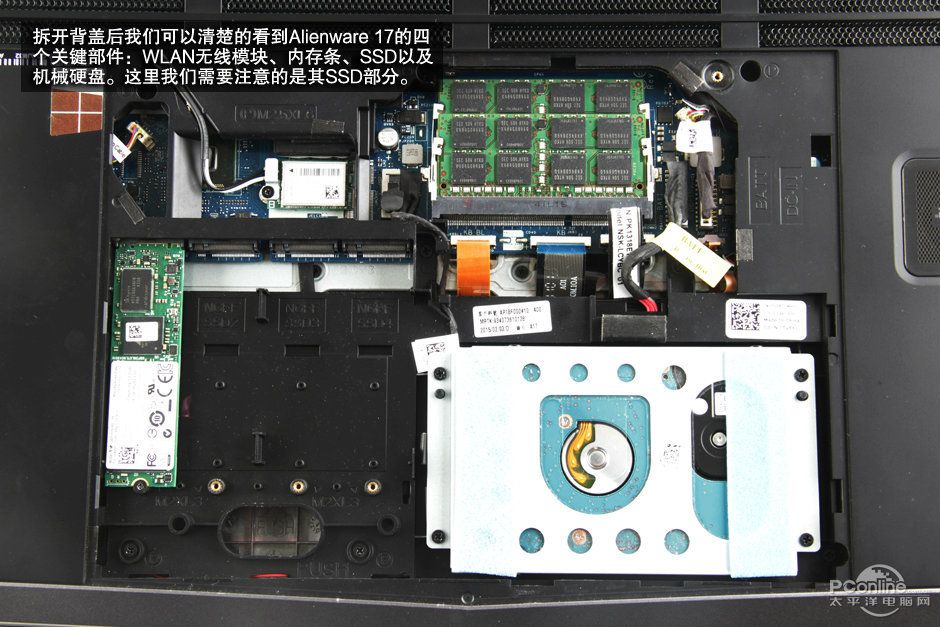 Unit showing both shipped this way from dell
Juggalomayhem
7 Posts
0
January 2nd, 2021 16:00
@JOcean @crimsom
So are these compatible, and Can you run a HDD and SSD?
https://www.newegg.com/western-digital-blue-1tb/p/N82E16820250092?Item=N82E16820250092 SSD
https://www.newegg.com/crucial-16gb-204-pin-ddr3-so-dimm/p/N82E16820148614?Item=9SIAKD3B5T1247 memory
any other different suggestions?
crimsom
7 Technologist
•
6.1K Posts
0
January 2nd, 2021 17:00
Hi @Juggalomayhem have attempted to zoom into image to determine the M.2 connector interface is M keyed. Have a look at How to distinguish the differences between M.2 cards to confirm M.2 connector interface is "M keyed using the PCIe x 4 bus". M.2 connector interface is M keyed, so NVMe card can be installed.
crimsom
7 Technologist
•
6.1K Posts
0
January 2nd, 2021 17:00
Hi @Juggalomayhem
There is one 2.5" bay into which you can install a SATA HDD, or a SATA SSD.
There are four M.2 slots into which you can install a SATA, PCIe, NVMe drives.
Installing OS (C:) onto M.2 NVMe drive is the best option.
Juggalomayhem
7 Posts
0
January 2nd, 2021 17:00
So, that goes against everything that I read. The M.2 Slots on this Motherboard are sata3 so the NVMe wont even work as the PC is lacking the PCIe Protocols for the M.2 port?
Juggalomayhem
7 Posts
0
January 2nd, 2021 17:00
I assume they do, never have used them. There is conflicting information on whether or not you use both a HDD & SSD on my system.
Juggalomayhem
7 Posts
0
January 2nd, 2021 18:00
Hey @crimsom Thank you for taking the time to confirm what i was reading/seeing.
Cool so I'm not losing my mind
I'm going to end up using
https://www.newegg.com/crucial-mx500-2tb/p/N82E16820156175?Item=N82E16820156175
I know Bios will accept it, and in my case there will be no performance difference. No reason to dig any further.
also shout out to @JOcean for helping confirm things aswell
crimsom
7 Technologist
•
6.1K Posts
0
January 2nd, 2021 18:00
Hi @Juggalomayhem would it be possible to zoom into one of your M.2 connectors and share the image?