Hello, the first thing to try is to run the ePSA diagnostic.
Press F12 during POST to enter the Boot Menu, you can select the Diagnostic from here. It will run hardware checks on your system and will hopefully pick up an error but it doesn't always find something.
Hi @Kiraness welcome to this free user to user Alienware laptop discussion forum. This is not Dell Support.
Blue Screen WHEA_UNCORRECTABLE_ERROR appears when there is hardware error and system has shut down suddenly to protect itself from data loss.
At Alienware splash screen, please press and hold down the F12 key. When boot menu appears, use up and down keys to find Diagnostics and press enter key. This is the Dell ePSA application that looks for more hardware problems than POST (Power On Self Test), but still does not test everything. ePSA Pre Boot System Assessment Dell Overview (Official Dell Tech Support) - YouTube
I did the test but it seems that it didn't detect any problems, except for 1 which is battery is disconnected. I disconnected it a while ago (1 month) but I don't think it's the source of my probiems since I had the problem 6 months ago and I only didconnected the battery to see if it was a power related problem. But it persists.
In any case, this diagnostics didn't detect the problem..
Have you tried opening a command prompt and running chkdsk c:/f
Yes, to test on next start.
Restart and allow the test to complete.
Under "System Properties" have you tried to set your "Performance Option" to "Adjust for best performance" and increase your "Virtual Memory" above the recommand amount.
Hi @Kiraness thank you for sharing Windows Reliability Monitor's timeline of events.
At the top, is the reliability timeline, and this system's graph says it is always about 40% (i.e. 4 out of 10). Evidently the system is struggling, its not 100% reliable. There are two regions of Critical events.
Windows not properly shut down could be user holding down the power-on key to force shut down. There were two shut downs on 6/11/2022 at 6:58:08 PM and at 10:06 PM.
The AWCC stopped working, and is also getting critical events on 6/11/2022 at 08:56 AM and 9:59 PM. But there was no technical explanation. At Startup, disable automatic run of AWCC.
In local admin account, please create Restore Point before making any changes to your system, then Restart (not shut Down). Please run System File Checker (sfc /scannow), then Restart. Please repair Windows System Image using DISM, then Restart.
Today, the problem is happening all the time after I turn on my pc and open chrome or a game. PC freezes and I can't do anything except forcing restart manually.
There's something I notice, everytime it freezes, toby eye tracking red light turns off. Is that something that can help define the problem?
I think I have figured it out. It's the hard drive. I disconnected it and tried using my laptop with only the ssd. The problem is not happening anymore. I will try it for another 48h just to make sure. If the problem doesn't happen, I will change my hard drive. Maybe I will by another SSD and use it instead of the hard drive.
After couple of years of struggle, I'm getting back to this post. (btw, putting an ssd didn't fix anythings).. To solve the BSOD problem, I found a solution on internet. Lots of people have reported that the intel UHD graphics 630 that comes in alienware R5 17 had created issues. And yes, when I install windows 10 my PC freezes or gives a BSOD. I boot another time, some thing. After the 2nd time, the PC goes in reparation mode, so I go with safe mode booting (no BSOD this time) and I disable to intel graphics card, restarts and voila... No more crash or BSOD.
BUT, I think the problem is happening again, the freezing is happening during windows 11 update. Now I'm stuck with windows 10, since it will be end of service in 14 october 2025, I really need to move to windows 11. Problem is, pc freezes at 48% during windows update installation in the black screen that says do not turn of your pc. So I have to hard turn it off and when I turn it back on, it undo the update and goes back to windows 10. The freezing has the same behavior as the freezing that happenes with intel graphics unables so I figured, maybe during windows 11 update, it updates intel graphcics and turns it back on? Maybe another issue? I'm really stuck I need your help again...



Kiraness
1 Rookie
•
19 Posts
0
June 21st, 2022 11:00
The problem was from my hard drive. Thank you all for your help.
I will remove the hard drive and I will install an ssd instead.
mattyb3
5 Practitioner
•
1.7K Posts
1
June 8th, 2022 14:00
Hello, the first thing to try is to run the ePSA diagnostic.
Press F12 during POST to enter the Boot Menu, you can select the Diagnostic from here. It will run hardware checks on your system and will hopefully pick up an error but it doesn't always find something.
crimsom
7 Technologist
•
6.1K Posts
1
June 8th, 2022 22:00
Hi @Kiraness welcome to this free user to user Alienware laptop discussion forum. This is not Dell Support.
Blue Screen WHEA_UNCORRECTABLE_ERROR appears when there is hardware error and system has shut down suddenly to protect itself from data loss.
At Alienware splash screen, please press and hold down the F12 key. When boot menu appears, use up and down keys to find Diagnostics and press enter key. This is the Dell ePSA application that looks for more hardware problems than POST (Power On Self Test), but still does not test everything. ePSA Pre Boot System Assessment Dell Overview (Official Dell Tech Support) - YouTube
Please run the Windows Reliability Monitor to look at the event timeline. How to use Windows Reliability Monitor to identify software issues | Dell US
Kiraness
1 Rookie
•
19 Posts
0
June 9th, 2022 10:00
Hi again, thank you for your help.
I did the test but it seems that it didn't detect any problems, except for 1 which is battery is disconnected. I disconnected it a while ago (1 month) but I don't think it's the source of my probiems since I had the problem 6 months ago and I only didconnected the battery to see if it was a power related problem. But it persists.
In any case, this diagnostics didn't detect the problem..
Any other suggestions out there?
crimsom
7 Technologist
•
6.1K Posts
0
June 9th, 2022 14:00
Hi @Kiraness what did Windows Reliability Monitor say?
Kiraness
1 Rookie
•
19 Posts
0
June 11th, 2022 14:00
I have waited for the problem to occur again to share reliability report, here is the result . It looks to me like there is no useful information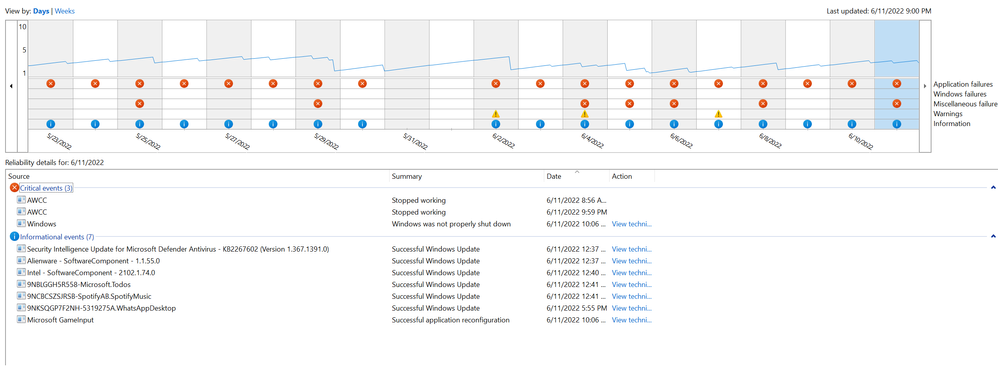
Kiraness
1 Rookie
•
19 Posts
0
June 11th, 2022 15:00
Today it happened twice, both while I was using alt+tab from a game to desktop or from chrome to the game
U2CAMEB4ME
4 Operator
•
6.2K Posts
1
June 12th, 2022 06:00
Welcome to the Dell Community @Kiraness
Have you tried opening a command prompt and running chkdsk c:/f
Yes, to test on next start.
Restart and allow the test to complete.
Under "System Properties" have you tried to set your "Performance Option" to "Adjust for best performance" and increase your "Virtual Memory" above the recommand amount.
Best regards,
U2
crimsom
7 Technologist
•
6.1K Posts
1
June 12th, 2022 10:00
Hi @Kiraness thank you for sharing Windows Reliability Monitor's timeline of events.
At the top, is the reliability timeline, and this system's graph says it is always about 40% (i.e. 4 out of 10). Evidently the system is struggling, its not 100% reliable. There are two regions of Critical events.
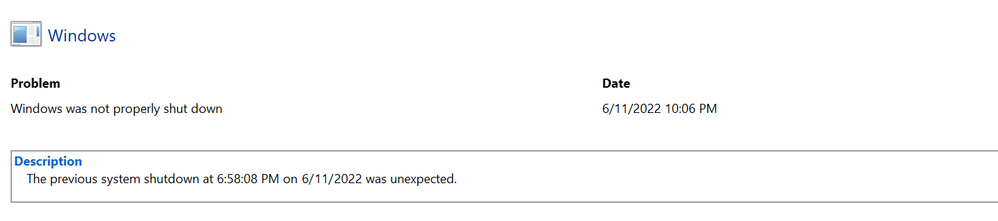
Windows not properly shut down could be user holding down the power-on key to force shut down. There were two shut downs on 6/11/2022 at 6:58:08 PM and at 10:06 PM.
The AWCC stopped working, and is also getting critical events on 6/11/2022 at 08:56 AM and 9:59 PM. But there was no technical explanation. At Startup, disable automatic run of AWCC.
In local admin account, please create Restore Point before making any changes to your system, then Restart (not shut Down). Please run System File Checker (sfc /scannow), then Restart. Please repair Windows System Image using DISM, then Restart.
FixWin for Windows 10: Repair problems and issues in a click (thewindowsclub.com) is a very powerful tool, do not be tempted to use any of its features without first creating a Restore Point.
Kiraness
1 Rookie
•
19 Posts
0
June 19th, 2022 05:00
I scanned by it did nothing.
Today, the problem is happening all the time after I turn on my pc and open chrome or a game. PC freezes and I can't do anything except forcing restart manually.
There's something I notice, everytime it freezes, toby eye tracking red light turns off. Is that something that can help define the problem?
Kiraness
1 Rookie
•
19 Posts
0
June 19th, 2022 14:00
Hello community,
I think I have figured it out. It's the hard drive.
I disconnected it and tried using my laptop with only the ssd. The problem is not happening anymore.
I will try it for another 48h just to make sure. If the problem doesn't happen, I will change my hard drive.
Maybe I will by another SSD and use it instead of the hard drive.
Kiraness
1 Rookie
•
19 Posts
0
September 28th, 2025 17:23
Hello,
After couple of years of struggle, I'm getting back to this post.
(btw, putting an ssd didn't fix anythings)..
To solve the BSOD problem, I found a solution on internet. Lots of people have reported that the intel UHD graphics 630 that comes in alienware R5 17 had created issues. And yes, when I install windows 10 my PC freezes or gives a BSOD. I boot another time, some thing. After the 2nd time, the PC goes in reparation mode, so I go with safe mode booting (no BSOD this time) and I disable to intel graphics card, restarts and voila... No more crash or BSOD.
BUT, I think the problem is happening again, the freezing is happening during windows 11 update. Now I'm stuck with windows 10, since it will be end of service in 14 october 2025, I really need to move to windows 11. Problem is, pc freezes at 48% during windows update installation in the black screen that says do not turn of your pc. So I have to hard turn it off and when I turn it back on, it undo the update and goes back to windows 10.
The freezing has the same behavior as the freezing that happenes with intel graphics unables so I figured, maybe during windows 11 update, it updates intel graphcics and turns it back on? Maybe another issue? I'm really stuck I need your help again...
(edited)