

Unsolved
This post is more than 5 years old
3 Posts
0
69638
May 10th, 2013 07:00
HOW CAN I CHECK ATI RADEON HD 8730M VGA CARD IS WORKING?
HELLO,
i purchased one dell inspiron 15R-3521 w8/15.6/1tb/4gb/2gb ATI RADEON HD 8730M VGA CARD,2 days before.
when i checked dxdiag report ,it showing intel 4000 graphics only
.Also ati Catalyst control center not showing any VGA card or driver name.
But device manager showing driver details.

check my attached pic and give me proper solution
0 events found
No Events found!
DELL-Saharsh K
4 Operator
•
1.5K Posts
0
May 10th, 2013 08:00
Hi Jaison,
Notebook computers with a switchable graphics feature have two graphics processing units (GPUs) - a power-saving, integrated GPU and a high-performance, discrete GPU. Computers with an Intel power-saving GPU and an AMD high-performance GPU combine the low power advantages of an integrated GPU with the maximum performance of a discrete GPU.
By default, a computer with switchable graphics uses the integrated, or power-saving, GPU for most applications. The computer will automatically switch to the discrete, or high-performance, GPU when an application requires more performance. You can configure which applications require the high-performance GPU by selecting the application in the Catalyst Control Center software. When an application is configured to use the high-performance GPU, the computer switches graphics solutions when the application is started or closed.
You may refer to the video below on how to configure AMD Radeon Switchable Graphics:
Hope this helps. Please reply if you have any questions.
CyberMaxX360
272 Posts
0
May 11th, 2013 11:00
@jaison binc
Are you using the Dell provided AMD Video Drivers OR have you gone and update the drivers directly from AMD recently?
Seems to me that you went and updated the AMD Drivers directly from AMD. This may have caused a version inconsistency with the OpenCL drivers.
You may want to read this mrlithium.blogspot.com/.../opencl-hassles-ati-opencl-driver-bug.html
Also, AMD provides a system monitor here -
sites.amd.com/.../overview.aspx
And, please review what Dell Saharsh K posted for a better understanding on how Discrete Graphics works.
In a nutshell the AMD card only provides RENDERING services it is not physically wired to the monitor nor is it wired directly to any output ports (hdmi, dvi, vga), the actual display port technology is still handled by the Intel Integrated GPU.
Cheers
jaison binc
3 Posts
0
May 11th, 2013 11:00
hello sir ,
can you check my attachment,that when i check my VGA with-TechPowerUp GPU-Z
why this error messages coming, ati is working or not? pls give proper sol,otherwise i have to go dell service center. thanks
jaison binc
3 Posts
0
May 13th, 2013 13:00
sir,
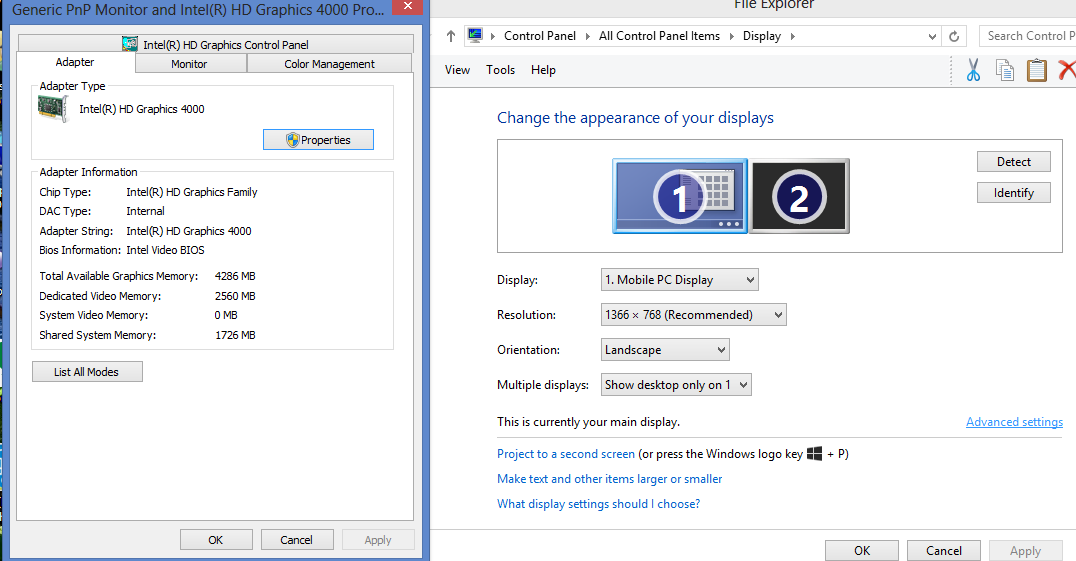
still i cannot identify VGA card with ATI HD 8730M.the system showing only one vga adapter that is intel hd 4000(check attachment).when i checking 2nd display is showing not detected VGA card.
CyberMaxX360
272 Posts
0
May 13th, 2013 15:00
@jaison binc - probably best if you search around on how Discrete GPU's work Keywords for (Enduro, Discrete)
Again, that ATI HD 8730M is not physically wired to any displays or display ports it can only RENDER it can not display, it must pass the Rendering to the Intel HD 4000, the HD 4000 is what is actually connected to the display. Thus, looking at the Generic PNP Monitor you WILL only see the HD 4000 as the Adapter connected to it.
Under Computer Management -> Device Manager -> Display Adapters you should see both Adapters listed.
DELL-Saharsh K
4 Operator
•
1.5K Posts
0
May 14th, 2013 08:00
Hi Jaison,
Please share the screenshot of the Device Manager. Here are the steps to open Device Manager:
@CyberMaxX360: Thank you for the inputs. Appreciate it.