Try a new OEM Dell AC adapter. If that doesn't solve the issue, replace the DC jack in the system (it is replaceable on most systems). If that doesn't solve the issue, the mainboard is bad.
Is the AC adapter correctly recognized or showing unknown? What system model? Did it start at less than 90% charge (some systems won't charge until depleted to a certain level)?
Check the charge settings - there is a setting on some systems that will prevent the battery from charging fully. If that's not set, and the system won't charge beyond 90%, call and exchange the system for one that charges properly.
There is no permanent solution for this. Dell knows this. It is an issue with Dell design.
You always have to unplug the battery and reset everything. This has been an ongoing issue with Dell laptops for 8 years....no solution. I solved it...bought an HP after this issue was unresolvable with my Dell XPS.
1.I cleaned the AC adapter charging pin and also laptop jack both but didn't worked for me
2.I tried disbale "Battery ACPI" driver then turn off the PC and put battery out from the laptop and wait for 1-2 hours then put battery again. this didn;t worked for me.
3.Update windows to latest . this also didn't worked for me.
4.I updated bois to latest using usb tool and code "boisn34945a19.exe/forceit" without 10% battery but on "UPS" also this didn't worked for me.
5.I installed all the latest drivers using "auto update our internet" this also didn't worked for me.
6.Installed Fresh Copy of windows i thought it will just refresh everything but it didn't worked for me..
(please note this only happens most of the time with dell laptops only they don't update their jack design my friends have cheap hp laptop and they never faced any problem like this and i bought very expensive laptop and this happened there I recommend not to buy from Dell Until they don't update their Laptop charging design)
and
I found all these solution here on dell community this community is great, thanks for your help everybody



ejn63
10 Elder
•
30.7K Posts
0
March 25th, 2018 09:00
Yes, there is a power manager on some Dell systems. See here:
https://www.dell.com/community/Inspiron/90-battery-not-charging-Dell-inspiron-7576/td-p/5707526
ejn63
10 Elder
•
30.7K Posts
0
March 25th, 2018 06:00
Images do not show in the forums.
The 1-2-3 of fixing this problem:
Try a new OEM Dell AC adapter. If that doesn't solve the issue, replace the DC jack in the system (it is replaceable on most systems). If that doesn't solve the issue, the mainboard is bad.
ejn63
10 Elder
•
30.7K Posts
0
March 25th, 2018 07:00
Is the AC adapter correctly recognized or showing unknown? What system model? Did it start at less than 90% charge (some systems won't charge until depleted to a certain level)?
ejn63
10 Elder
•
30.7K Posts
0
March 25th, 2018 07:00
Check the charge settings - there is a setting on some systems that will prevent the battery from charging fully. If that's not set, and the system won't charge beyond 90%, call and exchange the system for one that charges properly.
bhu1.cresta
1 Rookie
•
10 Posts
0
March 25th, 2018 07:00
Below 90% it shows plugged in (some minutes until full charged). 13 5378 model
bhu1.cresta
1 Rookie
•
10 Posts
0
March 25th, 2018 07:00
It charged up to 90%. Its my new laptop.
bhu1.cresta
1 Rookie
•
10 Posts
0
March 25th, 2018 08:00
Where do I find charge setting?
And I https://support.lenovo.com/us/en/solutions/ht103159 lenovo support.. Do we have something like this?
bhu1.cresta
1 Rookie
•
10 Posts
0
March 25th, 2018 19:00
Thank you for the link. Now battery is charging crossed 90%.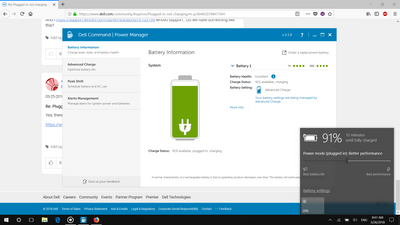
joneshank
2 Posts
1
March 24th, 2019 12:00
There is no permanent solution for this. Dell knows this. It is an issue with Dell design.
You always have to unplug the battery and reset everything. This has been an ongoing issue with Dell laptops for 8 years....no solution. I solved it...bought an HP after this issue was unresolvable with my Dell XPS.
bilalpervaiz58
3 Posts
1
June 13th, 2020 09:00
THIS METHOD WORKED FOR ME
I opened the AC ADAPTER charger jack pin and the center wire was broken so i fixed and it worked for me.
detailed version of how to do it is given in this post :
ALERT! The AC adapter wattage and type cannot be determined. "Tutorial"
All BELOW MENTION METHODS DIDN'T WORKED FOR ME:
1.I cleaned the AC adapter charging pin and also laptop jack both but didn't worked for me
2.I tried disbale "Battery ACPI" driver then turn off the PC and put battery out from the laptop and wait for 1-2 hours then put battery again. this didn;t worked for me.
3.Update windows to latest . this also didn't worked for me.
4.I updated bois to latest using usb tool and code "boisn34945a19.exe/forceit" without 10% battery but on "UPS" also this didn't worked for me.
5.I installed all the latest drivers using "auto update our internet" this also didn't worked for me.
6.Installed Fresh Copy of windows i thought it will just refresh everything but it didn't worked for me..
(please note this only happens most of the time with dell laptops only they don't update their jack design my friends have cheap hp laptop and they never faced any problem like this and i bought very expensive laptop and this happened there I recommend not to buy from Dell Until they don't update their Laptop charging design)
and
I found all these solution here on dell community this community is great, thanks for your help everybody
markrob32
2 Posts
0
April 23rd, 2021 00:00
I found that it was a bent pin in the end of the adapter lead which plugs into computer.
This was discovered after reading a redit post