

Unsolved
This post is more than 5 years old
3 Posts
0
211419
February 17th, 2013 07:00
Inspiron N7110 displaying multi-colored static at seemingly random times
My Inspiron N7110 display is beginning to change from normal screen to this:
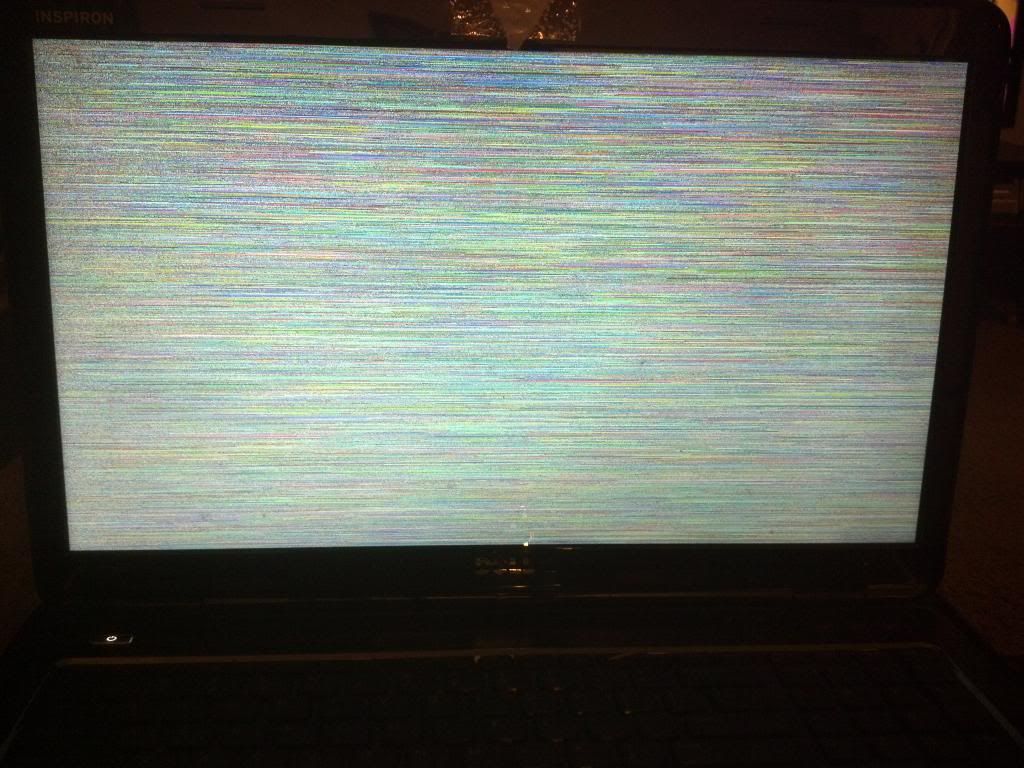
(yes, the screen is dirty, please ignore my lack of cleaning)
I can't really nail down the pattern, sometimes it happens when picking up or putting down the computer. Other times, the computer is just sitting on my lap, with no apparent physical trigger. When this happens, the only action that seems to work is a hard reset by holding the power button. Upon restarting, the computer tries to start in safe mode as normal if I were to hard reset. I believe that indicates Windows is still running, and the problem is somewhere between there and the screen.
I have checked all my drivers, and am currently up to date on everything. My warranty is set to run out in 30 days, but Dell is making it hard to contact them without paying extra money. Any and all suggestions will be appreciated. If I do not respond immediately, I will as soon as possible. Thanks in advance.


0 events found
ejn63
11 Legend
•
87.5K Posts
•
321.3K Points
0
February 17th, 2013 08:00
First thing to try would be attaching an external monitor. Does it show the same fault when the internal screen does? Or is its image clear?
Mr_Nohbdy
3 Posts
0
February 17th, 2013 11:00
That occured to me about 2 seconds after I hit post. I will have to wait for it to happen again then try. Glad to see I wasn't that far off. I will report back once I know anything new.
MissMorgan24
1 Message
0
February 24th, 2013 02:00
My XPS M1530 has the same issue; I connected it to an external monitor and the second monitor does just as my laptop does--multicolored lines, flashing, etc. Sometimes, it (laptop) seems to correct itself while other times the screen goes black or the image will still be displayed but the computer has frozen.
ejn63
11 Legend
•
87.5K Posts
•
321.3K Points
0
February 24th, 2013 03:00
The video chip is dying - which is very common with the nVidia chips in this system. The mainboard needs to be replaced - unfortunately, the replacement will do the same thing, so put the $200-300 or more the board would cost toward a new system. There's no long term fix for the nVidia chips in the 1530 model. They're all faulty and they all fail.
Mr_Nohbdy
3 Posts
0
February 26th, 2013 09:00
So the problem finally happened again. I tried plugging in an external monitor through the VGA connector and the HDMI port, but no display from either. The laptop's settings were to not display on an external monitor, and hitting the buttons to change it did not work. I have set it to display on an external monitor now. Any thoughts or corrections so far? I will report back again once the problem pops back up.
jeremy07950
1 Message
1
November 5th, 2013 17:00
This just happened to me on my N7110, 15 months after purchase. Does Dell acknowledge this problem and are they working to fix it? I know it seems unlikely, but it would be a refreshing change of pace if Dell would actually care about its products.
crislill
1 Message
0
January 28th, 2014 13:00
My laptop just started doing this, once last night and once this afternoon. I basically know nothing about computers and have no idea what to do! PLEASE HELP :)
JLTFT
1 Message
0
March 4th, 2014 15:00
Add me to the WTF list. The same exact thing is happening to mine. The only temporary solution is a hard reset. Have you noticed that when it happens, the little hamster inside starts running really fast and the rear left corner starts to overheat..?
It's getting really annoying...
My N7110 is approx 27months old. The only thing I've done differently lately, is occasionally hook my laptop up to the tv via hdmi cable.