Unsolved
This post is more than 5 years old
1 Rookie
•
11 Posts
0
57312
August 21st, 2012 11:00
Updated Audio Drivers, now laptop sound is not working properly?
I updated my audio drivers as per windows update and now my speakers are not as loud as they used to be. I do not know how to set up the IDT control panel for best playback, and I do not know how to fix this issue. I am on a Dell XPS 1645 using Windows 7 Pro, any help would be greatly appreciated.
No Events found!
Dell-Rajesh R
4 Operator
•
3.3K Posts
0
August 21st, 2012 11:00
Hi kbphoto615,
I recommend you to update the Audio drivers from the below mentioned link:
www.dell.com/.../studio-xps-1645
I have also provided a video link below which shows how to configure IDT control panel:
Keep me posted if you need any help.
Jim Coates
4 Operator
•
13.6K Posts
0
August 21st, 2012 12:00
There have not been any new audio drivers for your model for over 2 years, so no telling exactly what Microsoft did to your computer. Try using System Restore to undo the changes it made. If you get it working right again turn off Windows automatic updates of drivers and only allow security and operating system updates.
Type "System Restore" into the Start menu search box, and then, in the list of results, click System Restore. Select a Restore Point from a time before the changes occurred.
kbphoto615
1 Rookie
•
11 Posts
0
August 21st, 2012 14:00
Hey Rajesh, thanks for the help. The video is somewhat helpful only I do not have the same IDT Control Panel. Mine is the IDT HD Sound control panel and its controls are a bit different. I have also installed the driver in the link you suggested, and it is still the same result. Audio is not as loud as it used to be, when volume is up full force. It sounds like something is keeping the volume at half way when it is showing me it is all the way up.
Dell-Rajesh R
4 Operator
•
3.3K Posts
0
August 23rd, 2012 08:00
Hi kbphoto615,
I regret for the delay.
Ensure the master volume is set to high and the volume increases.
Ensure the master voulme and the system voulme is set high .
Below picture would help you in increasing the volume.
Keep me posted if you need any help.
kbphoto615
1 Rookie
•
11 Posts
0
August 23rd, 2012 13:00
Hi there, I am still having issues with this. I am just outside my warranty, is there no way to get some remote help with this issue?
Jim Coates
4 Operator
•
13.6K Posts
0
August 23rd, 2012 15:00
Even if your warranty were still in effect, software problems are not covered. I'm not sure that there is an "issue' here anyway. The new driver might just have lower volume than the old one.
kbphoto615
1 Rookie
•
11 Posts
0
August 23rd, 2012 19:00
Im sorry but when did Drivers become software related? I mean it is the software that runs the hardware am I not correct? Also, the "issue" is most def. an issue. The last audio on the dell site was updated in 2011, I was sent my laptop a month before hand. So the driver that I am installing, from the dell site, should fix the "issue" and bring me back to where I was before I used windows update, correct? So why is this "issue" happening with the same driver that was previously installed before the update?
I'm sorry but I believe my issue is somewhere in the setup of the IDT driver, or the IDT control panel. I could really use some in depth assistance with how to set it up. Other then making sure the master volume is turned up, because that much I can figure out on my own. :)
Jim Coates
4 Operator
•
13.6K Posts
0
August 23rd, 2012 20:00
Drivers are software and are not covered under the standard warranty.
Configuration issues are most definitely not covered. Dell includes in the laptop a way to return it to the original factory configuration which makes the software and configuration as good as new.
What I meant by it might not be an issue, you have not yet said that there is a problem. Is the audio too low to hear clearly, for example? That would be an issue.
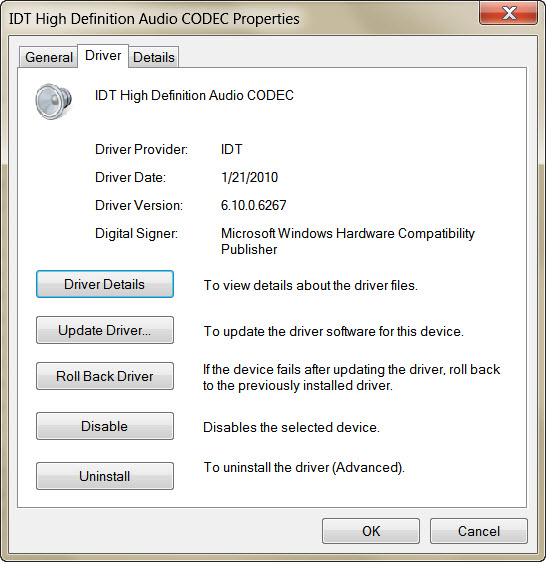
I don't see what you see when/if you enter your Service Tag number. I go directly to the Studio XPS 1645 drivers and download page and there is no IDT driver from 2011 there so I'm not sure what you are seeing. If Windows really updated the IDT driver to the newest version, then it installed version 6.10.0.6267 (dated 4/8/2010). That is the same one that Dell_Rajesh_ R linked you, so if you installed it as per his instructions you should have seen no change.
I don't know what driver you had before the Windows update, but there are only a couple of possibilities that I can see. There is IDT version 6.10.0.6217 (dated 9/23/2009), and there is the native audio driver in Windows which is a basic Intel audio driver. But if you had Windows update on for 2 years it's hard to understand why it waited until now to update from 6.10.0.6217 to 6.10.0.6267.
[Note: if you try to install 6.10.0.6217 while 6.10.0.6267 is already installed it might not work because when there are 2 driver versions Windows usually defers to the newest, so for best results remove version 6.10.0.6267 first. One way to do that is to go to Start>Control Panel>Uninstall a Program. Find the IDT audio driver then right click on it and uninstall it. Or you could uninstall it in Device Manager but when doing it that way you have to be sure to select the option to delete the driver's files or else the same driver will be reconstructed upon rebooting.]
Well, when you install or re-install an audio driver, at that point the configuration is at the default. You should not need to set it up for basic operation, just raise and lower the volume. If the volume is up all the way the only other way I can think to raise it more is to increase the equalizer settings.If you move them all higher that is sort of like increasing the volume.
I don't understand why there is a screen shot above, showing Independent Headphones. The default audio device needs to be Speaker/Headphones. There should be a green check next to it in the Windows Sound properties, something like this:
Settings you make in the Sound properties will be reflected in the IDT Control.
.
It is too late for me to think about this anymore tonight. If you see that 2011 audio driver again will you please provide a link to it or paste in the url.
kbphoto615
1 Rookie
•
11 Posts
0
August 24th, 2012 00:00
I appreciate the help and thought that you have already put in! :) I have once again attempted to uninstall and reinstall my drivers, this time I disabled windows update so that when my computer reboot it would not install any drivers on its own for the audio. I installed the driver from the link above, yet the issue is still going on. I thought if I enabled SRS premium, which is part of the IDT control panel, that it might help, and played around with the Eqaulizer hoping I could get it right, but it still sounds.. muffled. I really don't know how else to explain the issue. haha I feel dumb for not having a more descriptive way to describe the issue. But before this happened, before the windows updates, the speakers were just more amplified, and more clear. I really don't know how else to say it.. :/ haha
Jim Coates
4 Operator
•
13.6K Posts
0
August 24th, 2012 06:00
After the installation, did you check the version number of the audio driver to be sure it is the one you think it is? If you simply uninstalled the newer version by clicking "uninstall" in Device Manager then it might have been reinstalled. The files should be removed in addition to uninstalling.
It would be helpful to refer to these drivers by version number. For example it would have been extremely helpful to have known the version of the original driver and the version of the one Windows Update installed. You can find the driver version in Device Manager when you look at the device's properties..
You are confusing 2 things. With Windows Update turned off, Windows will not download a newer IDT driver from the internet, but it can still install its own native driver (non IDT) whether or not Update is turned on or off and whether or not the laptop is connected to the internet. The native driver is included in the Windows operating system itself. However the native driver can only be installed when there are no IDT driver files in the computer, as explained below.
Now I have a better idea of the issue -- low volume and muffled, correct? That is not necessarily related to the audio driver, so I think you should perform some tests that will help determine if it is.
First , listen to some audio either through headphones or external speakers. Please report if the audio is muffled or if okay when listening that way.
Next, install the Windows native audio driver. The way to do that is to remove all IDT drivers from the laptop. A couple of ways to do this:
> Go to Device Manager and uninstall the IDT driver and select the option to delete the files. When done, reboot.
> Go to Start>Control Panel>Uninstall a Program. Find the audio driver then right click on it and uninstall it. When you reboot the computer Windows will not be able to find IDT files and will be forced to install its native audio driver.
When the native driver is installed, look on any tab of Sound properties for the words ""High Definition Audio Device". If it says "IDT" High Definition Audio Codec" then you do not yet have the native driver installed, so repeat the procedure. (Windows will keep installing IDT drivers until all that have been downloaded are removed.)
Now listen again to audio. If it is okay with the native driver but not with the IDT driver, then the IDT driver is probably causing the problem. If the sound is still muffled even when using the native driver, then the cause of the problem is probably not the IDT driver and might be a hardware failure of some sort.
To check for hardware failure, run the Dell Diagnostics audio tests. When the audio is playing during the tests, listen to the quality and observe whether it is low and muffled or normal. The tests do not use any Windows audio driver and any problems that you can hear during the tests are due to a hardware problem.
kbphoto615
1 Rookie
•
11 Posts
0
August 28th, 2012 11:00
Ok, here is where I am at now. I have finally gotten the Dell IDT driver completely uninstalled, and when I restarted my computer Windows found and installed it's own generic audio driver. With this installed, before installing IDT, the volume is where it should be. I am almost tempted to keep it on the generic windows driver, except for one things. I cannot use the IDT control panel anymore if I do not install it. Is there an alternative to the IDT control panel, that I can use to adjust the settings of the sound? Such as the built in equalizer or SRS premium in the IDT control panel?
Jim Coates
4 Operator
•
13.6K Posts
0
August 28th, 2012 12:00
That's what I meant by "native" driver. I used to call it the "generic" driver but have lately changed the terminology I use. It is an Intel driver so now my thinking is that it is not truly generic. But in any case it is a basic driver and you might find that some of the features of the audio hardware no longer work, such as the mic jack. If you decide to install an IDT driver I suggest trying the older one first, 6.10.0.6217. If the audio is muffled and you don't like the sound then you should be able to get back to the native driver by using "roll back driver" (in the driver properties), or System Restore if you make a Restore Point first.
As an alternative way to adjust settings for sound, most of the audio players have controls and e.q..
kbphoto615
1 Rookie
•
11 Posts
0
September 3rd, 2012 00:00
Hi Jim,
SRS seems to be the trick to getting the sound louder. When all enhancments are disabled, the sound is lower. When SRS Premium is enabled, through IDT control panel, the sound returns to a louder volume. My issue now seems to be upon reboot of the system SRS is disabled automatically. Is there a way to ensure it stays enabled after reboot?
Thanks for all your help Jim.
Jim Coates
4 Operator
•
13.6K Posts
0
September 3rd, 2012 05:00
I don't know how to make it stick. Maybe Rajesh does. Do you think you had better volume with the original driver because SRS was on by default?
I'm still a little confused now. What driver version is currently installed? Are you hearing improvement in the muffled quality symptom?
kbphoto615
1 Rookie
•
11 Posts
0
September 3rd, 2012 13:00
I do not know honestly Jim. It still does not feel as loud as it used to be, but with SRS enabled it is def better then without it on. The generic/native driver does not have SRS on, or installed at all. SRS is installed along with IDT (driver and control panel)