


Unsolved
This post is more than 5 years old
7 Posts
0
124448
March 3rd, 2013 13:00
xps 17 orange/white light flashing
hi
i have a dell xps 17 and since last 3-4 days it is having weird problem. the battery charging light above the keyboard sometimes flash organge once the stop then it flashes 3-4 time then stop. sometimes it work perfectly fine and when next time i turn on my computer it starts flashing continuously.
in the dell battery meter sometimes it shows battery perfectly OK sometimes it show unable to determine battery. also sometimes when i plug in the charger a error message pops up adapter type cannot be determined and the battery doesn't charge.
all there problems occur sometimes and sometimes they do not occur at all
No Events found!
DELL-Manpreet C
343 Posts
0
March 3rd, 2013 15:00
Hi soona1991,
Please share the model number of the XPS 17 series; XPS L701X or XPS L702X and the version of operating system. Please drain the residual power; turn off the system and disconnect any attached peripherals (printer, Ethernet cable, USB flash drives, SD card, AC adapter and the battery). Press and hold the power button for 15-20 seconds. Connect the AC adapter only and power on the laptop. Connect the battery on the next reboot.
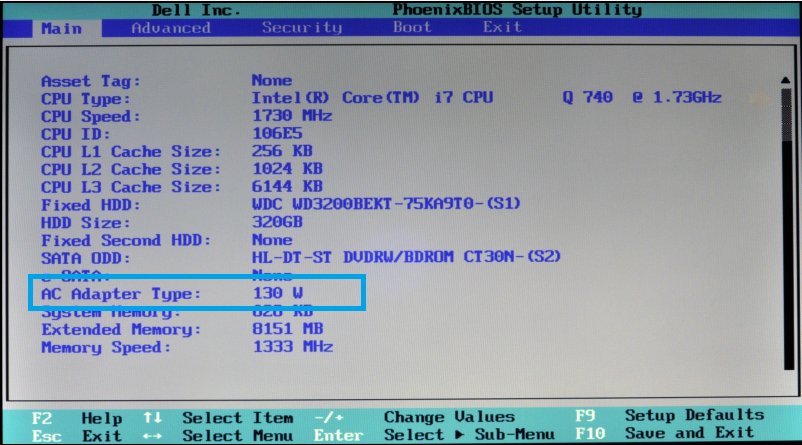
Restart the laptop and press F2 key repeatedly at Dell logo. Under the Main tab, locate the AC adapter type and check if there is any entry for the wattage as shown in the image.
Please update BIOS. Prior to that, check the BIOS version installed on the computer. Press Windows + 'R' key, type msinfo32 and press Enter.
If the BIOS version available is the latest, BIOS update is not required. If not, visit this link: http://dell.to/YBlak6, enter the laptop's service tag and click 'Submit'. Select the operating system, download and install the BIOS version.
Before flashing the BIOS please check the following:
* No external devices (printer, USB drive, SD card, DVD) should be connected.
* All other programs should be closed and documents saved.
* The AC adapter and battery should be connected during this process. The battery should be 10% or more than 10% charged.
Please try these steps and share the status.
soona1991
7 Posts
0
March 3rd, 2013 21:00
XPS L702X
150 W
as i said the problem doesn't persist . it happens only occasionally and is very irritating .
also i want to know are the adapters of all xps 17's kind of loose.
DELL-Vikram M
4 Operator
•
1.1K Posts
0
March 5th, 2013 23:00
Hi soona1991,
I am posting on the behalf of DELL-Manpreet C. There are no known issues with the AC Adapters of XPS 17. Please check and let me know i the charging port on the laptop is loose; you may wiggle the AC adapter and check for the loose port.
Also, update the BIOS which may fix this issue:
Note: Please save any unsaved data as your system will restart automatically after updating the BIOS. Disconnect all the external peripherals like printer, camera, scanner, external hard drive, flash drive etc. Also, the battery should be charged 10% or above.
Keep me posted. Please reply for any further questions.
mithun0785
1 Message
0
April 28th, 2013 17:00
hi,
i tried updating the bios through http://dell.to/YBlak6 and http://dell.to/Z9ZhvV. i am unable to.
1st link saying microsoft common language runtime version 4.0.303190, which im not sure how to do.
2nd link needs atleast 10% battery charge, since my basic porblem is battery not getting charged and orange flash light is always on, not sure how else to do.
please advice.
thanks in advance,
Mithun
ejn63
9 Legend
•
87.5K Posts
1
April 28th, 2013 18:00
If you remove the battery, does the LED flashing stop? If so, you have a bad battery.
DELL-Appu S
4 Operator
•
3.1K Posts
0
September 5th, 2013 01:00
Hi Philip,
If the AC Adapter status in BIOS is None, then it might be an issue with the DC-in port or the motherboard. Please check if the charging port on the laptop is loose. Connect an alternate AC Adapter to see if that works fine with the system.
What is the message that you get when you hover the mouse on the battery icon on the task-bar (plugged in,charging / plugged in, not charging)?
You may try resetting BIOS to defaults.
Check the Battery Health:
See this video for more information http://dell.to/14sYVk8
ahd8888
6 Posts
0
September 5th, 2013 01:00
Hi, please help. My L702X has the same problem of the Battery LED flashing orange and white light. My AC adapter type is shown as none in the BIOS although I have updated my BIOS to A19 (the latest). Is there anyway to solve my problem please?
Thanks in advance
Philip