I'm kevinf80 and I will be helping with any malware issues you may have with your system.
Please be aware that some of the logs I may ask for can be very complex and can take a long time to decipher. I am a volunteer here with a job and family so I ask that you be patient when waiting for replies.
Please DO NOT run any scans/tools/fixes on your own as this will conflict with the tools we are going to use.
Either print or Save to Notepad all instructions and please follow them carefully, if there's something you don't understand or that will not work please let me know and we will go through it together.
Malware is often buggy and can be very unstable, with that in mind it is advisable to backup any important data before we begin.
If you do not reply within 72 hours the thread will be closed, if you need more time let me know. Likewise if I do not respond within 48 hours feel free to PM me.
If you have any P2P applications installed such as BitTorrent, uTorrent, Limewire etc etc, please uninstall them before we begin.
If you are using Cracked or Illegal software your thread will be locked and all help will cease.
Please proceed as follows :-
When making replies and adding logs, copy and paste to your reply, do not attach them. Let me see the Combofix log and we`ll take it from there. The log should be here
C:\ComboFix.txt
- - End Of File - - 4AA69AC8614B524BCFE40D30D47F4691
Note: After ComboFix rebooted the machine, I received a Windows error for every thing I tried opening (Notepad, MS Word, ESETSmartInstaller.exe, etc). It stated that "An illegal operation occurred when trying to reference a registry key that was scheduled to be deleted." I rebooted again (manually) and everything worked fine after that.
Note: I had downloaded the offline scanner from Chrome and thus did not receive any links to export the log file afterward. But I got smart after three separate tries and found the program directory with log.txt sitting right there.
Copy the text between the dotted lines below to the clipboard by highlighting ALL of them and pressing CTRL + C (or, after highlighting, right-click and choose Copy): ------------------------------------------------------------------- :Files ipconfig /flushdns /c :Commands [Purity] [EmptyFlash] [EmptyTemp] [ResetHosts]
Return to OTMoveIt3, right click in the "Paste Instructions for Items to be Moved" window (under the yellow bar) and choose Paste.
Click the red button.
Copy everything in the Results window (under the green bar) to the clipboard by highlighting ALL of them and pressing CTRL + C (or, after highlighting, right-click and choose copy), and paste it in your next reply.
Close OTM
Note: If a file or folder cannot be moved immediately you may be asked to reboot the machine to finish the move process. If you are asked to reboot the machine choose
Yes.
If the machine reboots, the Results log can be found here:
c:\_OTMoveIt\MovedFiles\mmddyyyy_hhmmss.log
Where mmddyyyy_hhmmss is the date of the tool run.
Step 2
1. Close any open browsers.
2. Close/disable all anti virus and anti malware programs so they do not interfere with the running of ComboFix.
3. Open
notepad and copy/paste the text in the Codebox below into it:
CODE
Killall:: FixCSet::
Save this as
CFScript.txt, and as Type:
All Files(*.*) in the same location as ComboFix.exe
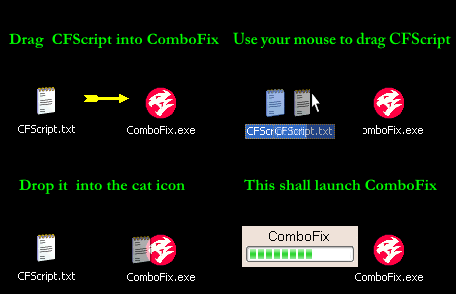
Refering to the picture above, drag CFScript into ComboFix.exe
When finished, it shall produce a log for you at
C:\ComboFix.txt which I will require in your next reply.
Double Click mbam-setup.exe to install the application.
Make sure a checkmark is placed next to Update Malwarebytes' Anti-Malware and Launch Malwarebytes Anti-Malware, then click Finish.
If an update is found, it will download and install the latest version.
Once the program has loaded, select "Perform Quick Scan", then click Scan.
The scan may take some time to finish,so please be patient.
When the scan is complete, click OK, then Show Results to view the results.
Make sure that everything is checked, and click Remove Selected.
When disinfection is completed, a log will open in Notepad and you may be prompted to Restart. (See Extra Note)
Please save the log to a location you will remember.
The log is automatically saved by MBAM and can be viewed by clicking the Logs tab in MBAM.
Copy and paste the entire report in your next reply.
Extra Note:
If MBAM encounters a file that is difficult to remove,you will be presented with 1 of 2 prompts,click OK to either and let MBAM proceed with the disinfection process. If asked to restart the computer, please do so immediately.
Completion time: 2011-04-22 14:33:35 - machine was rebooted
ComboFix-quarantined-files.txt 2011-04-22 20:33
ComboFix2.txt 2011-04-20 16:37
ComboFix3.txt 2011-04-18 18:54
.
Pre-Run: 42,589,429,760 bytes free
Post-Run: 42,597,134,336 bytes free
.
- - End Of File - - 549F523FCB999CC2263CF5E35B9EFED3
###mbam-log-2011-04-22 (14-55-16).txt####
Malwarebytes' Anti-Malware 1.50.1.1100
www.malwarebytes.org
Database version: 6422
Windows 6.0.6001 Service Pack 1
Internet Explorer 8.0.6001.19048
4/22/2011 2:55:16 PM
mbam-log-2011-04-22 (14-55-16).txt
Scan type: Quick scan
Objects scanned: 170954
Time elapsed: 7 minute(s), 10 second(s)
Memory Processes Infected: 0
Memory Modules Infected: 0
Registry Keys Infected: 0
Registry Values Infected: 0
Registry Data Items Infected: 0
Folders Infected: 0
Files Infected: 0
Memory Processes Infected:
(No malicious items detected)
Memory Modules Infected:
(No malicious items detected)
Registry Keys Infected:
(No malicious items detected)
Registry Values Infected:
(No malicious items detected)
Registry Data Items Infected:
(No malicious items detected)
Folders Infected:
(No malicious items detected)
Files Infected:
(No malicious items detected)
It half seems like she did a system restore when I wasn't looking, as a few of the files that ComboFix deleted before were reported as deleted AGAIN..and Java somehow was reverted to 6u5. I'm not sure what bearing this will have on all of this, but we seem to be doing okay regarding unwarranted popups and all that, so it may be fixed.
A small box will open, with an explanation about the tool.
When done, DDS will open two (2) logs 1. DDS.txt 2. Attach.txt
Save both reports to your desktop.
The instructions here ask you to attach the Attach.txt.
Instead of attaching, please copy/past both logs into your next reply.
Close the program window, and delete the program from your desktop.
Please note: You may have to disable any script protection running if the scan fails to run. After downloading the tool, disconnect from the internet and disable all antivirus protection. Run the scan, enable your A/V and reconnect to the internet.
I dont see anything significant in the DDS logs, except the following:
You have two Security Programs installed that have an Anti-virus component, Avast and Microsoft Security Essentials. One of these has to go, your choice which to keep. I`d recommend Microsoft Security Essentials as I use it myself.
Your Java and Adobe reader are both outdated, unless you specifically need these old outdated and possibly exploited versions remove the following via Uninstall a Program applet:
Adobe Reader 8.2.6 Java(TM) 6 Update 5
Next,
Your Adobe Acrobat Reader is out of date. Older versions are vulnerable to attack and exploitation.
Please go to the link below to update.
Adobe Reader Untick the Free McAfee® Security Scan Plus (optional) unless you want it. (not required)
Next,
You are using an old version of Java. Sun's Java is sometimes updated in order to eliminate the exploitation of vulnerabilities in an existing version. For this reason, it's extremely important that you keep the program up to date, and also remove the older more vulnerable versions from your system. The most current version of Sun Java is: Java Runtime Environment Version 6 Update 24.
Everything's been updated as directed. Thank you so much for helping out with this!
One offhand question..has any progress been made in figuring out where in the world this whole April 1 thing even originated or how it got onto any of these machines? My dad just reported that six of the company computers were infected just yesterday with some strange behavior, but he doesn't have any idea how it could have gotten in in the first place.
Read the article by Tony Klein in the following closure speech :-
Here are some tips to reduce the potential for malware infection in the future; I strongly recommend that you read them and take them to heart so that you don't have to endure the process of cleaning your computer again.
Make proper use of your antivirus and firewall
Antivirus and Firewall programs are integral to your computer security. However, just having them installed isn't enough. The definitions of these programs are frequently updated to detect the latest malware, if you don't keep up with these updates then you'll be vulnerable to infection. Many antivirus and firewall programs have automatic update features, make use of those if you can. If your program doesn't, then get in the habit of routinely performing manual updates, because it's important.
You should keep your antivirus and firewall guard enabled at all times,
NEVER turn them off unless there's a specific reason to do so. Also, regularly performing a full system scan with your antivirus program is a good idea to make sure you're system remains clean. Once a week should be adequate. You can set the scan to run during a time when you don't plan to use the computer and just leave it to complete on its own.
Install and use
WinPatrol This will inform you of any attempted unauthorized changes to your system.
You will have several programs installed, these maybe outdated and vulnerable to exploits also. To be certain, please run the free online scan by
Secunia, available
Here Before clicking the
Start scan button, please check the box for the option
Enable thorough system inspection. Just below the "Scan Options:" section, you'll see the status of what's currently processing....
...when the scan completes, the message "Detection completed successfully" will appear in the
Programs/Result section. For each problem detected, Secunia will offer a "Solution" option. Please follow those instructions to download updated versions of the programs as recommended by Secunia.
Use a safer web browser
Internet Explorer is not the most secure tool for browsing the web. It has been known to be very susceptible to infection, and there are a few good free alternatives:
All of these are excellent faster, safer, more powerful and functional free alternatives to Internet Explorer. It's definitely worth the short period of adjustment to start using one of these. If you wish to continue using Internet Explorer, it would be a good idea to follow the tutorial
HERE which will help you to make IE
MUCH safer.
These
browser add-ons will help to make your browser safer:
Web of Trust warns you about risky websites that try to scam visitors, deliver malware or send spam. WOT's color-coded icons show you ratings for 21 million websites, helping you avoid the dangerous ones:
Available for
Firefox and
Internet Explorer.
Green to go,
Yellow for caution, and
Red to stop.
Available for
Firefox only.
NoScript helps to block malicious scripts and in general gives you much better control over what types of things webpages can do to your computer while you're browsing.
These are just a couple of the most popular add-ons, if you're interested in more, take a look at
THIS article.
Here a couple of links by two security experts that will give some excellent tips and advice.
Finally this link
HERE will give a comprehensive upto date list of free Security programs. To include - Antivirus, Antispyware, Firewall, Antimalware, Online scanners and rescue CD`s.
Don`t forget, the best form of defense is common sense. If you don`t recognize it, don`t open it. If something looks to good to be true, then it aint.
Since this issue appears to be resolved the topic has been closed. Glad we could help.:emotion-21:
If you're the topic starter, and need this topic reopened, please contact a staff member with the address of the thread.
Everyone else please begin a New Topic.
The fixes and advice in this thread are for this System only. Do not apply the instructions from this thread to your own System. Please start a new thread describing your issue and someone will be along to assist you.



kevinf80_1d0ac6
1.1K Posts
0
April 19th, 2011 03:00
I'm kevinf80 and I will be helping with any malware issues you may have with your system.
Please proceed as follows :-
When making replies and adding logs, copy and paste to your reply, do not attach them. Let me see the Combofix log and we`ll take it from there. The log should be here C:\ComboFix.txt
Thanks,
Kevin...
danielsix-five
24 Posts
0
April 19th, 2011 08:00
Thank you for your quick reply. Here's the ComboFix log:
ComboFix 11-04-17.03 - Andrea 04/18/2011 11:57:35.1.2 - x86
Microsoft® Windows Vista™ Home Premium 6.0.6001.1.1252.1.1033.18.2037.975 [GMT -6:00]
Running from: f:\virus\ComboFix.exe
AV: avast! Antivirus *Enabled/Updated* {2B2D1395-420B-D5C9-657E-930FE358FC3C}
SP: avast! Antivirus *Enabled/Updated* {904CF271-6431-DA47-5FCE-A87D98DFB681}
SP: Windows Defender *Enabled/Outdated* {D68DDC3A-831F-4fae-9E44-DA132C1ACF46}
* Created a new restore point
.
.
((((((((((((((((((((((((((((((((((((((( Other Deletions )))))))))))))))))))))))))))))))))))))))))))))))))
.
.
C:\install.exe
c:\users\Andrea\AppData\Roaming\Adobe\plugs
c:\users\Andrea\AppData\Roaming\Adobe\shed
c:\users\Andrea\YouTubeDownloaderSetup253b.exe
c:\users\Andrea\YouTubeDownloaderSetup254.exe
c:\users\Andrea\YouTubeDownloaderSetup257.exe
c:\users\Mom\500_b028_english.exe
.
.
((((((((((((((((((((((((( Files Created from 2011-03-18 to 2011-04-18 )))))))))))))))))))))))))))))))
.
.
2011-04-18 18:28 . 2011-04-18 18:30 -------- d-----w- c:\users\Andrea\AppData\Local\temp
2011-04-18 18:28 . 2011-04-18 18:28 -------- d-----w- c:\windows\system32\config\systemprofile\AppData\Local\temp
2011-04-18 18:28 . 2011-04-18 18:28 -------- d-----w- c:\users\Mom\AppData\Local\temp
2011-04-18 18:28 . 2011-04-18 18:28 -------- d-----w- c:\users\Default\AppData\Local\temp
2011-04-18 16:35 . 2011-04-18 16:35 -------- d-----w- c:\program files\Common Files\Java
2011-04-18 16:35 . 2011-04-18 16:34 472808 ----a-w- c:\program files\Mozilla Firefox\plugins\npdeployJava1.dll
2011-04-18 16:35 . 2011-04-18 16:34 472808 ----a-w- c:\windows\system32\deployJava1.dll
2011-04-17 18:39 . 2011-04-17 18:56 -------- d-----w- c:\program files\Microsoft Security Client
2011-04-14 05:39 . 2011-04-14 05:39 -------- d-----w- c:\windows\Downloaded Program Files
2011-04-14 03:48 . 2011-04-14 03:48 -------- d--h--w- c:\windows\PIF
2011-04-12 16:50 . 2011-04-12 16:50 118784 --sha-r- c:\windows\system32\L2SecHCC.dll
2011-04-10 22:22 . 2011-02-23 13:56 371544 ----a-w- c:\windows\system32\drivers\aswSnx.sys
2011-04-10 22:22 . 2011-02-23 14:04 40648 ----a-w- c:\windows\avastSS.scr
2011-04-10 22:11 . 2011-04-10 22:11 -------- d-----w- c:\windows\system32\config\systemprofile\AppData\Local\Adobe
2011-04-10 22:09 . 2011-04-10 22:10 -------- d-----w- C:\Temp
2011-03-26 01:05 . 2011-03-26 01:05 -------- d-----w- c:\windows\Sun
2011-03-25 23:42 . 2005-06-15 09:00 102400 ----a-w- c:\windows\system32\tsccvid.dll
2011-03-25 23:41 . 2011-03-29 14:50 -------- d-----w- c:\users\Andrea\AppData\Local\Bible Explorer 4
2011-03-25 23:41 . 2011-03-25 23:42 -------- d-----w- c:\program files\Bible Explorer 4
2011-03-25 23:41 . 2011-03-25 23:41 -------- d-----w- c:\program files\Common Files\WORDsearch
2011-03-25 23:40 . 2011-03-25 23:40 -------- d-----w- c:\users\Andrea\AppData\Local\PackageAware
2011-03-25 23:39 . 2011-03-25 23:39 28535417 ----a-w- c:\program files\BE4setup.EXE
.
.
.
(((((((((((((((((((((((((((((((((((((((( Find3M Report ))))))))))))))))))))))))))))))))))))))))))))))))))))
.
2011-03-18 17:48 . 2011-03-18 17:48 1164938 ----a-w- c:\program files\Integrity Online - 3.14.11.2-integrity.exe
2011-02-23 14:04 . 2008-09-20 14:35 190016 ----a-w- c:\windows\system32\aswBoot.exe
2011-02-23 13:56 . 2008-09-23 17:19 301528 ----a-w- c:\windows\system32\drivers\aswSP.sys
2011-02-23 13:55 . 2008-09-20 14:35 49240 ----a-w- c:\windows\system32\drivers\aswTdi.sys
2011-02-23 13:55 . 2008-09-20 14:35 25432 ----a-w- c:\windows\system32\drivers\aswRdr.sys
2011-02-23 13:55 . 2008-09-20 14:35 53592 ----a-w- c:\windows\system32\drivers\aswMonFlt.sys
2011-02-23 13:54 . 2008-09-23 17:19 19544 ----a-w- c:\windows\system32\drivers\aswFsBlk.sys
2011-02-03 00:11 . 2009-12-10 19:42 222080 ------w- c:\windows\system32\MpSigStub.exe
2006-05-03 09:06 163328 --sh--r- c:\windows\System32\flvDX.dll
2007-02-21 10:47 31232 --sh--r- c:\windows\System32\msfDX.dll
2008-03-16 12:30 216064 --sh--r- c:\windows\System32\nbDX.dll
.
c:\program files\Adobe\Reader 8.0\Reader\Reader_sl .exe
c:\program files\Common Files\Adobe\ARM\1.0\AdobeARM .exe
c:\program files\Dell\MediaDirect\PCMService .exe
c:\program files\Dell Support Center\bin\sprtcmd .exe
c:\program files\Dell Support Center\gs_agent\custom\dsca .exe
c:\program files\DellTPad\Apoint .exe
c:\program files\Microsoft IntelliPoint\ipoint .exe
c:\program files\QuickTime\QTTask .exe
.
((((((((((((((((((((((((((((((((((((( Reg Loading Points ))))))))))))))))))))))))))))))))))))))))))))))))))
.
.
*Note* empty entries & legit default entries are not shown
REGEDIT4
.
[HKEY_LOCAL_MACHINE\software\microsoft\windows\currentversion\explorer\shelliconoverlayidentifiers\00avast]
@="{472083B0-C522-11CF-8763-00608CC02F24}"
[HKEY_CLASSES_ROOT\CLSID\{472083B0-C522-11CF-8763-00608CC02F24}]
2011-02-23 14:04 122512 ----a-w- c:\program files\Alwil Software\Avast5\ashShell.dll
.
[HKEY_CURRENT_USER\SOFTWARE\Microsoft\Windows\CurrentVersion\Run]
"ehTray.exe"="c:\windows\ehome\ehTray.exe" [2008-01-21 125952]
"ISUSPM"="c:\program files\Common Files\InstallShield\UpdateService\ISUSPM.exe" [2008-10-24 206112]
"googletalk"="c:\users\Andrea\AppData\Roaming\Google\Google Talk\googletalk.exe" [2007-01-01 3739648]
"WMPNSCFG"="c:\program files\Windows Media Player\WMPNSCFG.exe" [2008-01-21 202240]
.
[HKEY_LOCAL_MACHINE\SOFTWARE\Microsoft\Windows\CurrentVersion\Run]
"IgfxTray"="c:\windows\system32\igfxtray.exe" [2008-04-22 141848]
"HotKeysCmds"="c:\windows\system32\hkcmd.exe" [2008-04-22 166424]
"Persistence"="c:\windows\system32\igfxpers.exe" [2008-04-22 133656]
"Broadcom Wireless Manager UI"="c:\windows\system32\WLTRAY.exe" [2008-07-03 3563520]
"avast5"="c:\progra~1\ALWILS~1\Avast5\avastUI.exe" [2011-02-23 3451496]
"MSC"="c:\program files\Microsoft Security Client\msseces.exe" [2010-11-30 997408]
"SunJavaUpdateSched"="c:\program files\Common Files\Java\Java Update\jusched.exe" [2010-10-29 249064]
.
c:\users\Mom\AppData\Roaming\Microsoft\Windows\Start Menu\Programs\Startup\
OneNote 2007 Screen Clipper and Launcher.lnk - c:\program files\Microsoft Office\Office12\ONENOTEM.EXE [2009-2-26 97680]
.
c:\programdata\Microsoft\Windows\Start Menu\Programs\Startup\
Digital Line Detect.lnk - c:\program files\Digital Line Detect\DLG.exe [2008-9-13 50688]
.
c:\users\Default User\AppData\Roaming\Microsoft\Windows\Start Menu\Programs\Startup\
Dell Dock First Run.lnk - c:\program files\Dell\DellDock\DellDock.exe [2008-7-15 1226024]
.
[HKEY_LOCAL_MACHINE\software\microsoft\windows\currentversion\policies\system]
"EnableLUA"= 0 (0x0)
"EnableUIADesktopToggle"= 0 (0x0)
.
[HKEY_LOCAL_MACHINE\software\microsoft\windows nt\currentversion\winlogon\notify\GoToAssist]
2008-09-13 06:41 10536 ----a-w- c:\program files\Citrix\GoToAssist\514\g2awinlogon.dll
.
[HKEY_LOCAL_MACHINE\software\microsoft\windows nt\currentversion\drivers32]
"mixer"=wdmaud.drv
.
[HKEY_LOCAL_MACHINE\SYSTEM\CurrentControlSet\Control\SafeBoot\Minimal\MsMpSvc]
@="Service"
.
[HKEY_LOCAL_MACHINE\SYSTEM\CurrentControlSet\Control\SafeBoot\Minimal\srvF74]
@="service"
.
[HKEY_LOCAL_MACHINE\SYSTEM\CurrentControlSet\Control\SafeBoot\Minimal\Wdf01000.sys]
@="Driver"
.
[HKLM\~\startupfolder\C:^ProgramData^Microsoft^Windows^Start Menu^Programs^Startup^QuickSet.lnk]
path=c:\programdata\Microsoft\Windows\Start Menu\Programs\Startup\QuickSet.lnk
backup=c:\windows\pss\QuickSet.lnk.CommonStartup
backupExtension=.CommonStartup
.
[HKEY_LOCAL_MACHINE\software\microsoft\shared tools\msconfig\startupreg\cftmon]
c:\windows\system32\zyiit.exe [N/A]
.
[HKEY_LOCAL_MACHINE\software\microsoft\shared tools\msconfig\startupreg\iTunesHelper]
2008-09-11 00:40 289576 ----a-w- c:\program files\iTunes\iTunesHelper.exe
.
[HKEY_LOCAL_MACHINE\software\microsoft\shared tools\msconfig\startupreg\W5E7SH31DG]
c:\users\Andrea\AppData\Local\Temp\Sk4.exe [N/A]
.
[HKEY_LOCAL_MACHINE\software\microsoft\security center\Svc]
"AntiVirusOverride"=dword:00000001
"AntiSpywareOverride"=dword:00000001
.
[HKEY_LOCAL_MACHINE\software\microsoft\security center\Svc\S-1-5-21-1035652680-3128651844-2609310170-1000]
"EnableNotificationsRef"=dword:00000001
.
R2 AdobeActiveFileMonitor8.0;Adobe Active File Monitor V8;c:\program files\Adobe\Elements Organizer 8.0\PhotoshopElementsFileAgent.exe [2009-09-06 169312]
R2 srvF74;srvF74;c:\windows\system32\svchost.exe [2008-01-21 21504]
R3 B;B;c:\users\Andrea\AppData\Local\Temp\B.exe
R3 IPGVLDEHLLUBE;IPGVLDEHLLUBE;c:\users\Andrea\AppData\Local\Temp\IPGVLDEHLLUBE.exe
R3 LKHJBRKP;LKHJBRKP;c:\users\Andrea\AppData\Local\Temp\LKHJBRKP.exe
R3 MpNWMon;Microsoft Malware Protection Network Driver;c:\windows\system32\DRIVERS\MpNWMon.sys [2010-10-25 43392]
R3 NisDrv;Microsoft Network Inspection System;c:\windows\system32\DRIVERS\NisDrvWFP.sys [2010-10-25 54144]
R3 NisSrv;Microsoft Network Inspection;c:\program files\Microsoft Security Client\Antimalware\NisSrv.exe [2010-11-11 206360]
R3 NYK;NYK;c:\users\Andrea\AppData\Local\Temp\NYK.exe
R3 OCYHYONSF;OCYHYONSF;c:\users\Andrea\AppData\Local\Temp\OCYHYONSF.exe
R3 OWBGPYZ;OWBGPYZ;c:\users\Andrea\AppData\Local\Temp\OWBGPYZ.exe
R3 PMIGLQAQ;PMIGLQAQ;c:\users\Andrea\AppData\Local\Temp\PMIGLQAQ.exe
R3 qrkis;Tether Miniport;c:\windows\system32\DRIVERS\qrkis.sys [2009-10-16 45608]
S1 aswSnx;aswSnx;
S1 aswSP;aswSP;
S2 AESTFilters;Andrea ST Filters Service;c:\windows\system32\aestsrv.exe [2008-01-02 73728]
S2 aswFsBlk;aswFsBlk;
S2 aswMonFlt;aswMonFlt;c:\windows\system32\drivers\aswMonFlt.sys [2011-02-23 53592]
S2 DockLoginService;Dock Login Service;c:\program files\Dell\DellDock\DockLogin.exe [2008-05-02 161048]
S3 b57nd60x;Broadcom NetXtreme Gigabit Ethernet - NDIS 6.0;c:\windows\system32\DRIVERS\b57nd60x.sys [2007-05-21 179712]
.
.
--- Other Services/Drivers In Memory ---
.
*NewlyCreated* - MBAMSWISSARMY
*Deregistered* - MBAMSwissArmy
.
HKEY_LOCAL_MACHINE\SOFTWARE\Microsoft\Windows NT\CurrentVersion\Svchost - NetSvcs
srvF74
.
Contents of the 'Scheduled Tasks' folder
.
2011-04-18 c:\windows\Tasks\User_Feed_Synchronization-{0033CC0E-47AD-4CF3-86AE-A09E48616D01}.job
- c:\windows\system32\msfeedssync.exe [2011-02-28 04:47]
.
.
------- Supplementary Scan -------
.
uStart Page = hxxp://apod.nasa.gov/apod/
uInternet Settings,ProxyOverride = *.local
IE: E&xport to Microsoft Excel - c:\progra~1\MICROS~2\Office12\EXCEL.EXE/3000
FF - ProfilePath - c:\users\Andrea\AppData\Roaming\Mozilla\Firefox\Profiles\14kjbbf4.default\
FF - Ext: Default: {972ce4c6-7e08-4474-a285-3208198ce6fd} - c:\program files\Mozilla Firefox\extensions\{972ce4c6-7e08-4474-a285-3208198ce6fd}
FF - Ext: Microsoft .NET Framework Assistant: {20a82645-c095-46ed-80e3-08825760534b} - c:\windows\Microsoft.NET\Framework\v3.5\Windows Presentation Foundation\DotNetAssistantExtension
FF - Ext: Microsoft .NET Framework Assistant: {20a82645-c095-46ed-80e3-08825760534b} - %profile%\extensions\{20a82645-c095-46ed-80e3-08825760534b}
FF - Ext: Boomerang for GMail: {65e41d20-f092-41b7-bb83-c6e8a9ab0f57} - %profile%\extensions\{65e41d20-f092-41b7-bb83-c6e8a9ab0f57}
.
.
**************************************************************************
.
catchme 0.3.1398 W2K/XP/Vista - rootkit/stealth malware detector by Gmer, http://www.gmer.net
Rootkit scan 2011-04-18 12:30
Windows 6.0.6001 Service Pack 1 NTFS
.
scanning hidden processes ...
.
scanning hidden autostart entries ...
.
scanning hidden files ...
.
scan completed successfully
hidden files: 0
.
**************************************************************************
.
[HKEY_LOCAL_MACHINE\system\ControlSet006\Services\srvF74]
"servicedll"="\\?\globalroot\Device\HarddiskVolume3\Windows\Temp\srvF74.tmp"
.
--------------------- LOCKED REGISTRY KEYS ---------------------
.
[HKEY_LOCAL_MACHINE\software\Classes\CLSID\{A483C63A-CDBC-426E-BF93-872502E8144E}]
@Denied: (A 2) (Everyone)
@="FlashBroker"
"LocalizedString"="@c:\\Windows\\system32\\Macromed\\Flash\\FlashUtil10o_ActiveX.exe,-101"
.
[HKEY_LOCAL_MACHINE\software\Classes\CLSID\{A483C63A-CDBC-426E-BF93-872502E8144E}\Elevation]
"Enabled"=dword:00000001
.
[HKEY_LOCAL_MACHINE\software\Classes\CLSID\{A483C63A-CDBC-426E-BF93-872502E8144E}\LocalServer32]
@="c:\\Windows\\system32\\Macromed\\Flash\\FlashUtil10o_ActiveX.exe"
.
[HKEY_LOCAL_MACHINE\software\Classes\CLSID\{A483C63A-CDBC-426E-BF93-872502E8144E}\TypeLib]
@="{FAB3E735-69C7-453B-A446-B6823C6DF1C9}"
.
[HKEY_LOCAL_MACHINE\software\Classes\Interface\{E3F2C3CB-5EB8-4A04-B22C-7E3B4B6AF30F}]
@Denied: (A 2) (Everyone)
@="IFlashBroker4"
.
[HKEY_LOCAL_MACHINE\software\Classes\Interface\{E3F2C3CB-5EB8-4A04-B22C-7E3B4B6AF30F}\ProxyStubClsid32]
@="{00020424-0000-0000-C000-000000000046}"
.
[HKEY_LOCAL_MACHINE\software\Classes\Interface\{E3F2C3CB-5EB8-4A04-B22C-7E3B4B6AF30F}\TypeLib]
@="{FAB3E735-69C7-453B-A446-B6823C6DF1C9}"
"Version"="1.0"
.
[HKEY_LOCAL_MACHINE\system\ControlSet006\Control\Class\{4D36E96D-E325-11CE-BFC1-08002BE10318}\0000\AllUserSettings]
@Denied: (A) (Users)
@Denied: (A) (Everyone)
@Allowed: (B 1 2 3 4 5) (S-1-5-20)
"BlindDial"=dword:00000000
.
[HKEY_LOCAL_MACHINE\system\ControlSet006\Control\Class\{4D36E96D-E325-11CE-BFC1-08002BE10318}\0001\AllUserSettings]
@Denied: (A) (Users)
@Denied: (A) (Everyone)
@Allowed: (B 1 2 3 4 5) (S-1-5-20)
"BlindDial"=dword:00000000
.
[HKEY_LOCAL_MACHINE\system\ControlSet006\Control\Class\{4D36E96D-E325-11CE-BFC1-08002BE10318}\0002\AllUserSettings]
@Denied: (A) (Users)
@Denied: (A) (Everyone)
@Allowed: (B 1 2 3 4 5) (S-1-5-20)
"BlindDial"=dword:00000000
.
[HKEY_LOCAL_MACHINE\system\ControlSet006\Control\Class\{4D36E96D-E325-11CE-BFC1-08002BE10318}\0003\AllUserSettings]
@Denied: (A) (Users)
@Denied: (A) (Everyone)
@Allowed: (B 1 2 3 4 5) (S-1-5-20)
"BlindDial"=dword:00000000
.
[HKEY_LOCAL_MACHINE\system\ControlSet006\Control\Class\{4D36E96D-E325-11CE-BFC1-08002BE10318}\0004\AllUserSettings]
@Denied: (A) (Users)
@Denied: (A) (Everyone)
@Allowed: (B 1 2 3 4 5) (S-1-5-20)
"BlindDial"=dword:00000000
.
[HKEY_LOCAL_MACHINE\system\ControlSet006\Control\Class\{4D36E96D-E325-11CE-BFC1-08002BE10318}\0005\AllUserSettings]
@Denied: (A) (Users)
@Denied: (A) (Everyone)
@Allowed: (B 1 2 3 4 5) (S-1-5-20)
"BlindDial"=dword:00000000
.
Completion time: 2011-04-18 12:54:57
ComboFix-quarantined-files.txt 2011-04-18 18:54
.
Pre-Run: 45,848,023,040 bytes free
Post-Run: 45,936,263,168 bytes free
.
- - End Of File - - 55F120B85631FE2903BE7333E4D9D10A
kevinf80_1d0ac6
1.1K Posts
0
April 19th, 2011 12:00
Continue as follows please :-

Step 1
1. Close any open browsers.
2. Close/disable all anti virus and anti malware programs so they do not interfere with the running of ComboFix.
3. Open notepad and copy/paste the text in between the dotted lines below into it:
------------------------------------------------------------------------------------------------------------------------------------------------------
KillAll::
RenV::
c:\program files\Adobe\Reader 8.0\Reader\Reader_sl .exe
c:\program files\Common Files\Adobe\ARM\1.0\AdobeARM .exe
c:\program files\Dell\MediaDirect\PCMService .exe
c:\program files\Dell Support Center\bin\sprtcmd .exe
c:\program files\Dell Support Center\gs_agent\custom\dsca .exe
c:\program files\DellTPad\Apoint .exe
c:\program files\Microsoft IntelliPoint\ipoint .exe
c:\program files\QuickTime\QTTask .exe
File::
c:\windows\system32\zyiit.exe
c:\users\Andrea\AppData\Local\Temp\Sk4.exe
c:\users\Andrea\AppData\Local\Temp\B.exe
c:\users\Andrea\AppData\Local\Temp\IPGVLDEHLLUBE.exe
c:\users\Andrea\AppData\Local\Temp\LKHJBRKP.exe
c:\users\Andrea\AppData\Local\Temp\NYK.exe
c:\users\Andrea\AppData\Local\Temp\OCYHYONSF.exe
c:\users\Andrea\AppData\Local\Temp\OWBGPYZ.exe
c:\users\Andrea\AppData\Local\Temp\PMIGLQAQ.exe
Driver::
B
IPGVLDEHLLUBE
LKHJBRKP
NYK
OCYHYONSF
OWBGPYZ
PMIGLQAQ
Registry::
[-HKEY_LOCAL_MACHINE\software\microsoft\shared tools\msconfig\startupreg\W5E7SH31DG]
RegLock::
[HKEY_LOCAL_MACHINE\software\Classes\CLSID\{A483C63A-CDBC-426E-BF93-872502E8144E}]
@Denied: (A 2) (Everyone)
@="FlashBroker"
"LocalizedString"="@c:\\Windows\\system32\\Macromed\\Flash\\FlashUtil10o_ActiveX.exe,-101"
[HKEY_LOCAL_MACHINE\software\Classes\CLSID\{A483C63A-CDBC-426E-BF93-872502E8144E}\Elevation]
"Enabled"=dword:00000001
[HKEY_LOCAL_MACHINE\software\Classes\CLSID\{A483C63A-CDBC-426E-BF93-872502E8144E}\LocalServer32]
@="c:\\Windows\\system32\\Macromed\\Flash\\FlashUtil10o_ActiveX.exe"
[HKEY_LOCAL_MACHINE\software\Classes\CLSID\{A483C63A-CDBC-426E-BF93-872502E8144E}\TypeLib]
@="{FAB3E735-69C7-453B-A446-B6823C6DF1C9}"
[HKEY_LOCAL_MACHINE\software\Classes\Interface\{E3F2C3CB-5EB8-4A04-B22C-7E3B4B6AF30F}]
@Denied: (A 2) (Everyone)
@="IFlashBroker4"
[HKEY_LOCAL_MACHINE\software\Classes\Interface\{E3F2C3CB-5EB8-4A04-B22C-7E3B4B6AF30F}\ProxyStubClsid32]
@="{00020424-0000-0000-C000-000000000046}"
[HKEY_LOCAL_MACHINE\software\Classes\Interface\{E3F2C3CB-5EB8-4A04-B22C-7E3B4B6AF30F}\TypeLib]
@="{FAB3E735-69C7-453B-A446-B6823C6DF1C9}"
"Version"="1.0"
[HKEY_LOCAL_MACHINE\system\ControlSet006\Control\Class\{4D36E96D-E325-11CE-BFC1-08002BE10318}\0000\AllUserSettings]
@Denied: (A) (Users)
@Denied: (A) (Everyone)
@Allowed: (B 1 2 3 4 5) (S-1-5-20)
"BlindDial"=dword:00000000
[HKEY_LOCAL_MACHINE\system\ControlSet006\Control\Class\{4D36E96D-E325-11CE-BFC1-08002BE10318}\0001\AllUserSettings]
@Denied: (A) (Users)
@Denied: (A) (Everyone)
@Allowed: (B 1 2 3 4 5) (S-1-5-20)
"BlindDial"=dword:00000000
[HKEY_LOCAL_MACHINE\system\ControlSet006\Control\Class\{4D36E96D-E325-11CE-BFC1-08002BE10318}\0002\AllUserSettings]
@Denied: (A) (Users)
@Denied: (A) (Everyone)
@Allowed: (B 1 2 3 4 5) (S-1-5-20)
"BlindDial"=dword:00000000
[HKEY_LOCAL_MACHINE\system\ControlSet006\Control\Class\{4D36E96D-E325-11CE-BFC1-08002BE10318}\0003\AllUserSettings]
@Denied: (A) (Users)
@Denied: (A) (Everyone)
@Allowed: (B 1 2 3 4 5) (S-1-5-20)
"BlindDial"=dword:00000000
[HKEY_LOCAL_MACHINE\system\ControlSet006\Control\Class\{4D36E96D-E325-11CE-BFC1-08002BE10318}\0004\AllUserSettings]
@Denied: (A) (Users)
@Denied: (A) (Everyone)
@Allowed: (B 1 2 3 4 5) (S-1-5-20)
"BlindDial"=dword:00000000
[HKEY_LOCAL_MACHINE\system\ControlSet006\Control\Class\{4D36E96D-E325-11CE-BFC1-08002BE10318}\0005\AllUserSettings]
@Denied: (A) (Users)
@Denied: (A) (Everyone)
@Allowed: (B 1 2 3 4 5) (S-1-5-20)
"BlindDial"=dword:00000000
---------------------------------------------------------------------------------------------------------------------------------------------------------------------------
Save this as CFScript.txt, and as Type: All Files (*.*) in the same location as ComboFix.exe
Refering to the picture above, drag CFScript into ComboFix.exe
When finished, it shall produce a log for you at C:\ComboFix.txt which I will require in your next reply.
Step 2
Run ESET Online Scan
You can refer to this animation by neomage if needed.
Frequently asked questions available Here Please read them before running the scan.
Also be aware this scan can take between one and several hours to complete depending on the size of your system.
Let me see the logs from Combofix and ESET in your reply,
Kevin
danielsix-five
24 Posts
0
April 20th, 2011 17:00
Here are the results from the two scans:
#### ComboFix.txt ####
ComboFix 11-04-17.03 - Andrea 04/20/2011 9:47.2.2 - x86
Microsoft® Windows Vista™ Home Premium 6.0.6001.1.1252.1.1033.18.2037.1007 [GMT -6:00]
Running from: f:\virus\ComboFix.exe
Command switches used :: f:\virus\CFScript.txt
AV: avast! Antivirus *Enabled/Updated* {2B2D1395-420B-D5C9-657E-930FE358FC3C}
AV: Microsoft Security Essentials *Disabled/Updated* {108DAC43-C256-20B7-BB05-914135DA5160}
SP: avast! Antivirus *Enabled/Updated* {904CF271-6431-DA47-5FCE-A87D98DFB681}
SP: Microsoft Security Essentials *Disabled/Updated* {ABEC4DA7-E46C-2F39-81B5-AA334E5D1BDD}
SP: Windows Defender *Disabled/Outdated* {D68DDC3A-831F-4fae-9E44-DA132C1ACF46}
* Created a new restore point
.
FILE ::
"c:\users\Andrea\AppData\Local\Temp\B.exe"
"c:\users\Andrea\AppData\Local\Temp\IPGVLDEHLLUBE.exe"
"c:\users\Andrea\AppData\Local\Temp\LKHJBRKP.exe"
"c:\users\Andrea\AppData\Local\Temp\NYK.exe"
"c:\users\Andrea\AppData\Local\Temp\OCYHYONSF.exe"
"c:\users\Andrea\AppData\Local\Temp\OWBGPYZ.exe"
"c:\users\Andrea\AppData\Local\Temp\PMIGLQAQ.exe"
"c:\users\Andrea\AppData\Local\Temp\Sk4.exe"
"c:\windows\system32\zyiit.exe"
.
.
((((((((((((((((((((((((((((((((((((((( Other Deletions )))))))))))))))))))))))))))))))))))))))))))))))))
.
.
.
((((((((((((((((((((((((((((((((((((((( Drivers/Services )))))))))))))))))))))))))))))))))))))))))))))))))
.
.
-------\Service_B
-------\Service_IPGVLDEHLLUBE
-------\Service_LKHJBRKP
-------\Service_NYK
-------\Service_OCYHYONSF
-------\Service_OWBGPYZ
-------\Service_PMIGLQAQ
.
.
((((((((((((((((((((((((( Files Created from 2011-03-20 to 2011-04-20 )))))))))))))))))))))))))))))))
.
.
2011-04-20 15:59 . 2011-04-20 16:27 -------- d-----w- c:\users\Andrea\AppData\Local\temp
2011-04-20 15:59 . 2011-04-20 15:59 -------- d-----w- c:\windows\system32\config\systemprofile\AppData\Local\temp
2011-04-20 15:59 . 2011-04-20 15:59 -------- d-----w- c:\users\Mom\AppData\Local\temp
2011-04-20 15:59 . 2011-04-20 15:59 -------- d-----w- c:\users\Default\AppData\Local\temp
2011-04-19 21:53 . 2011-02-18 13:31 304640 ----a-w- c:\windows\system32\drivers\srv.sys
2011-04-19 21:53 . 2011-02-18 13:31 146432 ----a-w- c:\windows\system32\drivers\srv2.sys
2011-04-19 21:53 . 2011-02-18 13:31 102400 ----a-w- c:\windows\system32\drivers\srvnet.sys
2011-04-19 21:51 . 2011-02-17 06:23 420864 ----a-w- c:\windows\system32\vbscript.dll
2011-04-19 21:51 . 2011-02-16 13:24 292864 ----a-w- c:\windows\system32\atmfd.dll
2011-04-19 21:51 . 2011-02-16 15:29 34304 ----a-w- c:\windows\system32\atmlib.dll
2011-04-19 21:51 . 2011-02-22 12:52 213504 ----a-w- c:\windows\system32\drivers\mrxsmb10.sys
2011-04-19 21:51 . 2011-02-22 12:52 79360 ----a-w- c:\windows\system32\drivers\mrxsmb20.sys
2011-04-19 21:51 . 2011-02-22 12:51 105984 ----a-w- c:\windows\system32\drivers\mrxsmb.sys
2011-04-19 21:51 . 2011-02-22 12:51 69632 ----a-w- c:\windows\system32\drivers\bowser.sys
2011-04-19 21:51 . 2011-03-10 16:12 1136640 ----a-w- c:\windows\system32\mfc42.dll
2011-04-19 21:51 . 2011-03-10 16:12 1161728 ----a-w- c:\windows\system32\mfc42u.dll
2011-04-19 21:50 . 2010-12-29 17:41 429056 ----a-w- c:\windows\system32\EncDec.dll
2011-04-19 21:50 . 2010-12-29 17:41 323072 ----a-w- c:\windows\system32\sbe.dll
2011-04-19 21:50 . 2010-12-29 17:39 177664 ----a-w- c:\windows\system32\mpg2splt.ax
2011-04-19 21:50 . 2010-12-29 17:41 153088 ----a-w- c:\windows\system32\sbeio.dll
2011-04-19 21:50 . 2010-12-17 16:43 2067456 ----a-w- c:\windows\system32\mstscax.dll
2011-04-19 21:50 . 2010-12-17 15:06 677888 ----a-w- c:\windows\system32\mstsc.exe
2011-04-18 16:35 . 2011-04-18 16:35 -------- d-----w- c:\program files\Common Files\Java
2011-04-18 16:35 . 2011-04-18 16:34 472808 ----a-w- c:\program files\Mozilla Firefox\plugins\npdeployJava1.dll
2011-04-18 16:35 . 2011-04-18 16:34 472808 ----a-w- c:\windows\system32\deployJava1.dll
2011-04-17 18:39 . 2011-04-17 18:56 -------- d-----w- c:\program files\Microsoft Security Client
2011-04-14 05:39 . 2011-04-14 05:39 -------- d-----w- c:\windows\Downloaded Program Files
2011-04-14 03:48 . 2011-04-14 03:48 -------- d--h--w- c:\windows\PIF
2011-04-12 16:50 . 2011-04-12 16:50 118784 --sha-r- c:\windows\system32\L2SecHCC.dll
2011-04-10 22:22 . 2011-02-23 13:56 371544 ----a-w- c:\windows\system32\drivers\aswSnx.sys
2011-04-10 22:22 . 2011-02-23 14:04 40648 ----a-w- c:\windows\avastSS.scr
2011-04-10 22:11 . 2011-04-10 22:11 -------- d-----w- c:\windows\system32\config\systemprofile\AppData\Local\Adobe
2011-04-10 22:09 . 2011-04-10 22:10 -------- d-----w- C:\Temp
2011-03-26 01:05 . 2011-03-26 01:05 -------- d-----w- c:\windows\Sun
2011-03-25 23:42 . 2005-06-15 09:00 102400 ----a-w- c:\windows\system32\tsccvid.dll
2011-03-25 23:41 . 2011-03-29 14:50 -------- d-----w- c:\users\Andrea\AppData\Local\Bible Explorer 4
2011-03-25 23:41 . 2011-03-25 23:42 -------- d-----w- c:\program files\Bible Explorer 4
2011-03-25 23:41 . 2011-03-25 23:41 -------- d-----w- c:\program files\Common Files\WORDsearch
2011-03-25 23:40 . 2011-03-25 23:40 -------- d-----w- c:\users\Andrea\AppData\Local\PackageAware
2011-03-25 23:39 . 2011-03-25 23:39 28535417 ----a-w- c:\program files\BE4setup.EXE
.
.
.
(((((((((((((((((((((((((((((((((((((((( Find3M Report ))))))))))))))))))))))))))))))))))))))))))))))))))))
.
2011-03-18 17:48 . 2011-03-18 17:48 1164938 ----a-w- c:\program files\Integrity Online - 3.14.11.2-integrity.exe
2011-02-23 14:04 . 2008-09-20 14:35 190016 ----a-w- c:\windows\system32\aswBoot.exe
2011-02-23 13:56 . 2008-09-23 17:19 301528 ----a-w- c:\windows\system32\drivers\aswSP.sys
2011-02-23 13:55 . 2008-09-20 14:35 49240 ----a-w- c:\windows\system32\drivers\aswTdi.sys
2011-02-23 13:55 . 2008-09-20 14:35 25432 ----a-w- c:\windows\system32\drivers\aswRdr.sys
2011-02-23 13:55 . 2008-09-20 14:35 53592 ----a-w- c:\windows\system32\drivers\aswMonFlt.sys
2011-02-23 13:54 . 2008-09-23 17:19 19544 ----a-w- c:\windows\system32\drivers\aswFsBlk.sys
2006-05-03 09:06 163328 --sh--r- c:\windows\System32\flvDX.dll
2007-02-21 10:47 31232 --sh--r- c:\windows\System32\msfDX.dll
2008-03-16 12:30 216064 --sh--r- c:\windows\System32\nbDX.dll
.
.
((((((((((((((((((((((((((((((((((((( Reg Loading Points ))))))))))))))))))))))))))))))))))))))))))))))))))
.
.
*Note* empty entries & legit default entries are not shown
REGEDIT4
.
[HKEY_LOCAL_MACHINE\software\microsoft\windows\currentversion\explorer\shelliconoverlayidentifiers\00avast]
@="{472083B0-C522-11CF-8763-00608CC02F24}"
[HKEY_CLASSES_ROOT\CLSID\{472083B0-C522-11CF-8763-00608CC02F24}]
2011-02-23 14:04 122512 ----a-w- c:\program files\Alwil Software\Avast5\ashShell.dll
.
[HKEY_CURRENT_USER\SOFTWARE\Microsoft\Windows\CurrentVersion\Run]
"ehTray.exe"="c:\windows\ehome\ehTray.exe" [2008-01-21 125952]
"ISUSPM"="c:\program files\Common Files\InstallShield\UpdateService\ISUSPM.exe" [2008-10-24 206112]
"googletalk"="c:\users\Andrea\AppData\Roaming\Google\Google Talk\googletalk.exe" [2007-01-01 3739648]
"WMPNSCFG"="c:\program files\Windows Media Player\WMPNSCFG.exe" [2008-01-21 202240]
.
[HKEY_LOCAL_MACHINE\SOFTWARE\Microsoft\Windows\CurrentVersion\Run]
"IgfxTray"="c:\windows\system32\igfxtray.exe" [2008-04-22 141848]
"HotKeysCmds"="c:\windows\system32\hkcmd.exe" [2008-04-22 166424]
"Persistence"="c:\windows\system32\igfxpers.exe" [2008-04-22 133656]
"Broadcom Wireless Manager UI"="c:\windows\system32\WLTRAY.exe" [2008-07-03 3563520]
"avast5"="c:\progra~1\ALWILS~1\Avast5\avastUI.exe" [2011-02-23 3451496]
"MSC"="c:\program files\Microsoft Security Client\msseces.exe" [2010-11-30 997408]
"SunJavaUpdateSched"="c:\program files\Common Files\Java\Java Update\jusched.exe" [2010-10-29 249064]
.
c:\users\Mom\AppData\Roaming\Microsoft\Windows\Start Menu\Programs\Startup\
OneNote 2007 Screen Clipper and Launcher.lnk - c:\program files\Microsoft Office\Office12\ONENOTEM.EXE [2009-2-26 97680]
.
c:\programdata\Microsoft\Windows\Start Menu\Programs\Startup\
Digital Line Detect.lnk - c:\program files\Digital Line Detect\DLG.exe [2008-9-13 50688]
.
c:\users\Default User\AppData\Roaming\Microsoft\Windows\Start Menu\Programs\Startup\
Dell Dock First Run.lnk - c:\program files\Dell\DellDock\DellDock.exe [2008-7-15 1226024]
.
[HKEY_LOCAL_MACHINE\software\microsoft\windows\currentversion\policies\system]
"EnableLUA"= 0 (0x0)
"EnableUIADesktopToggle"= 0 (0x0)
.
[HKEY_LOCAL_MACHINE\software\microsoft\windows nt\currentversion\winlogon\notify\GoToAssist]
2008-09-13 06:41 10536 ----a-w- c:\program files\Citrix\GoToAssist\514\g2awinlogon.dll
.
[HKEY_LOCAL_MACHINE\software\microsoft\windows nt\currentversion\drivers32]
"mixer"=wdmaud.drv
.
[HKEY_LOCAL_MACHINE\SYSTEM\CurrentControlSet\Control\SafeBoot\Minimal\MsMpSvc]
@="Service"
.
[HKEY_LOCAL_MACHINE\SYSTEM\CurrentControlSet\Control\SafeBoot\Minimal\srvF74]
@="service"
.
[HKEY_LOCAL_MACHINE\SYSTEM\CurrentControlSet\Control\SafeBoot\Minimal\Wdf01000.sys]
@="Driver"
.
[HKLM\~\startupfolder\C:^ProgramData^Microsoft^Windows^Start Menu^Programs^Startup^QuickSet.lnk]
path=c:\programdata\Microsoft\Windows\Start Menu\Programs\Startup\QuickSet.lnk
backup=c:\windows\pss\QuickSet.lnk.CommonStartup
backupExtension=.CommonStartup
.
[HKEY_LOCAL_MACHINE\software\microsoft\shared tools\msconfig\startupreg\iTunesHelper]
2008-09-11 00:40 289576 ----a-w- c:\program files\iTunes\iTunesHelper.exe
.
[HKEY_LOCAL_MACHINE\software\microsoft\security center\Svc]
"AntiVirusOverride"=dword:00000001
"AntiSpywareOverride"=dword:00000001
.
[HKEY_LOCAL_MACHINE\software\microsoft\security center\Svc\S-1-5-21-1035652680-3128651844-2609310170-1000]
"EnableNotificationsRef"=dword:00000001
.
R2 AdobeActiveFileMonitor8.0;Adobe Active File Monitor V8;c:\program files\Adobe\Elements Organizer 8.0\PhotoshopElementsFileAgent.exe [2009-09-06 169312]
R2 srvF74;srvF74;c:\windows\system32\svchost.exe [2008-01-21 21504]
R3 MpNWMon;Microsoft Malware Protection Network Driver;c:\windows\system32\DRIVERS\MpNWMon.sys [2010-10-25 43392]
R3 NisDrv;Microsoft Network Inspection System;c:\windows\system32\DRIVERS\NisDrvWFP.sys [2010-10-25 54144]
R3 NisSrv;Microsoft Network Inspection;c:\program files\Microsoft Security Client\Antimalware\NisSrv.exe [2010-11-11 206360]
R3 qrkis;Tether Miniport;c:\windows\system32\DRIVERS\qrkis.sys [2009-10-16 45608]
S1 aswSnx;aswSnx;
S1 aswSP;aswSP;
S1 MpKsledf42a3e;MpKsledf42a3e;c:\programdata\Microsoft\Microsoft Antimalware\Definition Updates\{655DADEB-B137-48B4-B17B-40EE7554B661}\MpKsledf42a3e.sys [2011-04-20 28752]
S2 AESTFilters;Andrea ST Filters Service;c:\windows\system32\aestsrv.exe [2008-01-02 73728]
S2 aswFsBlk;aswFsBlk;
S2 aswMonFlt;aswMonFlt;c:\windows\system32\drivers\aswMonFlt.sys [2011-02-23 53592]
S2 DockLoginService;Dock Login Service;c:\program files\Dell\DellDock\DockLogin.exe [2008-05-02 161048]
S3 b57nd60x;Broadcom NetXtreme Gigabit Ethernet - NDIS 6.0;c:\windows\system32\DRIVERS\b57nd60x.sys [2007-05-21 179712]
.
.
HKEY_LOCAL_MACHINE\SOFTWARE\Microsoft\Windows NT\CurrentVersion\Svchost - NetSvcs
srvF74
.
Contents of the 'Scheduled Tasks' folder
.
2011-04-20 c:\windows\Tasks\User_Feed_Synchronization-{0033CC0E-47AD-4CF3-86AE-A09E48616D01}.job
- c:\windows\system32\msfeedssync.exe [2011-04-19 04:43]
.
.
------- Supplementary Scan -------
.
uStart Page = hxxp://apod.nasa.gov/apod/
uInternet Settings,ProxyOverride = *.local
IE: E&xport to Microsoft Excel - c:\progra~1\MICROS~2\Office12\EXCEL.EXE/3000
FF - ProfilePath - c:\users\Andrea\AppData\Roaming\Mozilla\Firefox\Profiles\14kjbbf4.default\
FF - Ext: Default: {972ce4c6-7e08-4474-a285-3208198ce6fd} - c:\program files\Mozilla Firefox\extensions\{972ce4c6-7e08-4474-a285-3208198ce6fd}
FF - Ext: Java Console: {CAFEEFAC-0016-0000-0024-ABCDEFFEDCBA} - c:\program files\Mozilla Firefox\extensions\{CAFEEFAC-0016-0000-0024-ABCDEFFEDCBA}
FF - Ext: Microsoft .NET Framework Assistant: {20a82645-c095-46ed-80e3-08825760534b} - c:\windows\Microsoft.NET\Framework\v3.5\Windows Presentation Foundation\DotNetAssistantExtension
FF - Ext: Microsoft .NET Framework Assistant: {20a82645-c095-46ed-80e3-08825760534b} - %profile%\extensions\{20a82645-c095-46ed-80e3-08825760534b}
FF - Ext: Boomerang for GMail: {65e41d20-f092-41b7-bb83-c6e8a9ab0f57} - %profile%\extensions\{65e41d20-f092-41b7-bb83-c6e8a9ab0f57}
.
- - - - ORPHANS REMOVED - - - -
.
MSConfigStartUp-cftmon - c:\windows\system32\zyiit.exe
.
.
.
**************************************************************************
.
catchme 0.3.1398 W2K/XP/Vista - rootkit/stealth malware detector by Gmer, http://www.gmer.net
Rootkit scan 2011-04-20 10:27
Windows 6.0.6001 Service Pack 1 NTFS
.
scanning hidden processes ...
.
scanning hidden autostart entries ...
.
scanning hidden files ...
.
scan completed successfully
hidden files: 0
.
**************************************************************************
.
[HKEY_LOCAL_MACHINE\system\ControlSet006\Services\srvF74]
"servicedll"="\\?\globalroot\Device\HarddiskVolume3\Windows\Temp\srvF74.tmp"
.
--------------------- DLLs Loaded Under Running Processes ---------------------
.
- - - - - - - > 'Explorer.exe'(3548)
c:\windows\system32\igfxpph.dll
c:\windows\system32\hccutils.DLL
.
------------------------ Other Running Processes ------------------------
.
c:\program files\Microsoft Security Client\Antimalware\MsMpEng.exe
c:\windows\System32\WLTRYSVC.EXE
c:\windows\System32\bcmwltry.exe
c:\program files\Alwil Software\Avast5\AvastSvc.exe
c:\windows\system32\WLANExt.exe
c:\program files\Bonjour\mDNSResponder.exe
c:\program files\Dell Support Center\bin\sprtsvc.exe
c:\windows\system32\STacSV.exe
c:\windows\system32\DRIVERS\xaudio.exe
c:\windows\system32\WUDFHost.exe
c:\program files\Alwil Software\Avast5\AvastUI.exe
c:\windows\system32\igfxsrvc.exe
c:\windows\ehome\ehmsas.exe
c:\windows\system32\msiexec.exe
.
**************************************************************************
.
Completion time: 2011-04-20 10:37:58 - machine was rebooted
ComboFix-quarantined-files.txt 2011-04-20 16:37
ComboFix2.txt 2011-04-18 18:54
.
Pre-Run: 43,036,987,392 bytes free
Post-Run: 42,470,940,672 bytes free
.
Current=6 Default=6 Failed=1 LastKnownGood=5 Sets=1,2,3,4,5,6
- - End Of File - - 4AA69AC8614B524BCFE40D30D47F4691
Note: After ComboFix rebooted the machine, I received a Windows error for every thing I tried opening (Notepad, MS Word, ESETSmartInstaller.exe, etc). It stated that "An illegal operation occurred when trying to reference a registry key that was scheduled to be deleted." I rebooted again (manually) and everything worked fine after that.
#### ComboFix-Quarantined-Files.txt ####
2011-04-20 16:35:00 . 2011-04-20 16:35:00 842 ----a-w- C:\Qoobox\Quarantine\Registry_backups\MSConfigStartUp-cftmon.reg.dat
2011-04-20 15:56:31 . 2011-04-20 15:56:31 1,128 ----a-w- C:\Qoobox\Quarantine\Registry_backups\Service_PMIGLQAQ.reg.dat
2011-04-20 15:56:31 . 2011-04-20 15:56:31 1,102 ----a-w- C:\Qoobox\Quarantine\Registry_backups\Service_OWBGPYZ.reg.dat
2011-04-20 15:56:31 . 2011-04-20 15:56:31 1,144 ----a-w- C:\Qoobox\Quarantine\Registry_backups\Service_OCYHYONSF.reg.dat
2011-04-20 15:56:30 . 2011-04-20 15:56:30 1,038 ----a-w- C:\Qoobox\Quarantine\Registry_backups\Service_NYK.reg.dat
2011-04-20 15:56:30 . 2011-04-20 15:56:30 1,128 ----a-w- C:\Qoobox\Quarantine\Registry_backups\Service_LKHJBRKP.reg.dat
2011-04-20 15:56:30 . 2011-04-20 15:56:30 1,208 ----a-w- C:\Qoobox\Quarantine\Registry_backups\Service_IPGVLDEHLLUBE.reg.dat
2011-04-20 15:56:29 . 2011-04-20 15:56:29 1,006 ----a-w- C:\Qoobox\Quarantine\Registry_backups\Service_B.reg.dat
2011-04-20 15:47:21 . 2011-04-20 15:47:21 0 ----a-w- C:\Qoobox\Quarantine\catchme.txt
2011-04-18 18:23:48 . 2011-04-20 15:55:54 8,354 ----a-w- C:\Qoobox\Quarantine\Registry_backups\tcpip.reg
2011-04-18 17:54:36 . 2011-04-20 15:47:20 124 ----a-w- C:\Qoobox\Quarantine\catchme.log
2010-07-30 18:10:32 . 2010-07-30 18:10:48 3,229,726 ----a-w- C:\Qoobox\Quarantine\C\Users\Andrea\YouTubeDownloaderSetup257.exe.vir
2010-04-15 17:05:08 . 2010-04-15 17:05:14 3,105,415 ----a-w- C:\Qoobox\Quarantine\C\Users\Andrea\YouTubeDownloaderSetup254.exe.vir
2009-11-07 17:08:59 . 2009-11-07 17:21:08 3,096,366 ----a-w- C:\Qoobox\Quarantine\C\Users\Andrea\YouTubeDownloaderSetup253b.exe.vir
2009-08-11 03:58:14 . 2009-08-11 03:50:18 227,412,312 ----a-w- C:\Qoobox\Quarantine\C\Users\Mom\500_b028_english.exe.vir
2007-11-07 15:03:18 . 2007-11-07 15:03:18 562,688 ----a-w- C:\Qoobox\Quarantine\C\install.exe.vir
Note: I had downloaded the offline scanner from Chrome and thus did not receive any links to export the log file afterward. But I got smart after three separate tries and found the program directory with log.txt sitting right there.
#### log.txt (ESET) ####
ESETSmartInstaller@High as CAB hook log:
OnlineScanner.ocx - registred OK
# version=7
# iexplore.exe=8.00.6001.18702 (longhorn_ie8_rtm(wmbla).090308-0339)
# OnlineScanner.ocx=1.0.0.6427
# api_version=3.0.2
# EOSSerial=4382a8423a711e40a3e02dc38d01ad0a
# end=finished
# remove_checked=true
# archives_checked=true
# unwanted_checked=true
# unsafe_checked=true
# antistealth_checked=true
# utc_time=2011-04-20 11:29:19
# local_time=2011-04-20 05:29:19 (-0700, Mountain Daylight Time)
# country="United States"
# lang=1033
# osver=6.0.6001 NT Service Pack 1
# compatibility_mode=512 16777215 100 0 0 0 0 0
# compatibility_mode=770 16774141 100 100 167608 238695097 0 0
# compatibility_mode=5892 16776574 66 100 1316055 139943071 0 0
# compatibility_mode=8192 67108863 100 0 0 0 0 0
# scanned=148599
# found=0
# cleaned=0
# scan_time=6617
Thank you.
-Daniel
kevinf80_1d0ac6
1.1K Posts
0
April 21st, 2011 00:00
Continue as follows please :-
Step 1
Please download OTM by OldTimer.
Alternative Mirror 1
Alternative Mirror 2
Save it to your desktop.
Double click OTM.exe to start the tool. Vista or Windows 7 users right click and select Run as Administrator
-------------------------------------------------------------------
:Files
ipconfig /flushdns /c
:Commands
[Purity]
[EmptyFlash]
[EmptyTemp]
[ResetHosts]
---------------------------------------------------------------------
Note: If a file or folder cannot be moved immediately you may be asked to reboot the machine to finish the move process. If you are asked to reboot the machine choose Yes.
If the machine reboots, the Results log can be found here:
c:\_OTMoveIt\MovedFiles\mmddyyyy_hhmmss.log
Where mmddyyyy_hhmmss is the date of the tool run.
Step 2
1. Close any open browsers.
2. Close/disable all anti virus and anti malware programs so they do not interfere with the running of ComboFix.
3. Open notepad and copy/paste the text in the Codebox below into it:
Killall::
FixCSet::
Save this as CFScript.txt, and as Type: All Files (*.*) in the same location as ComboFix.exe
Refering to the picture above, drag CFScript into ComboFix.exe
When finished, it shall produce a log for you at C:\ComboFix.txt which I will require in your next reply.
Step 3
Alernative D/L mirror
Alternative D/L mirror
Double Click mbam-setup.exe to install the application.
Extra Note:
If MBAM encounters a file that is difficult to remove,you will be presented with 1 of 2 prompts,click OK to either and let MBAM proceed with the disinfection process. If asked to restart the computer, please do so immediately.
What i`d like in your reply :-
Kevin
danielsix-five
24 Posts
0
April 22nd, 2011 15:00
####OTM - 04222011_134513.log####
All processes killed
========== FILES ==========
< ipconfig /flushdns /c >
Windows IP Configuration
Successfully flushed the DNS Resolver Cache.
F:\Virus\cmd.bat deleted successfully.
F:\Virus\cmd.txt deleted successfully.
========== COMMANDS ==========
[EMPTYTEMP]
User: All Users
User: Andrea
->Temp folder emptied: 3472506 bytes
->Temporary Internet Files folder emptied: 46005418 bytes
->Java cache emptied: 0 bytes
->FireFox cache emptied: 46175814 bytes
->Flash cache emptied: 4656 bytes
User: Default
->Temp folder emptied: 0 bytes
->Temporary Internet Files folder emptied: 33170 bytes
->Flash cache emptied: 41044 bytes
User: Default User
->Temp folder emptied: 0 bytes
->Temporary Internet Files folder emptied: 0 bytes
->Flash cache emptied: 0 bytes
User: Mom
->Temp folder emptied: 878256 bytes
->Temporary Internet Files folder emptied: 4197658 bytes
->FireFox cache emptied: 3403438 bytes
->Flash cache emptied: 615 bytes
User: Public
->Temp folder emptied: 0 bytes
%systemdrive% .tmp files removed: 0 bytes
%systemroot% .tmp files removed: 0 bytes
%systemroot%\System32 .tmp files removed: 0 bytes
%systemroot%\System32\drivers .tmp files removed: 0 bytes
Windows Temp folder emptied: 40697479 bytes
%systemroot%\system32\config\systemprofile\Local Settings\Temp folder emptied: 0 bytes
%systemroot%\system32\config\systemprofile\Local Settings\Temporary Internet Files folder emptied: 0 bytes
%systemroot%\system32\config\systemprofile\AppData\Local\Microsoft\Windows\Temporary Internet Files folder emptied: 32971 bytes
%systemroot%\system32\config\systemprofile\AppData\LocalLow\Sun\Java\Deployment folder emptied: 555 bytes
RecycleBin emptied: 72746996 bytes
Total Files Cleaned = 208.00 mb
C:\Windows\System32\drivers\etc\Hosts moved successfully.
HOSTS file reset successfully
OTM by OldTimer - Version 3.1.17.2 log created on 04222011_134513
Files moved on Reboot...
File move failed. C:\Windows\temp\_avast_\Webshlock.txt scheduled to be moved on reboot.
Registry entries deleted on Reboot...
kevinf80_1d0ac6
1.1K Posts
0
April 23rd, 2011 12:00
Hiya Daniel,
We need to see some additional information about what is happening in your machine.
Please perform the following scan:
2. Attach.txt
Please note: You may have to disable any script protection running if the scan fails to run.
After downloading the tool, disconnect from the internet and disable all antivirus protection.
Run the scan, enable your A/V and reconnect to the internet.
Information on A/V control HERE
Let me see the two logs from DDS in your reply, also give update on any issues or concerns....
Kevin
danielsix-five
24 Posts
0
April 23rd, 2011 15:00
####DDS.txt####
.
DDS (Ver_11-03-05.01) - NTFSx86
Run by Andrea at 14:56:38.15 on Sat 04/23/2011
Internet Explorer: 8.0.6001.19048
Microsoft® Windows Vista™ Home Premium 6.0.6001.1.1252.1.1033.18.2037.959 [GMT -6:00]
.
AV: avast! Antivirus *Enabled/Updated* {2B2D1395-420B-D5C9-657E-930FE358FC3C}
AV: Microsoft Security Essentials *Disabled/Updated* {108DAC43-C256-20B7-BB05-914135DA5160}
SP: avast! Antivirus *Enabled/Updated* {904CF271-6431-DA47-5FCE-A87D98DFB681}
SP: Microsoft Security Essentials *Disabled/Updated* {ABEC4DA7-E46C-2F39-81B5-AA334E5D1BDD}
SP: Windows Defender *Disabled/Outdated* {D68DDC3A-831F-4fae-9E44-DA132C1ACF46}
.
============== Running Processes ===============
.
C:\Windows\system32\wininit.exe
C:\Windows\system32\lsm.exe
C:\Windows\system32\svchost.exe -k DcomLaunch
C:\Windows\system32\svchost.exe -k rpcss
c:\Program Files\Microsoft Security Client\Antimalware\MsMpEng.exe
C:\Windows\System32\svchost.exe -k LocalServiceNetworkRestricted
C:\Windows\System32\svchost.exe -k LocalSystemNetworkRestricted
C:\Windows\system32\svchost.exe -k netsvcs
C:\Windows\system32\svchost.exe -k GPSvcGroup
C:\Windows\system32\SLsvc.exe
C:\Windows\system32\svchost.exe -k LocalService
C:\Program Files\Dell\DellDock\DockLogin.exe
C:\Windows\system32\svchost.exe -k NetworkService
C:\Windows\System32\WLTRYSVC.EXE
C:\Windows\System32\bcmwltry.exe
C:\Program Files\Alwil Software\Avast5\AvastSvc.exe
C:\Windows\system32\WLANExt.exe
C:\Windows\System32\spoolsv.exe
C:\Windows\system32\svchost.exe -k LocalServiceNoNetwork
C:\Program Files\Adobe\Elements Organizer 8.0\PhotoshopElementsFileAgent.exe
C:\Windows\system32\aestsrv.exe
C:\Program Files\Common Files\Apple\Mobile Device Support\bin\AppleMobileDeviceService.exe
C:\Program Files\Bonjour\mDNSResponder.exe
C:\Windows\system32\svchost.exe -k NetworkServiceNetworkRestricted
C:\Program Files\Dell Support Center\bin\sprtsvc.exe
C:\Windows\system32\STacSV.exe
C:\Windows\system32\svchost.exe -k imgsvc
C:\Windows\System32\svchost.exe -k WerSvcGroup
C:\Windows\system32\SearchIndexer.exe
C:\Windows\system32\DRIVERS\xaudio.exe
C:\Windows\system32\wbem\wmiprvse.exe
C:\Windows\system32\SearchProtocolHost.exe
C:\Windows\system32\Dwm.exe
C:\Windows\Explorer.EXE
C:\Windows\system32\taskeng.exe
C:\Program Files\DellTPad\Apoint.exe
C:\Windows\System32\igfxpers.exe
C:\Windows\System32\WLTRAY.EXE
C:\Windows\system32\igfxsrvc.exe
C:\Program Files\Dell\MediaDirect\PCMService.exe
C:\Program Files\Microsoft IntelliPoint\ipoint.exe
C:\Program Files\Adobe\Reader 8.0\Reader\reader_sl.exe
C:\Program Files\Microsoft Security Client\msseces.exe
C:\Windows\ehome\ehtray.exe
C:\Program Files\Common Files\InstallShield\UpdateService\ISUSPM.exe
C:\Users\Andrea\AppData\Roaming\Google\Google Talk\googletalk.exe
C:\Program Files\Windows Media Player\wmpnscfg.exe
C:\Program Files\Digital Line Detect\DLG.exe
C:\Program Files\DellTPad\ApMsgFwd.exe
C:\Windows\ehome\ehmsas.exe
C:\Program Files\DellTPad\Apntex.exe
C:\Program Files\Windows Media Player\wmpnetwk.exe
C:\Program Files\DellTPad\HidFind.exe
C:\Program Files\Microsoft IntelliPoint\dpupdchk.exe
C:\Windows\system32\taskeng.exe
\\?\C:\Windows\system32\wbem\WMIADAP.EXE
C:\Windows\system32\wbem\wmiprvse.exe
C:\Windows\system32\wuauclt.exe
C:\Windows\system32\wbem\wmiprvse.exe
C:\Windows\system32\WUDFHost.exe
C:\Windows\system32\SearchFilterHost.exe
C:\Windows\servicing\TrustedInstaller.exe
F:\Virus\dds.scr
.
============== Pseudo HJT Report ===============
.
uStart Page = hxxp://apod.nasa.gov/apod/
uInternet Settings,ProxyOverride = *.local
BHO: Adobe PDF Reader Link Helper: {06849e9f-c8d7-4d59-b87d-784b7d6be0b3} - c:\program files\common files\adobe\acrobat\activex\AcroIEHelper.dll
BHO: SSVHelper Class: {761497bb-d6f0-462c-b6eb-d4daf1d92d43} - c:\program files\java\jre1.6.0_05\bin\ssv.dll
BHO: CBrowserHelperObject Object: {ca6319c0-31b7-401e-a518-a07c3db8f777} - c:\program files\dell\bae\BAE.dll
uRun: [ehTray.exe] c:\windows\ehome\ehTray.exe
uRun: [ISUSPM] "c:\program files\common files\installshield\updateservice\ISUSPM.exe" -scheduler
uRun: [googletalk] c:\users\andrea\appdata\roaming\google\google talk\googletalk.exe /autostart
uRun: [WMPNSCFG] c:\program files\windows media player\WMPNSCFG.exe
mRun: [ECenter] c:\dell\e-center\EULALauncher.exe
mRun: [Apoint] c:\program files\delltpad\Apoint.exe
mRun: [IgfxTray] c:\windows\system32\igfxtray.exe
mRun: [HotKeysCmds] c:\windows\system32\hkcmd.exe
mRun: [Persistence] c:\windows\system32\igfxpers.exe
mRun: [Broadcom Wireless Manager UI] c:\windows\system32\WLTRAY.exe
mRun: [dscactivate] "c:\program files\dell support center\gs_agent\custom\dsca.exe"
mRun: [PCMService] "c:\program files\dell\mediadirect\PCMService.exe"
mRun: [IntelliPoint] "c:\program files\microsoft intellipoint\ipoint.exe"
mRun: [DellSupportCenter] "c:\program files\dell support center\bin\sprtcmd.exe" /P DellSupportCenter
mRun: [QuickTime Task] "c:\program files\quicktime\QTTask.exe" -atboottime
mRun: [Adobe Reader Speed Launcher] "c:\program files\adobe\reader 8.0\reader\Reader_sl.exe"
mRun: [Adobe ARM] "c:\program files\common files\adobe\arm\1.0\AdobeARM.exe"
mRun: [MSC] "c:\program files\microsoft security client\msseces.exe" -hide -runkey
StartupFolder: c:\progra~2\micros~1\windows\startm~1\programs\startup\digita~1.lnk - c:\program files\digital line detect\DLG.exe
mPolicies-system: EnableUIADesktopToggle = 0 (0x0)
IE: E&xport to Microsoft Excel - c:\progra~1\micros~2\office12\EXCEL.EXE/3000
IE: {08B0E5C0-4FCB-11CF-AAA5-00401C608501} - {CAFEEFAC-0016-0000-0005-ABCDEFFEDCBC} - c:\program files\java\jre1.6.0_05\bin\ssv.dll
IE: {2670000A-7350-4f3c-8081-5663EE0C6C49} - {48E73304-E1D6-4330-914C-F5F514E3486C} - c:\progra~1\micros~2\office12\ONBttnIE.dll
IE: {92780B25-18CC-41C8-B9BE-3C9C571A8263} - {FF059E31-CC5A-4E2E-BF3B-96E929D65503} - c:\progra~1\micros~2\office12\REFIEBAR.DLL
DPF: {CAFEEFAC-0016-0000-0005-ABCDEFFEDCBA} - hxxp://java.sun.com/update/1.6.0/jinstall-1_6_0_05-windows-i586.cab
DPF: {CAFEEFAC-FFFF-FFFF-FFFF-ABCDEFFEDCBA} - hxxp://java.sun.com/update/1.6.0/jinstall-1_6_0_05-windows-i586.cab
DPF: {E2883E8F-472F-4FB0-9522-AC9BF37916A7} - hxxp://platformdl.adobe.com/NOS/getPlusPlus/1.6/gp.cab
Notify: GoToAssist - c:\program files\citrix\gotoassist\514\G2AWinLogon.dll
Notify: igfxcui - igfxdev.dll
.
================= FIREFOX ===================
.
FF - ProfilePath - c:\users\andrea\appdata\roaming\mozilla\firefox\profiles\14kjbbf4.default\
FF - Ext: Default: {972ce4c6-7e08-4474-a285-3208198ce6fd} - c:\program files\mozilla firefox\extensions\{972ce4c6-7e08-4474-a285-3208198ce6fd}
FF - Ext: Microsoft .NET Framework Assistant: {20a82645-c095-46ed-80e3-08825760534b} - c:\windows\microsoft.net\framework\v3.5\windows presentation foundation\DotNetAssistantExtension
FF - Ext: Microsoft .NET Framework Assistant: {20a82645-c095-46ed-80e3-08825760534b} - %profile%\extensions\{20a82645-c095-46ed-80e3-08825760534b}
FF - Ext: Boomerang for GMail: {65e41d20-f092-41b7-bb83-c6e8a9ab0f57} - %profile%\extensions\{65e41d20-f092-41b7-bb83-c6e8a9ab0f57}
.
============= SERVICES / DRIVERS ===============
.
R1 aswSnx;aswSnx;c:\windows\system32\drivers\aswSnx.sys [2011-4-21 441176]
R1 aswSP;aswSP;c:\windows\system32\drivers\aswSP.sys [2008-9-23 307288]
R1 MpFilter;Microsoft Malware Protection Driver;c:\windows\system32\drivers\MpFilter.sys [2010-10-24 165264]
R1 MpKsl7348cea8;MpKsl7348cea8;c:\programdata\microsoft\microsoft antimalware\definition updates\{adc004d6-1d22-4cbf-9587-12a64eabd70a}\MpKsl7348cea8.sys [2011-4-23 28752]
R2 AdobeActiveFileMonitor8.0;Adobe Active File Monitor V8;c:\program files\adobe\elements organizer 8.0\PhotoshopElementsFileAgent.exe [2009-9-6 169312]
R2 AESTFilters;Andrea ST Filters Service;c:\windows\system32\AEstSrv.exe [2008-9-12 73728]
R2 aswFsBlk;aswFsBlk;c:\windows\system32\drivers\aswFsBlk.sys [2008-9-23 19544]
R2 aswMonFlt;aswMonFlt;c:\windows\system32\drivers\aswMonFlt.sys [2008-9-20 53592]
R2 avast! Antivirus;avast! Antivirus;c:\program files\alwil software\avast5\AvastSvc.exe [2010-2-25 42184]
R2 DockLoginService;Dock Login Service;c:\program files\dell\delldock\DockLogin.exe [2008-5-2 161048]
R3 b57nd60x;Broadcom NetXtreme Gigabit Ethernet - NDIS 6.0;c:\windows\system32\drivers\b57nd60x.sys [2008-9-13 179712]
R3 MpNWMon;Microsoft Malware Protection Network Driver;c:\windows\system32\drivers\MpNWMon.sys [2010-10-24 43392]
S3 NisDrv;Microsoft Network Inspection System;c:\windows\system32\drivers\NisDrvWFP.sys [2010-10-24 54144]
S3 NisSrv;Microsoft Network Inspection;c:\program files\microsoft security client\antimalware\NisSrv.exe [2010-11-11 206360]
S3 qrkis;Tether Miniport;c:\windows\system32\drivers\qrkis.sys [2010-7-1 45608]
.
=============== Created Last 30 ================
.
2011-04-23 20:49:42 28752 ----a-w- c:\progra~2\microsoft\microsoft antimalware\definition updates\{adc004d6-1d22-4cbf-9587-12a64eabd70a}\MpKsl7348cea8.sys
2011-04-22 20:46:43 38224 ----a-w- c:\windows\system32\drivers\mbamswissarmy.sys
2011-04-22 20:46:37 20952 ----a-w- c:\windows\system32\drivers\mbam.sys
2011-04-22 20:46:36 -------- d-----w- c:\program files\Malwarebytes' Anti-Malware
2011-04-22 20:38:12 7071056 ----a-w- c:\progra~2\microsoft\microsoft antimalware\definition updates\{adc004d6-1d22-4cbf-9587-12a64eabd70a}\mpengine.dll
2011-04-22 20:33:39 -------- d-----w- c:\users\andrea\appdata\local\temp
2011-04-22 20:23:21 -------- d-sh--w- C:\$RECYCLE.BIN
2011-04-22 19:59:56 98816 ----a-w- c:\windows\sed.exe
2011-04-22 19:59:56 89088 ----a-w- c:\windows\MBR.exe
2011-04-22 19:59:56 256512 ----a-w- c:\windows\PEV.exe
2011-04-22 19:59:56 161792 ----a-w- c:\windows\SWREG.exe
2011-04-22 17:57:44 2048 ----a-w- c:\windows\system32\winrsmgr.dll
2011-04-22 17:57:11 20480 ----a-w- c:\windows\system32\winrshost.exe
2011-04-22 17:57:11 12800 ----a-w- c:\windows\system32\wsmprovhost.exe
2011-04-22 17:57:10 40448 ----a-w- c:\windows\system32\winrs.exe
2011-04-22 17:57:09 10240 ----a-w- c:\windows\system32\wsmplpxy.dll
2011-04-22 17:57:08 10240 ----a-w- c:\windows\system32\winrssrv.dll
2011-04-22 17:57:02 79872 ----a-w- c:\windows\system32\wecutil.exe
2011-04-22 17:57:02 56320 ----a-w- c:\windows\system32\wecapi.dll
2011-04-22 17:57:01 81408 ----a-w- c:\windows\system32\wevtfwd.dll
2011-04-22 17:57:01 54272 ----a-w- c:\windows\system32\WsmRes.dll
2011-04-22 17:57:01 146944 ----a-w- c:\windows\system32\wecsvc.dll
2011-04-22 17:57:00 41472 ----a-w- c:\windows\system32\pwrshplugin.dll
2011-04-22 17:56:46 201184 ----a-w- c:\windows\system32\winrm.vbs
2011-04-22 17:56:42 145408 ----a-w- c:\windows\system32\WsmAuto.dll
2011-04-22 17:56:41 252416 ----a-w- c:\windows\system32\WSManMigrationPlugin.dll
2011-04-22 17:56:41 241152 ----a-w- c:\windows\system32\winrscmd.dll
2011-04-22 17:56:41 214016 ----a-w- c:\windows\system32\WsmWmiPl.dll
2011-04-22 17:56:40 246272 ----a-w- c:\windows\system32\WSManHTTPConfig.exe
2011-04-22 17:56:40 1181696 ----a-w- c:\windows\system32\WsmSvc.dll
2011-04-22 13:46:20 7071056 ----a-w- c:\progra~2\microsoft\microsoft antimalware\definition updates\backup\mpengine.dll
2011-04-21 17:31:26 441176 ----a-w- c:\windows\system32\drivers\aswSnx.sys
2011-04-21 17:31:18 40112 ----a-w- c:\windows\avastSS.scr
2011-04-21 17:05:02 2409784 ----a-w- c:\program files\windows mail\OESpamFilter.dat
2011-04-21 17:02:44 86528 ----a-w- c:\windows\system32\dnsrslvr.dll
2011-04-21 17:02:43 25088 ----a-w- c:\windows\system32\dnscacheugc.exe
2011-04-21 17:02:33 1136640 ----a-w- c:\windows\system32\mfc42.dll
2011-04-21 17:02:31 1161728 ----a-w- c:\windows\system32\mfc42u.dll
2011-04-21 17:02:22 213504 ----a-w- c:\windows\system32\drivers\mrxsmb10.sys
2011-04-21 17:02:21 79360 ----a-w- c:\windows\system32\drivers\mrxsmb20.sys
2011-04-21 17:02:20 105984 ----a-w- c:\windows\system32\drivers\mrxsmb.sys
2011-04-21 17:02:19 69632 ----a-w- c:\windows\system32\drivers\bowser.sys
2011-04-21 17:02:06 304640 ----a-w- c:\windows\system32\drivers\srv.sys
2011-04-21 17:02:05 146432 ----a-w- c:\windows\system32\drivers\srv2.sys
2011-04-21 17:02:04 102400 ----a-w- c:\windows\system32\drivers\srvnet.sys
2011-04-21 17:00:40 2040832 ----a-w- c:\windows\system32\win32k.sys
2011-04-21 17:00:29 738816 ----a-w- c:\windows\system32\inetcomm.dll
2011-04-21 17:00:20 420864 ----a-w- c:\windows\system32\vbscript.dll
2011-04-21 17:00:04 429056 ----a-w- c:\windows\system32\EncDec.dll
2011-04-21 17:00:03 323072 ----a-w- c:\windows\system32\sbe.dll
2011-04-21 17:00:02 177664 ----a-w- c:\windows\system32\mpg2splt.ax
2011-04-21 17:00:02 153088 ----a-w- c:\windows\system32\sbeio.dll
2011-04-21 16:58:22 2067456 ----a-w- c:\windows\system32\mstscax.dll
2011-04-21 16:58:20 677888 ----a-w- c:\windows\system32\mstsc.exe
2011-04-21 16:57:25 439632 ------w- c:\progra~2\microsoft\microsoft antimalware\definition updates\{c5efe620-3190-4989-affb-518d18802d83}\gapaengine.dll
2011-04-20 16:56:22 -------- d-----w- c:\program files\ESET
2011-04-20 16:26:40 -------- d-----w- C:\$RECYCLE(2).BIN
2011-04-18 16:35:31 -------- d-----w- c:\program files\common files\Java(107)
2011-04-17 18:39:40 -------- d-----w- c:\program files\Microsoft Security Client
2011-04-14 03:48:32 -------- d--h--w- c:\windows\PIF
2011-04-10 22:09:33 -------- d-----w- C:\Temp
2011-03-25 23:42:44 102400 ----a-w- c:\windows\system32\tsccvid.dll
2011-03-25 23:41:56 -------- d-----w- c:\users\andrea\appdata\local\Bible Explorer 4
2011-03-25 23:41:56 -------- d-----w- c:\program files\common files\WORDsearch
2011-03-25 23:41:56 -------- d-----w- c:\program files\Bible Explorer 4
2011-03-25 23:41:56 -------- d-----w- c:\progra~2\WORDsearch
2011-03-25 23:40:40 -------- d-----w- c:\users\andrea\appdata\local\PackageAware
2011-03-25 23:39:38 28535417 ----a-w- c:\program files\BE4setup.EXE
2011-03-25 23:04:48 6792528 ------w- c:\progra~2\microsoft\windows defender\definition updates\{c15ec2f5-aae5-474a-b8cb-97254a70528c}\mpengine.dll
.
==================== Find3M ====================
.
2011-03-18 17:48:46 1164938 ----a-w- c:\program files\Integrity Online - 3.14.11.2-integrity.exe
2011-02-22 06:21:28 916480 ----a-w- c:\windows\system32\wininet.dll
2011-02-22 06:17:08 43520 ----a-w- c:\windows\system32\licmgr10.dll
2011-02-22 06:16:53 1469440 ----a-w- c:\windows\system32\inetcpl.cpl
2011-02-22 06:16:40 71680 ----a-w- c:\windows\system32\iesetup.dll
2011-02-22 06:16:40 109056 ----a-w- c:\windows\system32\iesysprep.dll
2011-02-22 05:20:39 385024 ----a-w- c:\windows\system32\html.iec
2011-02-22 04:43:54 133632 ----a-w- c:\windows\system32\ieUnatt.exe
2011-02-22 04:42:38 1638912 ----a-w- c:\windows\system32\mshtml.tlb
2011-02-16 15:29:56 34304 ----a-w- c:\windows\system32\atmlib.dll
2011-02-16 13:24:56 292864 ----a-w- c:\windows\system32\atmfd.dll
2006-05-03 09:06:54 163328 --sh--r- c:\windows\system32\flvDX.dll
2007-02-21 10:47:16 31232 --sh--r- c:\windows\system32\msfDX.dll
2008-03-16 12:30:52 216064 --sh--r- c:\windows\system32\nbDX.dll
.
============= FINISH: 15:03:10.47 ===============
kevinf80_1d0ac6
1.1K Posts
0
April 24th, 2011 14:00
Hiya Daniel,
I dont see anything significant in the DDS logs, except the following:
You have two Security Programs installed that have an Anti-virus component, Avast and Microsoft Security Essentials. One of these has to go, your choice which to keep. I`d recommend Microsoft Security Essentials as I use it myself.
Your Java and Adobe reader are both outdated, unless you specifically need these old outdated and possibly exploited versions remove the following via Uninstall a Program applet:
Adobe Reader 8.2.6
Java(TM) 6 Update 5
Next,
Your Adobe Acrobat Reader is out of date. Older versions are vulnerable to attack and exploitation.
Please go to the link below to update.
Adobe Reader Untick the Free McAfee® Security Scan Plus (optional) unless you want it. (not required)
Next,
You are using an old version of Java. Sun's Java is sometimes updated in order to eliminate the exploitation of vulnerabilities in an existing version.
For this reason, it's extremely important that you keep the program up to date, and also remove the older more vulnerable versions from your system.
The most current version of Sun Java is: Java Runtime Environment Version 6 Update 24.
Let me know if you have any remaining issues or concerns....
Kevin...
danielsix-five
24 Posts
0
April 26th, 2011 08:00
Everything's been updated as directed. Thank you so much for helping out with this!
One offhand question..has any progress been made in figuring out where in the world this whole April 1 thing even originated or how it got onto any of these machines? My dad just reported that six of the company computers were infected just yesterday with some strange behavior, but he doesn't have any idea how it could have gotten in in the first place.
kevinf80_1d0ac6
1.1K Posts
0
April 26th, 2011 12:00
Read the article by Tony Klein in the following closure speech :-
Here are some tips to reduce the potential for malware infection in the future; I strongly recommend that you read them and take them to heart so that you don't have to endure the process of cleaning your computer again.
Make proper use of your antivirus and firewall
Antivirus and Firewall programs are integral to your computer security. However, just having them installed isn't enough. The definitions of these programs are frequently updated to detect the latest malware, if you don't keep up with these updates then you'll be vulnerable to infection. Many antivirus and firewall programs have automatic update features, make use of those if you can. If your program doesn't, then get in the habit of routinely performing manual updates, because it's important.
You should keep your antivirus and firewall guard enabled at all times, NEVER turn them off unless there's a specific reason to do so. Also, regularly performing a full system scan with your antivirus program is a good idea to make sure you're system remains clean. Once a week should be adequate. You can set the scan to run during a time when you don't plan to use the computer and just leave it to complete on its own.
Install and use WinPatrol This will inform you of any attempted unauthorized changes to your system.
WinPatrol features explained Here
You will have several programs installed, these maybe outdated and vulnerable to exploits also. To be certain, please run the free online scan by Secunia, available Here Before clicking the Start scan button, please check the box for the option Enable thorough system inspection. Just below the "Scan Options:" section, you'll see the status of what's currently processing....
...when the scan completes, the message "Detection completed successfully" will appear in the Programs/Result section. For each problem detected, Secunia will offer a "Solution" option. Please follow those instructions to download updated versions of the programs as recommended by Secunia.
Use a safer web browser
Internet Explorer is not the most secure tool for browsing the web. It has been known to be very susceptible to infection, and there are a few good free alternatives:
Firefox,
Opera, and
Chrome.
All of these are excellent faster, safer, more powerful and functional free alternatives to Internet Explorer. It's definitely worth the short period of adjustment to start using one of these. If you wish to continue using Internet Explorer, it would be a good idea to follow the tutorial HERE which will help you to make IE MUCH safer.
These browser add-ons will help to make your browser safer:
Web of Trust warns you about risky websites that try to scam visitors, deliver malware or send spam. WOT's color-coded icons show you ratings for 21 million websites, helping you avoid the dangerous ones:
Available for Firefox and Internet Explorer.
Green to go,
Yellow for caution, and
Red to stop.
Available for Firefox only. NoScript helps to block malicious scripts and in general gives you much better control over what types of things webpages can do to your computer while you're browsing.
These are just a couple of the most popular add-ons, if you're interested in more, take a look at THIS article.
Here a couple of links by two security experts that will give some excellent tips and advice.
So how did I get infected in the first place by Tony Klein
How to prevent Malware by Miekiemoes
Finally this link HERE will give a comprehensive upto date list of free Security programs. To include - Antivirus, Antispyware, Firewall, Antimalware, Online scanners and rescue CD`s.
Don`t forget, the best form of defense is common sense. If you don`t recognize it, don`t open it. If something looks to good to be true, then it aint.
Take care,
Kevin
danielsix-five
24 Posts
0
April 29th, 2011 10:00
Thank you so much for your help. I appreciate your time helping me remedy this.
-Daniel
kevinf80_1d0ac6
1.1K Posts
0
April 29th, 2011 13:00
Since this issue appears to be resolved the topic has been closed. Glad we could help.:emotion-21:
If you're the topic starter, and need this topic reopened, please contact a staff member with the address of the thread.
Everyone else please begin a New Topic.
The fixes and advice in this thread are for this System only. Do not apply the instructions from this thread to your own System. Please start a new thread describing your issue and someone will be along to assist you.