

Unsolved
1 Rookie
•
28 Posts
0
409
July 28th, 2023 21:00
XPS 8930, confused about vram
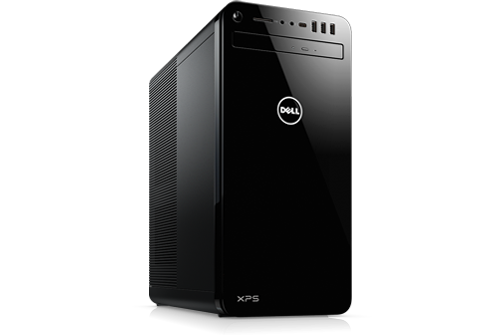
XPS 8930
I have a 8930 which has a geforce 1660 ti in it. I would like to get into doing AI stuff. The 1660 does not have vram. I have been looking at a nvidia geforce rtx 3050. I have looked at the specs at different websites and they mention that it has 8gb of ram and GDDR6 but it says nothing about vram. How do I tell if it has vram? I think the specs say 8gb of video ram. Is that the same as vram? And why I asking about this card, it says the power supply should be at least 550. Mine is the standard 460. I guess if I buy the card, I should get a 750 psu. And one last thing. I guess my motherboard will handle the
graphics card. A guy on youtube installed a rtx 3060 in his 8930. Sorry for the dumb questions.
..
0 events found


Chino de Oro
9 Legend
•
8.3K Posts
•
45.9K Points
0
July 29th, 2023 00:00
VRAM stands for video random access memory and is the same as referred amount video memory GDDR5 or GDDR6. Same information can be referenced here.
GeForce GTX 1660 has 6 GB of GDDR5 VRAM and uses 120w of power.
GeForce RTX 3050 has 8 GB of GDDR6 VRAM and uses 130w of power.
You can install either video cards to your XPS 8930 without upgrading the power supply. Your system can handle up to 180w video card with the 460w power supply.
ProfessorW00d
4 Operator
•
2.4K Posts
0
July 29th, 2023 13:00
from nVidia Specifications;
* Requirement is made based on PC configured with an Intel Core i9-10900K processor. A lower power rating may work depending on system configuration.
. . . not sure what processor OP has
i9-10900K is 125 watts TDP
Vic384
4 Operator
•
3.2K Posts
0
July 29th, 2023 13:00
Not sure why, but NVIDIA here suggests the Required System Power is 550 Watts for the RTX 3050.
Chino de Oro
9 Legend
•
8.3K Posts
•
45.9K Points
0
July 29th, 2023 18:00
I guess that video cards manufacturers want to make certain their products will perform well and they over suggested the power requirements.
My assessment was based on seeing many Dell units with 460w power supply providing enough power for i7, i9 in combination with 180w graphics cards. Several machines with 460w ATX style PSU are still running as of today. A few examples as XPS 8700, 8900, 8930. One thing in common, all of those power supplies could provided higher wattages for 3.3v and 5v rails comparing to retail power supplies. Their maximum power might not always needed, but they are meeting overall sufficiency power demand.
wayneout423
1 Rookie
•
28 Posts
0
July 30th, 2023 12:00
Sorry I didn't mention that I have a i7 9700 cpu @ 3.0 ghz. I was under the impression that my
card doesn't have any vram. I am trying to use Stable Diffusion and it is not working. But I am
not sure if changing to 8gb of vram will help. I have 16gb of ram, I could try upgrading to 32 to
see of that will work. Don't what to spend over 200 dollars for a new graphics card if it will not
help. Thanks for all the answers.
ProfessorW00d
4 Operator
•
2.4K Posts
0
July 30th, 2023 14:00
Stable Diffusion system requirements are pretty low, so I don't think that is your issue. Of course, these are the minimum system requirements. Looks like 16GB of RAM may be needed.
RoHe
10 Elder
•
45.2K Posts
•
172.6K Points
0
July 30th, 2023 18:00
@wayneout423 - I have an XPS 8930 with i7-9700, 16 GB of RAM, Dell OEM GTX 1660-TI which sounds exactly like your PC. (I also have the optional upgraded 850W Dell PSU.) I'm running Win 10 22H2.
GPU-Z (free) reports my GPU has 6 GB of GDDR6 vRAM on the card which is exactly what Dell's specs say for the GPU in my PC, as listed on the Product Specs page for my specific Service Tag:
Dell OEM GPUs are designed to need fewer watts than a "retail" card with the same GTX (or RTX) number because they typically have fewer/different video ports, fewer fans, and less vRAM than a retail card with same GTX/RTX number.
Define Stable Diffusion is "not working". The minimum requirements for Stable Diffusion are GPU with 4 GB of vRAM so your PC, with 6 GB of vRAM and 16 GB of system RAM, should be able to run at least certain releases. There are some releases that require a GPU with 10 GB of vRAM, so it may depend on which release you're trying to use.
Is your your monitor connected to the NVidia card or to one of the on-board Intel Graphics ports? What's the resolution of this monitor? How much free space is available on your drive? Looks like you need at least 10 GB of free space.
And, no offense intended, did you install Stable Diffusion correctly?
wayneout423
1 Rookie
•
28 Posts
0
July 31st, 2023 11:00
Connected to the monitor. 1920 x 1080 free space is 2TB. Yes, it is installed correctly. I get
the following message when I try to do txt to image
NansException: A tensor with all NaNs was produced in Unet. This could be either because there's not enough precision to represent the picture, or because your video card does not support half type. Try setting the "Upcast cross attention layer to float32" option in Settings > Stable Diffusion or using the --no-half commandline argument to fix this. Use --disable-nan-check commandline argument to disable this check.
Time taken: 31.10sTorch active/reserved: 3843/4092 MiB, Sys VRAM: 5960/6144 MiB (97.01%)
RoHe
10 Elder
•
45.2K Posts
•
172.6K Points
0
July 31st, 2023 12:00
@wayneout423 - Lots of posts around the net with exact same error message, using various NVidia GPU cards. So it's not a specific issue with your GTX 1660-TI.
Read here and here, and there's a possible bug in the software...
I have no experience with this software, so I can't make any suggestions how to fix this...