


Unsolved
1 Rookie
•
57 Posts
1
22845
September 11th, 2021 09:00
Aurora R10, BIOS 2.2.1 update, AGESA 1.0.0.6
Good afternoon everyone,
Just noticed the new 2.2.1 BIOS update for the Aurora R10.
This is the list of fixes :
------------------------------------
Fixes & Enhancements
Fixes:
- Fixed the issue where the BIOS cannot be updated using Dell SupportAssist.
Enhancements:
- Added Dell SupportAssist | Pre-Boot System Performance Check warning message that is displayed while booting after Real Time Clock (RTC) reset.
- Enhanced the stability of the system after installing an XMP device. It is applicable on systems with BIOS versions earlier than 2.2.1.
- Reduced the fan noise when the system is idle.
- Fixed the issue where the BIOS cannot be updated using Dell SupportAssist.
Enhancements:
- Added Dell SupportAssist | Pre-Boot System Performance Check warning message that is displayed while booting after Real Time Clock (RTC) reset.
- Enhanced the stability of the system after installing an XMP device. It is applicable on systems with BIOS versions earlier than 2.2.1.
- Reduced the fan noise when the system is idle.
----------------------------------------
So nothing really interesting, I guess the motherboard will still report itself wrongly to cpuz as a x570. I'll eat the bullet and update it to check the AGESA (we can always dream). Same AGESA, my hopes are down again.
Before :
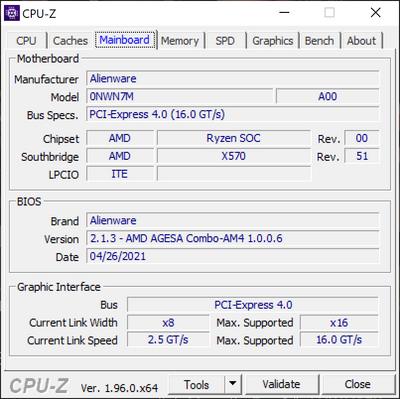
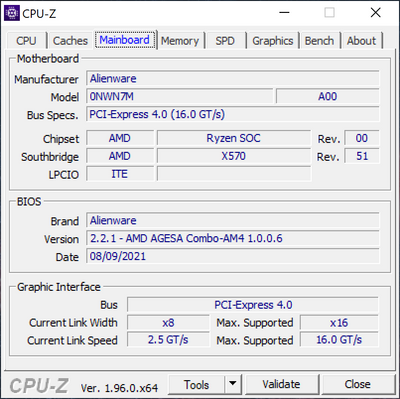
I ll update my post with the new version.
After update:
No Events found!
Vanadiel
6 Professor
•
7K Posts
1
September 11th, 2021 10:00
I don't believe they can update AGESA without updating the micro code, and for some reason they cannot update the micro code.
I am thinking we will be stuck on AGESA 1.0.0.6 until EOL for the R10.
I do like how it's called "XMP device". So XMP memory. I have no issues with my aftermarket memory, so I am going to wait a bit to see how this update works out.
On a side note, can you try out REBAR support, see if the BIOS allows it? It was not included with the previous BIOS release.
DexKen66
1 Rookie
•
38 Posts
2
September 11th, 2021 11:00
Updated, to 2.2.1 and the fans are certainly quieter at the expense of a couple of degrees in temperature. One downside is AWCC no longer shows any info for the CPU, Frequency or temp.
Vanadiel
6 Professor
•
7K Posts
1
September 11th, 2021 14:00
I am going to hold off for a bit on this update. I have my fans fine tuned and would hate having to change the setup.
Captain.sx
3 Posts
0
September 11th, 2021 14:00
Same to me, no more CPU info showing on the FUSION.
Dear DexKen66, how can your FUSION has advance view tab on CPU and memory clock? so envy of you. Is you CPU high end X model?
DexKen66
1 Rookie
•
38 Posts
0
September 11th, 2021 23:00
Yeah, it's a Ryzen 9 5900X
GuillaumeA
1 Rookie
•
57 Posts
0
September 12th, 2021 00:00
On my R10 3000, still nothing about REBAR, i have a RTX3080
Captain.sx
3 Posts
0
September 12th, 2021 09:00
In order to enable the Resizable BAR on RTX 3080, I think the GPU BIOS needs to be updated by using NVIDIA GeForce RTX 3080 Firmware Update Utility.
https://www.dell.com/support/home/en-us/drivers/driversdetails?driverid=35r91&oscode=wt64a&productcode=alienware-aurora-r10-desktop
Fixes & Enhancements
- Supports Resizable BAR feature to improve the gaming performance.
GuillaumeA
1 Rookie
•
57 Posts
0
September 12th, 2021 12:00
No problems in mine
3700X and RTX3080
GuillaumeA
1 Rookie
•
57 Posts
0
September 12th, 2021 12:00
I already have to vBIOS updated, but Dell didnt put the RBAR in the motherboard BIOS. There is not option in it. Mainly it is due to the fact that it will require to go higher in AGESA version and we would be able to go from Ryzen 3000 to Ryzen 5000, and they don't want that.
Captain.sx
3 Posts
0
September 12th, 2021 14:00
I'm really grateful to learn something new from your reply every time.
CPU-Z shows no info about AGESA version for my Ryzen 5900 OEM in BIOS version, only 2.2.1
My hands are shaking, I admit that I don't have the courage to flash the GPU BIOS.
Sigh.
tc5
1 Rookie
•
54 Posts
1
September 12th, 2021 15:00
I'm having the same issue as @DexKen66—after updating to BIOS v2.2.1, I've lost CPU performance info in AWCC.
Since @DexKen66 is running a 5900X and I'm running a 5600X, perhaps the loss of CPU stats in AWCC is limited to Aurora R10's with Ryzen 5000-series CPUs installed?
Vanadiel
6 Professor
•
7K Posts
0
September 12th, 2021 15:00
Yes, there are 2 revisions of same motherboard for the R10. Each uses a different BIOS, and a different AGESA version.
- 1 revision that supports Ryzen 3000 only.
- 1 revision that supports Ryzen 5000 only.
Only the Ryzen 5000 revision supports REBAR on the motherboard side. The Ryzen 3000 version does not support it on the motherboard side.
I was told by tech support that is because Nvidia officially does not support the Ryzen 3000 as a processor that meets REBAR requirements.
I could fix this if I could upgrade to a Ryzen 5000 CPU, but alas, that is not possible on this motherboard.
I have more or less thrown the towel down on this, and I am waiting on component prices to come down a bit before upgrading this to a new build, and I will have REBAR on my 3700X running.
For now it is meeting my requirements.
Nvidia REBAR support table
Yet I have a 2600X in a different build running with REBAR enabled...
tc5
1 Rookie
•
54 Posts
0
September 12th, 2021 15:00
I'm able to enable Resizable BAR support in BIOS v2.2.1.
The only difference I can find between my R10 and @GuillaumeA's R10 is that I'm running a Ryzen 5000-series CPU.
GPU-Z reports Resizable BAR is enabled, but I can't validate support in Windows since my GPU—an RTX 2080—doesn't support resizable BAR.
tc5
1 Rookie
•
54 Posts
0
September 12th, 2021 16:00
I didn't realize that Alienware released different revisions of the Aurora Ryzen Edition R10 motherboard, but upon inspection it looks like the motherboard in my R10 reports model 0TYR0X, whereas @GuillaumeA's R10 reports model 0NWN7M.
Definitely a bummer to hear Resizable BAR isn't available on R10's with Ryzen 3000-series processors, and ty for sharing the feedback you got from the tech support team about Nvidia's position on RTX 30-series resizable BAR support and Ryzen 3000-series CPUs.
Anyways, sounds like you got a plan and hope you can get your new build up and runnin soon!
sm56
2 Intern
•
178 Posts
0
September 13th, 2021 09:00
Just my opinion, but if using the first generation R10 with Ryzen 3000's series CPU then I would stick with BIOS version 1.0.8 and not update to the 2.x.x version.