

1 Rookie
•
4 Posts
2
11811
July 1st, 2022 11:00
Aurora R13, video stutter, audio stutter, SA?
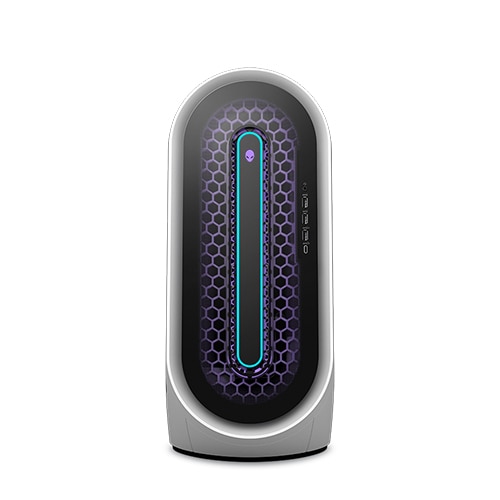
Alienware Aurora R13
Starting experiencing this problem around a week/week and a half ago, random stutter where my audio slightly cuts out something like a buzz sound, and my monitor skips a few frames. Absolutely no idea where this problem is coming from. I've ran the tests on SA (SupportAssist), as well as have run some windows tests. Anyone have this same problem? I've read that perhaps SA itself might be a problem and I might just uninstall to see if that fixes the problem.
No Events found!
DehTeh
2 Posts
9
July 3rd, 2022 08:00
I can confirm, this was also the fix for me. Reinstalled the latest win update, turned Acc. GPU Scheduling back on, and uninstalled Dell SupportAssist.
Side observation: The stutter got even worse, in duration and frequency, while running the SupportAssist's hardware tests (I thought I'd just give that a try prior to uninstalling it). The tests did not detect any malfunction.
Zoggo_
2 Posts
1
July 7th, 2022 08:00
When this stuttering started I had BIOS, nvidia, windows 11 and SupportAssist updates at almost the same time. So initially I had to roll back various updates to discover the culprit.
Thanks to previous posters. Uninstalling SupportAssist cures this issue.
Sort of ironic, a Dell product meant to make your life easier makes things worse.
RTID75
1 Rookie
•
87 Posts
0
July 1st, 2022 12:00
Looks like Jonny has got this one worked out in his thread about Windows update KB5014668.
speedstep
11 Legend
•
47K Posts
1
July 1st, 2022 12:00
@Releska
@EdCo64
@RTID75
windows june 2022 updates
June 14 2022 KB5014699
After installing KB5014699 I was having problems where network connections were getting reset every 5 minutes.
This includes RDP sessions, SMB sessions, and a session between the bridge and an IoT device disabled the Network Bridge, with the IoT device, the problem goes away,” “Enabling Internet Connection Sharing breaks the ability to access the web on the computer sharing the connection. Even sites running on localhost spin forever and time out. Enabling ICS also destroys the ability to RDP to computers connected to the network adapter that the Internet connection is shared with. Notably, I can still connect to port 3389 via telnet on the computer sharing the connection, but the RDP client just spins forever “Configuring remote session the bug also broke RDP.
IMPORTANT If you install Windows updates using offline OS image servicing and have not installed updates dated March 22, 2022 or later, you must install the servicing stack update (KB5014032) before installing this update.
https://www.catalog.update.microsoft.com/Search.aspx?q=KB5014032
6/2/22
REMINDER Windows 10, version 20H2 reached end of service on May 10, 2022, for devices running the Home, Pro, Pro Education, and Pro for Workstations editions. After May 10, 2022, these devices will no longer receive monthly security and quality updates that contain protection from the latest security threats. To continue receiving security and quality updates, Microsoft recommends updating to the latest version of Windows 10 or Windows 11.
RTID75
1 Rookie
•
87 Posts
0
July 1st, 2022 12:00
I've noticed this too in the last couple of weeks or so. Update related?
It's not terrible, but it's not right either.
Releska
1 Rookie
•
4 Posts
0
July 1st, 2022 12:00
For me, it is anywhere, I could be in chrome, in game, and I will still get these random stutters, I have the same specs, I7 12700KF, RTX3080, 32GB RAM. It's just getting to the point of where it's getting annoying. I hope it resolves itself or hopefully there being a solution soon.
EdCo64
2 Intern
•
201 Posts
0
July 1st, 2022 12:00
Same here, but only with Netflix for about 4 weeks, and after a windows update to 22H2 version 22621.160 i need to restart Netflix or go from full screen to windowed and back, pretty weird.
I think its a preview build here from Windows insiders, in my case,but indeed, since the last update from supportassist the hardware check is take a long time, around the 24 minutes, XD
It wasn't that slow before, i bring this up in Windows Insider but it seems that the last workaround is not the issue, so it might come from a update from here
I use a I7 12700KF with a standard RTX3080, 32GB Ram, but that seems not the problem
Jonny
1 Rookie
•
110 Posts
0
July 1st, 2022 13:00
It's certainly related to windows 11 updates
EdCo64
2 Intern
•
201 Posts
0
July 1st, 2022 13:00
I never installed a 5014699...my last quality update was 14770, and i have 6 previous left, but not that KB 5014699 and 5 previews from 22593.1 till 22621.1, i checked my network and there is no problem here
Releska
1 Rookie
•
4 Posts
0
July 1st, 2022 14:00
I'm happy that its likely related to windows 11 and not my hardware, I was a bit worried that I had something faulty. Again, I just hope that this is resolved soon since dealing with this is annoying after a while of it happening.
Jonny
1 Rookie
•
110 Posts
0
July 1st, 2022 15:00
I rolled back one windows build and thankfully it sorted it for me. I've spent the last week trying everything I could except reinstalling windows and a the roll back, absolute pain, hope you get it sorted. AMD on windows 11 had this pretty bad.
EdCo64
2 Intern
•
201 Posts
0
July 1st, 2022 17:00
Are you a windows insider? just curious #
Zoggo_
2 Posts
1
July 2nd, 2022 02:00
Same problem on my R13 too. Micro graphic/audio stutter lasts under a second every couple of minutes.Happens in any application. This is definitely related to Windows 11 update earlier in the week as this started happening immediately after update and I never had this issue before.
Ran various tests, can't find the cause.
Jonny
1 Rookie
•
110 Posts
0
July 2nd, 2022 06:00
Turning off Hardware - accelerated GPU scheduling which is on by default in windows 11 is helping some people.
DehTeh
2 Posts
1
July 2nd, 2022 10:00
I too, am suffering from these graphic/audio stutters every couple of minutes, regardless of activity, in any application - and it's driving me insane now.
KB5014668 was installed on my machine only after I first experienced this issue. Uninstalling this update did not change anything.
Turning off Accelerated GPU Scheduling also had no effect.
The only other Update I am aware of, is (as OP also stated) Dell SupportAssist 3.11.4.29, which was installed right the night before I first experienced this issue.
i7 12700KF, 32GB RAM, RTX 3080, Win 11