

Unsolved
This post is more than 5 years old
3 Posts
0
131259
January 17th, 2016 12:00
HELP!!
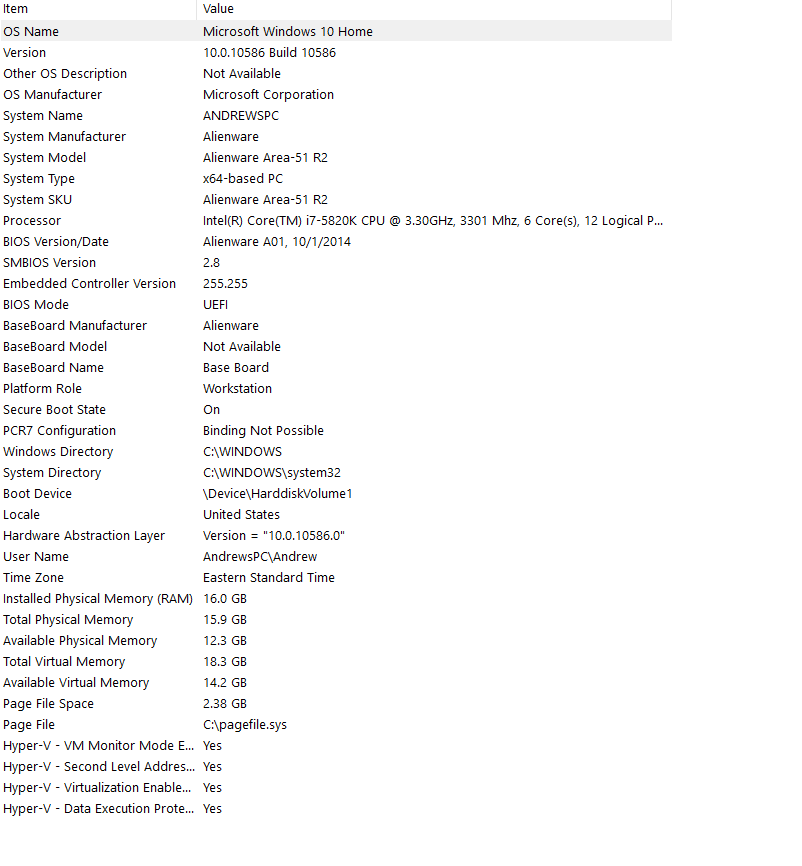
Hello, I have a pretty new Alienware computer (about 10 months old) and I have several problems. (I am 99% sure I don't have a virus I don't download much)
One of the problems is I cannot turn off my computer. If I press the power button it will stay at "shutting down" I left it there for an hour once even. It will restart and force power off but not normally.
The main problem I have is that I am trying to duel boot Windows 7 and Windows 10 but I can't get into my BIOS!!!!! I have spammed the delete key on startup (Also all the F keys) and I have gone into advanced startup and launched utility mode. Whenever I do either of those I get a black screen and nothing happens even when I leave it for half an hour. (I have fast boot off but I have tried it both on and off)
HELP!!!!!!!!!!!!!!!
Tesla1856
10 Wizard
•
17.7K Posts
•
70.7K Points
0
January 17th, 2016 20:00
Check Event Viewer to see what's hanging up the Shut-Down.
F2 should get you to BIOS screen (at power-up). If it doesn't seem to be working, try a plain wired USB keyboard. If the key is working but no video, try a different video port.
Andr3wGames
3 Posts
0
January 18th, 2016 08:00
Thanks for trying to help but first of all, as far as I can see nothing is hanging up shut down, I get the shutting down screen. Also since it is a dell computer the BIOS button is DEL but I have tried F1 through F12. I have a wired keyboard. I think my computer is trying to get to BIOS but when it tries it gets a black screen. It's not that I don't know how to get in my bios. It's that my computer won't get into it.
RaysXPS730h2c
23 Posts
0
January 19th, 2016 12:00
I assume you have each operating system on a different hard drive. Disconnect one of the Operating Systems hard drives and see if that helps.
Tesla1856
10 Wizard
•
17.7K Posts
•
70.7K Points
0
January 19th, 2016 13:00
Andr3wGames
3 Posts
0
January 20th, 2016 16:00
How would I do that
purple397
166 Posts
0
January 22nd, 2016 18:00
Not sure if you can get into EFI/Bios or either Windows from your description of problem. I suspect, that part of your dual booting problem is a feature of Windows 10. Normally Windows 10 does not shut down the hard drive, but puts it into a Hibernate State. This is to aid in a faster startup. I tripped into this with trying to boot Linux from the Optical Drive, and from a USB key. If one can get into the power save features of Windows 10, then one can change the advanced options to completely shut down the hard drive. Even though it is supposed to work the same, I suspect that the Shutdown works better from using the Shutdown with the mouse, rather than the power key. If one tries to use another OS when the hard drive did not get turned off, but rather was still in a Windows 10 Hibernate state, then I am not sure of all the possible things that can happen. Ubuntu said the drive was in an unstable state, so I just Powered it down, (at that moment not knowing what the issue was) and restarted Windows 10 to research weirdness.
Might be you need to take it to some shop. They might try to open laptop, unplug battery. Unplug Hard drive (or SSD) and then the EFI/BIOS might be accessible to boot Windows from a USB key, where one would update the EFI/BIOS, and then plug the Hard Drive(or SSD ) in and of course the battery. But I am not an expert, just I might be dumb enough to try that. That might work if the problem was that the Hard Drive (or SSD) was causing hang. Probably ruin the disk structure on the hard drive/ssd, and then you have to re-Format.
How important is doing a Windows 7 and a Windows 10 dual boot is to you? Rumor is that Microsoft will try to drop Windows 7 support in less than a year. and force everyone onto Windows 10. but that is just a rumor.