


Unsolved
1 Rookie
•
9 Posts
0
78
August 6th, 2024 00:33
How to upgrade storage on Alienware m17 R2
I want to replace my primary NVme SSD card with a larger volume (the 2nd NVme slot is already in use). It came with Windows installed on the 3rd partition. I have an external USB NVme enclosure to use during this operation.
I'll be using GParted to copy the partitions to the new SSD.
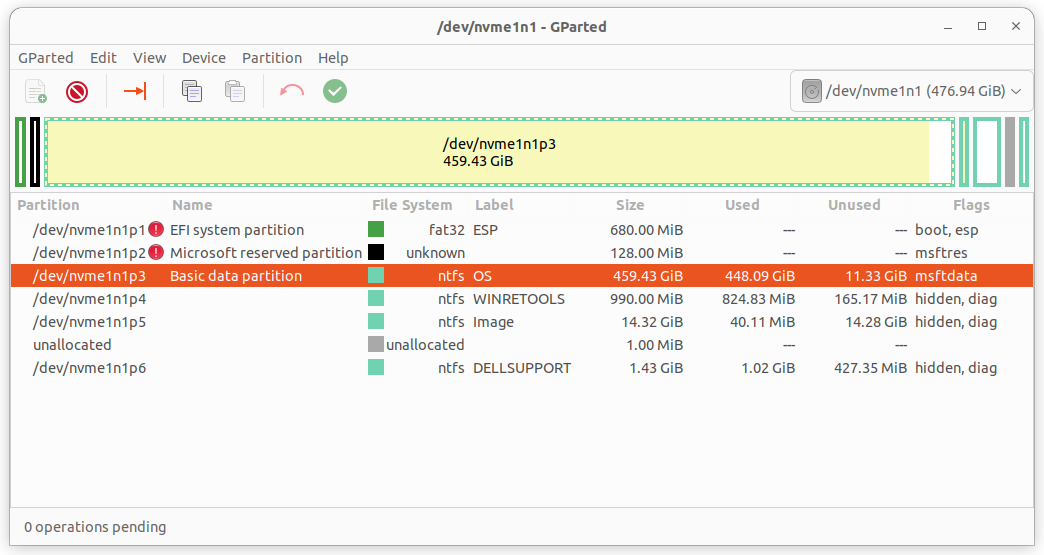
However, the original volume has several other partitions besides the one holding Windows, some of which are of reserved types. I imagine they contain recovery software, etc. Is there a way to prepare a volume with the original factory-installed partitions so I can retain those features?
I'm attaching a screenshot to illustrate what I mean. The first two partitions are particularly problematic since gparted can't read them.
Ideally I'll want to copy all the partitions (or recreate the original ones), move p4-p6 to the end of the volume, and then increase the size of p3 (the OS partition)
I'm hoping there's a utility or BIOS function to ease recreating the original partitions and content (except for the Windows OS).
ejn63
10 Elder
•
30.2K Posts
0
August 6th, 2024 01:09
Use the trial version of Macrium Reflect to clone the existing drive to the new one (it will resize the partitions to fit the larger drive).
https://www.macrium.com/reflectfree