


This post is more than 5 years old
3 Posts
0
21929
September 10th, 2013 05:00
Alert! CPU fan failure XPS 435t - quick question
hi guys, this is probably aa really simple question, but i always like to double check before i do things :) for the last day or so ive heard the fans in my case running a lot louder than usual. figured it might of been some program being bad, so i rebooted and went to bed. this morning i woke up to this:
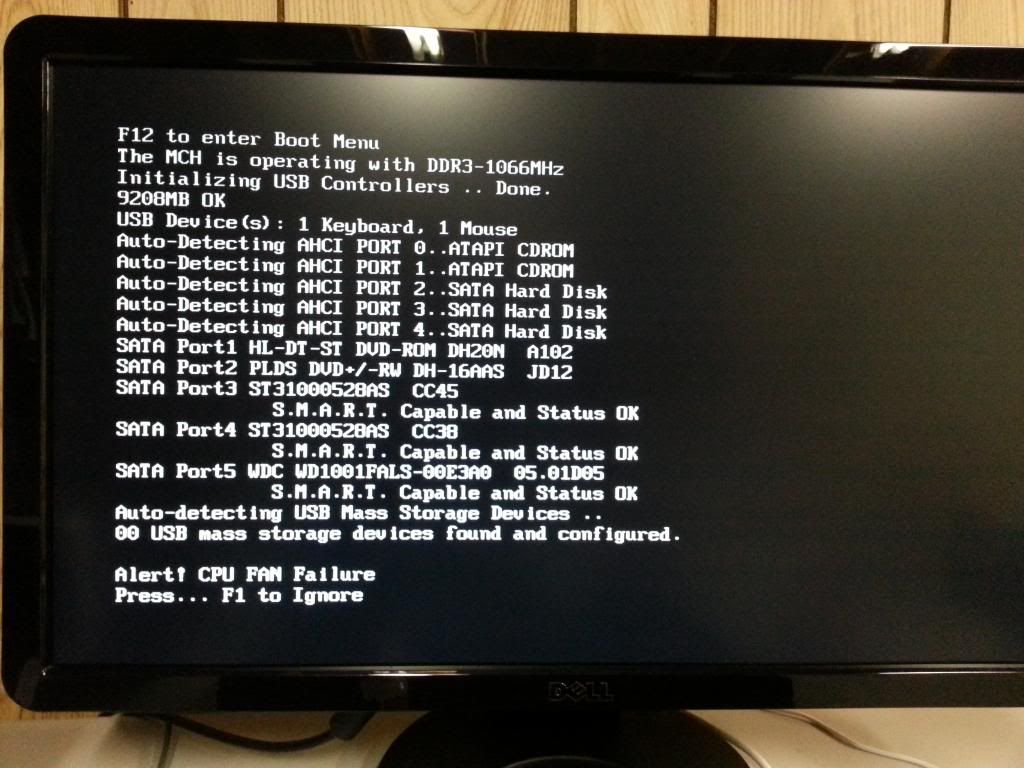
i took off the side panel and rebooted again but the big cpu fan did not come on. the other 2 case fans were running normally. i am out of warranty and i have not modified my rig in the 4 years ive had it other than adding hard drives. i just wanna make sure that this http://goo.gl/ogCCm8 is the part i need or if theres anything else i should check before i dive in and make this fix. thanks!
mrmako777
3 Posts
0
September 21st, 2013 13:00
hey guys, just wanted to check in and say i replaced the cpu fan last week and so far my pc is running good with no issues! thanks for all the help!
DELL-Munawar P
748 Posts
0
September 10th, 2013 06:00
Hi mrmako777,
We appreciate that you’ve done a couple of troubleshooting steps and provided us the information.
Good observation on the error messages for the Fan failure, you also try removing and reseating the fan cables and see if that fixes the issue.
Please click on the below link to download the manual for your computer.
http://dell.to/1dFtXxL
Click on option Manuals, type in the Service tag of your computer and download the manuals for reseating the cables.
If in case this does not fix the issue, you may consider replacing the CPU Fan and the eBay link you’ve provided is the right part for your computer.
Let us know if this helps.
shesagordie
10 Elder
•
46K Posts
0
September 10th, 2013 09:00
mrmako777
Did you first try removing the fan power connector to the motherboard and reconnecting it, to see if it makes a difference?
Dell P281K Heatsink Fan & Shroud for XPS 435T, is the right part.
Bev.
mrmako777
3 Posts
0
September 10th, 2013 11:00
hi guys, thanks for the quick responses! i did in fact unplug and reinsert the fan power connector to the mb and sadly, still a no go. im going to order the fan today. after i install the new one, i will report back. thanks again for all your help!
shesagordie
10 Elder
•
46K Posts
0
September 10th, 2013 12:00
mrmako777
:emotion-21:
Bev.
DELL-Munawar P
748 Posts
0
September 11th, 2013 05:00
Hi mrmako777,
Thank you for your response and since reseating the fan has not fixed the issue and you’ve already ordered a new fan.
Please reply us once you’ve installed the new fan on your computer and let us know if any issues.
shesagordie
10 Elder
•
46K Posts
0
September 21st, 2013 15:00
mrmako777
Sounds good, thank's for the feedback.
Bev.